


 Password Manager
 Identity Theft Protection

 Team / Business
 Enterprise
 Government
 MSP
MSP


TL;DR:
- Automated password resets, or self-service password reset systems, significantly reduce help desk tickets, operational costs, and improve security through policy enforcement and MFA. They enable users to regain access quickly and ensure compliance through real-time logging and integration with identity platforms. Implementing these systems enhances security, cuts costs, and supports Zero Trust principles across distributed environments.
What are the core benefits of automated password resets?
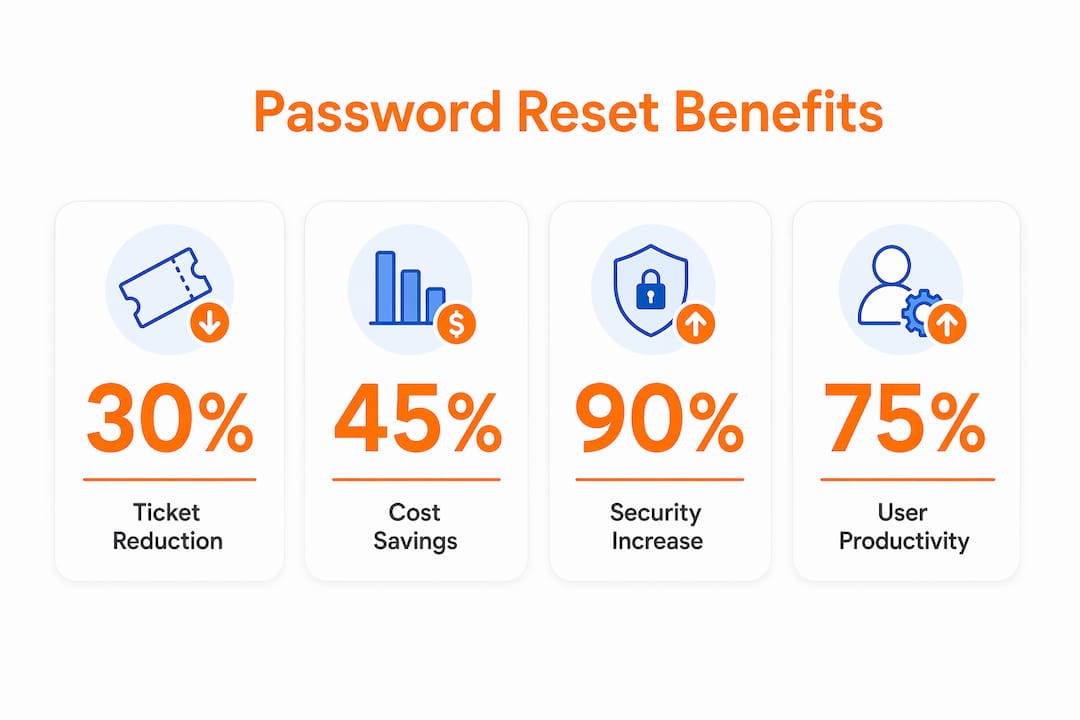
Automated password resets cut help desk ticket volume, reduce operational costs, enforce security policies consistently, and give users immediate access recovery without waiting on IT staff. For any organization running more than a few hundred employees, the case for automation is straightforward.
- Ticket volume drops sharply. Password resets make up 20–30% of all IT service desk requests, and automation can eliminate the majority of those calls entirely.
- Operational costs fall. At $70 per manual reset event, the savings compound fast across large workforces.
- Security tightens. Automated systems enforce password complexity, reuse restrictions, and multi-factor authentication (MFA) at every reset, removing the human error that manual processes introduce.
- Users regain access faster. Self-service portals resolve resets in under 30 seconds versus the 10+ minutes a help desk call typically takes.
- Compliance becomes automatic. Every reset is logged, policy-checked, and auditable without any extra effort from your team.
- IAM integration scales cleanly. Connections to Active Directory, Azure AD, and similar platforms keep on-premises and cloud credentials synchronized in real time.
Self-service password reset (SSPR) is the industry term for this capability. You will see both “automated password reset” and SSPR used throughout this article; they refer to the same core function.
How automation cuts operational costs and IT workload
The financial case for SSPR is one of the clearest in IT operations. According to Gartner, password resets account for 20–30% of all IT tickets, and a 10,000-person organization can spend around $300,000 annually just handling them manually. Forrester puts the average labor cost at $70 per reset event, which means a company with 500 monthly reset tickets is burning $35,000 a month on a task that automation handles in seconds.
Automating password resets is consistently ranked the #1 OPEX savings opportunity for IT service desks, with organizations reporting ticket volume reductions of 40–60% after deployment.
The productivity gain for IT staff matters just as much as the direct cost savings. When technicians stop fielding repetitive Tier 1 calls, they shift attention to security projects, infrastructure improvements, and work that actually requires their expertise. Burnout from low-value tasks is a real retention risk in IT departments, and removing the password reset queue addresses it directly.
- Ticket volume reductions of 40–80% are typical after SSPR deployment.
- 24/7 self-service availability prevents productivity loss from after-hours lockouts.
- Freed technician time compounds: fewer tickets mean faster response on the tickets that remain.
How automated password resets improve security

Manual password resets have a well-documented vulnerability: social engineering. An attacker who can convincingly impersonate an employee over the phone can often persuade a busy help desk technician to reset credentials without proper verification. Automated MFA-backed resets close that gap by removing the human from the verification chain entirely.
The security advantages extend well beyond social engineering defense:
- Policy enforcement at every reset. Complexity rules, password history restrictions, and length requirements apply automatically, with no way for users to bypass them.
- MFA as the verification gate. Users prove identity through something they have (an authenticator app or hardware key) and something they know, rather than answering guessable security questions.
- Real-time writeback. Password changes sync instantly to Active Directory and connected systems, eliminating the window where stale credentials could be exploited.
- Detailed audit trails. Every reset attempt, success, failure, and account unlock is logged, giving security teams an immediate record for incident response and regulatory compliance.
- Reduced attack surface. Fewer human touchpoints in the reset process means fewer opportunities for credential theft or insider manipulation.
User experience and productivity gains you can actually measure
Users do not care about ticket metrics. They care about getting back to work. Automated systems resolve password issues in under 30 seconds, compared to 10 minutes or more for a help desk call that requires hold time, identity verification back-and-forth, and manual processing.
For distributed and remote teams, the 24/7 availability of SSPR is particularly valuable. A user locked out at 11 PM in a different time zone does not wait until morning. They reset their credentials through a self-service portal or mobile app and are back online in under a minute.
- Multiple access points. Resets can be initiated from a web portal, mobile app, Windows login screen, or messaging platforms like Slack and Teams.
- No IT dependency. Users handle their own access recovery, which reduces frustration and removes the perception that IT is a bottleneck.
- Consistent experience across devices. Whether on a corporate laptop or a personal phone, the reset flow works the same way.
Pro Tip: Configure your SSPR portal to also handle account unlocks without forcing a full password reset. Many lockouts are caused by expired sessions, not forgotten passwords, and an unnecessary reset adds friction users remember.
Compliance and policy enforcement advantages
Compliance officers often discover that manual password resets are their weakest enforcement point. When a technician resets a password over the phone, there is no guarantee the new credential meets complexity requirements, and the interaction may never be logged in a way that satisfies an auditor. Automation fixes both problems at once.
Every reset executed through an SSPR system applies your organization’s password policy at the point of change. Minimum length, character requirements, history restrictions, and rotation schedules are enforced without exception. Users cannot choose a weak password or reuse a recent one, regardless of how they initiate the reset.
- Audit logs satisfy regulatory requirements under frameworks like NIST SP 800-63, HIPAA, SOC 2, and PCI-DSS.
- Suspicious activity surfaces immediately. Multiple failed reset attempts or unusual timing patterns trigger alerts before they escalate.
- Hybrid and cloud environments stay consistent. Policy enforcement applies whether the user resets through an on-premises portal or a cloud-based identity provider.
- Access policy changes propagate automatically. When your organization updates its password policy, the new rules apply at the next reset without any manual intervention.
How automated password reset systems actually work
The architecture behind SSPR is worth understanding before you deploy it. At a high level, the process starts when a user initiates a reset through a portal, chatbot, or login screen. The system then verifies identity through MFA, executes the password change against the relevant identity store, and syncs the update across connected systems.
The identity verification step is where most of the security work happens. Modern SSPR platforms support adaptive verification, meaning the system can require stronger proof of identity based on risk signals like unusual location or device. Once identity is confirmed, the backend automation handles the actual reset.
- IAM integration is the foundation. Systems connect to Active Directory, Azure AD, Okta, Ping, and other providers to execute resets and unlocks across the full identity stack.
- Real-time writeback prevents sync failures. Delayed synchronization between self-service portals and Active Directory is a common failure point; robust writeback eliminates it.
- Chained automation handles complexity. A single reset can trigger account unlocks, cross-platform credential syncs, and notifications across multiple systems simultaneously.
- Retry logic and delegated approvals. Platforms apply configurable retry rules for time-based lockouts and allow managers or help desk agents to initiate resets for contractors or new hires without full admin rights.
Why manual password resets create compounding problems
Manual processes do not just cost money. They create a feedback loop that degrades both security and team morale over time. Each manual reset takes 10 minutes or more of technician time, but the downstream effects are worse: users locked out during off-hours lose an hour or more of productivity, and repeated calls for the same issue signal that the underlying process is broken.
The social engineering risk compounds with scale. As help desk teams grow and handle higher volumes, the pressure to process tickets quickly increases, and verification shortcuts become more common. An attacker needs only one distracted technician to succeed.
- High ticket volume drives verification shortcuts, increasing social engineering exposure.
- After-hours lockouts go unresolved until the next business day, costing hours of productivity per incident.
- Latency in manual writeback causes failed logins after a reset, generating repeat calls and user frustration.
- Repetitive low-value work accelerates burnout, reducing the security focus of your most experienced staff.
- No consistent audit trail means compliance gaps that only surface during an audit or incident investigation.
Best practices for deploying automated password reset solutions
Getting SSPR right the first time requires more than installing a tool and pointing it at Active Directory. The organizations that see the largest ticket volume reductions treat deployment as an identity architecture project, not a help desk convenience upgrade.
Chaining password reset automation with related workflows like account unlocks and cross-platform synchronization significantly improves overall ROI and user experience. A reset that also unlocks the account and syncs credentials across SaaS applications eliminates the secondary calls that often follow a basic reset.
- Integrate with your full IAM stack from day one: Active Directory, Azure AD, Okta, and any legacy systems that hold credentials.
- Require MFA for every reset. Security questions are not sufficient; use authenticator apps, hardware tokens, or biometric verification.
- Design for mobile from the start. A self-service portal that works poorly on a phone will drive users back to the help desk.
- Configure real-time writeback to avoid the synchronization latency that generates repeat calls and failed logins.
- Track adoption and compliance metrics. Monitor enrollment rates, reset success rates, and policy violation attempts to identify gaps early.
For a practical starting point on company password policies, aligning your SSPR configuration with your broader password governance framework prevents policy conflicts at deployment.
How automated password resets support Zero Trust security
Zero Trust operates on one principle: never trust, always verify. Every access request, including a password reset, is a potential attack vector. Manual resets violate Zero Trust by default because they rely on human judgment for identity verification, which is inconsistent and manipulable.
SSPR is widely recognized as a foundational component of Zero Trust identity architecture. Industry experts cite SSPR as a critical building block for consistent enforcement of complex security policies across distributed environments, precisely because it removes discretion from the verification process.
Logmeonce’s passwordless MFA and Zero Trust security capabilities integrate directly with automated reset workflows, giving organizations a unified identity layer that enforces verification policies consistently across every access event. Automated logging and policy enforcement also defend against insider threats in distributed environments, where traditional perimeter controls offer little protection.
Key Takeaways
Automated password resets deliver measurable cost savings, stronger security, and consistent compliance enforcement, making SSPR one of the highest-ROI investments available to IT and security teams.
| Point | Details |
|---|---|
| Ticket volume reduction | Password resets make up 20–30% of IT tickets; automation cuts that volume by 40–80%. |
| Cost savings per event | Each manual reset costs an average of $70 in labor; automation eliminates most of that expense. |
| Security enforcement | MFA-backed automated resets remove social engineering risk and enforce password policies at every reset. |
| Resolution speed | Automated systems resolve resets in under 30 seconds versus 10+ minutes for a manual help desk call. |
| Zero Trust alignment | SSPR enforces consistent identity verification at every reset, supporting least-privilege and continuous-verification principles. |
See how Logmeonce handles automated password resets

Logmeonce brings together automated password management, passwordless MFA, single sign-on, and identity safeguards in one platform built for organizations that take access security seriously. Whether you are deploying SSPR for the first time or replacing a fragmented identity stack, Logmeonce gives your team the policy controls, audit trails, and IAM integrations needed to make automation work at scale. Explore Logmeonce’s password management benefits to see how it fits your environment.
Recommended
- 6 Signs It’s Time to Invest in a Team Password Manager
- 7 Benefits of Using Password Management Software – LogMeOnce
- 5 Benefits of a Team Password Manager


