


 Password Manager
 Identity Theft Protection

 Team / Business
 Enterprise
 Government
 MSP
MSP


TL;DR:
- Single sign-on centralizes authentication but increases the risk if the Identity Provider is compromised.
- Proper session management, regular testing, and backup authentication are vital for SSO security resilience.
- SSO requires ongoing operational discipline beyond initial deployment to maintain security effectiveness.
Single sign-on promises simplicity: one login, access everywhere. But that promise carries a hidden edge. When every application in your environment trusts one Identity Provider, a single compromised session can cascade across dozens of systems in seconds. SSO security posture depends heavily on validation and session configuration, and regulators scrutinize the concentration risk that comes with centralized authentication. This article cuts through the surface-level promises to show you exactly how SSO works, where it fails, and how to implement it in a way that actually strengthens your security posture.
Key Takeaways
| Point | Details |
|---|---|
| Centralized access control | SSO lets organizations manage access to many applications through one trusted identity provider. |
| Security trade-offs | Effective session validation and backup authentication are critical to minimize SSO risks. |
| Protocol selection matters | Choosing the right protocol (SAML or OIDC) shapes SSO’s effectiveness across enterprise or cloud environments. |
| Incident preparedness | IT teams must plan for IdP outages and account lockouts to ensure business continuity. |
What is single sign-on and why does it matter?
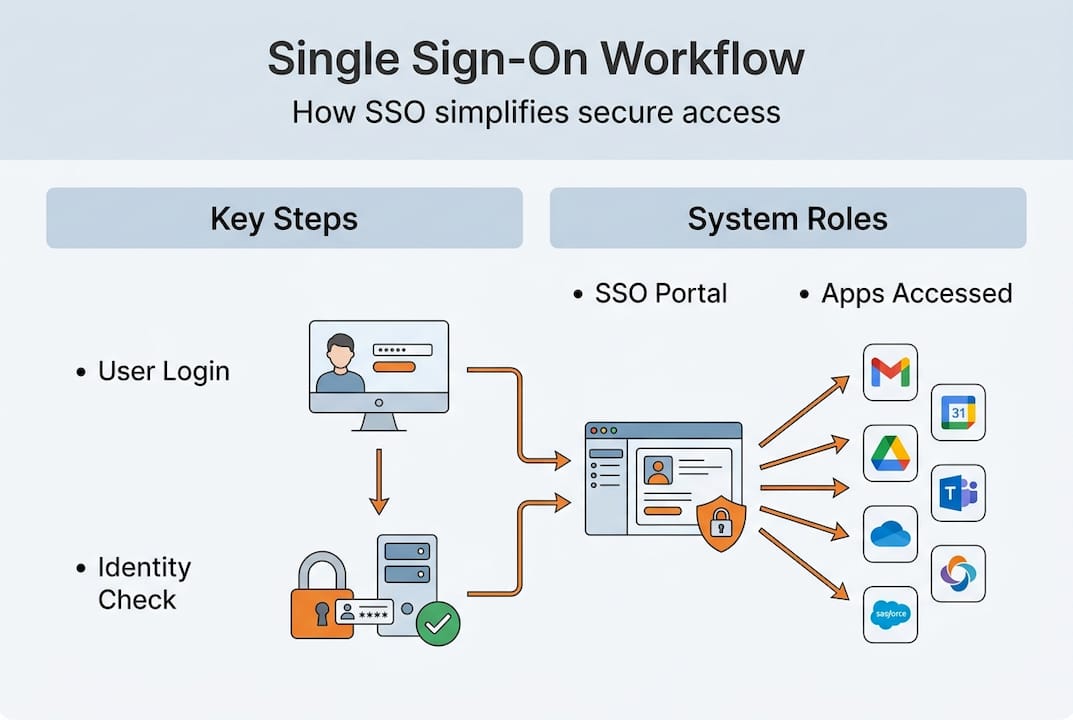
Single sign-on, commonly called SSO, is an authentication method that lets a user log in once and gain access to multiple applications without re-entering credentials. For IT managers in enterprise and government environments, this is not just a convenience feature. It is a foundational control that directly affects how you manage identity, enforce policy, and respond to threats at scale.
The appeal is clear. Password fatigue is real. When users juggle dozens of separate logins, they resort to weak passwords, reuse credentials across systems, and bypass security controls out of frustration. SSO eliminates that problem by centralizing authentication. Instead of storing credentials in every application, the user authenticates once against a trusted Identity Provider (IdP), and each application accepts the resulting session or token.
Here is what SSO actually handles for your organization:
- Centralized credential management: One set of credentials per user, managed in a single directory
- Reduced attack surface: Fewer places where passwords are stored, transmitted, or exposed
- Consistent policy enforcement: MFA requirements, session timeouts, and access controls apply uniformly at the IdP level
- Faster user provisioning and deprovisioning: Remove access across all connected apps by disabling one account
- Audit efficiency: Centralized logs give you a unified view of authentication events
“The protocols that power SSO differ in important ways. SAML is widely used in enterprise and government federation using XML assertions and browser POST or redirect bindings, while OIDC is commonly used in modern cloud and mobile flows using JWT-based ID tokens on top of OAuth 2.0.”
Understanding single sign-on security at this level is what separates a successful SSO deployment from one that creates new vulnerabilities. The protocol choice alone has significant implications for how assertions are validated, how tokens are scoped, and how an attacker could potentially exploit a misconfiguration.
How does single sign-on work? The core mechanics
When a user tries to access an application protected by SSO, the application does not handle authentication itself. Instead, it redirects the user to the Identity Provider. The IdP verifies the user’s identity, issues a token or assertion, and the application accepts that proof of identity. The user is in, without ever creating credentials inside the application itself.

Understanding these protocols helps clarify how SSO actually orchestrates secure access across your environment. Here is a simplified view of how the two dominant protocols handle that exchange:
| Feature | SAML 2.0 | OIDC |
|---|---|---|
| Token format | XML assertions | JSON Web Tokens (JWT) |
| Primary use case | Enterprise, government federation | Cloud, mobile, modern web apps |
| Binding method | Browser POST or redirect | HTTP redirects with OAuth 2.0 |
| Complexity | Higher, but deeply established | Lower, more developer-friendly |
| Revocation support | Session-based, IdP-driven | Token expiry plus refresh tokens |
The typical SAML flow works like this:
- The user visits a service provider (SP), such as a government portal or enterprise application.
- The SP generates a SAML authentication request and redirects the user to the IdP.
- The IdP authenticates the user (password, MFA, or both) and issues a signed XML assertion.
- The assertion is sent back to the SP via the user’s browser using a POST binding.
- The SP validates the signature, checks the assertion attributes, and grants access.
The OIDC flow is similar in concept but uses a different mechanism. The application redirects the user to an authorization server. After authentication, the server issues an ID token (a JWT) and optionally an access token. The application validates the JWT’s signature, checks claims like issuer and expiry, and grants access.
SSO security challenges often originate at these exact handoff points. Weak assertion validation, improper signature checking, and misconfigured token scopes are among the most common vulnerabilities. The SSO security posture of your environment depends heavily on how thoroughly you validate these tokens and how carefully you configure session lifetimes at every layer.
A critical but often ignored detail: session management is not binary. An IdP session, an SP-side session, and an application session can all have different lifetimes. If your application caches the session for 24 hours but your IdP session expires in two, you create gaps where revoked access can persist. Getting this right requires deliberate configuration, not default settings.
Security trade-offs and concentration risk in SSO
Here is the uncomfortable truth that most SSO discussions avoid: centralizing authentication is also centralizing risk. Every application that trusts your IdP is exposed when that IdP is compromised. This is what security professionals call the “blast radius,” and in SSO environments, it can be enormous.
SSO amplifies blast radius, meaning IT managers must ensure IdP availability and design incident response and backup authentication paths for IdP downtime or account lockouts. Regulators in both the private sector and government understand this risk. Auditors routinely scrutinize SSO configurations specifically because one failure point can produce enterprise-wide impact.
The NIST Special Publication 800-63B provides specific guidance on how long SSO sessions should last, based on the Authenticator Assurance Level (AAL) required for each application:
| Assurance level | Maximum session duration | Notes |
|---|---|---|
| AAL1 | Up to 30 days | Low sensitivity applications, basic authentication |
| AAL2 | 12 hours with activity-based extension | Requires MFA, suitable for most enterprise use |
| AAL3 | 15 minutes inactivity | High-value targets, hardware authenticator required |
These are not arbitrary numbers. They reflect the likelihood that an attacker who hijacks a session will have time to cause damage. Shorter sessions limit that window. Longer sessions improve user experience but increase exposure.
Here are practical ways to reduce blast radius without dismantling the benefits of SSO:
- Layer MFA at the IdP level: Requiring a second factor before issuing assertions adds friction for attackers even if credentials are stolen
- Enforce step-up authentication for sensitive applications: Do not rely solely on the existing SSO session for high-risk actions
- Configure session timeouts aligned with NIST AAL guidance: Match session duration to the sensitivity of the data and operations involved
- Implement IdP high availability: Run redundant IdP nodes across geographic locations to prevent a single outage from locking users out
- Maintain break-glass accounts: Emergency admin access that bypasses SSO provides a recovery path when the IdP itself fails
Good enterprise password strategies complement these controls by ensuring that the credentials feeding into your IdP are themselves protected. And at the platform level, a purpose-built solution for enterprise identity management provides the tooling to enforce these policies at scale without burdening your team.
Pro Tip: Do not configure SSO session lifetime at the IdP alone. Review every application’s local session settings to ensure they do not cache authentication state longer than your IdP policy allows. Application-side session persistence is a frequent source of policy gaps.
Implementing SSO: Best practices for IT managers
Deployment is where SSO strategy becomes SSO reality, and it is where most organizations stumble. The technical configuration of SAML or OIDC is only part of the picture. The operational readiness around SSO is just as important, and it is almost always underbuilt.
Because SSO amplifies blast radius, IT managers should ensure IdP availability and design incident response and backup authentication paths for IdP downtime or account lockouts. Follow this structured approach to build a resilient SSO deployment:
-
Evaluate and document IdP reliability requirements. Determine what uptime SLA (service level agreement) your IdP must meet and whether your current provider delivers it. For government environments, this often requires on-premises or hybrid IdP deployments.
-
Define backup authentication for every integrated application. Every application in your SSO environment should have a tested fallback path. This might be local admin credentials, a secondary IdP, or an emergency access account stored securely offline.
-
Design and test your incident response playbook. What happens when the IdP goes down at 2 AM? Who has the authority to activate break-glass accounts? Which applications are deemed critical enough to require manual access paths? Document these answers before you need them. Reviewing SSO incident response procedures is a strong starting point.
-
Apply session configuration based on risk tiers. Group your applications by sensitivity. Finance and HR systems warrant AAL2 or AAL3 session parameters. General productivity tools may tolerate AAL1 settings. Apply the NIST-recommended timeouts to each tier.
-
Monitor IdP logs in real time. Failed authentication attempts, unusual login times, and geographic anomalies are early indicators of credential attacks. A SIEM (Security Information and Event Management) integration with your IdP makes this feasible at scale.
-
Test SSO configuration after every major change. Certificate rotations, protocol upgrades, and application integrations all introduce regression risk. Automated testing against your SSO flows catches misconfigurations before users do.
-
Review token validation settings across all service providers. Every application that accepts SAML assertions or OIDC tokens must be configured to validate signatures, check issuer claims, and enforce expiry. Misconfiguration at the SP level is a common attack vector.
When a breach does happen, having documented password breach actions ready will dramatically reduce recovery time and limit damage. Your SSO environment should also fall within your broader vulnerability response policy to ensure that IdP vulnerabilities get the same priority attention as other critical infrastructure.
Pro Tip: Run a tabletop exercise specifically simulating IdP failure at least once a year. Many IT teams discover their backup authentication paths exist only in documentation and have never actually been tested under pressure. A dry run is far less costly than a real outage.
What most SSO guides overlook: Beyond deployment
Most SSO implementation guides stop at deployment. Configure your IdP, integrate your applications, enable MFA, done. That framing fundamentally misrepresents how SSO security works in practice, and it leads organizations into a false sense of security that can persist for years.
Here is the harder truth: SSO is not a one-time project. It is an ongoing operational discipline. The threat landscape changes. Applications get added. Certificates expire. Session configuration that was appropriate two years ago may be inadequate today. Organizations that treat SSO as “set and forget” are quietly accumulating risk that does not show up until something goes wrong.
The operational risks that cause the most pain are rarely the dramatic ones. Token validation logic quietly goes stale. An application gets integrated without proper session timeout configuration. A break-glass account gets forgotten in a password manager that only one person knows how to access. These are the conditions that turn a minor IdP incident into a multi-day recovery crisis.
What we consistently see in mature SSO environments is that the organizations doing it best are not the ones with the most sophisticated IdP platforms. They are the ones with the clearest operational procedures. They review session configuration quarterly. They test backup authentication every six months. They have runbooks that actually match their current infrastructure. Pairing SSO with a solid continuous password strategy is part of what keeps those environments resilient over time.
Access monitoring is the other overlooked element. SSO centralizes authentication, but it does not automatically centralize visibility into what authenticated users are doing after they log in. That requires deliberate integration between your IdP, your applications, and your monitoring tools. Without it, you have one strong gate and no cameras inside the building.
The takeaway is this: the value of SSO is real, but it is conditional. It requires continuous evaluation, tested resilience, and operational discipline that most deployment guides simply do not address. Build your SSO program around those realities, not just the initial configuration checklist.
Secure your organization’s access with LogMeOnce
Managing SSO effectively requires more than good policy. It requires tools that enforce policy consistently across every user and every application in your environment.

LogMeOnce provides enterprise-grade cybersecurity solutions designed for the exact challenges covered in this article: centralized identity management, strong MFA enforcement, and resilient access controls built for both businesses and government agencies. The platform’s password management benefits extend SSO security by ensuring that the credentials feeding into your IdP are protected, monitored, and never reused. And with built-in two-factor authentication support, LogMeOnce helps you enforce the step-up authentication your highest-risk applications require, without adding friction that drives users to work around your controls. Start with a free trial and see how LogMeOnce fits your access management strategy.
Frequently asked questions
How does SSO reduce password fatigue?
SSO lets users access multiple apps with a single set of credentials, eliminating the need to remember or manage separate passwords for each system. Fewer credentials means less temptation to reuse weak passwords across applications.
What is concentration risk in SSO?
Concentration risk means that one IdP compromise can produce unauthorized access across every connected application simultaneously. Regulators and auditors scrutinize this risk because the blast radius of a single SSO failure can be enormous.
How often should users re-authenticate under SSO?
NIST SP 800-63B recommends session durations up to 30 days for AAL1, 12 hours with activity-based extension for AAL2, and 15 minutes of inactivity before re-authentication for AAL3, based on the sensitivity of the resources being accessed.
What should IT teams do if the IdP goes down?
IT teams must have backup authentication paths and a documented incident response plan tested before an outage occurs. Break-glass accounts and secondary IdP configurations are essential components of any resilient SSO architecture.
Which SSO protocol is best for modern cloud applications?
OIDC is often the better fit because it is designed for cloud and mobile environments, using lightweight JWT-based tokens on top of OAuth 2.0 rather than the heavier XML assertions used by SAML.


