


 Password Manager
 Identity Theft Protection

 Team / Business
 Enterprise
 Government
 MSP
MSP


TL;DR:
- A good password manager uses zero-knowledge encryption, supports multi-factor authentication, and undergoes independent audits to ensure security. It must also enable cross-device sync and support passkeys to provide effective protection. Avoid browser-only managers and those without recent third-party audit reports for optimal security.
A good password manager is a tool that generates, stores, and autofills unique, strong passwords across multiple devices using zero-knowledge encryption and multi-factor authentication. The average person manages approximately 250 online accounts requiring passwords. That number makes reusing passwords not just lazy but genuinely dangerous. Tools like Bitwarden, 1Password, and Dashlane have become the standard answer to this problem. Knowing what separates a trustworthy password manager from a risky one is the first step toward real credential security.
What is a good password manager? Core security features explained
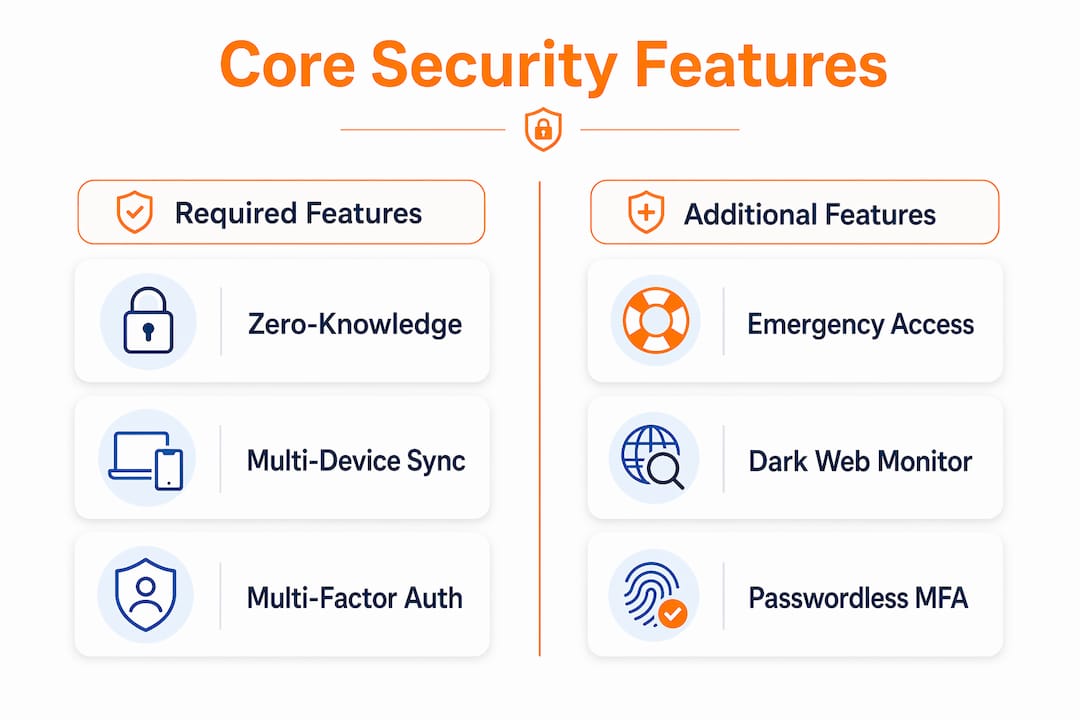
A reliable password manager must support zero-knowledge encryption, multi-device sync, and independent audits to qualify as trustworthy. Zero-knowledge architecture means the provider never sees your master password or vault contents. Even if their servers are breached, your data stays encrypted and unreadable.

Multi-factor authentication (MFA) is the second non-negotiable feature. A strong master password alone is not enough. MFA adds a second verification layer, such as a time-based one-time code or biometric scan, so stolen credentials cannot unlock your vault without physical access to your device.
Cross-platform synchronization matters more than most people realize. Your passwords need to follow you across Windows, macOS, iOS, and Android without friction. A manager that works only on one operating system creates gaps that attackers exploit.
Open-source code with third-party audits provides the strongest trust signal in the industry. Marketing phrases like “military-grade encryption” mean nothing without published audit reports. Bitwarden publishes annual third-party security audits. That transparency is the benchmark every serious contender should meet.
- Zero-knowledge encryption: Your provider cannot read your vault, even under legal compulsion.
- MFA support: Authenticator apps, hardware keys (like YubiKey), and biometrics all count.
- Cross-device sync: Seamless access across all your devices without manual export.
- Independent audits: Published reports from firms like Cure53 or Deloitte carry real weight.
- Breach monitoring: Alerts when your stored credentials appear in known data leaks.
Pro Tip: Before you commit to any password manager, search for its most recent third-party audit report. If the company cannot produce one, treat that as a red flag regardless of its marketing claims.
How do popular password managers compare in 2026?
Choosing the best password management software requires comparing real features and real costs, not just brand recognition. The table below covers five widely reviewed options across the key decision points.
| Manager | Free Tier | Premium Cost (per year) | Open Source | Notable Feature |
|---|---|---|---|---|
| Bitwarden | Yes, full-featured | $10–$20 | Yes | Published annual audits |
| 1Password | No | ~$36 | No | Travel Mode, Watchtower |
| Dashlane | Limited | $30–$60 | No | Built-in VPN, dark web monitoring |
| Proton Pass | Yes | ~$24 | Yes | Integrated with Proton ecosystem |
| NordPass | Limited | ~$36 | No | XChaCha20 encryption |
Bitwarden stands out for individuals who want a proven, audited provider at the lowest cost. Its free tier covers unlimited passwords across unlimited devices, which no other major competitor matches. 1Password targets professionals and families with polished apps and a Travel Mode that hides selected vaults at border crossings. That feature alone makes it worth the premium for frequent international travelers.
Dashlane costs the most but bundles a VPN and live dark web monitoring directly into the app. For users who want a single subscription covering multiple security needs, that bundling has real value. Proton Pass appeals to privacy-focused users already inside the Proton ecosystem, pairing well with ProtonMail and Proton VPN. NordPass uses XChaCha20 encryption, a newer algorithm that performs faster on devices without hardware acceleration for AES.
Emergency access is a feature worth checking before you buy. 1Password and Bitwarden both support it. Dashlane offers it on premium plans. This feature lets a trusted contact request vault access if you are incapacitated, preventing permanent data loss.
What pitfalls should you avoid when choosing a password manager?
Browser-built-in password managers are the most common mistake people make. Chrome, Safari, and Firefox all offer to save passwords, and the convenience is real. The problem is that browser-only managers lack cross-platform portability and standardized security auditing, creating vendor lock-in. If you switch browsers or operating systems, your credentials do not travel cleanly.
Avoid services that have suffered recurring security breaches. One well-publicized incident does not automatically disqualify a provider if they responded transparently and fixed the root cause. Repeated incidents with poor disclosure are a different story. Checking whether a password manager is truly unhackable requires reading post-incident reports, not just press releases.
- Lifetime deal traps: A password manager charging a one-time fee has no recurring revenue to fund ongoing security research and audits. Avoid them.
- Weak master password: Your master password is the single key to everything. Make it a long passphrase, not a word with symbols tacked on.
- Skipping MFA: Setting up a password manager without enabling MFA defeats half its security purpose.
- Delaying emergency access setup: Configure emergency access immediately after account creation. Losing your master password without a recovery path means permanent vault lockout.
- Ignoring breach alerts: Most premium managers flag compromised credentials. Ignoring those alerts is the equivalent of leaving a known broken lock on your front door.
Pro Tip: Set a calendar reminder every six months to review your vault. Delete accounts you no longer use, update passwords flagged in breach reports, and confirm your emergency contact information is still current.
How to implement a password manager effectively for personal and business use
Setting up a password manager correctly from day one saves significant trouble later. Follow this sequence for the best result.
- Choose your manager and create your account. Pick a provider with published audits and MFA support. Use a strong, unique master passphrase of at least four random words, following NIST guidance on password length over character complexity.
- Enable MFA immediately. Use an authenticator app like Google Authenticator or Authy rather than SMS, which is vulnerable to SIM-swapping attacks.
- Configure emergency access. Designate a trusted contact before you store a single password. This step takes two minutes and prevents permanent lockout.
- Import existing passwords. Most managers accept CSV exports from browsers and competing tools. Import, then audit for duplicates and weak passwords.
- Install browser extensions and mobile apps. The browser extension handles autofill. A good autofill feature refuses to fill credentials on phishing or suspicious pages, which is a critical protection layer.
- Generate new unique passwords for high-value accounts. Start with email, banking, and work accounts. Use the built-in generator set to at least 16 characters.
- Enable passkey support where available. Passkeys replace passwords entirely with cryptographic key pairs tied to your device. Google, Apple, and Microsoft all support passkeys. Your password manager should store and sync them.
For teams and businesses, shared vaults with role-based access controls are the key feature to evaluate. The six key features of any team password manager include granular permissions, audit logs, and offboarding workflows. When an employee leaves, revoking their vault access should take seconds, not days.
Pro Tip: When sharing credentials with a team, never share the master password. Use the manager’s built-in sharing feature so you can revoke access individually without changing the underlying credential.
Key takeaways
A good password manager requires zero-knowledge encryption, independent security audits, and MFA to deliver real protection for individuals and businesses.
| Point | Details |
|---|---|
| Zero-knowledge encryption is non-negotiable | Your provider must never have access to your vault contents, even under legal pressure. |
| Independent audits beat marketing claims | Published reports from firms like Cure53 carry more weight than any “military-grade” label. |
| Browser managers create risk | Chrome and Safari password storage lacks portability and standardized auditing. |
| Emergency access must be set up first | Configure a trusted contact immediately after account creation to prevent permanent lockout. |
| Passkeys are the next standard | Store and sync passkeys through your manager to reduce reliance on passwords entirely. |
My honest take on password managers in 2026
After years of watching people get this wrong, the pattern is clear. Most people pick a password manager based on a top-ten list, set it up halfway, and never revisit it. That approach gives you maybe 40% of the security benefit.
The open-source versus proprietary debate matters less than people think. Bitwarden is open source and excellent. 1Password is proprietary and also excellent. What actually matters is whether the company publishes third-party audit results and responds honestly when things go wrong. A closed-source manager with annual published audits beats an open-source one with no audit history.
Passkey support is the feature I watch most closely right now. The technology is maturing fast. Within two years, most major sites will support passkeys as the primary login method. A password manager that cannot store and sync passkeys will feel outdated by 2027. Check that your chosen tool already handles passkeys before committing.
The weakest link in any setup is almost always user behavior, not the software. Phishing attacks do not crack your vault. They trick you into typing your master password into a fake login page. Train yourself to check URLs before entering any credentials, and let your manager’s phishing-aware autofill serve as a second check. If the autofill does not trigger on a login page, treat that as a warning.
— Mike
Logmeonce offers a complete answer for password security
Logmeonce covers every security pillar covered in this guide: zero-knowledge encryption, passwordless MFA, dark web monitoring, and cloud storage encryption for both personal and business vaults. The platform supports single sign-on, biometric login, and passkey storage, making it a practical fit for individuals and teams alike.

Logmeonce offers flexible plans for personal users, small businesses, and enterprise teams, with audit-ready access controls and offboarding workflows built in. If you want to see exactly how the features stack up against your current setup, the Logmeonce cybersecurity platform includes a free trial with no credit card required. You can also use the password manager ROI calculator to estimate the time and risk savings for your organization before committing.
FAQ
What makes a password manager trustworthy?
A trustworthy password manager uses zero-knowledge encryption and publishes independent third-party audit results. Marketing claims alone are not sufficient proof of security.
Are password managers safe to use?
Password managers are significantly safer than reusing passwords or storing them in a browser. The key is choosing a provider with a strong audit history and enabling MFA on your account. You can read more about how secure password managers are before deciding.
How do I choose a password manager for my business?
Look for shared vault support, role-based access controls, audit logs, and a clear offboarding process for departing employees. Pricing for business plans typically runs higher than personal tiers but covers multiple users under one account.
What is the difference between free and premium password managers?
Free tiers from providers like Bitwarden cover unlimited passwords and devices. Premium plans add features like emergency access, advanced MFA options, breach monitoring, and priority support, typically for $10–$60 per year.
Should I use a passkey instead of a password?
Passkeys are more secure than passwords because they use cryptographic key pairs that cannot be phished. Store passkeys in your password manager so they sync across all your devices automatically.
Recommended
- Are Password Managers Safe? How to Find a Secure Password Manager
- Data Security: The Incredible Benefits of Using a Password Manager
- How secure are password manager tools – LogMeOnce


