


 Password Manager
 Identity Theft Protection

 Team / Business
 Enterprise
 Government
 MSP
MSP


TL;DR:
- Password vulnerabilities stem from weak creation, storage, or management practices that attackers exploit to access accounts. Short, predictable, and reused passwords are most often targeted, with length offering stronger protection than complexity. Using two-factor authentication, password managers, and breach monitoring significantly reduces password-related risks.
Password vulnerabilities are weaknesses in how passwords are created, stored, or managed that attackers exploit to gain unauthorized access to accounts and systems. These weaknesses sit at the center of most data breaches today. Credential-related breaches cost an average of $4.81 million, and between one in three and one in two people face password compromise every year. Organizations like NIST and the UK National Cyber Security Centre have updated their guidance significantly in recent years, shifting the entire field’s understanding of what makes a password truly secure.
What are the most common password vulnerabilities?
Password security risks fall into three main categories: weak construction, reuse across accounts, and predictable complexity patterns. Understanding password vulnerabilities starts with recognizing how attackers think.

Weak length and predictable patterns are the most exploited weaknesses. Passwords under 12 characters fall to automated cracking tools in minutes. Attackers do not guess randomly. They run rule-based dictionary attacks that try common words, names, dates, and substitutions first. A password like “P@ssw0rd!” looks complex but rule-based cracking exhausts every variation of that pattern in seconds. The complexity feels meaningful to the user but adds almost no real security.
Credential stuffing is the attack that turns password reuse into a mass breach event. 94% of leaked passwords are reused across multiple accounts. When one site is breached, attackers feed those credentials into automated tools that test them against banking, email, and social media platforms simultaneously. One compromised password can cascade into dozens of account takeovers.
Infostealer malware represents the fastest-growing attack vector. Infostealer malware accounted for 24% of cyber incidents in 2024. These programs harvest saved passwords from browsers, clipboard data, and session tokens without the user ever clicking a phishing link. The credential is stolen before any password policy can stop it.
Common password weaknesses that attackers target most often:
- Passwords under 12 characters
- Dictionary words with simple substitutions (e.g., “a” replaced by “@”)
- Reused passwords across multiple services
- Passwords based on personal information (birthdays, names, pet names)
- Passwords stored in plain text or browser autofill without encryption
- Passwords that have appeared in previous breach databases
Pro Tip: Never trust complexity for security. A 20-character random passphrase like “correct-horse-battery-staple” is exponentially harder to crack than “P@ssw0rd1!” and far easier to remember.
Does password length matter more than complexity?
The answer is yes, and the research is definitive. NIST SP 800-63B recommends a minimum of 15 characters, allows up to 64 or more, and explicitly removes mandatory complexity requirements like forced symbols and mixed case. This guidance overturns a decade of conventional wisdom that pushed users toward short, complex passwords they could barely remember.
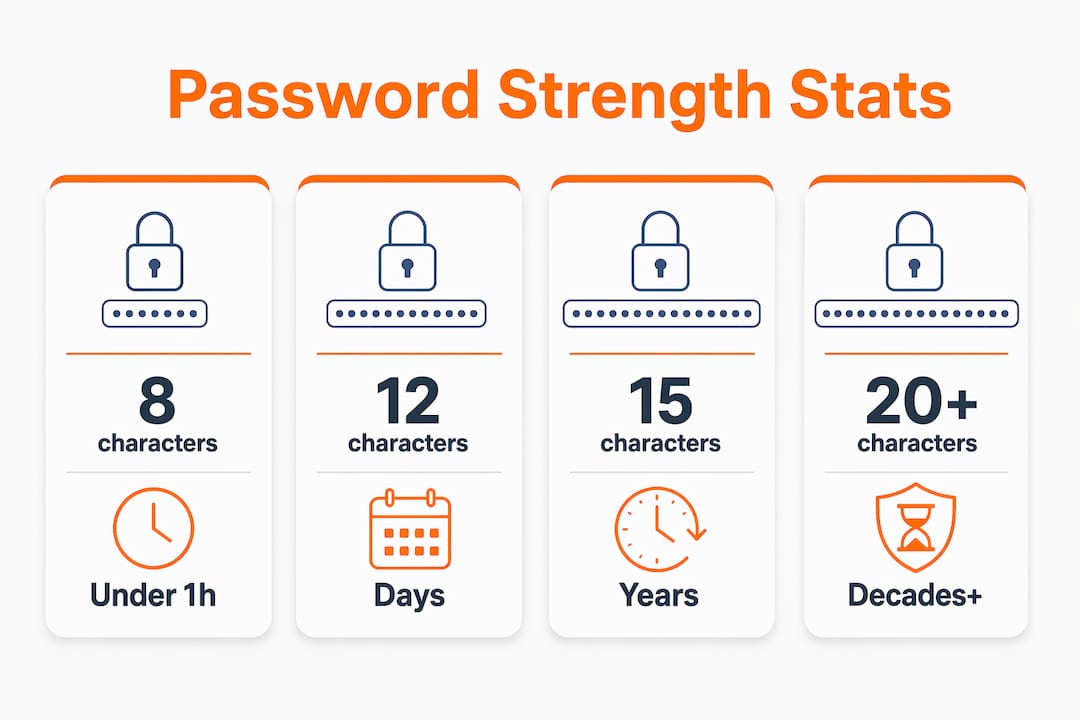
The reason length wins comes down to entropy. Every additional character multiplies the number of possible combinations an attacker must try. Complexity adds characters from a larger set, which helps, but length compounds that effect exponentially. A 20-character lowercase passphrase has more entropy than a 10-character password mixing symbols, numbers, and letters.
| Password type | Length | Estimated crack time |
|---|---|---|
| Common word + numbers | 8 characters | Under 1 hour |
| Mixed case + symbols | 10 characters | A few days |
| Random lowercase phrase | 15 characters | Decades |
| Random mixed passphrase | 20 characters | Centuries or more |
Note: Crack time estimates assume offline brute-force attacks with modern hardware. Actual times vary by hardware and attack method.
Complexity rules also backfire behaviorally. When users must include a symbol, a number, and an uppercase letter, they default to predictable patterns. “Password1!” satisfies most complexity requirements and fails almost immediately under attack. Human-chosen passwords fall to rule-based cracking quickly because people follow the same mental shortcuts.
Breach screening is the other critical layer. A mathematically strong password provides zero protection if it already appears in a breach database. Time-to-crack calculators can mislead when reuse is not considered. A password rated “very strong” by a strength meter is instantly compromised if an attacker finds it in leaked data. NIST now requires organizations to screen new passwords against known breach lists before accepting them.
Pro Tip: Use a passphrase of four or more random words as your master password for any password manager. Avoid phrases from songs, movies, or books. True randomness is the goal.
How does two-factor authentication reduce password risk?
Two-factor authentication (2FA), also called two-step verification (2SV), is the single most effective control for protecting accounts when passwords fail. The UK National Cyber Security Centre calls 2SV the most important security step beyond the password itself. Even a stolen password becomes useless to an attacker if a second factor blocks access.
The practical steps for enabling 2FA and moving toward passwordless authentication:
- Enable 2FA on every account that supports it, starting with email, banking, and cloud storage.
- Use an authenticator app (such as Google Authenticator or Microsoft Authenticator) instead of SMS codes, which are vulnerable to SIM-swapping attacks.
- For high-value accounts, use a hardware security key like a YubiKey, which cannot be phished remotely.
- Check whether your most-used services support FIDO2 passkeys and enable them where available.
- For organizations, enforce MFA at the policy level and audit compliance quarterly.
Passwordless authentication via FIDO2 and passkeys is the direction the industry is moving. 48% of top 100 websites now support passkeys, though user adoption remains low. Passkeys replace the password entirely with a cryptographic key pair stored on the user’s device. There is no password to steal, reuse, or crack.
The frontier threat is session token theft. Infostealer malware can bypass MFA by stealing the session cookie after authentication, effectively hijacking an already-verified session. Hardware security keys and time-based one-time passwords (TOTP) reduce this risk because they bind authentication to the physical device. No stolen cookie can replicate a hardware key response.
Best practices for protecting against password-related breaches
The most effective defense against password security risks combines a password manager, unique credentials per service, and active breach monitoring. No single control is sufficient on its own.
For individuals, a reputable password manager is the foundation. Tools like Bitwarden, 1Password, Dashlane, and Logmeonce generate and store unique, random passwords for every account. Cryptographically secure pseudorandom number generators in these tools produce passwords far superior to anything a person or an AI chatbot would create. AI-generated passwords follow language model patterns that make them more predictable than they appear. A dedicated password manager removes that risk entirely.
Breach monitoring is the next layer. Services like Have I Been Pwned allow anyone to check whether their email address or passwords have appeared in known breach databases. Checking regularly and changing any compromised credentials immediately limits the damage window significantly. Understanding how secure password manager tools are helps users make informed choices about which platform to trust.
| Common mistake | Best practice |
|---|---|
| Reusing the same password | Use a unique password for every account |
| Short, complex passwords | Use 15+ character random passphrases |
| Relying on browser-saved passwords | Use a dedicated password manager |
| Skipping 2FA | Enable 2FA on every account |
| Ignoring breach alerts | Monitor with Have I Been Pwned regularly |
| Forced 90-day password rotation | Change passwords only when compromised |
For organizations, the priority is updating password policies to align with NIST SP 800-63B. That means removing mandatory rotation schedules, dropping arbitrary complexity requirements, and implementing breach screening at account creation and login. Employee training on best practices for password security reduces the human error that attackers rely on most. Enterprise password management platforms centralize credential control, enforce policy, and provide audit trails that individual tools cannot match. Logmeonce offers enterprise password management built specifically for organizations that need policy enforcement at scale.
Pro Tip: Your master password for any password manager is the one password you must memorize. Make it a passphrase of five or more random words. Write it down once, store it physically in a secure location, and never type it anywhere else.
Key takeaways
Password vulnerabilities are best addressed by combining long, unique passwords with two-factor authentication and active breach monitoring, not by relying on complexity rules alone.
| Point | Details |
|---|---|
| Length beats complexity | NIST recommends 15+ character passwords; length increases crack time exponentially. |
| Reuse is the top risk | 94% of leaked passwords are reused, making credential stuffing highly effective. |
| 2FA is non-negotiable | The UK NCSC identifies 2SV as the single most important account protection step. |
| Password managers are essential | Tools using CSPRNGs generate truly random passwords that humans and AI cannot replicate. |
| Breach screening closes the gap | Even strong passwords fail if they appear in breach databases; screen and replace them. |
The uncomfortable truth about password security advice
Most password advice people receive is years out of date. I have reviewed countless corporate security policies that still mandate 90-day rotations and demand symbols in every password. NIST retired those recommendations because they make security worse, not better. Users forced to rotate passwords every three months end up cycling through “Summer2024!”, “Fall2024!”, and “Winter2025!” in sequence. Attackers know this pattern. It is one of the first rule sets they load.
The harder truth is that the password itself is becoming the weakest link by design. Passkeys and FIDO2 authentication exist precisely because no password policy, however well-crafted, fully addresses the human element. People reuse credentials. They fall for phishing. They save passwords in browsers that infostealer malware can read in seconds. The technology has outpaced the habit.
What I find most encouraging is that the tools to fix this are free or low-cost and available right now. Bitwarden is free. Have I Been Pwned is free. Authenticator apps are free. The gap between knowing what to do and actually doing it is not a resource problem. It is an education and friction problem. Organizations that invest in reducing that friction, through good tooling and clear training, see measurable improvements in credential hygiene. The password is not dead yet, but the path forward is clear: longer, unique, monitored, and backed by a second factor.
— Mike
Logmeonce password security tools for individuals and organizations
Logmeonce addresses the full spectrum of password security risks in one platform, from unique password generation to multi-factor authentication and dark web monitoring.

Logmeonce generates cryptographically secure passwords for every account, stores them in an encrypted vault, and alerts users when credentials appear in breach data. For organizations, Logmeonce’s cybersecurity platform enforces password policies, supports passwordless MFA, and provides centralized credential oversight across teams. The password management benefits include single sign-on, breach monitoring, and flexible plans for personal users through large enterprises. Logmeonce removes the friction that keeps most organizations from adopting strong credential practices.
FAQ
What is a password vulnerability?
A password vulnerability is any weakness in how a password is created, stored, or managed that an attacker can exploit to gain unauthorized access. Common examples include short length, reuse across accounts, and predictable patterns like dictionary words with simple substitutions.
How do attackers crack passwords?
Attackers primarily use rule-based dictionary attacks, credential stuffing, and brute-force methods. Rule-based attacks exhaust common substitutions and patterns first, which is why complex but predictable passwords like “P@ssw0rd!” offer little real protection.
Does two-factor authentication stop password attacks?
Two-factor authentication blocks most account takeover attempts even when a password is stolen. The UK National Cyber Security Centre identifies 2SV as the most important single security step beyond the password itself, though advanced infostealer malware can bypass it by stealing session tokens.
How long should a password be?
NIST SP 800-63B recommends a minimum of 15 characters and supports passwords up to 64 characters or more. Length increases crack time exponentially and provides stronger protection than short passwords with complex symbols.
Are password managers safe to use?
Password managers that use cryptographically secure pseudorandom number generators are significantly safer than user-created or AI-generated passwords. Dedicated managers like Bitwarden, 1Password, and Logmeonce store credentials in encrypted vaults and generate truly random passwords that attackers cannot predict.
Recommended
- Why Passwords Are Cybersecurity’s Weakest Link – LogMeOnce
- How to Create Strong Password to Keep the Hackers Out
- 6 Reasons to Take Password Fatigue Seriously (And How to Avoid It)


