


 Password Manager
 Identity Theft Protection

 Team / Business
 Enterprise
 Government
 MSP
MSP


Start by building an app inventory that flags which protocol each application supports, SAML or OIDC, then pick your identity provider. Everything else follows a fixed sequence: prerequisites, IdP configuration, service provider registration, attribute mapping, certificate setup, testing, pilot, and rollout. Most organizations end up running both protocols side by side rather than standardizing on one, so plan for a hybrid environment from day one.
TL;DR:
- Most organizations run SAML and OIDC protocols side by side because they support different application types, with SAML for legacy systems and OIDC for cloud-native apps.
- Building a comprehensive app inventory, confirming directory source, and preparing a rollback plan are essential steps before configuring the identity provider to prevent rollout stalls.
- Certificate expiry and clock skew are the leading causes of SSO failures, so proactive certificate rotation and time synchronization are critical for system stability.
- Attribute mapping must be carefully documented and tested to avoid silent access issues caused by naming or formatting mismatches, especially with group claims.
- Proper pilot testing with realistic failure scenarios and phased rollout strategies minimize user disruption and enable quick rollback if problems occur.
Step By Step SSO Setup: What To Prepare First
Rushing into IdP configuration before your environment is ready is the single biggest reason SSO rollouts stall midway. Before touching any settings, build a checklist that covers your directory, your network, and your test plan.
Start with an application inventory. For every app, record which protocol it supports, its Assertion Consumer Service (ACS) URL or redirect URI, and the name of a technical owner you can reach when something breaks.
Next, confirm your identity source of truth. Most organizations sync from Azure AD, AD LDS, or an LDAP directory, and you need to know exactly which one feeds your IdP before you configure anything downstream.
- App inventory fields: protocol support, ACS/redirect URIs, app owner contact, current login method
- Directory source: confirm Azure AD, AD LDS, or LDAP as authoritative, and document the sync frequency
- Network readiness: valid TLS certificate on the IdP domain, DNS control, NTP time sync, and firewall rules that allow IdP/SP traffic
- Test environment: a designated test tenant separate from production
- Pilot group: a small, cross-functional group of users for the first live test
- Rollback plan: written steps to disable SSO fast if the pilot fails
Atlassian’s own setup documentation calls out domain verification and NTP time sync as prerequisites specifically because skipping them causes SAML failures that look like configuration bugs but are actually clock or DNS issues.
Should You Use SAML Or OIDC?
The protocol choice usually isn’t organization-wide, it’s app-by-app. SAML 2.0 remains the standard for classic enterprise web applications, things like legacy HR systems, on-prem portals, and older SaaS tools built before OAuth became dominant. OIDC, built on top of OAuth 2.0, is the default for cloud-native apps, mobile clients, and anything with a modern API-first architecture.
To figure out which one an app needs, check its admin settings page for an “SSO” or “Enterprise” tab, and look for the words “SAML metadata” or “OpenID Connect discovery” in its developer documentation. Most vendors state their supported protocol plainly; if they support both, note that in your inventory too.
- Check the app’s admin console for a dedicated SSO/SAML/OIDC configuration tab
- Search the vendor’s developer docs for “SAML metadata” or “.well-known/openid-configuration”
- Ask the app owner directly if documentation is unclear
- Record the confirmed protocol in your app inventory alongside ACS/redirect URI data
Most organizations don’t pick one protocol and standardize on it. They run a hybrid model, SAML for the older enterprise stack, OIDC for newer cloud and mobile apps, because that’s what actually covers their full application footprint. Trying to force every app onto a single protocol usually means ripping out working integrations for no real security benefit.
How Do You Set Up Your Identity Provider?
Your identity provider is the authentication hub every application will trust, so get its foundation right before connecting a single app. The sequence below applies whether you’re standing up a cloud tenant or configuring an on-prem server.
- Provision the IdP. Set up your cloud tenant or on-prem server, then assign admin roles to the people who’ll manage day-to-day configuration. Limit this list. Every admin account is a potential attack surface.
- Connect your directory. Install and enable the appropriate connector, an AD agent, Azure AD sync, or an LDAP connector, then run a test lookup to confirm the IdP can find and read real user records.
- Set baseline authentication policies. Decide your MFA requirements now, before any app is connected. Retrofitting MFA after rollout creates a second wave of user friction you can avoid entirely.
- Export your IdP metadata. Pull the SSO URL, Entity ID, and signing certificate. These three values are what every service provider will ask for during registration, so keep them in one accessible, secured location.
Microsoft’s own Entra admin center workflow follows nearly this exact sequence: register the application, configure the sign-on URL and Entity ID, then download the signing certificate for upload into the SP. Google Workspace mirrors it too, letting admins create an SSO profile and generate an X.509 certificate that gets assigned to specific organizational units or groups rather than the entire domain at once.
Pro Tip: Export your IdP metadata as an XML file rather than typing each value manually into every SP’s config screen. Manual entry is where typos in Entity IDs and ACS URLs tend to hide until the third failed login attempt.
How Do You Register A Service Provider?
Once your IdP is live, each application, the service provider in SSO terminology, needs its own registration pass. The exact fields differ by protocol, but the process is consistent.
- Gather SP configuration values from the app owner. You need the ACS URL (sometimes called Reply URL), the Entity ID, any redirect URIs, and which SAML bindings the app supports (POST is most common).
- For SAML apps, import metadata when available. Most modern apps publish an XML metadata file you can import directly into the IdP, which avoids the manual transcription errors that come from typing ACS URLs by hand. If no metadata file exists, enter the ACS URL and Entity ID manually and upload your IdP’s signing certificate when the app requests it.
- For OIDC apps, register the client credentials. Create a client_id and client_secret pair, add every redirect URI the app will use, and set your scopes, typically
openid,profile, andemailfor standard identity claims. - Exchange and record everything. Every SP value and every IdP value needs to live somewhere secure and searchable, not scattered across email threads and sticky notes. A password vault or secrets manager built for enterprise use works better here than a shared spreadsheet.
Skipping the metadata import step is the single most common cause of first-attempt SAML failures. A hand-typed ACS URL with a trailing slash where the app doesn’t expect one will silently break authentication, and the resulting error message rarely points at the actual cause.
What Attributes Need To Be Mapped?
Getting authentication working is only half the job. If the right attributes don’t ride along in the token or assertion, users log in successfully and then can’t access anything, or worse, get access they shouldn’t have.
Map the standard set first: email address, a unique identifier (sub in OIDC, a NameID in SAML), given name, family name, department, and group membership. Group membership is the attribute that does the heaviest lifting, because it’s usually what determines role-based access inside the application itself.
- Map
email,sub/uid,givenName,familyName,department, andgroupsat minimum - Translate IdP group names into the roles each SP expects, and write down the exact claim name used on both sides
- Choose SCIM when you need full lifecycle provisioning, including automatic deprovisioning when someone leaves
- Choose JIT (just-in-time) provisioning for lighter-weight onboarding where accounts get created on first login
- Confirm attribute values during testing, not just their presence
Attribute mapping is where most rollouts quietly go wrong, often because a group name gets capitalized differently on the IdP side than the SP expects, or an email address arrives mixed-case when the app expects it lowercase.
Pro Tip: Don’t just check whether an attribute is present in the token. Check its exact format. A group claim that reads “Finance-Team” on your IdP and “finance-team” on the SP side will fail authorization silently, with no error message pointing you to the mismatch.

How Do Certificates And Session Rules Protect SSO?
X.509 certificates are what let your IdP sign assertions and let the SP verify they’re genuine, and they’re also the single most common reason SSO stops working with zero warning.
Download your IdP’s signing certificate from the same admin console where you exported metadata, then upload it to every SP that requires it directly (some SPs pull it automatically via metadata import instead). Certificates expire, and when they do, every affected app goes down simultaneously.
- Build a rotation calendar tied to each certificate’s actual expiry date, not a generic annual reminder
- Set automated alerts at 90, 30, and 7 days before expiry, since proactive rotation with monitoring is what prevents emergency outages
- Enforce MFA at the IdP level for every SSO login, not just for admin accounts
- Set session timeout defaults deliberately. Shorter sessions for privileged accounts, longer for low-risk apps
- Check for CORS misconfigurations and proxy interception, which frequently break token validation in ways that look like certificate problems but aren’t
A single expired certificate can take down authentication for every connected application at once, so treat rotation as a scheduled operational task, not a reactive fire drill.
How Should You Test And Pilot Your SSO Setup?
Testing SSO in production with real user accounts is how small configuration mistakes turn into company-wide lockouts. Build a repeatable test sequence first, then expand to a pilot group.
- Create test accounts on a nonverified domain. Atlassian’s documentation specifically recommends testing with an admin account outside your verified domain so a bad configuration can’t lock out your actual admin access. Run initial checks in an incognito browser session to avoid cached credentials masking problems.
- Verify tokens and assertions directly. Confirm every expected attribute is present, correctly formatted, and that role assignment inside the app matches what the group mapping should produce.
- Deliberately trigger failure cases. Test an expired certificate, a revoked account, and a network restriction, then document what each failure actually looks like to the end user.
- Run a real pilot. Include a cross-section of roles and apps, not just IT staff, and adjust attribute mappings based on what the pilot surfaces before expanding further.
How Do You Roll Out SSO Without Disrupting Users?
Moving from a successful pilot to full enforcement works best as a staged expansion rather than a single cutover. Each phase should be small enough to reverse quickly if something goes wrong.
- Expand in three phases: pilot group, then targeted departments, then organization-wide enforcement
- Assign SSO profiles to specific organizational units or groups rather than applying one blanket policy, with documented overrides for edge cases like service accounts
- Write helpdesk runbooks before rollout, covering the exact error messages users will see and the fix for each
- Send user communication ahead of each phase explaining what changes and what to do if login fails
- Schedule high-impact application changes during defined change windows, with a tested rollback step ready before the window opens
Google Workspace’s approach of assigning SSO profiles at the organizational-unit level rather than domain-wide is worth copying regardless of which IdP you run. It gives you a clean lever to pull if one department hits problems the others didn’t.
Why Does SSO Break, And How Do You Roll It Back Fast?
Most SSO failures trace back to one of four causes, and recognizing the pattern quickly saves hours of guesswork during an outage.
- Clock skew: SAML assertions carry timestamps, and if the IdP and SP clocks drift beyond a few minutes, valid logins get rejected as expired
- Certificate expiry: the most common cause of a sudden, total outage across every connected app
- Wrong ACS/redirect URI: often a trailing slash, http versus https mismatch, or a stale URL left over from a staging environment
- Attribute mismatch: authentication succeeds but authorization fails, usually a group name or claim format issue
Use SAML traces, IdP logs, and the OIDC discovery endpoint to pinpoint exactly where a failure occurs rather than guessing. Capturing the SAML response and comparing it against a directory snapshot taken right before the test isolates whether the problem is the assertion itself or a downstream mapping issue.
For emergency rollback, disable the SSO policy for the affected app or user group first, rather than tearing down the entire IdP configuration. That keeps working integrations intact while you fix the broken one.
Pro Tip: Keep a “break glass” admin account that bypasses SSO entirely, stored securely and tested quarterly. It’s the difference between a ten-minute fix and a locked-out admin console during a real outage.
What Ongoing Maintenance Does SSO Need?
SSO isn’t a set-and-forget system. Treat it like any other piece of production infrastructure, with a maintenance cadence that catches problems before users do.
- Set automated alerts for upcoming certificate expiry and for spikes in failed assertions
- Run quarterly access reviews to catch orphaned accounts and outdated group memberships
- Feed login anomalies into your SIEM and alert on repeated failures from the same account or IP range
- Update the application inventory and runbooks every time an app is added, removed, or reconfigured
An inventory that’s accurate on day one and stale six months later is worse than no inventory at all. It gives the next admin false confidence in data nobody’s checked.
Who Wrote This Guide, And What Tools Support It?
This guide draws on documented implementation patterns from major identity platforms and enterprise rollout checklists, written by Mike for Logmeonce’s security resource library.
Logmeonce’s own platform addresses the pieces that pure SSO configuration leaves open: passwordless MFA for the authentication layer, centralized identity management for the directory side, and encrypted credential vaulting for the legacy apps that never got SAML or OIDC support in the first place. For readers who want the certificate download and upload mechanics spelled out in more visual detail, the SSO fundamentals walkthrough covers that ground directly.
An Editorial Take On What Actually Makes SSO Rollouts Succeed
Most SSO guides spend their energy on the IdP and SP configuration screens, because that’s the part with buttons to click and fields to fill in. That’s not where rollouts actually fail. They fail on attribute mapping, and they fail because nobody budgeted time for it.
The conventional advice treats attribute mapping as a five-minute checkbox exercise after the “real” configuration is done. In practice, it’s where a properly authenticated user gets denied access to the app they were just approved for, because a group name arrived with different capitalization than the SP expected. That’s not a security failure. It’s a documentation failure, and it’s entirely preventable if you write down the exact claim names on both sides before you test anything.
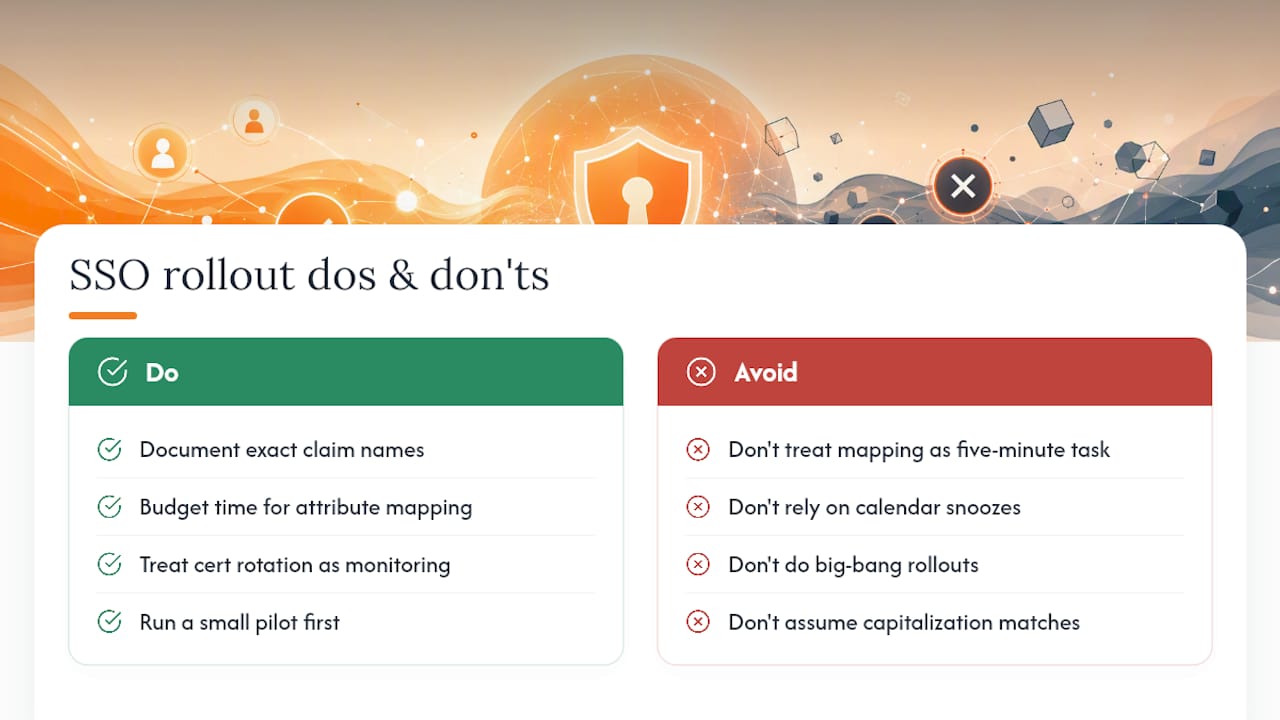
The other place conventional wisdom falls short is certificate rotation. Most teams treat it as a calendar reminder that gets snoozed twice before the outage hits. Treat it instead as infrastructure monitoring, the same category as disk space alerts or SSL expiry checks on a public website, because that’s functionally what it is.
If you take one thing from this guide, prioritize the small pilot over the big-bang rollout. A five-person pilot that surfaces a broken group mapping is a Tuesday afternoon fix. The same bug hitting your entire sales department on a Monday morning is a very different conversation with your CISO.
— Mike
Reduce SSO Friction With The Right Identity Layer
SSO handles federated authentication well, but it doesn’t solve everything on its own. Legacy apps that never got SAML or OIDC support still need credentials managed somewhere, and admins still need a way to enforce MFA consistently across systems that federation doesn’t touch. Logmeonce fills that specific gap: passwordless MFA for the login layer, centralized identity management for policy enforcement, and encrypted password vaulting for every application your SSO rollout couldn’t reach.

For the apps sitting outside your SSO footprint, an enterprise password management layer keeps credentials secure and centrally auditable instead of scattered across individual employee vaults. If you’re mapping out where SSO ends and where a supplementary identity layer needs to pick up the slack, Logmeonce’s cybersecurity platform is worth a direct look, start with a trial account and run it against your own app inventory to see exactly which gaps it closes.
Where To Find Vendor-Specific SSO Documentation
Protocol references and admin steps vary by platform, so keep these bookmarked for the vendor-specific parts this guide can’t cover in full:
- Microsoft Entra SAML setup, for exact Reply URL and certificate fields in the Entra admin center
- Google Workspace SSO setup, for SSO profile creation and OU-based assignment
- Start with Identity’s SSO guide, for protocol selection and hybrid deployment reasoning
- Atlassian’s SAML configuration docs, for prerequisite checks and safe testing practices
Sources
- The Complete Guide to Implementing Single Sign-On (SSO) · Start with Identity
- Enable SAML single sign-on for an enterprise application
- Setting up SSO | Apps & integrations
- Configure SAML single sign-on with an identity provider


