


 Password Manager
 Identity Theft Protection

 Team / Business
 Enterprise
 Government
 MSP
MSP


A random password is a string of characters or words chosen with no predictable pattern, algorithm-generated rather than picked by a human brain that always leans toward names, dates, and keyboard patterns. The single best rule: favor length over complexity. A sufficiently long character random string or a multi-word passphrase beats a shorter password stuffed with symbols almost every time.
You have two practical paths:
- A character-based random string (letters, numbers, symbols) for sites with strict character rules
- A word-based passphrase (four to six random words) for accounts where you need something you can actually type or recall
Whichever you pick, generate it with a trustworthy tool and drop it straight into a password manager. Never a sticky note, never a browser autofill you forgot you saved, never memory alone.
TL;DR:
- Trustworthy password generators should perform all generation locally using Web Crypto API or open-source code to ensure security.
- Length of passwords or passphrases significantly improves resistance to brute-force attacks, overshadowing complexity added by symbols or uppercase letters.
- For critical accounts like banking or finance, offline or local password generation tools are safer than web-based generators to prevent server-side logging risks.
- Storing generated passwords in an encrypted vault and enabling multi-factor authentication greatly enhances overall account security.
- Avoid adding predictable patterns or prefixes to random strings, as they reduce true randomness and weaken the password’s strength.
How Do Random Password Generators Actually Work?
Not all “random” is equal. A pseudo-random number generator (PRNG) uses a mathematical formula seeded by something like the system clock, which makes it fast but theoretically predictable if someone figures out the seed. True random number generation pulls entropy from physical chaos instead. Random, for instance, draws its randomness from atmospheric noise, an entropy source no algorithm can reverse-engineer.

For everyday password generation, though, the real workhorse is the Web Crypto API, specifically the crypto.getRandomValues() function built into every modern browser. It’s cryptographically secure, runs locally, and doesn’t need a server round-trip to produce strong output. Tools built on it, like Strongpass, generate the password inside your browser and typically recommend 16 or more characters, or four to six random words, for a credential you’d trust with a real account.
One technical wrinkle worth knowing: generators don’t just grab a random number and call it done. Mapping a raw random integer onto a character set can introduce “modulo bias,” where certain characters get picked slightly more often than others. Solid implementations use rejection sampling from browser-supplied values to eliminate that skew, as RandomHub documents in its technical breakdown.
- PRNG: fast, seeded, fine for most non-cryptographic uses
- True RNG: physical entropy source, no algorithmic seed to attack
- Web Crypto API: cryptographically secure, local, the practical standard for browser-based generators
Here’s the catch on strength meters: a generator that forces “at least one uppercase, one number, one symbol” is technically shrinking the pool of valid combinations at certain positions, which changes the entropy math even though the password looks more complex.
How Do You Choose a Trustworthy Password Generator?
Run any generator through this checklist before you trust it with a real login:
- Confirm client-side generation. The password should be created inside your browser, never sent to a server for processing. If a site’s own documentation says nothing is logged or transmitted, that’s a good sign.
- Check for Web Crypto or open-source code. A generator built on
crypto.getRandomValues(), or one with publicly inspectable source code, gives you something to verify instead of just trust. - Match length to sensitivity. A throwaway forum account doesn’t need the same treatment as your bank login. Scale length up as the stakes rise.
- Skip custom prefixes or patterns. Adding “Summer2026!” to the front of a random string feels clever, but it hands an attacker a predictable anchor and quietly shrinks your effective randomness.
- Check the destination site’s rules first. If a site blocks symbols or caps length at 12 characters, a passphrase of real words often clears those restrictions better than a jammed character string.
- Store it in a password manager, not a browser’s default save prompt or a text file, so you’re not stuck reusing the one password you can actually remember.
Pro Tip: If a generator’s website doesn’t explain how it produces randomness or where the password goes after you click “generate,” that’s your answer. Trustworthy tools are specific about their own mechanics.
What Do Strong Random Passwords Actually Look Like?
Length recommendations shift with what’s at stake, but general advice suggests longer passwords for more sensitive accounts, with high-value accounts benefiting from substantially longer character counts or passphrases.
Here’s what those look like in practice:
- 16-character random string:
j8Xk#mQ2!vRt9nWp - 20-character string for a site with tighter symbol rules:
Tf7nMk2QpLxV9wRb4Hs2 - 4-word passphrase:
harbor-velvet-quartz-drizzle
Length beats complexity almost every time. Adding one more random character multiplies the number of guesses an attacker needs exponentially, while bolting on a single extra symbol barely moves the needle.
If a site blocks symbols, rejects long strings, or insists on some odd rule like “no more than two repeating characters,” don’t fight it with a shorter, weaker password. Switch to a passphrase instead. Four or five unrelated words, lowercase, joined by hyphens, sails through nearly every restrictive login form while staying easy enough to type without a manager on hand.
When Should You Skip Web-Based Generators?
For your highest-value accounts, online banking, brokerage logins, or anything guarding real money, lean toward offline or local generation instead of an unfamiliar web tool. A password manager’s built-in generator, or a locally run command-line utility, keeps the process entirely on your own machine.
Here’s the nuance most guides skip: SSL encryption protects the password in transit, but it does not eliminate the theoretical risk of server-side logging or a compromised backend. RANDOM.ORG itself advises caution for extremely sensitive accounts, even though it doesn’t store generated passwords.
- Prefer offline tools (password manager generators, OS utilities) for banking and financial admin accounts
- Open your browser’s network panel, or check the generator’s own documentation, to confirm the password never leaves your device
- Treat “we use SSL” as encryption in transit, not proof of zero server involvement
How Does LogMeOnce Handle Random Password Generation and Storage?
Generating a strong random password solves half the problem. Storing it without writing it down or reusing it solves the other half. Logmeonce’s online password generator and calculator produces random strings you can drop straight into an encrypted vault, instead of copying them into a browser prompt you’ll forget about.
The bigger advantage shows up after generation. Logmeonce pairs that vault with passwordless multi-factor authentication, so a random password isn’t the only thing standing between an attacker and your account.
- Generate, then store instantly in an encrypted vault instead of a note app
- Enable MFA so a leaked password alone can’t unlock the account
- Import existing random passwords into one manager instead of scattering them across browsers
| Point | Details |
|---|---|
| Generate | Use LogMeOnce’s generator to create a 16+ character string or passphrase in one step. |
| Store | Save it into an encrypted vault instead of a browser autofill prompt. |
| Layer defense | Turn on passwordless MFA so a stolen password isn’t enough on its own. |
Key Takeaways
Random password strength depends far more on length and true randomness than on symbol complexity, and a trustworthy generator always creates and stores that password without ever sending it to a server.
| Point | Details |
|---|---|
| Length beats complexity | A 16+ character string or a 4 to 6 word passphrase resists brute-force attacks better than a short, symbol-heavy password. |
| Verify client-side generation | Confirm the generator uses crypto.getRandomValues() or open-source code so nothing gets logged on a server. |
| Match length to risk | Scale up to 20+ characters or a long passphrase for banking, admin, and financial accounts. |
| Avoid web tools for critical logins | Use offline generation or a password manager’s built-in generator for your highest-value accounts. |
| Generate and store together | Logmeonce lets you create a random password and immediately save it to an encrypted vault with MFA layered on top. |
Why “Length First” Beats Most Password Advice You’ve Heard
Most password advice still obsesses over symbol requirements, one uppercase letter, one number, one special character, as if complexity were the goal. It isn’t. The math behind brute-force resistance favors length by an enormous margin, and forcing category requirements can actually shrink the usable character pool at certain positions, which is the opposite of what most people assume they’re buying with a “strong” password.
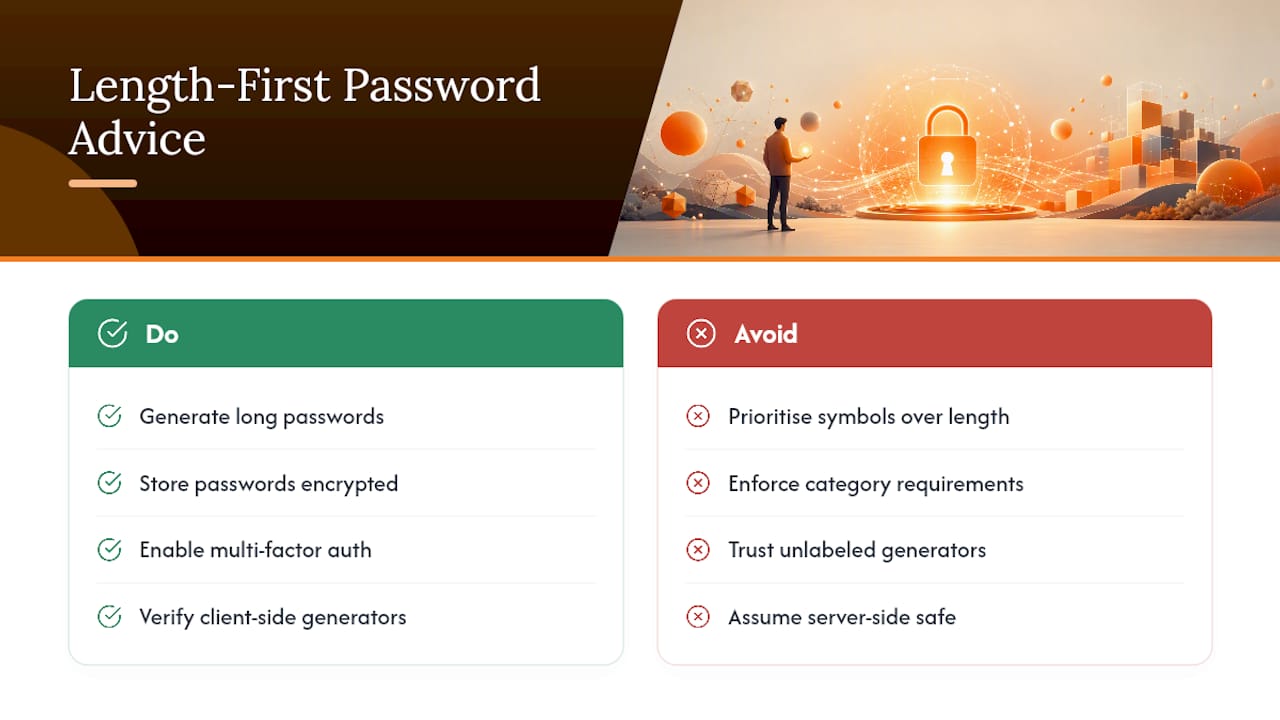
The bigger blind spot is trust verification. Readers assume any site labeled “password generator” is safe by default, but plenty of tools never disclose whether generation happens client-side or gets processed on a server somewhere. Checking for Web Crypto usage, or simply reading whether a tool claims client-side generation, takes thirty seconds and matters more than any symbol rule.
If you take one thing from this guide, make it this: generate long, store smart, and layer a second defense like MFA so a single leaked password never becomes the whole story. Tools that combine generation with encrypted storage close the gap between “I made a strong password” and “I actually protected the account.”
— Mike
Get a Random Password and a Safer Place to Keep It
Generating a strong random password is only step one. Without secure storage and a second layer of defense, even a perfect 20-character string is one data breach away from being useless. Logmeonce gives you both in one place: a built-in password generator paired with an encrypted vault, so you’re not juggling a generator tab, a notes app, and a browser’s autofill prompt just to manage one login.

What makes this fit the reader coming from this guide is the pairing itself. You already know length and client-side generation matter. Logmeonce adds passwordless MFA on top, so a leaked or guessed password isn’t the only barrier protecting your accounts. Check the cybersecurity plans page to see which tier fits your setup, and start generating and storing your next password in one workflow instead of two.
Sources
- Random Password Generator
- Strongpass
- Random Password Generator — Web Crypto and Rejection Sampling | RandomHub


