


 Password Manager
 Identity Theft Protection

 Team / Business
 Enterprise
 Government
 MSP
MSP


A secure enterprise biometric login rollout runs on FIDO2/WebAuthn for phishing-resistant authentication, layered as step-up MFA on top of your existing identity provider (IdP), and governed by a centralized policy engine. That’s the whole architecture in one sentence. Everything else in this guide is about making that sentence survive contact with 3,000 employees, a mixed fleet of laptops and phones, and a help desk that gets nervous every time “biometric” and “mandatory” appear in the same sentence.
This is enterprise identity management, not device settings. We’re talking about how your organization enrolls, enforces, and governs biometric authentication across an IdP and connected apps, not how an individual employee turns on Face ID for their own phone.
By the end of this guide you’ll have a concrete map of where FIDO2, WebAuthn, passkeys (both synced and device-bound), FIDO2 security keys, Windows Hello for Business, certificate-based authentication (CBA), and a Temporary Access Pass (TAP) each fit into a real rollout. According to NIST Special Publication 800-63B, organizations should select biometric factors to match the operational use case, then let WebAuthn carry the phishing resistance, most often as a step-up layer rather than a full IdP replacement.
Key Takeaways
A successful enterprise biometric login program depends on portable-first bootstrap, hardware-backed attestation for high-risk roles, and lifecycle governance that treats recovery as the top priority.
| Point | Details |
|---|---|
| Confirm IdP readiness first | Verify FIDO2/WebAuthn support, SCIM provisioning, and audit logging before enrolling a single user. |
| Bootstrap with a portable credential | Issue a TAP or use existing MFA to register a passkey or FIDO2 key, then bootstrap local credentials. |
| Register two authenticators minimum | One portable and one local credential per user prevents single-device lockouts. |
| Test break-glass tokens regularly | Untested recovery paths turn routine incidents into extended outages. |
| Consolidate with a unified platform | Logmeonce centralizes policy enforcement, biometric integration, and SSO lifecycle controls in one system. |
Setting Up Biometric Login: What to Confirm First
Before you touch a single enrollment policy, verify that the pieces you already own can actually support what you’re about to build. Skipping this step is the single most common reason pilots stall at week three.
- IdP and SSO capabilities. Confirm your identity provider supports FIDO2/WebAuthn natively, along with SCIM provisioning, audit logging, and hooks for session and step-up policy enforcement. Not every legacy IdP does this out of the box.
- Device posture and inventory. Catalog which endpoints support platform authenticators like Windows Hello for Business, macOS platform keys, or mobile passkeys, and which will need roaming FIDO2 security keys instead. A finance team on locked-down desktops has different needs than field technicians on shared tablets.
- Attestation and device trust policy. Decide upfront whether you’ll require direct attestation, accept packed attestation, or skip attestation checks entirely, based on how much you need to verify authenticator provenance versus how much friction you can tolerate.
- Organizational sign-off. Get stakeholder approval, run a data protection impact assessment (DPIA) or legal review for biometric data handling, brief the help desk, and build your break-glass hardware token plan before enrollment opens.
Pro Tip: Run the DPIA in parallel with your technical pilot, not after it. Legal review timelines routinely outlast engineering timelines, and starting them together avoids a finished technical rollout sitting idle for six weeks waiting on sign-off.
Which Biometric Factors Fit Which Roles?
There’s no single correct authenticator. There’s a correct authenticator for a given person’s risk profile, device access, and mobility pattern, and picking the wrong one is how you end up with domain admins authenticating with the same setup as a part-time contractor.
Fingerprint sensors and facial recognition work well as local, device-bound factors for desk-based and mobile-first staff who use the same device daily. Hardware FIDO2 security keys are portable, work across shared or kiosk devices, and give you a physical object you can revoke by confiscation, which matters for high-risk roles. Certificate-based authentication (CBA) still earns its place where regulated environments require a specific PKI chain of trust that WebAuthn alone doesn’t satisfy.
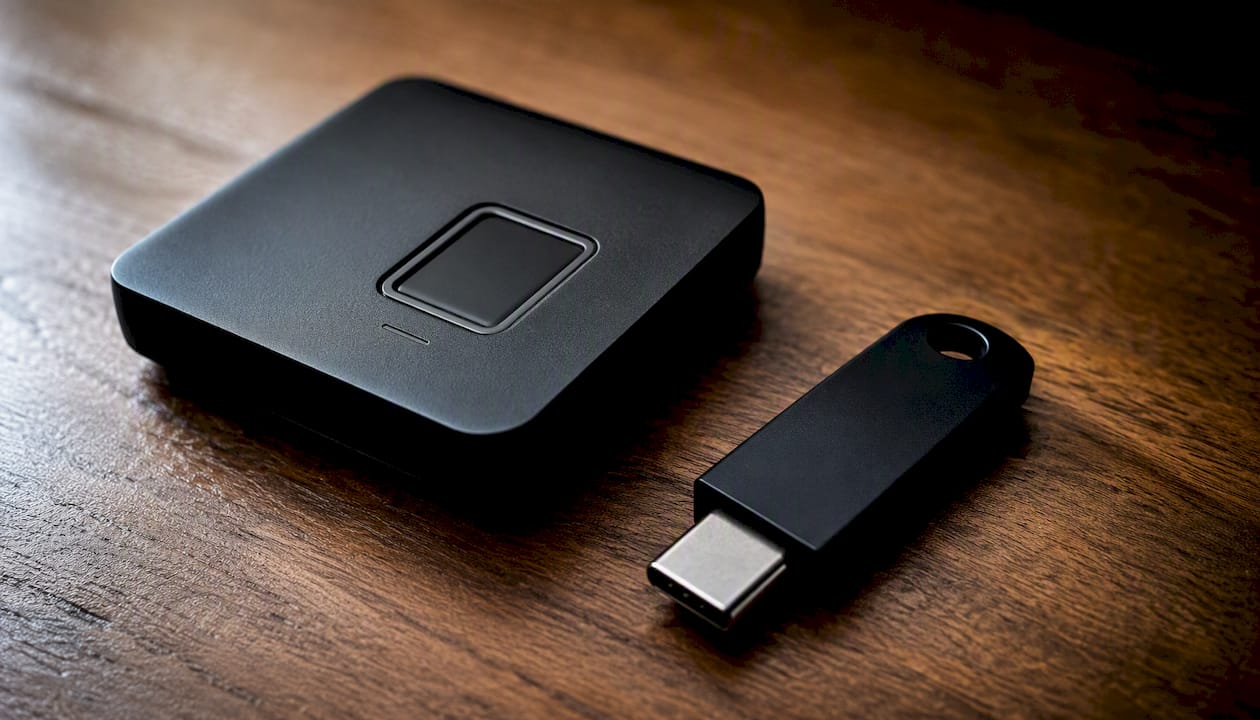
Microsoft’s own deployment guidance recommends registering at least two independent authenticators per user, typically one portable and one local, so a lost phone or a wiped laptop doesn’t lock someone out of everything at once.
| Persona | Recommended Portable Credential | Recommended Local Credential |
|---|---|---|
| IT/domain admins | FIDO2 hardware security key | Windows Hello for Business (biometric + PIN) |
| High-risk regulated staff | FIDO2 hardware key with direct attestation | Certificate-based authentication (CBA) |
| Desk-based employees | Synced passkey | Windows Hello for Business or macOS platform key |
| Mobile-first field staff | Device-bound passkey | Mobile biometric (fingerprint/face) |
| Contractors/temporary access | FIDO2 hardware key (revocable) | None (portable only, shorter lifecycle) |
- Assign contractors a portable-only credential so offboarding is a single revocation event, not a device wipe.
- Reserve certificate-based authentication for personas where regulatory audit trails specifically require it, since CBA adds real operational overhead.
Pro Tip: Don’t let fingerprint versus facial recognition become a philosophical debate. Pick based on the device fleet you already have. If most of your workforce carries laptops with fingerprint readers, standardize there; retrofitting facial recognition hardware later is expensive and slow.
How Should WebAuthn Integrate With Your Existing IdP?
Two integration patterns dominate real deployments, and picking the wrong one creates federation headaches that take months to unwind.
The first, and by far the more common, pattern is WebAuthn as step-up MFA: your IdP handles the initial assertion and session, and WebAuthn kicks in for stronger verification on sensitive actions or first login. This is the approach SSOJet’s implementation guidance recommends for enterprise SSO, since it preserves SCIM provisioning, centralized session policy, and audit logging that live inside the IdP. The second pattern, replacing the IdP entirely with a WebAuthn-native flow, is rare and generally only makes sense for greenfield environments with no legacy federation debt.
Relying Party (RP) ID and origin policies matter more than most teams expect. A misconfigured RP ID breaks authentication across subdomains or multi-tenant apps, and it’s a common source of “it worked in staging but not production” tickets.
The identity providers that get this right treat WebAuthn as an addition to the federation layer, not a replacement for it. Ripping out SAML or OIDC to chase a fully passwordless IdP usually costs more in broken integrations than it saves in security gains.
For legacy apps that can’t speak FIDO2 natively, an identity broker or federation gateway can translate modern authentication events into SAML or OIDC that the old app already understands, keeping your centralized policy enforcement intact instead of carving out exceptions app by app.
- Step-up pattern: lower risk, preserves existing SSO investment, faster to deploy.
- Full replacement: higher risk, appropriate mainly for new environments with no legacy federation to protect.
- Gateway pattern: use when a critical legacy app simply has no FIDO2 support and can’t be replaced soon.
How Do You Enroll and Bootstrap Biometric Credentials?
Enrollment is where governance either holds or falls apart, and the sequence matters more than the technology.
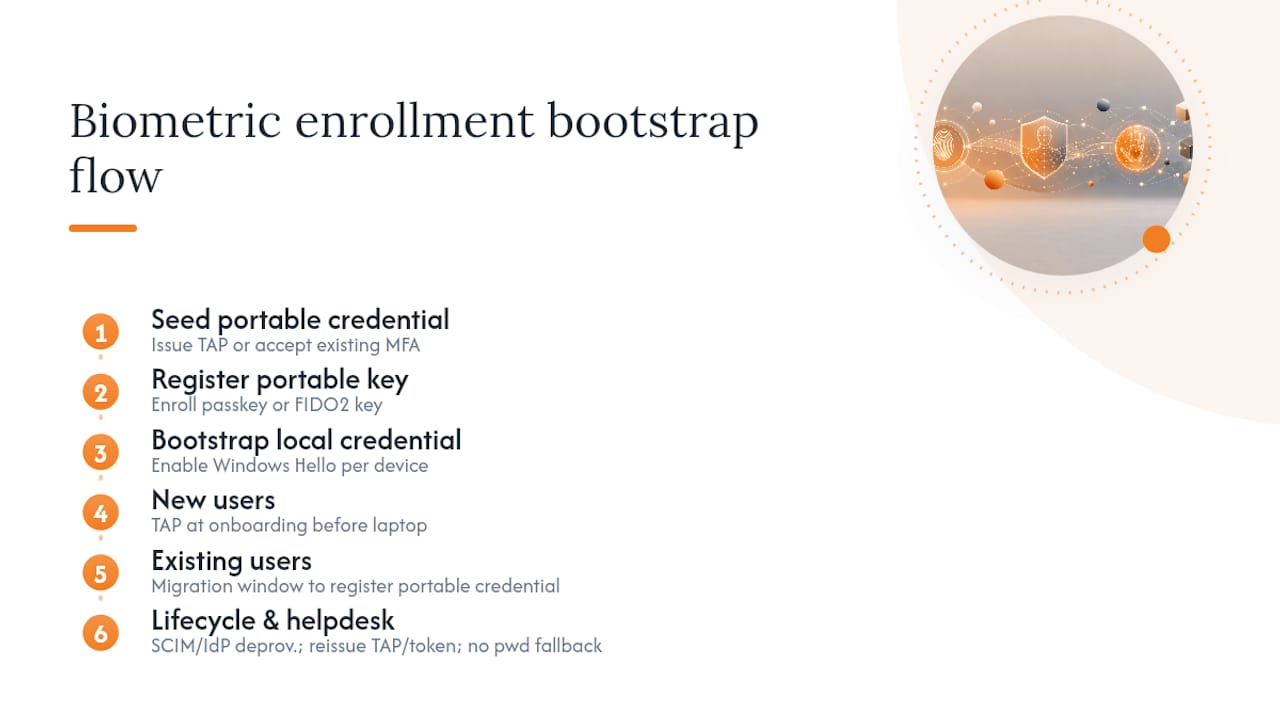
Microsoft’s recommended bootstrap flow starts with a portable credential, not a local one. Issue a Temporary Access Pass (TAP) to new users, or let existing users authenticate with their current MFA method, and use that to register their first passkey or FIDO2 key. Only after that portable credential exists do you bootstrap local credentials like Windows Hello for Business on each individual machine.
New users get the TAP as part of onboarding, before their laptop is even provisioned. Existing users with legacy MFA (SMS codes, an old authenticator app) get a migration window where they register a portable credential using their current method, then bootstrap local credentials device by device. BYOD devices generally stick to portable credentials only, since you can’t guarantee the same platform-level trust as a corporate-managed laptop.
Registration counts alone don’t tell you if a rollout is working. Lifecycle resilience, meaning how cleanly you handle recovery, replacement, and revocation, is the real measure of program maturity.
Lifecycle operations need to tie directly into SCIM and IdP provisioning: when someone leaves, their authenticators deprovision automatically, not as a manual afterthought. Build help desk recovery flows around re-issuing a TAP or handing out a break-glass hardware token, and resist the temptation to quietly reintroduce a password fallback as a safety net. That safety net becomes the attacker’s preferred entry point.
What Are the Real Risks and How Do You Mitigate Them?
Biometric login isn’t risk-free, and pretending otherwise is how security teams get blindsided. The realistic threats fall into five categories: biometric template compromise, spoofing or deepfake attacks against facial recognition, device cloning, abuse of fallback authentication paths, and fraudulent enrollment where an attacker registers their own biometric against someone else’s account.
Mitigation starts with storage architecture. On-device template storage, where the biometric never leaves the local secure enclave, avoids creating a centralized honeypot of biometric data. Controlled on-premise server-side matching is the alternative when data sovereignty rules require it, but it comes with heavier auditability obligations.
| Risk | Primary Mitigation |
|---|---|
| Template theft | On-device storage in hardware-backed secure enclave |
| Spoofing/deepfake | Liveness detection on facial recognition where risk warrants it |
| Device cloning | Attestation checks confirming authenticator provenance |
| Fallback-path abuse | Strict fallback governance, no silent password reintroduction |
| Enrollment fraud | Supervised or witnessed enrollment for high-risk roles |
- Require hardware-backed authenticators for any role with access to sensitive systems or admin consoles.
- Test break-glass tokens quarterly, not just at rollout, since untested recovery paths are where outages turn into incidents.
Biometric data carries legal weight that a password never did. ISACA’s guidance on passwordless readiness points to DPIA and region-specific legal review as a prerequisite, not a compliance afterthought bolted on post-launch.
How Do You Roll Out Biometric Login Without Breaking Production?
A phased rollout beats a big-bang launch every time, and the sequence should follow risk tolerance, not org chart convenience.
- Pilot. Start with a low-risk group, typically IT or security staff themselves, who can troubleshoot their own enrollment issues and surface edge cases before anyone else hits them.
- Expand. Move persona by persona, using the credential mapping from earlier in this guide, rather than department by department, since risk profiles cross departmental lines.
- Deprecate passwords. Only after a persona group shows stable authentication success rates do you disable password fallback for that group specifically.
Build your operational checklist around enrollment events, help desk scripts for common failure modes, a clear internal communications plan, break-glass token distribution logistics, and dedicated admin training before each phase opens.
- Track registration coverage per persona group, not just an organization-wide percentage.
- Monitor authentication success rate and recovery incident volume weekly during each rollout phase.
- Set an exception rate threshold that triggers a pause before expanding to the next group.
How Do You Test and Prove Compliance?
Technical validation and compliance documentation need to happen together, because an audit that finds a working system with no logs is barely better than a broken one.
Essential test cases include enrollment quality checks, cross-device authentication (does a passkey registered on a laptop work when the user switches to a tablet), attestation verification, fallback path testing, break-glass access drills, and large-scale revocation scenarios, meaning simulating what happens if you need to revoke thousands of credentials at once.
Log attestation results, assertion details, registration events, and revocation events, and feed all of it into your SIEM with alerting thresholds tuned to catch unusual authentication patterns rather than flooding analysts with noise.
- Document your DPIA, consent channels, and retention policy in a format your auditors have actually seen before, not a custom template invented for this project.
- Schedule periodic review of policy engine enforcement across the IdP and every downstream app, since drift between systems is where compliance gaps quietly form.
- Verify userVerification=‘required’ is enforced in your WebAuthn configuration, confirming the authenticator actually checked a biometric or PIN rather than skipping that step silently.
What Actually Determines Whether This Rollout Succeeds?
The security-versus-usability tradeoff gets talked about constantly, but it’s not the tradeoff that decides whether a biometric rollout succeeds or quietly dies six months in. That comes down to something less glamorous: recovery design.
Every enterprise I’ve seen struggle with passwordless authentication struggled in the same place, not at the authenticator choice, but at what happens when a device gets lost, a phone gets replaced, or someone’s fingerprint sensor stops recognizing them after a minor injury. Teams pour weeks into deciding between fingerprint and facial recognition, then wing the recovery flow, and that’s backward. The authenticator choice is reversible. A bad recovery process, once it’s live and someone’s locked out during a board meeting, is what erodes trust in the entire program.
My one-line recommendation: adopt WebAuthn/FIDO2 as step-up MFA over your existing IdP, require hardware-backed attestation for any high-risk persona, and put a genuinely tested policy engine and recovery path in place before you enroll a single ordinary user. Device-bound versus portable credentials, attestation strictness, all of that is a policy dial you can adjust later. Recovery design you get wrong the first time costs you the trust of every employee who gets stuck outside the system through no fault of their own.
How Logmeonce Supports Enterprise Biometric Rollouts
If you’re weighing whether to build this stack piece by piece across separate vendors or consolidate it, Logmeonce gives you passwordless MFA, biometric integration, and SSO under one policy engine instead of stitching together an IdP, a separate FIDO2 provider, and a third tool for lifecycle governance.

Logmeonce maps directly onto the operational needs covered in this guide: centralized policy enforcement across platform and roaming authenticators, support for both synced and device-bound credentials, break-glass hardware token workflows for emergency access, and audit logging built for SIEM integration rather than bolted on afterward. Logmeonce has already integrated biometric support for Samsung fingerprint readers, extending platform authenticator coverage without requiring a separate vendor relationship for device-level biometrics.
Explore the passwordless MFA platform to see how policy profiles, step-up enforcement, and credential lifecycle management fit together, or visit the cybersecurity solutions page to start a pilot conversation with a specialist who can walk through your existing IdP setup.
Sources
- How to deploy phishing-resistant passwordless authentication – Microsoft Learn
- Passwordless authentication: risk, reward, and readiness – ISACA
- Passkeys/WebAuthn for enterprise SSO: A practical implementation guide – SSOJet
- Passwordless authentication at scale exposes the real IAM rollout gap
Recommended


