


 Password Manager
 Identity Theft Protection

 Team / Business
 Enterprise
 Government
 MSP
MSP


Adopt a layered approach: identity-verified recovery for total lockouts, cryptographic escrow through an Organization Recovery Key (ORK) for password-manager vaults, admin-initiated break-glass with multi-person approval for emergencies, and redundant fallback authenticators for routine lost-credential cases. No single method covers every failure mode, and treating account recovery as one generic “reset button” is how organizations end up with either constant helpdesk tickets or a gaping social-engineering hole.
The core design principle is simple to state and hard to execute: every recovery path must preserve the cryptographic isolation of secrets while producing an audit trail good enough to survive a forensic review. Microsoft Entra now frames recovery as identity-verified trust re-establishment rather than a password-reset convenience. NIST-aligned governance frameworks push the same point from the compliance side: recovery is a high-risk lifecycle process, not a feature toggle. Logmeonce builds its enterprise recovery workflows around that same logic.
Here is the shortlist worth evaluating first:
- Identity-verified recovery for full account lockout, using document or biometric checks tied to an identity verification provider.
- Cryptographic escrow / Organization Recovery Key for password-manager vaults, kept offline and outside the application environment.
- Admin-initiated break-glass with dual control and time-boxed access, reserved for genuine emergencies.
- Fallback authenticators (backup codes, reserved hardware keys, secondary devices) for the day-to-day lost-phone scenario.
- Federated/SSO recovery that routes recovery through your identity provider instead of duplicating logic in every app.
Key Takeaways
Secure account recovery works only when identity-verified recovery, cryptographic escrow, admin break-glass, and fallback authenticators are matched deliberately to account sensitivity and backed by auditable approvals.
| Point | Details |
|---|---|
| Layer your recovery methods | Match identity-verified recovery, ORK escrow, break-glass, and fallback authenticators to distinct risk scenarios rather than using one method for everything. |
| Keep the ORK offline | Generate and store the Organization Recovery Key outside the application environment, and rotate it after every use. |
| Treat break-glass as an emergency-only path | Require dual control, time-boxed credentials, and automatic revocation for any admin-initiated recovery. |
| Test recovery on a schedule | Run tabletop exercises quarterly and full rehearsals annually to catch failures before a real incident does. |
| Align tooling with layered recovery | Logmeonce supports cryptographic isolation, admin-assisted approval workflows, and MFA-backed fallback authenticators for enterprise deployments. |
How Do the Main Account Recovery Methods Compare?
Picking a method starts with knowing what each one actually costs you in friction, admin time, and forensic visibility. The table below lines up the five method categories against the dimensions that matter most for enterprise deployment: assurance level, user experience, admin overhead, auditability, cryptographic isolation, and how fast you can realistically expect recovery to complete.
A few recommendation badges worth attaching to this table: identity-verified recovery is the enterprise default for total lockouts; ORK-based escrow is the right call for high-sensitivity vault accounts; admin break-glass should be labeled emergency only and gated hard; fallback authenticators are your routine-loss workhorse.
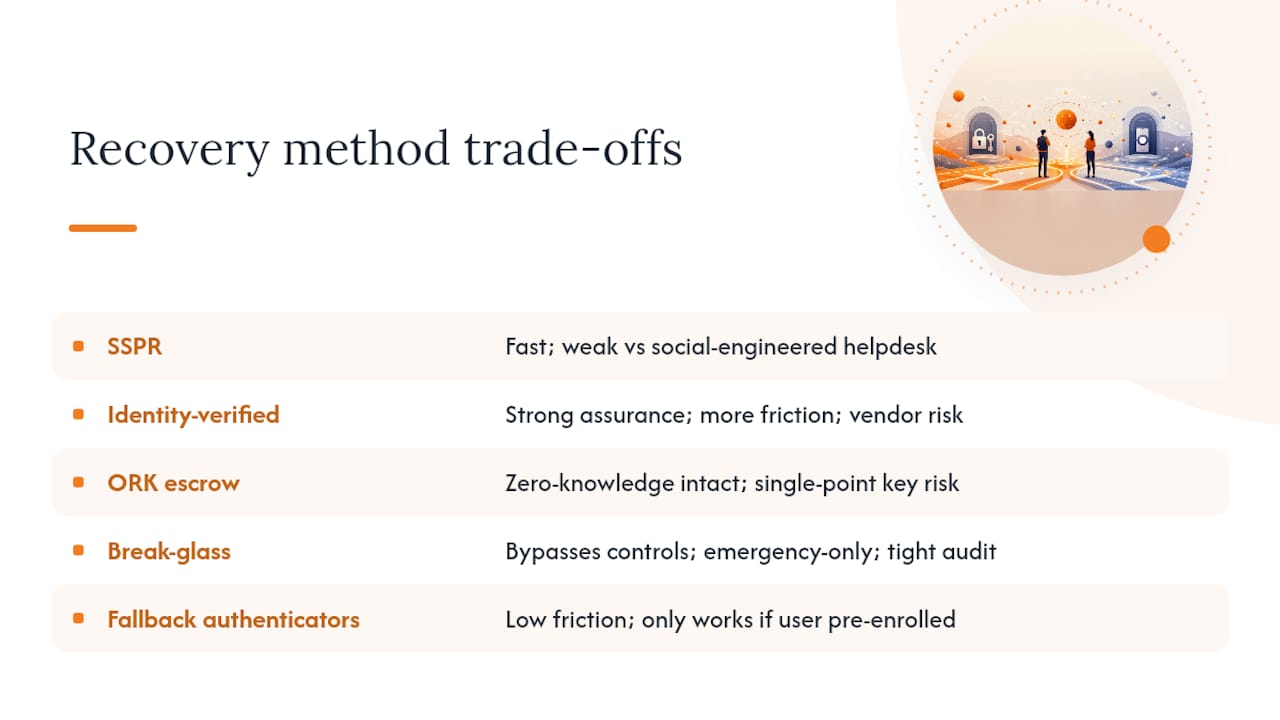
The trade-off in one line per method: SSPR is fast but weak against a determined social engineer working the helpdesk phone line. Identity-verified recovery closes that gap but adds real friction and a dependency on a third-party identity-proofing vendor. ORK escrow keeps your zero-knowledge architecture intact but creates a single point of catastrophic failure if the key itself isn’t handled correctly. Break-glass access is powerful precisely because it bypasses normal controls, which is exactly why it needs the tightest audit trail of anything on this list. Fallback authenticators are nearly frictionless but only help when the user planned ahead and enrolled one.
When Should You Use SSPR Versus Identity-Verified Recovery?
Self-service password reset works fine when a user loses one authentication factor and still controls another, an email address, a phone number, a security question they actually remember. It falls apart the moment someone loses everything at once, because at that point you’re asking the system to verify identity using signals the attacker could also produce.
That’s the scenario identity-verified recovery is built for. Microsoft Entra’s identity verification profile model routes total-lockout cases through a third-party identity verification provider and issues a Verified ID, a portable credential the user proves ownership of before any credential reset happens. Entra runs this in both evaluation and production modes, letting security teams test verification logic against real identity documents before it touches live employees.
A few configuration details matter more than they look at first glance:
- Match rules can run exact or relaxed, controlling how strictly a submitted identity document has to align with directory records.
- Custom authentication extensions, built on something like Azure Functions, let you cross-check a recovery attempt against HR or HRIS data before granting access, catching the case where someone was terminated last week but their AD account is still live.
- Step-up authentication should be enforced immediately after any identity-verified recovery completes, not left to the next login cycle.
- Enrollment governance needs an explicit default: opt-in, opt-out, prompt, or fully disabled, set at the tenant level and reviewed on a schedule.
Identity proofing cuts social-engineering risk sharply, but it doesn’t eliminate risk, it relocates it. You’re now trusting a document-verification vendor’s supply chain and holding biometric or ID data with its own privacy exposure. Weigh that trade-off explicitly rather than assuming “identity-verified” means “risk-free.”
Pro Tip: For any account tagged high-risk, require two independent identity signals, a verified credential plus an internal HRIS or badge-system cross-check, rather than relying on the identity verification provider alone.
What Makes Cryptographic Escrow Safe for Password Vaults?
Cryptographic escrow lets an enterprise password manager keep true zero-knowledge storage while still giving administrators a path to recover a locked vault, but only if the Organization Recovery Key lives outside the application environment entirely. Store the ORK inside the same system it’s meant to unlock, and you’ve quietly rebuilt the exact single point of failure zero-knowledge architecture was supposed to eliminate.
Implementing this correctly comes down to a short sequence most teams get partially right and pay for later:
- Generate the ORK offline, on an air-gapped machine if possible, never inside the browser session used for daily admin work.
- Choose import or generate deliberately. Imported keys let you control provenance; generated keys need documented custody from the moment they’re created.
- Store it offline, in a physical safe, a hardware security module, or a sealed envelope in a controlled location, never in the same cloud tenant as the vault.
- Rotate on a fixed cadence and rotate immediately after every use. A recovery key that’s been read once should not be trusted for the next incident.
- Require the current ORK to authorize any policy change to the recovery feature itself, so an attacker can’t simply toggle recovery on with a key of their own.
Beyond the key lifecycle, governance controls decide whether this system holds up under audit:
- Split custody across two or more people so no single admin can trigger recovery alone.
- Require multi-person approval before the ORK is ever presented for use.
- Retain the recovery request itself as evidence, not just the outcome.
- Log who supplied the ORK, when, and under what documented justification.
Losing the ORK, or storing it somewhere reachable from the application it protects, doesn’t just weaken security. It typically means permanent, unrecoverable loss of any vault data that wasn’t otherwise shared or backed up.
That’s not a hypothetical edge case. It’s the direct consequence of the same isolation that makes zero-knowledge storage worth having in the first place: enterprise account recovery for password managers works precisely because the recovery path sits outside normal system access, which cuts both ways.
How Should Admin-Initiated Break-Glass Recovery Work?
Admin-initiated recovery is an emergency control, and it needs to be restricted, auditable, and time-limited by design, not by policy that admins can quietly ignore under pressure. The moment break-glass access becomes the easy option for a busy helpdesk, it stops being an emergency mechanism and starts being a standing backdoor.
A safe implementation checklist looks like this:
- Role-based approval, with the approver never the same person requesting access.
- Dual control on every use, the two-person rule applied without exception.
- Constrained, just-in-time credentials that expire automatically rather than needing manual revocation.
- Notification and escalation the moment break-glass is triggered, sent to security operations in real time.
- Automatic revocation once the account owner’s identity is validated and normal access is restored.
A workable playbook for break-glass events runs through five stages:
- Define trigger conditions clearly enough that a tired on-call engineer can apply them consistently at 2 a.m.
- Maintain a fixed, small approver list, not “any admin on duty.”
- Collect evidence, ticket number, requester identity, business justification, before granting access.
- Take a forensic snapshot of account state before and after the recovery action.
- Run a post-event review within 48 hours, regardless of whether anything went wrong.
Audit requirements here are non-negotiable: immutable logs, recorded approver identities, precise timestamps, attached evidence, and a retention window long enough to support a forensic investigation months later. Identity governance guidance on recovery treats this as standard practice, not an aspirational goal.
A recovery process with no audit trail isn’t a control at all, it’s an unmonitored path to full account takeover with an admin’s fingerprints removed.
In practice, a well-run workflow looks like this: a security manager approves the request, a second admin executes it, the ticketing system captures every artifact automatically, and the account owner is re-onboarded through a short identity re-verification step before regaining full access, closing the loop instead of leaving break-glass credentials active indefinitely.
Which Fallback Authenticators Reduce Lockouts Without Weakening Security?
Redundant authenticators, backup codes, a reserved hardware token, a secondary registered device, cut the volume of full lockouts dramatically without touching your baseline assurance level. This is the cheapest lever in the entire recovery stack, and it’s the one most organizations under-provision.

The common options carry different assurance and convenience profiles. Time-based backup codes are simple and free but easy for users to lose or store insecurely. Hardware security keys kept in sealed storage offer strong assurance if the storage discipline holds. Secondary device registration works well for mobile-first workforces. Pre-issued temporary access passes fit contractor and short-term-employee scenarios where full enrollment doesn’t make sense.
| Issuance Method | Storage Location | Rotation Frequency | Revocation Trigger |
|---|---|---|---|
| Backup codes | Sealed offline record or encrypted vault | On each full use | Employee offboarding or suspected compromise |
| Reserved hardware key | Physical safe, admin custody | Rarely, unless lost | Device loss or role change |
| Secondary device | User’s registered mobile device | On device replacement | Device deregistration or termination |
| Temporary access pass | Issued at enrollment or incident time | Single use or short expiry | Automatic at expiry |
Balance matters here. Issuing a hardware token to every employee sounds airtight until you’re the one tracking hundreds of physical devices through onboarding, loss reports, and offboarding. Most enterprises land on a hybrid: backup codes as the universal baseline, hardware tokens reserved for privileged or high-sensitivity accounts, and secondary devices as the default middle tier.
How Do You Map Recovery Methods to Assurance Levels and Cost?
Map each recovery method to an account sensitivity tier and a defined SLA before you turn on any recovery workflow, not after the first incident forces the decision under pressure. Skipping this step is how organizations end up applying the same low-friction reset flow to a standard user account and a domain admin account.
A working policy template covers:
- Enrollment default: prompt, opt-in, opt-out, or disabled, set per sensitivity tier.
- Multi-admin approval thresholds, scaled to account risk.
- ORK custody rules, spelled out by role, not left implicit.
- Approved identity verification providers, named explicitly.
- Audit retention periods, aligned to your compliance obligations.
The decision matrix underneath that policy is straightforward once the tiers exist: standard users default to SSPR with light identity proofing; privileged accounts require identity-verified recovery plus step-up authentication; vault-holding accounts route through ORK escrow; genuine emergencies fall back to break-glass with dual control regardless of tier.
Lifecycle governance can’t be a one-time setup. Recovery enrollments need recertification on a schedule, and every joiner-mover-leaver event should trigger a review of that person’s recovery configuration, not just their standing access.
Higher-assurance recovery paths cost more in governance overhead, but the helpdesk savings from fewer full-lockout escalations and fewer social-engineering incidents usually outweigh that cost within the first year of rollout.
How Do You Test and Audit Recovery Processes?
Regular testing and telemetry aren’t optional extras, they’re the difference between a recovery process that works and one you only discover is broken during a real incident. An untested recovery path is a hidden liability sitting quietly in your IAM stack.
A workable test schedule looks like this:
- Tabletop exercises quarterly, walking through a lockout scenario without touching production systems.
- Live drills twice a year, executing an actual recovery against a test account.
- Full recovery rehearsals annually, including ORK retrieval and break-glass activation end to end.
Track these KPIs against every drill and every real event: time-to-recovery, number of failed attempts before success, approval latency between request and grant, and audit completeness, meaning every required log field was actually captured.
A step-by-step drill needs assigned roles (requester, approver, executor, observer), a written script, and a hard requirement to capture evidence at each step exactly as you would during a real incident. Follow it with a postmortem checklist: what worked, what took longer than expected, and what policy or tooling change comes out of it.
On the telemetry side, alert on recovery enrollment changes, any ORK usage event, and every admin-initiated recovery approval, with retention windows long enough to support both compliance reporting and forensic reconstruction.
Pro Tip: Run at least one cross-team drill a year involving IAM, security operations, HR, and legal together, not in separate silos, for any workflow rated high-assurance. The gaps that matter usually show up at the handoff between teams, not inside any single team’s process.
What Do Enterprise Security Teams Get Wrong About Recovery?
The most common mistake is enabling automatic enrollment into a recovery method with no visibility into who’s actually enrolled. Teams flip on a convenient default, move on to the next project, and six months later nobody can say with confidence which accounts have an active recovery path or whether that path is still appropriate for the role.
The second mistake compounds the first: storing the Organization Recovery Key inside the same environment it’s meant to protect. It feels efficient in the moment. It also means a single compromised admin account can unlock every vault in the organization, which defeats the entire point of cryptographic escrow.
The third pitfall is treating recovery like a helpdesk convenience instead of a lifecycle entitlement. If recovery enrollment doesn’t get reviewed during offboarding the same way VPN access or admin rights do, you end up with former employees who technically retain a recovery path into systems they haven’t touched in years. And single-person ORK custody, one admin holding the only copy of the key, is the kind of shortcut that looks fine until that person leaves the company on bad terms or simply loses the physical storage device.
Practical mitigation for the first 90 days of any rollout: run an enrollment audit weekly, not monthly. Watch for spikes in recovery attempts against any single account, that’s often the earliest signal of a targeted social-engineering attempt. And require a second signature on any ORK access, no exceptions, even during the pilot phase when it feels like overkill.
How LogMeOnce Supports Enterprise Recovery Requirements
If you’re building the layered approach outlined above, Logmeonce is built to support exactly that architecture rather than force a single generic reset flow onto every account tier. It maintains cryptographic isolation between vault secrets and recovery authority, supports admin-assisted recovery workflows with approval controls, and backs fallback access with MFA-integrated authenticators instead of relying on a single weak factor.
For teams evaluating password management security at enterprise scale, the enterprise password management platform covers configuration for identity-based recovery policies, admin approval chains, and MFA lifecycle management in one place. You can also review Logmeonce’s password management benefits to see how policy controls map to your existing IAM setup, and use the password manager ROI calculator to estimate helpdesk savings before committing to a higher-assurance recovery tier. Start a trial or reach out to the solutions engineering team to scope a deployment against your specific sensitivity tiers and SLA targets.
30/90/180-Day Rollout Checklist
Getting a layered recovery program running doesn’t require a year-long project. It requires a sequence.
- First 30 days: Inventory the current recovery state across every system, set conservative enrollment defaults (prompt or opt-in), secure ORK storage offline if a password manager is in scope, and turn on telemetry and alerting for recovery-related events.
- First 90 days: Pilot identity-verified recovery with a limited group of high-risk users, stand up a multi-admin approval workflow for break-glass access, and run at least one tabletop drill.
- First 180 days: Move validated profiles into full production, rotate the ORK per policy, fold recovery status into joiner-mover-leaver processes, and schedule recurring audits of enrollment and approval logs.
Where to Read Next
Start with Microsoft Entra’s account recovery overview for the identity-verification model referenced throughout this guide. The DoD/Defense IAM best practices document lays out the MFA and SSO integration principles behind the fallback-authenticator recommendations here.
For the governance angle, NHIMG’s analysis of enterprise account recovery and its companion FAQ on identity governance both go deeper into treating recovery as a lifecycle entitlement rather than a helpdesk shortcut.
On the product side, Logmeonce’s enterprise password management page covers configuration details for teams ready to implement these controls, and the team password manager guidance is worth reviewing before finalizing your enrollment policy.
Frequently Asked Questions
What are the most secure account recovery methods for enterprise password managers?
Cryptographic escrow through an offline-stored Organization Recovery Key, combined with identity-verified recovery for full lockouts, gives the strongest combination of cryptographic isolation and auditability currently available.
How is identity-verified recovery different from self-service password reset?
SSPR handles single-factor loss using existing contact methods. Identity-verified recovery re-establishes trust from zero using document or biometric checks through a third-party identity verification provider, making it the right fit for total lockouts.
How often should an Organization Recovery Key be rotated?
Rotate it after every use, at minimum, and on a fixed schedule even if it hasn’t been used, since a key that’s been read once should never be trusted for a future incident.
What audit data should every account recovery event produce?
Immutable logs, approver identities, timestamps, attached evidence, and a retention period long enough to support a forensic investigation months after the event.
How often should recovery processes be tested?
Quarterly tabletop exercises, live drills twice a year, and a full recovery rehearsal, including ORK retrieval, at least once annually.
Sources
- Account recovery (Microsoft Entra) — concept and overview
- Identity and access management recommended best practices for administrators (DoD/Defense media PDF)
- Enterprise account recovery changes the trust model for password managers (NHIMG analysis)


