


 Password Manager
 Identity Theft Protection

 Team / Business
 Enterprise
 Government
 MSP
MSP


The identity provider is the single most valuable target in your environment, and treating it that way is the whole game. A secure SSO implementation guide worth following starts from one premise: whoever controls the IdP controls every connected application at once, so the five controls below carry more weight than any other section of your security program. Enforce phishing-resistant MFA for every admin and every user. Store signing keys in FIPS 140 compliant hardware and rotate them on a schedule. Choose OIDC authorization-code flows for anything modern and reserve SAML for legacy systems, with strict signature validation on every assertion. Automate provisioning and deprovisioning through SCIM wherever the app supports it. Feed IdP logs into your SIEM and write the incident runbook before you need it, not during the breach.
Quick take: NIST’s federation guidelines set FIPS 140 level 1 as the floor for signing keys at FAL2 and FAL3, a detail most implementation teams skip until an auditor asks about it.
- Harden the IdP first, applications second.
- Kill password-only admin access immediately.
- Rotate signing keys on a calendar, not on a crisis.
- Automate deprovisioning; JIT alone leaves orphaned accounts.
- Route every auth event to your SIEM from day one.
Key Takeaways
Secure SSO depends on hardening the identity provider itself, protecting signing keys in FIPS 140 compliant hardware, and automating deprovisioning through SCIM to close the gaps attackers exploit most.
| Point | Details |
|---|---|
| Harden the IdP first | Treat the identity provider as your top security asset and separate admin accounts from daily-use logins. |
| Store keys in hardware | Use HSM or TPM storage meeting FIPS 140 level 1 minimum for FAL2/FAL3 signing keys. |
| Pick OIDC for new apps | Reserve SAML for legacy systems only, and validate every SAML signature against XSW variants. |
| Automate deprovisioning | Use SCIM instead of relying on JIT alone, which leaves orphaned accounts active after offboarding. |
| Support the stack with LogMeOnce | LogMeOnce pairs SSO integrations with passwordless MFA and a secure vault for break-glass credentials. |
Planning Before You Touch a Single SSO Setting
Rushing into a secure single sign-on setup without a planning phase is how teams end up with a fragile IdP wired into forty apps and no idea which ones actually need step-up authentication. The Enterprise SSO Playbook lays out five phases for standing up or modernizing an enterprise SSO service, and the sequence matters more than any individual step.
- Build the business case in plain terms. Frame it around fewer help-desk password resets and continuity during outages, not just “better security,” because that’s what gets budget approved.
- Inventory every application and map each one to its identity assurance level, authenticator assurance level, and federation assurance level (IAL/AAL/FAL). Separate legacy apps that only speak SAML from modern apps that can handle OIDC.
- Decide managed versus self-hosted. A managed identity provider suits teams without dedicated identity engineers; self-hosting only makes sense if you have the staff to maintain uptime and patch cadence yourself.
- Define admin roles and incident ownership before go-live, not after the first outage forces the question.
- Plan your integrations early: SIEM, privileged access management, a secrets manager, and a real test environment that mirrors production closely enough to catch problems before users do.
The Playbook also references the DIRA requirement, which pushes teams to document assurance-level decisions rather than default to whatever the vendor ships out of the box.
Which Protocol Should You Use, OIDC or SAML?
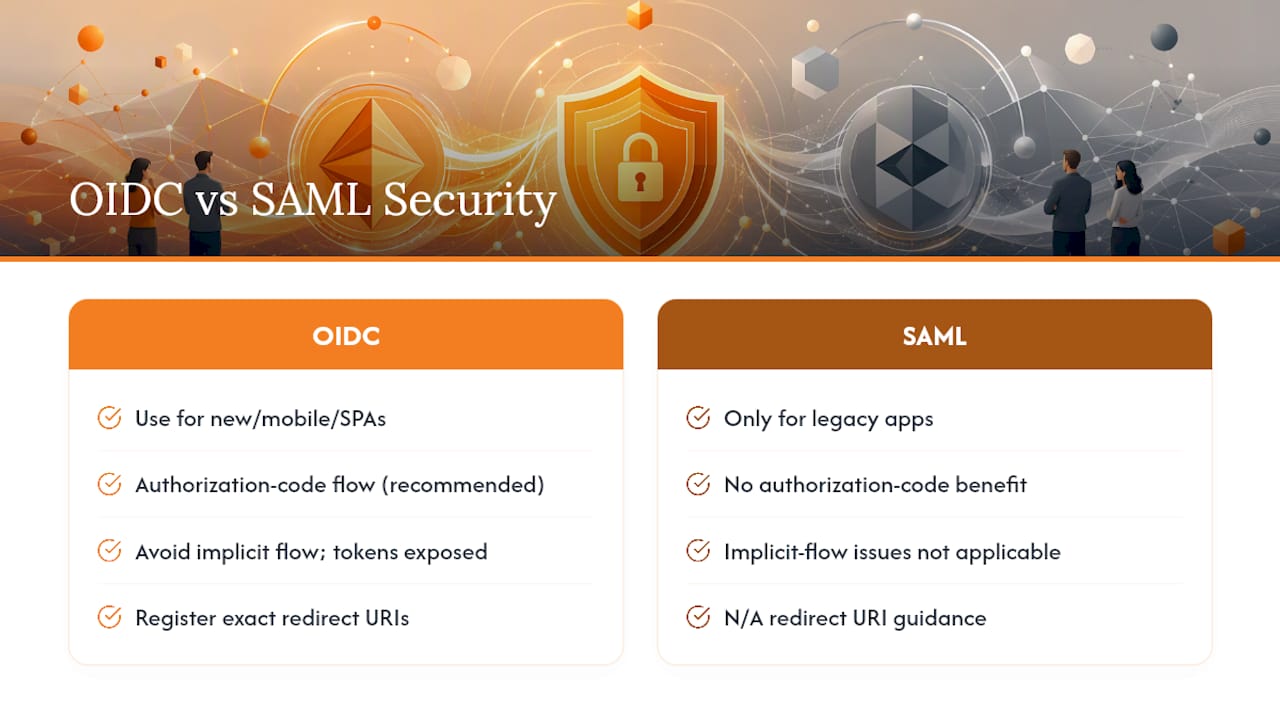
Use OpenID Connect (OIDC) with the authorization-code flow for anything new, mobile, or single-page. Use SAML only when you’re stuck integrating a legacy application that never got an OIDC upgrade. That’s the rule, and deviating from it usually means someone chose convenience over security early on and never revisited the decision.
Implicit flows are the biggest OIDC mistake teams still make, because tokens end up exposed in browser history and referrer headers. Register exact redirect URIs for every client rather than wildcard patterns, and validate the state parameter on every request to block cross-site request forgery. If you’re stuck with SAML, signature validation has to check more than “is this signed”: confirm the signature covers the correct XML element, verify issuer and audience match, and enforce NotOnOrAfter timestamps strictly.
Admin accounts deserve their own hardening track entirely. Never let an administrator use their daily-driver account to manage the IdP. Create dedicated admin accounts on separately hardened devices, require FIDO2 hardware keys for authentication, and grant elevated privileges through temporary, scoped sessions that expire automatically rather than standing admin rights that sit active for months. Infosecurity Magazine’s SSO best practices list admin account separation and phishing-resistant MFA as the two controls that most consistently prevent lateral movement after a phishing hit.

Step-up authentication policies matter for sensitive apps: a finance system or an HR platform holding Social Security numbers should trigger a fresh MFA challenge even if the user already has an active SSO session elsewhere. And attribute mapping needs the same discipline. Map only the claims each application actually needs, not the entire directory schema, because over-scoped attribute release is how a single compromised app leaks data about users it never should have touched.
Pro Tip: Test your redirect URI validation by attempting to register a URI with a trailing slash difference or subdomain variant. If your IdP accepts it, you have an open redirect vulnerability waiting to be exploited.
How Should You Store and Rotate Signing Keys?
Signing keys are the crown jewels of your federation setup, and NIST is specific about the minimum bar. SP 800-63C-4 requires FIPS 140 level 1 storage at minimum for signing keys used in FAL2 and FAL3 implementations, though most security teams treat that as a floor rather than a target and push for hardware security modules (HSMs) or TPMs that make keys non-exportable outright.
A compromised signing key is often treated as unrevocable in federated environments, since every relying party has already cached the trust relationship. That’s the uncomfortable reality behind the guidance: design for rapid rotation now, because a compromised key later forces you to revoke every dependent token and roll certificates across every connected service provider simultaneously.
- Store signing keys in an HSM or TPM, never in application config files or source repositories.
- Route secrets through a centralized secrets manager, hardware-backed or cloud-native, and audit every access attempt.
- Automate certificate rotation on a fixed calendar; proactive rollover means adding the new certificate before the old one expires, not after.
- Maintain a documented emergency rotation procedure that your on-call team has actually rehearsed, not just written.
- Restrict key access operations to the smallest group of people who can justify needing it.
Our NIST 800 information security resources walk through how these storage requirements map onto practical control implementation if you need a reference point for audit documentation.
Connecting Applications Without Creating Orphaned Accounts
Every service provider integration starts with a metadata exchange, and this is where sloppy configuration quietly creates backdoors. Verify the Entity ID and the exact assertion consumer service (ACS) or redirect URI on both sides. A near match, an extra trailing character, a wrong port, isn’t close enough; it’s a misconfiguration that can be exploited.
- Exchange metadata through a verified channel, not an email attachment someone forwards without checking the sender.
- Choose SCIM over just-in-time provisioning wherever the app supports it. JIT alone creates a deprovisioning gap: an account gets created the moment someone logs in, but nothing automatically removes it when that person leaves. SCIM handles both directions.
- Apply least-privilege attribute mapping and OAuth scope grants for every app, then schedule a recurring audit, quarterly at minimum, to catch scope creep as apps get updated.
- Roll out new integrations in phases, starting with a pilot group and test entries in your metadata/user registry before flipping the switch for the whole organization.
The gap between SCIM and JIT is the single most common cause of orphaned accounts still holding valid access months after someone’s departure. If your organization can’t support SCIM for a given app, document that limitation explicitly and add compensating manual review, because “we’ll catch it eventually” is not a control.
Getting Session Lifetimes and Token Handling Right
Session mismatches between the IdP and the connected apps create the kind of confusing security gaps that are hard to explain to leadership after the fact. Align session lifetimes so the service provider’s session never outlives the identity provider’s, and lean toward shorter SP sessions rather than longer ones. Sliding session windows need careful limits too; an indefinitely renewing session defeats the purpose of having a timeout at all.
- Use the authorization code flow and never pass tokens as URL parameters, where they leak into browser history, server logs, and referrer headers.
- Add PKCE (Proof Key for Code Exchange) for public clients like mobile apps and single-page apps that can’t securely store a client secret.
- Adopt sender-constrained tokens, such as DPoP, or token binding where your stack supports it, and keep refresh token scope and lifetime tight.
- Be realistic about single logout: it’s notoriously unreliable across mixed vendor environments, so compensate with short-lived tokens and mandatory re-authentication for high-risk applications instead of betting everything on SLO working perfectly.
- Set a strict
Referrer-Policyheader andSameSitecookie attributes on every session cookie to cut off a common token leakage path.
How Do You Test and Monitor Your SSO Deployment?
A secure SSO setup that’s never been tested against real attack patterns isn’t secure, it’s untested. Building the checklist before go-live catches problems while they’re cheap to fix.
- Run signature validation tests against known XSW (XML Signature Wrapping) variants, and verify
InResponseTo,Audience,Recipient, andNotOnOrAfterchecks all fire correctly rather than trusting that “signed” means “safe.” - Send every IdP configuration change and authentication event to your SIEM. Watch for token issuance anomalies and login attempts from unexpected geographies or unrecognized devices.
- Store break-glass credentials in a secure vault and actually test the recovery runbook on a schedule, not just write it once and file it away.
- On confirmed compromise, act in this order: revoke active IdP sessions, rotate signing keys immediately, disable affected SCIM-provisioned accounts, and force MFA re-enrollment for every impacted user.
- Run tabletop exercises and scheduled automated scans against your own IdP configuration at a fixed cadence.
Pro Tip: A well-audited, actively maintained SAML library will catch far more XSW variants than a homegrown XML parser ever will. If your team is hand-rolling signature validation, that’s the first thing to replace.
What Actually Trips Up Teams Implementing SSO
Managed versus self-hosted IdP isn’t a security question first, it’s a staffing question. A five-person IT team running a self-hosted identity provider without dedicated identity engineers is choosing complexity they can’t fully support, and that gap shows up during an incident, not during the calm rollout weeks.
The two failure patterns I see repeated most often are slow deprovisioning and admin accounts that never got separated from daily-use accounts. Both are boring problems with boring fixes: automate the leaver process and stop letting anyone log into the IdP console with the same credentials they use to check email. Neither fix requires new budget, just discipline and a written policy someone actually enforces. For teams building out the broader identity picture, our identity and access management resources go deeper on federation assurance alignment.
— Mike
Where LogMeOnce Fits in a Secure SSO Rollout
Every control covered above, phishing-resistant MFA, hardware-backed key protection, break-glass credential storage, maps to a capability LogMeOnce builds directly into its platform. LogMeOnce combines SSO integrations with passwordless MFA options, so admin accounts and end users both authenticate through hardware-backed methods instead of passwords that phishing kits can harvest.

For the emergency rotation and break-glass procedures this guide recommends, LogMeOnce’s password management benefits include a secure vault built for exactly that kind of credential storage, separate from your day-to-day password sprawl. Pair that with encrypted cloud storage for secrets that don’t belong in a config file, and you’ve covered two of the riskiest gaps this guide flags.
If your team is still mapping out which controls to prioritize first, start with the LogMeOnce cybersecurity overview and evaluate which pieces slot into your existing IdP setup this quarter.
Sources
- NIST SP 800-63C-4 Digital Identity Guidelines: Federation and Assertions
- Enterprise Single Sign-On Playbook – IDManagement
- The Complete Guide to Implementing Single Sign-On (SSO) · Start with Identity


