


 Password Manager
 Identity Theft Protection

 Team / Business
 Enterprise
 Government
 MSP
MSP


More than 60 percent of American organizations have faced remote access-related breaches in recent years, underscoring a growing concern for IT leaders everywhere. For enterprises with globally distributed teams, secure remote access is no longer a convenience—it is a necessity in defending sensitive data and upholding operational continuity. This article unpacks the crucial technologies and strategies that help IT security managers make informed choices for effective, resilient remote access protection.
Key Takeaways
| Point | Details |
|---|---|
| Importance of Secure Remote Access | Secure remote access is essential for protecting enterprise networks in distributed work environments, safeguarding sensitive data through controlled and encrypted connections. |
| Technological Strategies | Key technologies such as Multi-Factor Authentication, Encryption, and Access Control are vital to verifying user identity and securing data transmission. |
| Adaptation of Protocols | Enterprises should evaluate and combine modern protocols like ZTNA and SSO for more refined control and improved user experiences in remote access. |
| Holistic Security Approach | A comprehensive strategy involving continuous monitoring and employee training is required to mitigate security risks associated with remote access technologies. |
Defining secure remote access for enterprises
Secure remote access represents a critical cybersecurity strategy that enables authorized personnel to safely connect to enterprise networks and resources from external locations. As organizations increasingly adopt distributed work environments, understanding the fundamental components of secure remote access becomes paramount for protecting sensitive digital infrastructure.
According to the US Cybersecurity and Infrastructure Security Agency (CISA), secure remote access is a comprehensive approach involving controlled, encrypted network entry that prevents unauthorized intrusion while maintaining operational flexibility. Secure remote access strategies encompass multiple critical technological and procedural layers designed to verify user identity, protect data transmission, and maintain strict access controls.
At its core, secure remote access involves several key technological mechanisms:
- Authentication: Multi-factor verification processes that confirm user identity
- Encryption: Protecting data transmission through advanced cryptographic techniques
- Access Control: Granular permissions defining precisely what resources users can access
- Monitoring: Continuous tracking of network interactions and potential security anomalies
These comprehensive strategies allow enterprises to balance operational efficiency with robust security protocols, ensuring that remote workers can seamlessly collaborate while maintaining stringent protective measures against potential cyber threats.
Pro tip: Implement a zero-trust security model that requires continuous verification for every network access attempt, regardless of user location or previous authentication status.
Core technologies and authentication protocols
Secure remote access relies on a sophisticated array of authentication technologies that protect enterprise networks from unauthorized intrusion while enabling flexible workforce connectivity. Modern authentication protocols have evolved far beyond traditional username and password combinations, incorporating advanced security mechanisms that dynamically verify user identity and protect sensitive digital resources.
Digital identity frameworks developed by the National Institute of Standards and Technology (NIST) outline comprehensive strategies for implementing robust authentication technologies. These protocols incorporate multiple layers of verification, including multi-factor authentication, risk-based access controls, and continuous identity validation across complex enterprise environments.
Key authentication technologies critical for secure remote access include:
- VPN Protocols: Encrypted network tunneling for secure connection
- Single Sign-On (SSO): Streamlined access across multiple enterprise applications
- Multi-Factor Authentication: Combining multiple verification methods
- Zero Trust Network Access (ZTNA): Identity-centric access control
- Federated Identity Management: Enabling secure cross-platform authentication
Enterprise security teams must strategically implement these technologies, balancing robust protection with user experience and operational efficiency. Modern authentication approaches leverage adaptive technologies that assess risk in real-time, adjusting access permissions based on contextual factors like device security, user behavior, and network conditions.
Pro tip: Implement continuous authentication mechanisms that validate user identity throughout the entire session, not just at initial login.
Major types: VPN, ZTNA, SSH, and SSO
Secure remote access technologies have evolved to provide sophisticated solutions for enterprise network protection, each with unique capabilities and security approaches. Understanding the distinctive characteristics of Virtual Private Networks (VPNs), Zero Trust Network Access (ZTNA), Secure Shell (SSH), and Single Sign-On (SSO) is crucial for developing a comprehensive remote access strategy.
Comparative analysis of remote access protocols reveals significant differences in how these technologies handle network access and authentication. Traditional VPNs provide network-level access after initial authentication, while modern ZTNA approaches focus on granular, application-specific access controls that continuously verify user identity and device security.
Key characteristics of each remote access technology include:
-
VPN (Virtual Private Network)
- Creates encrypted network tunnels
- Provides broad network-level access
- Suitable for traditional remote connectivity
-
ZTNA (Zero Trust Network Access)
- Implements strict identity-based access controls
- Restricts access to specific applications
- Continuously validates user and device trust
-
SSH (Secure Shell)
- Enables encrypted command-line server access
- Critical for system administrators and developers
- Provides secure remote system management
-
SSO (Single Sign-On)
- Streamlines authentication across multiple services
- Reduces password fatigue
- Centralizes access management
Enterprise security teams must carefully evaluate these technologies, understanding that each protocol offers unique advantages depending on specific organizational requirements, infrastructure complexity, and security objectives. The most effective remote access strategies often combine multiple approaches to create a layered, adaptive security framework.
Here is a concise comparison of remote access technologies and their recommended use cases:
| Technology | Best Use Case | Security Strength | User Experience |
|---|---|---|---|
| VPN | Broad remote connectivity | Good for large networks | May require manual setup |
| ZTNA | Granular, app-level access | Excellent for sensitive apps | Adaptive and context-driven |
| SSH | Remote server management | Strong for admin tasks | Command-line interface |
| SSO | Access across platforms | Moderate, improves password hygiene | Streamlined for users |
Pro tip: Implement a hybrid approach that leverages multiple remote access technologies to create a more robust and flexible security ecosystem.
Key use cases in remote workforce protection
Secure remote workforce protection has become a critical imperative for organizations navigating increasingly complex digital work environments. Modern enterprises must develop comprehensive strategies that address diverse scenarios ranging from global telework to contractor access, ensuring robust security across multiple operational contexts.
Comprehensive remote workforce security guidance from the National Institute of Standards and Technology highlights several key use cases that demand specialized security approaches. These scenarios require nuanced strategies that balance operational flexibility with stringent protection mechanisms.
Critical remote workforce protection use cases include:
-
Telework and Home Office
- Secure access for employees working from personal networks
- Protection of sensitive corporate data
- Management of personal device risks
-
Bring Your Own Device (BYOD)
- Implementing device security controls
- Establishing clear ownership boundaries
- Creating secure device management protocols
-
Global Branch and Contractor Connectivity
- Enabling secure access for international teams
- Managing third-party vendor network interactions
- Implementing granular access controls
-
Mobile and Cloud-Based Work
- Securing cloud application access
- Protecting data across multiple platforms
- Implementing multi-factor authentication
Enterprise security teams must develop adaptive strategies that recognize the unique challenges of each use case. This requires a holistic approach that combines technological solutions, comprehensive policies, and continuous monitoring to maintain robust protection across diverse work environments.
Pro tip: Develop a flexible remote access policy that can dynamically adjust security parameters based on specific user roles, device types, and network contexts.
Security risks, compliance, and common pitfalls
Remote access technologies introduce complex security challenges that demand sophisticated, proactive strategies from enterprise IT teams. Organizations must navigate an intricate landscape of technological vulnerabilities, regulatory requirements, and potential operational risks that can compromise sensitive digital infrastructure.
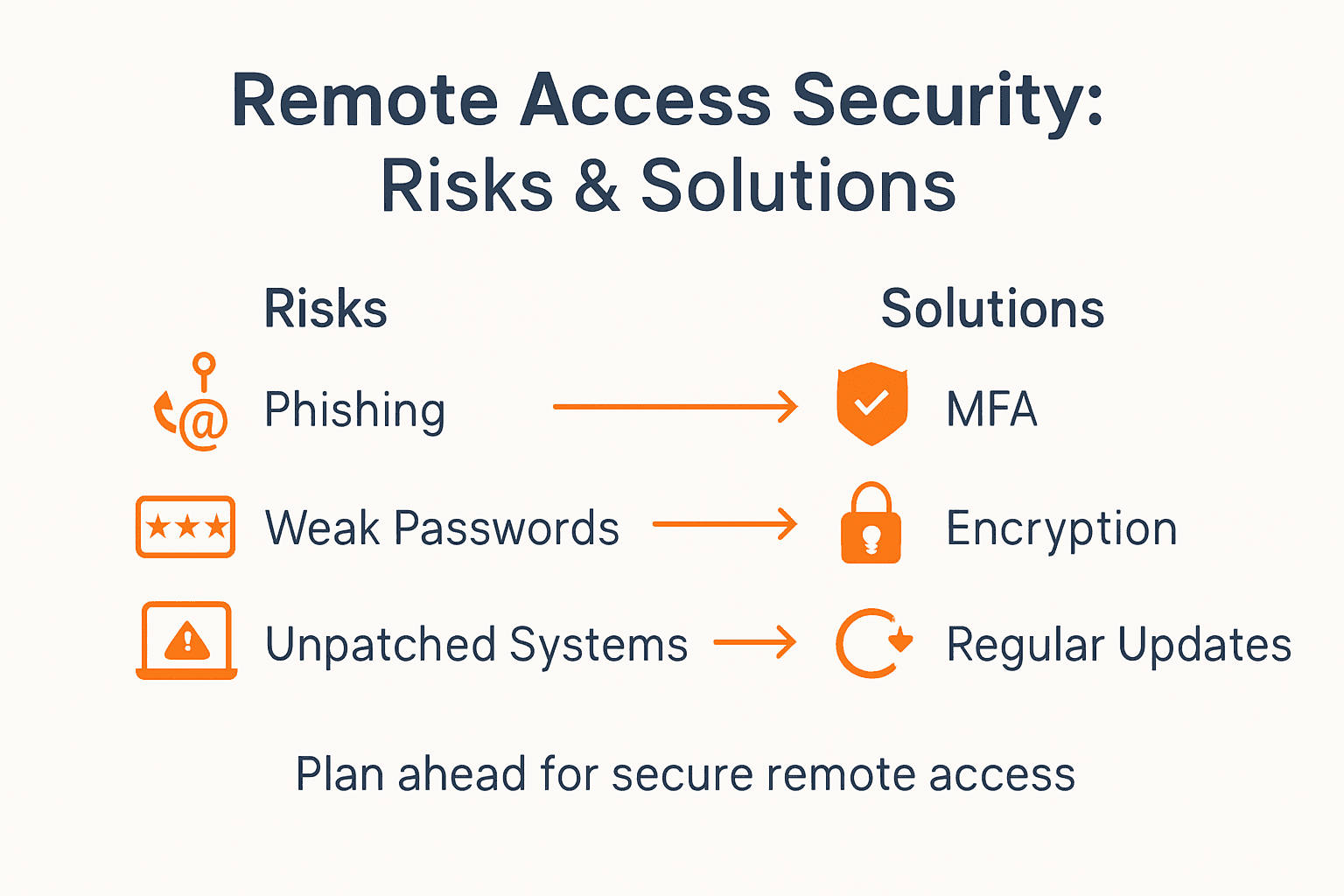
Systematic research on remote work security risks reveals multiple critical threat vectors that enterprises must address comprehensively. The most prevalent risks emerge from human behavior, technological misconfiguration, and inadequate security protocols that create exploitable gaps in organizational defenses.
Key security risks and compliance challenges include:
-
Phishing and Social Engineering
- Targeted attacks exploiting remote worker vulnerabilities
- Sophisticated email and communication-based threats
- Manipulating trust in distributed work environments
-
Device and Network Vulnerabilities
- Unsecured personal devices accessing corporate networks
- Misconfigured VPN and remote access solutions
- Weak authentication and access management
-
Data Protection and Regulatory Compliance
- Managing data residency requirements
- Protecting sensitive information across diverse platforms
- Maintaining audit trails and access logs
-
Shadow IT and Unauthorized Technologies
- Employees using unapproved cloud services
- Uncontrolled software and application proliferation
- Bypassing organizational security controls
Successful risk mitigation requires a holistic approach that combines technological solutions, comprehensive training, and adaptive security frameworks. Enterprise security teams must develop dynamic strategies that can rapidly respond to emerging threats while maintaining operational efficiency and regulatory compliance.
This table summarizes key security risks in remote access environments and proven management strategies:
| Risk Category | Typical Challenge | Effective Management |
|---|---|---|
| Phishing Attacks | Targeted deceptive emails | Regular staff training |
| Device Vulnerabilities | Unsecured personal devices | Enforced device policies |
| Compliance Gaps | Data residency violations | Centralized audit controls |
| Shadow IT | Unapproved cloud services | Strict app whitelisting |
Pro tip: Implement continuous security awareness training that simulates real-world attack scenarios and provides immediate feedback to employees.
Choosing secure remote access over alternatives
Selecting the right remote access solution has become increasingly complex as organizations navigate rapidly evolving technological and security landscapes. Traditional approaches no longer suffice in protecting distributed workforce environments, compelling IT leaders to critically evaluate emerging technologies that offer more granular, adaptive security mechanisms.
Contemporary remote access technology comparisons reveal significant disparities between legacy Virtual Private Networks (VPNs) and modern Zero Trust Network Access (ZTNA) solutions. The fundamental distinction lies in how these technologies fundamentally approach network access and user authentication.
Key comparison points between remote access alternatives include:
-
VPN (Traditional Approach)
- Provides broad network-level access
- Relies on perimeter-based security model
- Limited post-authentication verification
- Potentially expansive attack surfaces
-
ZTNA (Modern Approach)
- Implements application-level access controls
- Continuous identity and device verification
- Granular, context-aware permissions
- Minimizes potential lateral threat movement
-
SSH (Specialized Access)
- Encrypted command-line server interactions
- Limited to specific technical use cases
- Strong encryption for administrative tasks
-
Single Sign-On (SSO)
- Centralized authentication across platforms
- Reduces password management complexity
- Integrates with existing identity providers
Successful remote access strategy requires understanding each technology’s strengths and limitations. Organizations must align their selection with specific operational requirements, compliance mandates, and existing technological infrastructure.
Pro tip: Conduct a comprehensive security and performance assessment before migrating between remote access technologies to ensure minimal operational disruption.
Strengthen Your Secure Remote Access Strategy Today
The article highlights critical challenges enterprises face in implementing robust secure remote access such as managing multi-factor authentication, mitigating phishing attacks, and enforcing granular access controls with modern protocols like ZTNA and SSO. If you are seeking to protect your distributed workforce while enhancing user experience and compliance, LogMeOnce offers a comprehensive suite of solutions designed to tackle these exact pain points. Our platform emphasizes passwordless multi-factor authentication, secure single sign-on, and end-to-end encrypted cloud storage that empower your IT teams to implement zero-trust access and continuous identity verification across all user environments.
Take control of your remote workforce security with LogMeOnce’s innovative tools that adapt to diverse use cases, from telework and BYOD to global contractor access. Experience the ease and confidence that come from having complete visibility and protection against data breaches and unauthorized access.

Discover how you can safeguard your enterprise with trusted secure remote access solutions. Visit LogMeOnce now to start your free trial and explore powerful features including multi-factor authentication and single sign-on. Protect your digital infrastructure and empower your teams today.
Frequently Asked Questions
What is secure remote access and why is it important for enterprises?
Secure remote access is a cybersecurity strategy that allows authorized personnel to connect to enterprise networks and resources securely from external locations. It is important for protecting sensitive digital infrastructure, especially in distributed work environments.
What are the key technologies involved in secure remote access?
Key technologies include authentication methods like multi-factor authentication, encryption techniques to protect data transmission, access control measures that define user permissions, and continuous monitoring to detect security anomalies.
How does Zero Trust Network Access (ZTNA) differ from traditional VPNs?
ZTNA implements identity-centric access controls with application-specific permissions and continuous identity verification, while traditional VPNs provide broad network-level access with limited post-authentication validation and rely on a perimeter-based security model.
What are some common security risks associated with remote access?
Common risks include phishing attacks that exploit remote worker vulnerabilities, device vulnerabilities from unsecured personal devices, compliance challenges related to data residency, and the use of unauthorized applications known as shadow IT.
Recommended
- How to Increase Remote Work Security to Protect Sensitive Data
- 7 Ways to Boost Mobile Device Security for an Enterprise


