


 Password Manager
 Identity Theft Protection

 Team / Business
 Enterprise
 Government
 MSP
MSP


TL;DR:
- Multi-step authentication verifies users with two or more independent factors, strengthening account security. Passkeys and FIDO2 credentials provide the highest protection by eliminating phishing threats. Implementing MFA with backup codes, enforcement across system layers, and device transfer protocols reduces risks and improves user compliance.
A multi-step authentication flow is a security process that requires users to verify their identity through two or more independent factors before gaining access to an account. Single passwords fail regularly. Credential stuffing, phishing, and brute-force attacks exploit them constantly. The National Cyber Security Centre (NCSC) and the FIDO Alliance now recommend layered verification as the baseline for any account worth protecting. Whether you manage personal accounts or enterprise systems, understanding how to design and implement a solid two-factor authentication process is no longer optional. It is the foundation of modern account security.
What are the typical components of a multi-step authentication flow?
A multi-step authentication flow combines at least two of three factor categories: knowledge, possession, and inherence. Knowledge factors are things you know, like a password or PIN. Possession factors are things you have, like a smartphone running an authenticator app or a hardware security key. Inherence factors are things you are, like a fingerprint or face scan.
Most flows follow a predictable sequence. You enter your username and password first. The system then challenges you with a second factor, typically a time-based one-time password (TOTP) code from an authenticator app, an SMS code, or a biometric prompt. Some high-security environments add a third factor, such as a hardware key after biometric confirmation.
The table below shows the three factor types, common examples, and their typical use cases.
| Factor type | Examples | Common use case |
|---|---|---|
| Knowledge | Password, PIN, security question | First step in most login flows |
| Possession | Authenticator app, SMS code, hardware key | Second or third verification step |
| Inherence | Fingerprint, face recognition, voice | Mobile apps, enterprise workstations |
Fallback methods matter just as much as primary factors. Every well-designed multi-factor login system includes a recovery path, usually backup codes or a secondary email. Without a fallback, a lost phone becomes a permanent lockout.
Which secure technologies are recommended for authentication flows in 2026?
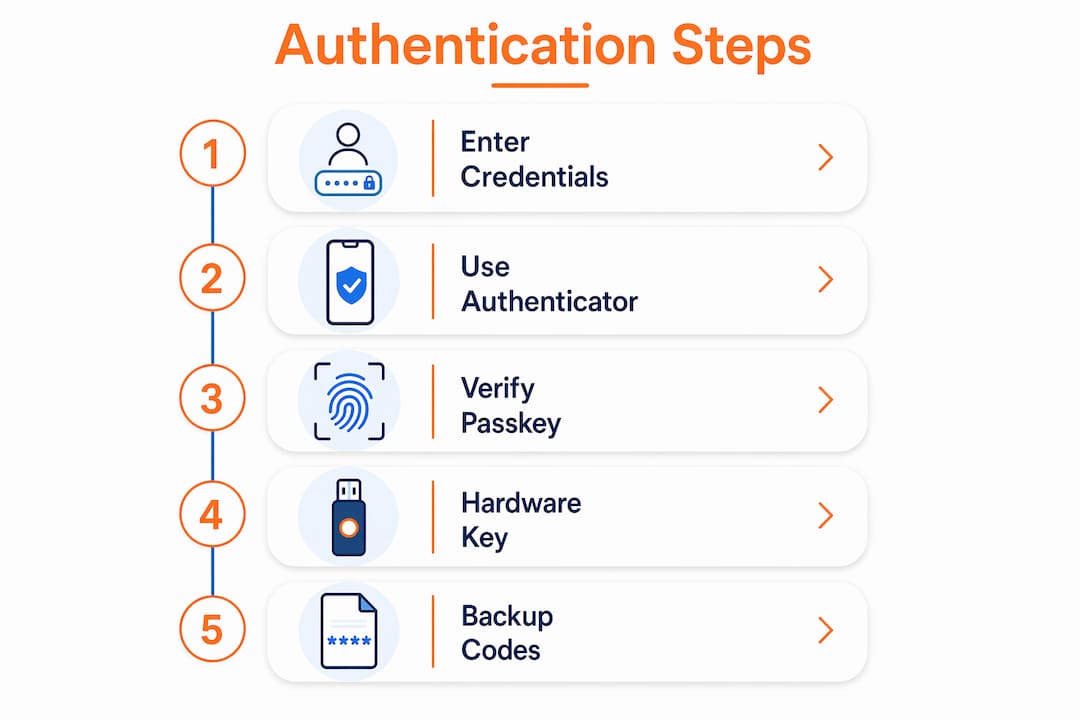
Authenticator apps and TOTP
Authenticator apps using TOTP generate 6-digit codes that rotate every 30 seconds. They work without an internet connection, require no carrier involvement, and are widely supported across consumer and enterprise platforms. This makes them the most balanced option for most users: stronger than SMS, less complex than hardware keys.

SMS codes are convenient but carry real risk. Attackers can intercept or relay SMS codes in real time through SIM swapping and SS7 protocol exploits. The NCSC explicitly flags SMS as phishable, which is why authenticator apps have become the recommended minimum for any serious authentication flow design.
Passkeys and FIDO2 credentials
Passkeys, built on the FIDO2 standard, represent the most significant shift in authentication flow design in a decade. The FIDO Alliance states that passkeys replace both passwords and secondary factors by using cryptographic key pairs bound to the legitimate service. That binding is what makes phishing practically impossible. A fake login page cannot capture a passkey because the key never leaves the device.
The NCSC now recommends passkeys over traditional MFA, with two-step verification serving only as a fallback. That is a meaningful policy shift. It signals that the industry is moving away from shared secrets entirely.
Hardware security keys
Hardware security keys, such as those using the FIDO2 or WebAuthn standard, offer the highest phishing resistance of any physical device. They require physical presence, which stops remote attackers cold. The tradeoff is usability: keys can be lost, and not every platform supports them yet. For most enterprise environments protecting sensitive data, hardware keys remain the gold standard for high-privilege accounts.
Pro Tip: Set up your authenticator app on two devices by scanning the QR code on each during enrollment. This cuts your lockout risk significantly if one device is lost or damaged.
| Method | Phishing resistance | Ease of use | Cost |
|---|---|---|---|
| SMS code | Low | High | Free |
| Authenticator app (TOTP) | Medium | Medium | Free |
| Passkey (FIDO2) | Very high | High | Free |
| Hardware security key | Very high | Medium | Paid |
How do you design and implement an effective multi-step auth flow?
Prerequisites and planning
Before writing a single line of code or enrolling a single user, identify what you need. You need an authenticator app (Google Authenticator, Authy, or any TOTP-compatible app), passkey support if your platform allows it, and a backup code strategy. Effective MFA implementation also requires enforcing authorization rules across every layer: frontend, backend, API servers, and database. Checking only at the frontend is a common and costly mistake.
Step-by-step setup
- Enable MFA in your platform or identity provider settings. Most modern platforms expose this in the security or authentication section of the admin console.
- Present a QR code or setup key to the user during enrollment. The user scans this with their authenticator app to link the account.
- Verify the link by asking the user to enter the first TOTP code. This confirms the app is synced correctly before you lock anything in.
- Generate and display backup codes. Show them once and prompt the user to save them offline or in a password manager.
- Test the backup codes immediately. Log out and log back in using one backup code. This step confirms the codes work and that the user actually saved them.
- Set your enforcement policy. Decide whether MFA is mandatory for all users, optional, or required only for specific roles or access levels.
- Build a recovery workflow. Define what happens when a user loses their device. Options include admin-assisted reset, backup codes, or secondary email verification.
A well-designed multi-factor login system also includes an unenroll path. Users need a way to remove a lost or replaced device without getting locked out permanently.
Best practices for backup code management
Backup codes are the safety net of any authentication flow. They are also the most neglected part.
- Store backup codes offline or in a dedicated password manager, never in plain text on the same device.
- Generate a fresh set of backup codes any time you change your primary MFA method.
- Test at least one backup code immediately after setup to confirm it works.
- Treat each backup code as single-use. Most systems invalidate a code after one successful login.
- Keep a printed copy in a physically secure location for critical accounts.
Pro Tip: If you manage MFA for an organization, build a backup code audit into your onboarding checklist. Confirm each user has saved their codes before you enforce MFA as mandatory.
Policy enforcement options
MFA policy falls into three categories. Mandatory MFA applies to every user with no exceptions. This is the right choice for any system handling sensitive data or financial information. Optional MFA lets users choose, which improves adoption but leaves gaps. Selective MFA applies only to specific roles, such as administrators or users accessing sensitive modules. The NCSC and FIDO Alliance both favor mandatory enforcement for accounts with elevated access.
What are common mistakes and troubleshooting tips for MFA implementation?
Common mistakes to avoid
- Relying solely on SMS codes for high-risk accounts, where phishing and SIM swapping are real threats.
- Skipping the backup code test after enrollment, which leaves users one lost phone away from a permanent lockout.
- Failing to enforce MFA at the API and database layers, which lets attackers bypass frontend checks entirely.
- Not providing a clear recovery workflow, which creates support burden and user frustration.
- Treating MFA as a one-time setup rather than an ongoing policy that needs auditing and updates.
Troubleshooting tips
Backup code loss is the most common support issue in any MFA rollout. Build an admin-assisted reset path before you go live, not after the first lockout ticket arrives. Device changes are the second most common issue. If a user gets a new phone, they need a way to transfer their authenticator app or re-enroll. Apps like Authy support cloud sync, which reduces this friction. Scanning the QR code on multiple devices during initial setup also provides a built-in backup.
Phishing remains a risk even with TOTP. Attackers can build real-time relay proxies that capture a TOTP code and use it before it expires. The only method that eliminates this attack vector entirely is a FIDO2 passkey, because the cryptographic binding to the legitimate domain makes relay attacks structurally impossible.
User compliance drops when friction is too high. If your MFA flow requires too many steps or fails too often, users find workarounds. Keep the flow to two steps for standard logins and reserve three-factor flows for genuinely high-risk actions like wire transfers or admin privilege escalation.
Key Takeaways
A well-implemented multi-step authentication flow combines the right factor types, a tested backup strategy, and enforcement at every system layer to block the vast majority of account takeover attacks.
| Point | Details |
|---|---|
| Factor types matter | Use knowledge, possession, and inherence factors in combination for stronger protection. |
| Passkeys lead in 2026 | FIDO2 passkeys eliminate phishing and credential relay attacks that TOTP cannot stop. |
| Backup codes need testing | Test at least one backup code immediately after setup to prevent future lockouts. |
| Enforce at every layer | Apply MFA rules at the frontend, backend, API, and database levels without exception. |
| Policy drives compliance | Mandatory MFA for high-privilege accounts reduces risk more than optional enrollment. |
Why the shift to passkeys changes everything
I have watched authentication advice evolve for years, and the move toward passkeys is the first change that actually solves the root problem rather than adding another layer on top of a broken foundation. Traditional MFA, including TOTP apps, still relies on a shared secret that a user types into a box. That box can be faked. A convincing phishing page can capture a TOTP code in real time and use it before it expires. I have seen this happen to technically sophisticated users who knew the risks.
Passkeys remove the box entirely. There is no code to type, no secret to intercept. The authentication happens between the device and the legitimate service, cryptographically. When the NCSC shifted its official guidance to recommend passkeys over traditional two-step verification, that was not a minor update. It was an acknowledgment that the old model has a structural flaw.
The practical advice I give now: start with TOTP if passkeys are not yet supported on your platform. It is a meaningful improvement over passwords alone. But treat it as a stepping stone, not a destination. Build your passwordless authentication strategy now, even if full deployment is 12 months away. The organizations that wait until passkeys are everywhere will spend those months cleaning up breaches that passkeys would have prevented.
— Mike
How Logmeonce supports your authentication security
Logmeonce brings together password management and multi-factor authentication in one platform built for individuals, IT teams, and enterprises. Its passwordless login options and emergency access features address the exact gaps that make traditional MFA setups fragile.

If you manage accounts for a team or organization, Logmeonce handles enrollment, factor management, and policy enforcement without requiring you to build those workflows from scratch. The platform supports TOTP, biometric login, and backup access methods in a single interface. See the full list of features and plan options on the Logmeonce benefits page to find the right fit for your security requirements.
FAQ
What is a multi-step authentication flow?
A multi-step authentication flow is a login process that requires users to verify their identity through two or more independent factors, such as a password plus a TOTP code or biometric. It significantly reduces the risk of unauthorized account access.
Are passkeys better than authenticator apps?
Passkeys are more secure than authenticator apps because they use cryptographic key pairs bound to the legitimate service, making phishing and credential relay attacks structurally impossible. The NCSC and FIDO Alliance both recommend passkeys as the preferred authentication method in 2026.
What should I do if I lose my MFA device?
Use a backup code to regain access, then re-enroll a new device immediately. If you did not save backup codes, contact your platform’s support team for an admin-assisted reset.
How do I test backup codes after MFA setup?
Log out of your account immediately after setup, then log back in using one of your backup codes instead of your authenticator app. This confirms the codes are valid and that you stored them correctly.
Is SMS-based two-factor authentication still safe?
SMS-based verification is better than no MFA, but it is vulnerable to SIM swapping and real-time phishing relay attacks. For any account holding sensitive data, switch to an authenticator app or passkey as soon as possible.


