


 Password Manager
 Identity Theft Protection

 Team / Business
 Enterprise
 Government
 MSP
MSP


TL;DR:
- MFA prevents 99.9% of automated attacks and significantly reduces breach costs and detection times.
- Phishing-resistant MFA methods like FIDO2 are essential for high-value assets, as SMS OTPs are increasingly vulnerable.
- Successful MFA deployment requires ongoing governance, risk-based policies, user education, and adaptive authentication practices.
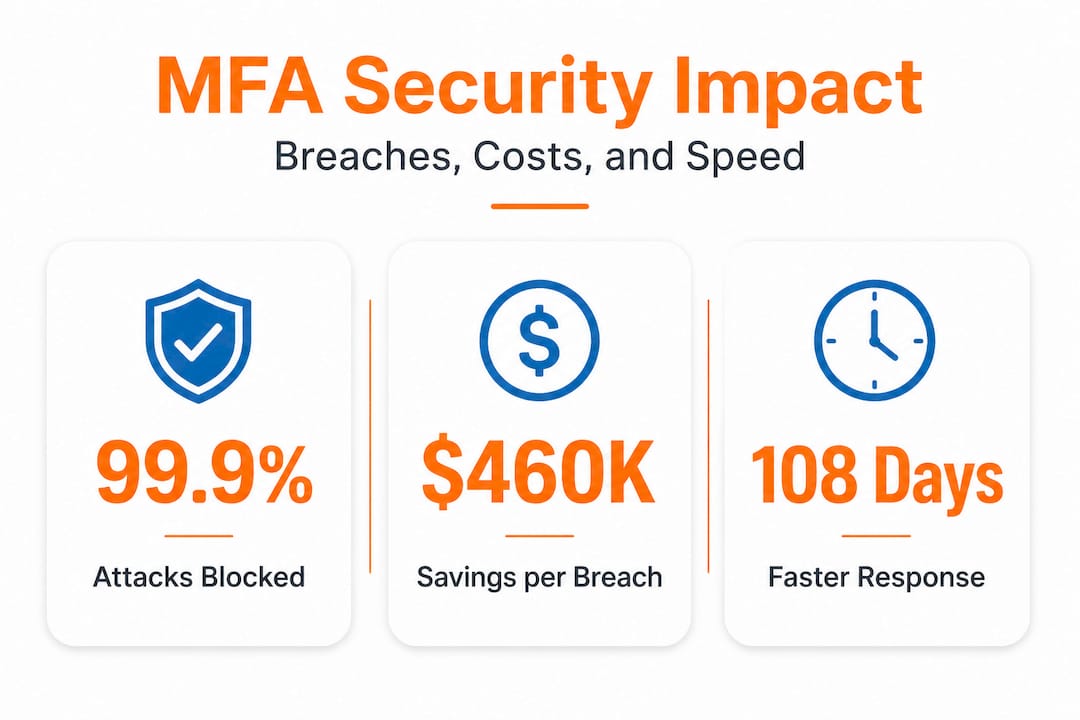
Credential theft is the engine behind most modern cyberattacks, and the financial damage is staggering. Organizations that detect breaches faster with MFA save an average of $460,000 per incident and contain threats 108 days sooner, while the average credential-related breach now costs $4.88 million. Yet many organizations still rely on passwords alone, assuming complexity rules and periodic resets are enough. They are not. This article breaks down exactly how multi-factor authentication works, what it measurably prevents, where it falls short, and how to deploy it in a way that actually protects your highest-value assets.
Key Takeaways
| Point | Details |
|---|---|
| MFA stops most attacks | Deploying multi-factor authentication blocks over 99 percent of automated credential attacks. |
| Phishing resistance matters | Using hardware keys and passkeys provides superior security compared to SMS or OTP MFA. |
| Breach costs drop | Organizations with MFA detect breaches faster and cut average incident costs by hundreds of thousands of dollars. |
| User experience trade-offs | MFA can increase login failures, so rollouts must balance security with usability. |
| Flexible deployment is key | Risk-based prompts and backup factors maximize both coverage and user acceptance. |
Understanding multi-factor authentication: Principles and process
Multi-factor authentication, or MFA, requires users to verify their identity using two or more independent factors before accessing a system. The rationale is straightforward: even if an attacker steals a password, they cannot gain access without also compromising a second, unrelated verification method. This layered approach dramatically raises the cost and complexity of a successful attack.
The MFA verification process follows a consistent framework regardless of implementation. First, the user asserts their identity, typically with a username. Then the system challenges them to verify using one or more additional factors. Finally, upon successful verification, a session is established. The National Institute of Standards and Technology (NIST) Special Publication 800-63B formalizes this into three Authenticator Assurance Levels, known as AAL1 through AAL3, each representing a progressively stronger security posture.
The three NIST assurance levels
| Level | Requirements | Suitable for |
|---|---|---|
| AAL1 | Single-factor or basic MFA | Low-risk applications |
| AAL2 | Two factors including a possession or biometric factor | Moderate-risk systems, most enterprise apps |
| AAL3 | Hardware-based, phishing-resistant authenticators | High-value assets, government, privileged access |
The three verification factors that MFA draws from are:
- What you know: Passwords, PINs, security questions
- What you have: Hardware tokens, smartphone authenticator apps, smart cards
- What you are: Fingerprints, facial recognition, retinal scans
One of the most important shifts in MFA over recent years is the move away from SMS one-time passwords (OTPs) toward phishing-resistant methods. NIST now requires phishing-resistant MFA at AAL3, with FIDO2 passkeys and hardware keys being the primary compliant options. SMS and OTP methods are being limited or downgraded in many standards. Notably, roughly 77% of payment systems align with NIST guidance, but 33% still rely on OTP, leaving a significant share of organizations exposed to attacks that can intercept one-time codes in real time.
Understanding the business benefits of two-factor authentication starts with recognizing that different assets carry different risk levels and should be matched to the appropriate assurance level. Not everything needs AAL3, but everything needs at least AAL1, and your crown jewels need much more.
The real-world impact of MFA: Risk reduction and outcomes
Understanding the mechanics of MFA is useful. Seeing its measurable impact in the field is what drives executive buy-in and budget allocation.
The headline statistic is hard to ignore: MFA prevents 99.9% of automated attacks, according to Microsoft’s Secure Initiative research. This includes credential stuffing, brute force attacks, and password spraying, which collectively represent the vast majority of identity-based intrusions. The same research found that phishing-resistant MFA has been adopted by 92% of corporate users in organizations that have committed to modern identity security frameworks.
“MFA is the single most impactful control an organization can implement to reduce identity-based risk. No other control comes close in terms of coverage-to-cost ratio.”
The financial picture is equally compelling. Consider the following comparison:
Breach cost comparison: Organizations with and without MFA
| Metric | Without MFA | With MFA |
|---|---|---|
| Average breach cost | $4.88 million | $4.42 million (est.) |
| Breach detection time | 194 days (avg.) | 86 days (108 days faster) |
| Containment time | 292 days (avg.) | Significantly reduced |
| Cost savings per incident | Baseline | ~$460,000 |
The data is clear: organizations using MFA detect and contain breaches 108 days faster and save close to half a million dollars per incident. Over a multi-year period, that kind of savings justifies nearly any reasonable MFA deployment budget.

The MFA business outcomes extend beyond direct breach savings. Organizations also benefit from reduced incident response hours, lower cyber insurance premiums, stronger compliance posture, and reduced reputational risk. Insurance carriers are increasingly requiring MFA as a baseline control before issuing or renewing cybersecurity policies. If you do not have MFA in place, you may be paying more for coverage that excludes credential-based attack claims entirely.
Key outcomes organizations report after implementing MFA include:
- Fewer successful phishing attacks reaching the account access stage
- Reduced lateral movement when a single endpoint is compromised
- Faster investigation times because authentication logs provide clearer forensic trails
- Improved regulatory compliance with frameworks like SOC 2, HIPAA, and PCI DSS
The 99.9% attack prevention figure deserves some context. It applies most strongly to automated, opportunistic attacks. Targeted attacks by sophisticated threat actors require more than standard MFA, which is why phishing-resistant implementations matter so much for high-value environments.
Challenges and limitations: Productivity, coverage, and evolving threats
While the security upside is clear, organizations must also understand the hidden challenges and how to avoid common pitfalls before, during, and after rollout.
The most consistent friction point is user experience. Research published in the Information Systems Frontiers journal found that enhanced MFA increases login failures and time-away from productive work, particularly when organizations transition from simple authentication to mobile-based MFA. A policy change of that nature can spike help desk calls, frustrate users who travel frequently or work with limited connectivity, and create shadow IT workarounds where employees avoid protected systems entirely.
Here are the most common practical challenges in MFA rollouts:
- Incomplete enrollment: When MFA is not required for all users and systems, attackers simply target unprotected accounts. Even one uncovered privileged account is a critical exposure point.
- Legacy system incompatibility: Older applications often lack native MFA support, requiring additional identity gateways or retiring the legacy system entirely.
- Backup method gaps: Users who lose access to their primary MFA factor (lost phone, dead hardware token) without a secure backup process often resort to account recovery flows that bypass MFA entirely.
- Inconsistent enforcement: Organizations frequently enforce MFA for cloud apps but forget on-premises systems, VPN clients, or service accounts.
- Privileged account exemptions: IT teams sometimes exempt their own accounts from MFA for convenience, which is precisely the access level attackers most want to compromise.
Beyond implementation gaps, modern attackers have developed specific techniques to bypass traditional MFA. The most concerning are:
- Push bombing (MFA fatigue): Attackers flood a user with push notifications until the user approves one out of frustration or confusion.
- SIM swapping: Attackers convince a carrier to transfer a victim’s phone number, redirecting SMS OTPs to an attacker-controlled device.
- Real-time phishing proxies: Tools like Evilginx2 sit between the user and legitimate login pages, relaying credentials and session tokens in real time, bypassing time-sensitive OTPs entirely.
Cisco Talos reported that MFA weaknesses ranked first in their 2024 incident response findings, with 24% of engagements involving no MFA enrollment at all and 22% where MFA was implemented but not fully enabled across all critical systems. That is nearly half of all IR engagements where MFA could have meaningfully reduced the blast radius of the attack.
Pro Tip: Implement adaptive MFA that evaluates login context, including device health, location, and behavior patterns, before deciding how much authentication to require. Risk-based prompting reduces friction for low-risk logins while applying stronger controls when signals indicate elevated risk.
Best practices for effective MFA deployment
To bridge the gap between theory and effective implementation, let’s turn to actionable best practices that reflect both field experience and established vendor guidance.
Microsoft’s deployment guidance for enterprise MFA rollout recommends a structured, phased approach built around Conditional Access policies. The core principles from that guidance, translated into operational steps, are:
- Start with a pilot group: Select a representative cross-section of users, including power users, remote workers, and executives. Measure help desk call rates, login failure rates, and user satisfaction before expanding.
- Register multiple authentication methods: Require each user to enroll at least two methods during onboarding. This prevents lockouts when a primary method is unavailable and reduces dependency on insecure recovery flows.
- Use risk-based prompting: Do not require the same level of authentication for every login. A user on a managed device on the corporate network should face fewer friction points than the same user logging in from an unfamiliar device in an unrecognized location.
- Secure the registration process itself: Attackers increasingly target MFA enrollment rather than authentication. Require identity verification before allowing new authenticators to be registered on an account.
- Prioritize high-value assets first: Privileged accounts, financial systems, customer data repositories, and cloud infrastructure should be your first targets for strong MFA, ideally FIDO2 or hardware keys at NIST AAL3.
- Phase out SMS and email OTP: Set a clear timeline for deprecating weaker methods and replacing them with phishing-resistant alternatives. Communicate the change well in advance with user training.
The goal is not to maximize authentication friction. The goal is to match authentication strength to the real risk level of each access request. A well-tuned MFA deployment feels nearly invisible for routine, low-risk logins and presents a meaningful barrier exactly when an attacker would try to exploit stolen credentials.
Pro Tip: When deploying FIDO2 hardware keys for privileged users, issue two keys per person at enrollment. One is primary; the second is a backup stored securely. This prevents account lockout without creating insecure recovery backdoors.
User communication is not optional. Send clear, jargon-free instructions before rollout. Explain why the change is happening, not just how to complete enrollment. Users who understand the purpose of MFA are far more likely to comply and far less likely to call the help desk or seek workarounds.
A candid take: What most MFA guides won’t tell you
Most MFA content focuses on the mechanics and the metrics, which is useful. But there is a set of harder truths that organizations encounter in practice that rarely make it into vendor documentation or conference presentations.
The first uncomfortable reality is that standard MFA, deployed without ongoing governance, degrades over time. Users leave the organization but their authenticators remain registered. New applications get added outside the MFA policy. Service accounts accumulate with no authentication method at all. A deployment that earned an “MFA enabled” checkbox in year one can quietly develop dozens of uncovered exposure points by year three.
The second reality is that phishing-resistant MFA is not optional for high-value environments. It is not a premium feature. It is the baseline. Any organization still relying on SMS OTPs for access to financial systems, cloud infrastructure management, or executive email should treat that as an active risk, not a future improvement. Attackers have industrialized SIM swap and real-time proxy attacks. The defenses must match the threat.
The third truth is about compliance theater. Organizations that implement MFA purely to pass an audit frequently check the box without thinking through coverage, assurance levels, or user behavior. An auditor may confirm that MFA is “in place.” But if 22% of critical systems are exempt and no one has a hardware token, that MFA policy is a liability dressed up as a control.
The most successful MFA deployments we have seen share one characteristic: they treat authentication as a living program, not a one-time project. They run quarterly coverage reviews, track authentication anomalies as a security signal, and continuously improve the user experience so that adoption stays high and workarounds stay low.
Context-aware, risk-based authentication is where mature identity security programs land. It is the version of MFA that actually scales to an organization’s complexity without crushing productivity. If your current MFA strategy does not incorporate behavioral signals and adaptive policies, that is the most important gap to close.
Take the next step: Secure your organization with advanced MFA
Now that you understand the impact and proven practices for MFA, here’s how you can simplify and accelerate adoption across your organization.

LogMeOnce offers an enterprise cybersecurity platform purpose-built for organizations that need more than a basic authentication checkbox. With support for phishing-resistant methods, risk-based adaptive authentication, passwordless login, and centralized identity management, LogMeOnce aligns directly with the NIST AAL framework and modern threat realities. Explore two-factor authentication solutions that scale from SMEs to large enterprises and government agencies. Whether you are starting your first MFA rollout or upgrading from legacy OTP methods, LogMeOnce provides the tools, flexibility, and support to protect your highest-value assets without sacrificing the user experience your teams depend on every day.
Frequently asked questions
How does multi-factor authentication reduce security breaches?
MFA adds extra verification steps beyond passwords, blocking over 99% of automated attacks and making stolen credentials far less useful to attackers. Without the second factor, a compromised password alone cannot grant access.
What are the most secure MFA methods in 2026?
Phishing-resistant methods like FIDO2 hardware keys and passkeys are the strongest available, as NIST requires them at AAL3. These methods resist SIM swap attacks and real-time phishing proxies that defeat SMS OTP.
Does MFA impact user productivity?
Yes, poorly implemented MFA can increase login failures and time away from work, especially during transitions from simple to mobile-based methods, as research confirms productivity costs. Risk-based and adaptive MFA significantly reduces this friction by reserving strong challenges for high-risk logins.
What attacks can still bypass MFA?
Push bombing, SIM swapping, and real-time phishing proxies can all bypass traditional MFA methods, with Talos reporting these weaknesses as the top identity-related threat patterns in 2024 incident response engagements. Phishing-resistant FIDO2 methods address all three attack vectors effectively.


