


 Password Manager
 Identity Theft Protection

 Team / Business
 Enterprise
 Government
 MSP
MSP


TL;DR:
- Many organizations incorrectly believe they have implemented true MFA when using multi-step login forms that draw from only one factor. NIST defines MFA as requiring at least two distinct authentication factors, such as knowledge, possession, or inherence, to ensure strong security. Effective enterprise MFA involves careful evaluation of factor strength, recovery methods, user onboarding, and operational support, prioritizing phishing resistance and assurance levels to reduce operational risks and enhance security posture.
Most IT teams believe they already have MFA deployed, and many are wrong. Two successive password prompts, a username plus a security question, or even a PIN followed by a recovery email are not MFA. They are multi-step logins dressed up as something stronger. True multi-factor authentication, as NIST SP 800-63-4 defines it, requires more than one distinct factor, meaning a combination drawn from something you know, something you have, or something you are. This guide cuts through the confusion with real organizational MFA examples and a practical framework for deployment.
Key Takeaways
| Point | Details |
|---|---|
| True MFA is factor-based | MFA requires distinct factors like knowledge, possession, or inherence, not just extra login steps. |
| Enterprise MFA uses multiple methods | Successful programs provide users with several authentication methods and recovery options. |
| Evaluate beyond technology | A robust MFA program plans for rollout, recovery, and user support, not just factor strength. |
| Phased rollout reduces risk | Deploying MFA in waves with pilot groups mitigates operational disruption and increases adoption. |
What counts as true MFA? NIST-defined factors explained
The official definition matters more than most security teams realize. NIST defines MFA as authentication that uses more than one distinct authenticator factor, specifically knowledge, possession, or inherence. Two factors from the same category, even if they feel different to the user, do not qualify.
“Multi-factor authentication (MFA) is an authentication system that requires more than one distinct authentication factor for successful authentication.” — NIST SP 800-63-4
The three recognized factor types break down like this:
- Knowledge factors (something you know): passwords, PINs, security questions, pass phrases
- Possession factors (something you have): mobile authenticator apps, hardware security keys, smart cards, SMS OTP codes sent to a registered device
- Inherence factors (something you are): fingerprint scans, facial recognition, iris scans, voice biometrics
The key rule is simple. A login is true MFA only when it draws from at least two of those three categories. Your NIST 800 security policies should reflect this exact boundary.
Common factor combinations: what qualifies and what doesn’t
| Login combination | Factor categories used | Qualifies as MFA? |
|---|---|---|
| Password + PIN | Knowledge + Knowledge | No |
| Password + security question | Knowledge + Knowledge | No |
| Password + authenticator app OTP | Knowledge + Possession | Yes |
| Smart card + PIN | Possession + Knowledge | Yes |
| Fingerprint + face scan | Inherence + Inherence | No |
| FIDO2 passkey + biometric | Possession + Inherence | Yes |
| SMS OTP + password | Possession + Knowledge | Yes (lower assurance) |
| Hardware key + fingerprint | Possession + Inherence | Yes (high assurance) |
Two common mistakes organizations make when evaluating MFA:
- Counting steps, not factors. Adding a second prompt that draws from the same category (knowledge) gives users a false sense of security and leaves the organization exposed.
- Assuming all MFA is equal. SMS OTP involves a possession factor, but SIM-swapping attacks make it weaker than app-based or hardware options. Factor strength varies significantly within each category.
- Ignoring assurance levels. NIST SP 800-63 defines three authenticator assurance levels (AAL1, AAL2, AAL3). Most enterprise applications require at least AAL2, which mandates proof of possession using cryptographic means.
- Skipping phishing resistance as a criterion. Push notifications and OTP codes can be intercepted via real-time phishing proxies. FIDO2 and hardware-backed keys are phishing-resistant by design because the cryptographic exchange is bound to the site origin.
Understanding these distinctions turns MFA evaluation from a checkbox exercise into a genuine risk reduction decision.
MFA in action: Enterprise-ready examples and mechanics
Now that you know what counts as true MFA, here is how organizations put these principles into practice with specific methods, realistic user flows, and deployment mechanics from major platforms.
Enterprise MFA: platform examples and security benefits
| Platform | MFA methods offered | Primary security benefit |
|---|---|---|
| Oracle Cloud | App push, passcode, email OTP, phone OTP, FIDO, bypass codes | Broad method choice with fallback coverage |
| Microsoft Entra ID | Authenticator app, FIDO2 key, Windows Hello, SMS, voice | Conditional access and phishing-resistant options |
| Google Workspace | Google Prompt, TOTP, hardware key, SMS | Seamless integration with Android ecosystem |
| Okta | Push, TOTP, WebAuthn, biometric | Strong adaptive risk signals |
| LogMeOnce | Passwordless photo login, PIN, biometric, hardware key | Frictionless UX with high assurance |
Oracle Cloud documentation confirms that its MFA offering includes app push, passcode, email OTP, phone OTP, FIDO authentication, and bypass codes, giving enterprise administrators both primary and fallback options out of the box. That range matters. Users who lose their authenticator device need a safe path back in without exposing a bypass that attackers could exploit.
Microsoft Entra ID recommends pairing conditional access policies with a pilot group before enforcing MFA organization-wide, and ensuring users register backup methods during enrollment. This reflects a mature understanding that MFA is a program, not a setting.
What makes an MFA method enterprise-grade?
Three qualities separate enterprise-ready methods from consumer-grade ones:
- Factor strength and phishing resistance. FIDO2 hardware keys and platform passkeys (like Windows Hello) are cryptographically bound to the relying party, making them immune to phishing proxies. SMS OTP is not.
- Recovery and bypass design. A locked-out user calling the helpdesk at 2 a.m. during a production incident is a real scenario. Bypass codes that are single-use, time-limited, and logged are the correct answer. Permanent bypass accounts are not.
- Self-service enrollment and management. Requiring IT to manually enroll every user creates delays and help desk backlogs. Enterprise platforms should allow users to enroll, update, and manage their own authenticators within policy guardrails.
A typical enterprise MFA enrollment and login flow
- User receives an enrollment invitation via email with a time-limited link.
- User logs in with their existing credentials and is prompted to register an MFA method.
- User downloads an authenticator app or inserts a hardware key and completes pairing.
- User is encouraged to register a backup method (SMS OTP or a second hardware key).
- On next login, user provides password and then authenticates with the registered factor.
- Conditional access policy evaluates device compliance, location, and risk score before granting access.
- If primary factor fails, user can request a bypass code through a verified secondary channel.
Pro Tip: Choose complementary factors, not redundant steps. If your primary factor is an authenticator app (possession), your backup should not be SMS OTP (also possession). A biometric or hardware key as a backup shifts the recovery path to a different category and strengthens your overall posture.
You can see how two factor authentication in practice handles this layered approach, and for organizations scaling up, reviewing advanced MFA deployment patterns gives teams a structured blueprint for enterprise rollout.

Evaluating MFA solutions: Mechanics, assurance, and recovery
With real examples in mind, here is how to evaluate solutions intelligently for your organization’s specific risk profile and operational realities.
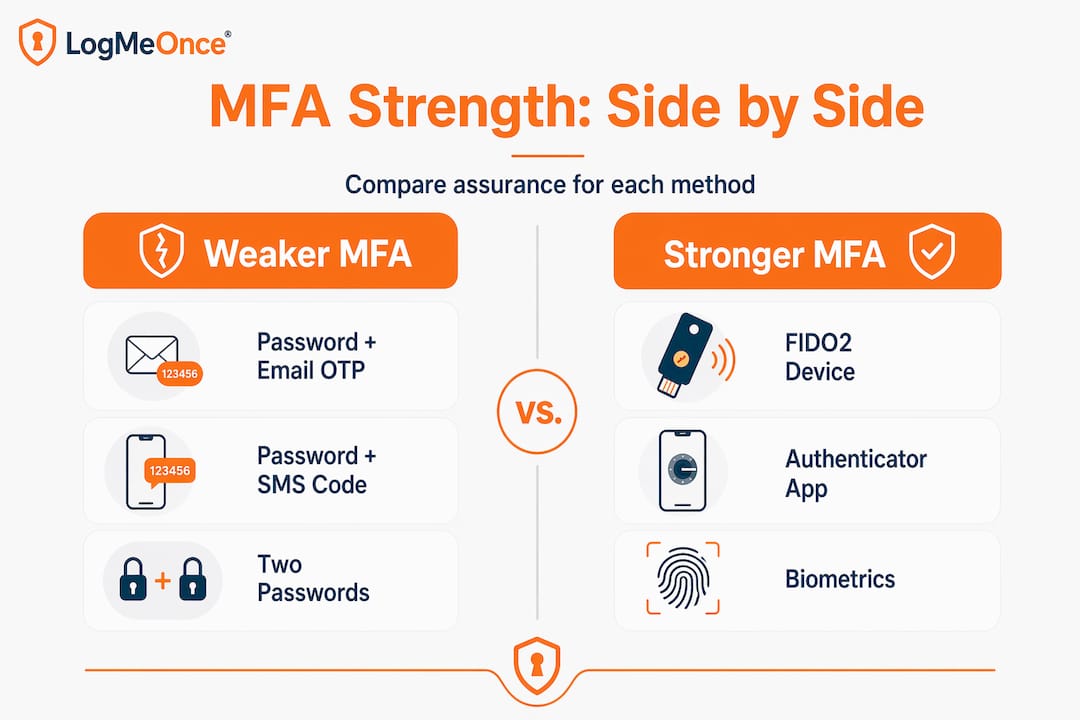
Comparing factor types for assurance and phishing resistance
The NIST authentication assurance model draws clear boundaries. Evaluating both factor mechanics and assurance levels is essential for organizations that handle sensitive data or are subject to regulatory requirements like HIPAA, FedRAMP, or SOC 2.
- AAL1: Single factor or weak MFA. Not appropriate for privileged access or sensitive systems.
- AAL2: Requires proof of possession via cryptographic means plus a second factor. Suitable for most enterprise applications.
- AAL3: Requires hardware-based cryptographic authentication (hardware security key). Required for the most sensitive government and financial use cases.
When comparing vendors, ask specifically which assurance level each offered method achieves. A vendor claiming “MFA support” while only offering email OTP is offering AAL1 at best.
Key programmatic features to evaluate
Beyond the technology, a mature MFA program depends on operational infrastructure. Microsoft recommends building a program that includes recovery and bypass planning, phased rollout, and flexibility for users to manage multiple methods. These are the specific capabilities to verify with any vendor:
- Self-service enrollment: Can users register their own devices and factors without IT involvement?
- Multiple method registration: Can users register a primary and at least one backup factor simultaneously?
- Conditional access integration: Does the platform support location, device health, and risk-based policy enforcement?
- Bypass code management: Are bypass codes single-use, audited, and administratively controlled?
- Pilot and wave deployment: Can administrators scope MFA enforcement to specific groups before broad rollout?
- Reporting and anomaly detection: Does the platform surface unusual authentication patterns in real time?
When organizations skip backup method registration, help desk call volume typically spikes during initial enforcement waves. Users who lose access to their primary device with no backup registered have only one option: escalate to IT. Multiply that scenario across thousands of employees on rollout day and you have an operational crisis that could have been avoided.
Pro Tip: Before enforcing MFA organization-wide, run a two-week pilot with 50 to 100 users across different job functions, device types, and locations. Capture failure modes, help desk tickets, and user feedback. This intelligence makes your full rollout dramatically smoother.
Questions to ask MFA vendors during evaluation
- What NIST authenticator assurance level does each method achieve?
- How are bypass codes generated, delivered, and audited?
- Does your platform support phishing-resistant FIDO2 authentication natively?
- Can conditional access policies be applied per application rather than globally?
- What happens when a user loses all registered factors? What is the verified recovery path?
- How does the solution integrate with our existing identity provider and directory?
Solid enterprise password management practices sit beneath every effective MFA program. And for organizations exploring passwordless options, understanding passwordless login and MFA bypass mechanics helps frame the conversation around eliminating the weakest link entirely.
A smarter MFA program: What most security teams overlook
Here is the honest perspective after watching many MFA rollouts succeed and fail: most security teams over-invest in selecting the “strongest” factor and under-invest in everything else that determines whether the program actually works in production.
Factor strength is important. Phishing-resistant FIDO2 is genuinely better than SMS OTP. But a technically superior MFA method that users find confusing, that has no graceful recovery path, and that generates 500 help desk tickets in the first week will be walked back under organizational pressure. Leadership will grant exceptions. Exceptions will proliferate. Within six months, the “mandatory MFA” policy will be mandatory for some people, sometimes, for some applications. That outcome is worse than a simpler program that is consistently enforced.
The hardest part of MFA is not the cryptography. It is the enrollment, recovery, and support design that allows every user in the organization to authenticate securely without generating operational chaos.
What sets successful programs apart comes down to three things most checklists ignore. First, recovery planning is treated as a first-class feature, not an afterthought. Every user has a documented, tested path back to access if they lose their primary factor. Second, user education is delivered before enforcement, not as a panicked response to lockout complaints. Third, the program is designed to evolve. The authenticator landscape in 2026 looks different than it did three years ago, and organizations that treat MFA as a one-time technology purchase rather than an ongoing program fall behind quickly.
The best MFA programs also recognize that enterprise onboarding and recovery are deeply connected. A user who breezes through enrollment and never needs recovery support is the goal. But when recovery is needed, a frictionless, secure path protects both the user and the organization.
Treat MFA as a journey with milestones. Start with your highest-risk users and applications. Expand methodically. Revisit factor choices annually as the threat landscape shifts. The organizations that do this consistently are the ones that never make the breach headlines.
Take your organization’s MFA defense further
Building a resilient MFA program requires more than choosing the right factors. It demands a platform that handles enrollment, recovery, conditional access, and reporting as an integrated system rather than a collection of disconnected tools.

LogMeOnce delivers exactly that for enterprise teams ready to move beyond basic MFA. The enterprise cybersecurity platform supports passwordless login, biometric authentication, hardware key integration, and granular access policies in a single unified solution. You can explore advanced two-factor authentication options tailored for organizations of any size, and see how the platform aligns with the full range of password management benefits your security team needs. Book a demonstration and see what a production-ready MFA program looks like when everything works together from day one.
Frequently asked questions
What are common MFA factor types used in organizations?
The three main factor types are knowledge (password or PIN), possession (mobile authenticator app or hardware token), and inherence (fingerprint or facial biometric), as established by NIST’s factor framework. True MFA requires at least two of these distinct categories in a single authentication event.
How do backup MFA methods improve security posture?
Backup methods ensure users retain secure access when their primary factor is unavailable, significantly reducing help desk burden during lockout events. Microsoft recommends that every user register more than one MFA method at enrollment to prevent single points of failure.
Can bypass codes undermine MFA security?
Bypass codes are safe when they are single-use, time-limited, logged, and administratively controlled, adding resilience without creating a permanent backdoor. Oracle’s MFA implementation includes bypass codes as a standard recovery mechanism within a properly scoped security design.
Is SMS-based OTP considered strong enough for MFA?
SMS OTP satisfies the possession factor requirement and qualifies as MFA when paired with a knowledge factor, but it is vulnerable to SIM-swapping and real-time phishing attacks. NIST’s assurance model places app-based and hardware-based methods at higher assurance levels, making them the preferred choice for privileged or sensitive access.
What’s the best approach for rolling out MFA in a large organization?
Start with a pilot group of 50 to 100 users across different roles and device types, collect feedback, then expand in controlled waves with recovery options verified at each stage. Microsoft’s recommended practice emphasizes phased rollout and backup method registration as the foundation of any successful enterprise MFA deployment.


