


 Password Manager
 Identity Theft Protection

 Team / Business
 Enterprise
 Government
 MSP
MSP


TL;DR:
- Having encryption enabled does not guarantee data protection if key management and workflows are neglected. Building a comprehensive, repeatable encryption process involves data classification, proper key handling, regular testing, and operational discipline. Most SMB encryption failures stem from workflow and secrets management issues rather than algorithm weaknesses, emphasizing the importance of procedural rigor.
A small healthcare billing firm had encryption “enabled” across its cloud storage and felt secure. Then an auditor discovered that their key management was handled inside the same application environment as the data, developers had CI/CD pipeline variables containing plaintext credentials, and nobody had tested backup restoration in eight months. Their encryption was technically on. Their data was practically exposed. If your team checks the encryption box but hasn’t built a real workflow around it, you’re in the same boat and this guide will show you exactly how to fix that.
Key Takeaways
| Point | Details |
|---|---|
| Workflow over checklist | Effective encryption is a lifecycle of processes, not just enabling technical features. |
| Key management is vital | Poor key practices undermine even the strongest encryption and must be operationally managed. |
| Cloud demands scrutiny | You must customize and regularly audit cloud encryption and key separation procedures. |
| Verification prevents disaster | Routine testing of restores and responses guarantees encryption actually protects your data. |
| Regulations are only a start | Compliance is a baseline; workflow discipline and coverage keep SMB data truly safe. |
Plan your encryption workflow: Preparation and prerequisites
Every strong encryption program starts well before you touch a configuration panel. The first task is building a data inventory. You need to know exactly what sensitive data exists, where it lives, and how it moves. Customer personally identifiable information, payment records, protected health information, intellectual property, and employee data each carry different legal weight and different exposure risks. Without that inventory, you’re encrypting blind.
Once you have the inventory, classify your data into tiers. A simple three-tier model works well for most SMBs: regulated data (legal mandates apply), sensitive internal data (not regulated but commercially or operationally critical), and general operational data. Your encryption controls should be proportional to each tier. This is how enterprise password practices connect to encryption: the credentials protecting your most sensitive tier need the strongest controls.
Understanding the difference between data at rest and data in transit is non-negotiable. Data at rest lives on disks, databases, and backups. Data in transit moves over networks between services, users, or cloud platforms. Each requires different encryption mechanisms, and many breach scenarios exploit whichever one the team forgot to address. As the CSF Critical Security Controls 3.10-3.11 frame it, treat encryption as a programmatic lifecycle: identify sensitive data, encrypt at rest and in transit, and manage keys as a separate operational responsibility.
Key management must be treated as its own workstream, not an afterthought. Who generates keys? Who stores them? Who can rotate them? These questions need documented answers before you implement anything. Assign specific roles with separation of duties so that the person who administers the encrypted database isn’t also the person who holds the master key.
Pre-implementation checklist:
- Complete a data classification inventory with sensitivity tiers
- Map data flows for both at-rest and in-transit scenarios
- Identify all regulatory obligations (GDPR, HIPAA, PCI-DSS, CCPA)
- Define key management ownership and assign roles
- Document each workflow step with a named responsible party
- Establish a baseline for what “properly encrypted” looks like for each tier
Good preparation also means checking what you’re encrypting against. Review protecting cloud data as part of your pre-assessment to surface gaps in how your current cloud storage handles encryption defaults.
Step-by-step: Building your SMB encryption workflow
With groundwork in place, here’s how to build the actual workflow. This isn’t a checklist you complete once. It’s a repeating operational cycle.
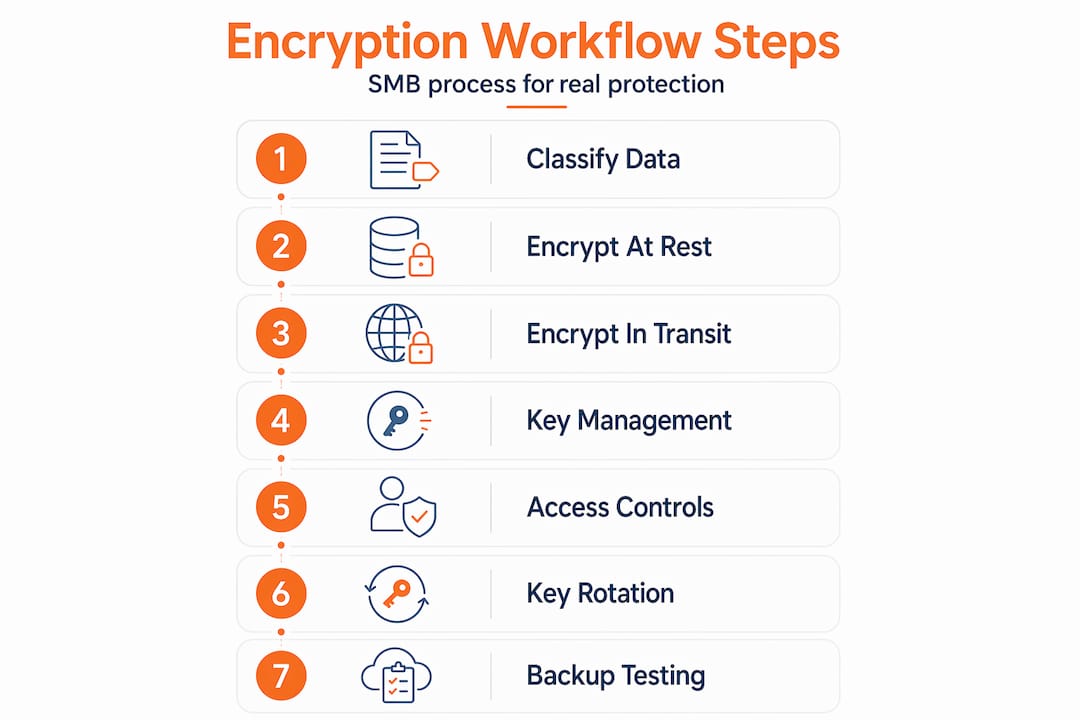
Step 1: Classify and tag sensitive data. Use your inventory to apply data classification labels to files, database tables, and data streams. Many modern data platforms support automated tagging.
Step 2: Apply encryption at rest. For databases, use transparent data encryption or column-level encryption for the most sensitive fields. For file storage, use AES-256 encryption at the storage layer. Don’t rely on operating system defaults without verifying the configuration.

Step 3: Enforce encryption in transit. Require TLS 1.2 or higher for all network communications. Disable older protocol versions explicitly. This applies to internal service-to-service traffic, not just external-facing APIs. Many SMBs forget to encrypt east-west traffic inside their own network.
Step 4: Implement key management. Use a dedicated key management service (KMS) rather than storing keys alongside your data. Cloud providers offer native KMS options. For on-premises environments, hardware security modules (HSMs) provide the strongest isolation. As the CSF Critical Security Controls describe, a defensible workflow flows from data classification through encryption to a continuous key management lifecycle including access control, rotation, and monitoring.
Step 5: Define and enforce access controls. Keys and encrypted data should have separate access policies. Use role-based access control (RBAC) to ensure that only authorized services and personnel can request key operations.
Step 6: Document and automate key rotation. Set rotation schedules based on data sensitivity. Annual rotation is an absolute minimum; quarterly is better for regulated data. Automate rotation where possible to remove human error from the process. Splunk’s key management guidance emphasizes that strong key management requires generation, secure storage, access limitation, and regular rotation as non-negotiable elements.
Step 7: Run backup restoration tests before go-live. This step is where most SMBs fail. Encrypting your backups is meaningless if you can’t decrypt and restore them when it counts.
Pro Tip: Schedule a full backup restoration test as part of your encryption go-live, not weeks later. If your restored data is corrupt or your keys aren’t accessible during a recovery scenario, your encryption provided zero protection.
Encryption options comparison:
| Method | Use case | Strength | Complexity |
|---|---|---|---|
| AES-256 | File and disk encryption | Very high | Low to medium |
| TLS 1.3 | Data in transit | Very high | Low |
| Envelope encryption | Cloud key wrapping | High | Medium |
| CMEK (Customer-Managed) | Cloud at-rest with key control | High | High |
| HSM-backed keys | Regulated/high-value data | Very high | High |
Understanding why cloud encryption matters helps frame the business case when presenting these options to leadership. The technical choices above all connect to specific cloud storage encryption scenarios your SMB will encounter.
Managing keys and secrets without breaking your workflow
Once encryption is running, key and secrets management becomes your primary ongoing challenge. This is where well-built encryption programs fall apart in practice.
In modern environments, secrets live everywhere: environment variables, CI/CD pipeline configurations, container orchestration platforms, and third-party integrations. Each location is a potential exposure point. Kubernetes, for example, stores secret data in etcd and requires explicit encryption configuration plus a dedicated key service to protect those secrets properly. Default Kubernetes configurations do not encrypt secret data at rest without additional setup.
CI/CD pipelines are particularly dangerous. GitHub Actions and similar tools can expose secrets through misconfigured workflows, forked repository access, or overly broad environment variable scoping. Encryption being “enabled” on your storage layer doesn’t prevent a pipeline from logging a decrypted key to an artifact that’s accessible to all contributors.
Common secrets management mistakes:
- Storing API keys or encryption key references in source code repositories
- Using the same key across multiple environments (dev, staging, production)
- Granting developer teams direct access to production key management systems
- Relying on cloud provider default key storage without configuring your own KMS
- Failing to rotate keys after team member departures
- Not monitoring key access logs for anomalous usage patterns
The solution is a dedicated secrets management system, whether that’s HashiCorp Vault, a cloud-native secrets manager, or an integrated platform. The critical design principle is that your secrets management system must operate independently of the systems it protects. Splunk’s research on key management reinforces this: limiting access to keys and monitoring key usage are as important as the encryption algorithm itself.
Pro Tip: Assign secrets management ownership to your security or IT operations team, not your development team. Developers need access to secrets to do their jobs, but they shouldn’t administer the vault that holds them. This separation of duties catches mistakes before they become incidents.
Caution: Encrypted data can still be disclosed if keys or workflow permissions are misconfigured. Encryption is not a substitute for access control. It’s a defense layer that only works when key custody is properly maintained.
Understanding how secure password manager tools are gives you a useful mental model for thinking about secrets vaults, as both rely on similar principles of encrypted storage with access-controlled retrieval. For hands-on configuration, exploring cloud encryption implementation options helps IT teams test their current state before hardening.
Cloud-specific encryption workflow: Pitfalls and best practices
Most SMBs operate substantially in cloud environments today, and cloud platforms introduce specific workflow considerations that differ from on-premises setups.
TLS configuration requires active attention. Major cloud platforms support modern TLS versions, but they often allow older versions by default for backward compatibility. You need to explicitly enforce TLS 1.2 or higher across all services. The Microsoft Azure Security Benchmark requires that clients negotiate modern TLS for data in transit and that encryption at rest be enabled across all Azure resources. Don’t assume the default configuration meets this standard.
At-rest encryption defaults also require verification. Most cloud storage services encrypt data at rest by default, but that doesn’t mean your configuration is complete. You still need to verify encryption is applied to every storage class, that database snapshots and backups are included, and that the encryption method meets your regulatory requirements.
Customer-managed encryption keys (CMEK) represent a significant decision point. With CMEK, your organization holds and manages the encryption keys rather than delegating that to the cloud provider. Google Cloud’s CMEK best practices note that CMEK reduces custody risk by giving you full control, but it substantially increases operational complexity and creates a new single point of failure if your key management system is misconfigured or unavailable.
Cloud provider encryption workflow comparison:
| Provider | At-rest default | KMS option | CMEK support | Key rotation |
|---|---|---|---|---|
| AWS | Yes (S3, RDS, EBS) | AWS KMS | Yes (SSE-C) | Manual or auto |
| Azure | Yes (Storage, SQL) | Azure Key Vault | Yes | Manual or auto |
| Google Cloud | Yes (all services) | Cloud KMS | Yes (per service) | Automated option |
Cloud encryption pitfalls to avoid:
- Leaving API keys or service account credentials with access to KMS exposed in application configs
- Using provider-managed keys without understanding the shared responsibility implications
- Failing to enforce TLS on internal microservice traffic within the cloud environment
- Not testing cross-region backup encryption during disaster recovery drills
- Ignoring encryption for development and staging environments that sometimes contain real data
Addressing password management errors is closely tied to cloud encryption hygiene, since the credentials protecting your cloud KMS are as valuable as the keys themselves.
Verification and operational maintenance: Testing your encryption workflow
Encryption that hasn’t been tested isn’t trustworthy. This is the section most IT teams skip because it feels redundant once everything is configured and “working.” It isn’t redundant. It’s the only way to know your encryption is actually protecting anything.
Verification steps to build into your operational calendar:
- Monthly: Verify key rotation logs and access control reviews. Confirm no unauthorized key access events appear in your monitoring system.
- Quarterly: Run a backup restoration test on your most critical encrypted datasets. Verify that decryption works correctly end-to-end.
- Semi-annually: Conduct a tabletop incident response exercise focused on an encryption-related scenario (ransomware attack on encrypted backups, key compromise, accidental key deletion).
- Annually: Full audit of your data classification inventory against actual data flows. Systems change faster than documentation.
The incident response piece deserves particular emphasis. What happens when someone deletes the wrong key? What’s the process if a key is suspected compromised? Encryption strategies for SMBs consistently show that encryption workflows need to be paired with operational testing for recovery and incident handling, not just initial deployment. An encryption incident playbook should cover key compromise response, backup recovery procedures, regulatory notification timelines, and escalation contacts.
A statistic worth internalizing: industry surveys consistently find that a significant percentage of SMB data loss events that occur despite encryption enabled trace directly back to recovery gaps, either inaccessible keys during a crisis or backups that were never validated. The configuration was correct. The operational discipline wasn’t.
Pair this with the guidance on choosing password management tools, since recovery processes often depend on credential access that must also be protected and tested.
The overlooked reality: Why most encryption failures are workflow failures
Here’s what most encryption guides won’t tell you: the algorithm almost never matters. AES-256 vs. AES-128, TLS 1.2 vs. TLS 1.3. These differences are nearly irrelevant for the vast majority of SMB breach scenarios. What breaks encryption programs is the workflow around the cryptography, not the cryptography itself.
The billing firm from the introduction wasn’t using weak encryption. They were using strong encryption incorrectly. Their keys were accessible to the wrong systems. Their CI/CD environment leaked credentials. Their backups hadn’t been tested. None of those failures had anything to do with their choice of algorithm.
Teams fail most often at handoffs. When the development team finishes a feature and hands it to operations, key rotation practices sometimes don’t transfer. When a vendor is onboarded, their access to secrets may be provisioned but never deprovisioned when the engagement ends. When a cloud environment is spun up quickly for a project, encryption configuration may be left at default. These aren’t algorithm failures. They’re workflow failures.
The organizations with genuinely strong encryption programs treat it the same way they treat payroll or compliance reporting. It’s a repeating operational process with named owners, scheduled reviews, and documented procedures. The algorithm is chosen once. The workflow runs forever.
“Encryption success is not a product feature. It’s a workflow outcome.”
The organizations that get this right focus less on which encryption tool they buy and more on whether their team actually follows the process. Explore how secure cloud storage concerns connect to this operational mindset for a practical example of how workflow discipline shapes real-world protection.
Get expert help securing your encryption workflows
Knowing the right workflow is one thing. Sustaining it across a growing SMB without dedicated security staff is genuinely hard. Key rotation, access control audits, cloud encryption configuration, and secrets management all require consistent attention that competes with every other IT priority.

LogMeOnce offers integrated tools specifically built for the operational realities SMBs face. From cloud storage encryption to centralized credential and secrets management, the platform is designed to reduce the manual overhead that makes encryption programs drift. You can explore the full range of SMB cybersecurity solutions to find where your current workflow has gaps. If you’re ready to build a defensible, maintainable encryption program, start by reviewing the password management benefits that anchor secure access to every layer of your encryption workflow. The tools exist to make this sustainable. You just need to build the workflow first.
Frequently asked questions
What is the most critical step in an SMB encryption workflow?
Strong key management, including generation, secure storage, rotation, and access control, is the most critical step because effective key management controls determine whether your encryption can actually protect data when it matters.
How should we test our encryption workflow?
Regularly verify by restoring backups and conducting incident response exercises, because operational testing for recovery confirms data is both encrypted and actually recoverable under real conditions.
Is enabling cloud provider default encryption enough?
No, you also need to enforce TLS for all communications, verify key management configuration, and test access controls, since modern TLS and encryption at rest requirements go beyond simply toggling default settings.
What is the main reason encryption fails in small businesses?
Workflow breaks and improper secrets handling are the primary causes, because edge failures from secrets exposure paths can compromise data even when encryption is technically enabled across your systems.
Which regulations typically require encryption for SMB data?
Common requirements include GDPR for organizations serving EU customers and HIPAA for US healthcare data, but always verify your industry-specific obligations since NIST small business guidance recommends documenting all regulatory dependencies as part of your security program.


