


 Password Manager
 Identity Theft Protection

 Team / Business
 Enterprise
 Government
 MSP
MSP


TL;DR:
- Secure remote access is only safe when it manages identity, device health, and session control as a continuous program. Relying solely on VPNs is insufficient, as they do not verify endpoints or enforce least privilege, increasing breach risk. Implementing zero trust principles and phishing-resistant MFA greatly reduces vulnerabilities and limits damage from compromised accounts.
Secure remote access is defined as the controlled, authenticated ability to connect to corporate systems from outside the network while protecting sensitive data through layered security controls. The industry term for this practice is “secure remote access,” which encompasses technologies including VPN, Remote Desktop Protocol (RDP), SSH, and Zero Trust Network Access (ZTNA). Whether remote access is truly safe depends not on the technology alone, but on how identity, device health, and session governance are managed together. NIST, NSA, and CISA all publish guidance confirming that misconfiguration and weak authentication are the leading causes of remote access breaches. Understanding these factors is the first step toward building a program that actually protects sensitive data.
Is secure remote access safe when VPNs are the only control?
The short answer is no. VPNs encrypt the tunnel between a remote device and the corporate network, but they do not verify whether the device itself is safe. A valid login on a compromised endpoint gives an attacker the same network reach as a legitimate employee, enabling lateral movement inside the enterprise. Endpoint trust gaps are as dangerous as weak authentication, because the access method and the device health must both be secured.
The scale of exposure is significant. In march 2026, Shodan.io identified over 35,000 internet-exposed Cisco ASA SSL VPN devices vulnerable to exploitation. That number represents tens of thousands of organizations with gateways visible to any attacker running a basic internet scan. Misconfigured VPNs lacking MFA are a primary source of security breaches, not an edge case.
Credential theft and session hijacking compound the problem. Attackers do not need to break encryption when they can steal credentials through phishing and log in as a trusted user. Once inside a VPN with broad network access, a threat actor can move laterally for days before detection. The false assumption that authentication equals safety ignores the reality of endpoint compromise.
Legacy protocols and unpatched gateways add another layer of risk. CVE-2026-50751 carried a 9.3 CVSS score and was actively exploited by ransomware groups shortly after public disclosure. That timeline shows how quickly attackers operationalize known vulnerabilities in remote access infrastructure.
Key vulnerabilities IT teams must address
- Exposed gateways: VPN and RDP endpoints visible on Shodan or Censys invite automated scanning and exploitation.
- Weak or absent MFA: Password-only authentication fails against credential stuffing and phishing campaigns.
- Broad network access: VPNs that grant full network reach after login create a large blast radius from any single compromised account.
- Unmanaged endpoints: BYOD and contractor devices without posture checks introduce unknown malware and configuration risks.
- Insufficient monitoring: Organizations that log authentication events but not post-login behavior miss the most damaging phase of an attack.
Why VPN alone is not enough for safe remote access
VPN provides encrypted transport. It does not enforce least privilege, verify device health after login, or limit access to specific resources. Best practice mandates combining VPN with identity verification, MFA, device posture checks, and session monitoring to achieve real security. Treating VPN plus MFA as a complete solution is a strategic error because segmentation and continuous monitoring are required to close the remaining blind spots.

The problem with standing privileges is that they persist long after they are needed. A contractor account provisioned for a three-month project but never deprovisioned remains an open door. Broad network access after login increases risk, and access that is not regularly reviewed creates persistent exposure to attackers.
Zero trust architecture addresses this directly. ZTNA grants access only after verifying identity, device posture, and session context, then scopes that access to specific resources rather than the full network. Zero trust principles mandate session scoping to specific resources and ongoing risk evaluation, rather than relying on one-time authentication to protect broad network zones. This model limits the blast radius from any single compromised account or device.
Phishing-resistant MFA is a non-negotiable component of this architecture. NSA and CISA guidance specifically recommends FIDO2 and PKI certificate-based authentication over SMS or push notifications. FIDO2 and PKI certificates prevent real-time phishing attacks and push fatigue exploits that bypass weaker MFA methods. SMS-based codes and simple push approvals are no longer sufficient against modern adversaries.
Pro Tip: Audit your current MFA method before evaluating any new remote access platform. If your organization still uses SMS-based codes as the primary second factor, that is the highest-priority fix regardless of what other controls are in place.
| Security layer | What it does | What it does not do |
|---|---|---|
| VPN | Encrypts traffic in transit | Verifies device health or enforces least privilege |
| MFA (SMS/push) | Adds a second factor to login | Stops real-time phishing or push fatigue attacks |
| Phishing-resistant MFA (FIDO2) | Prevents credential interception | Monitors post-authentication behavior |
| ZTNA | Scopes access to specific resources | Replace endpoint security controls |
| Continuous session monitoring | Detects anomalies after login | Prevent initial compromise if posture checks are skipped |
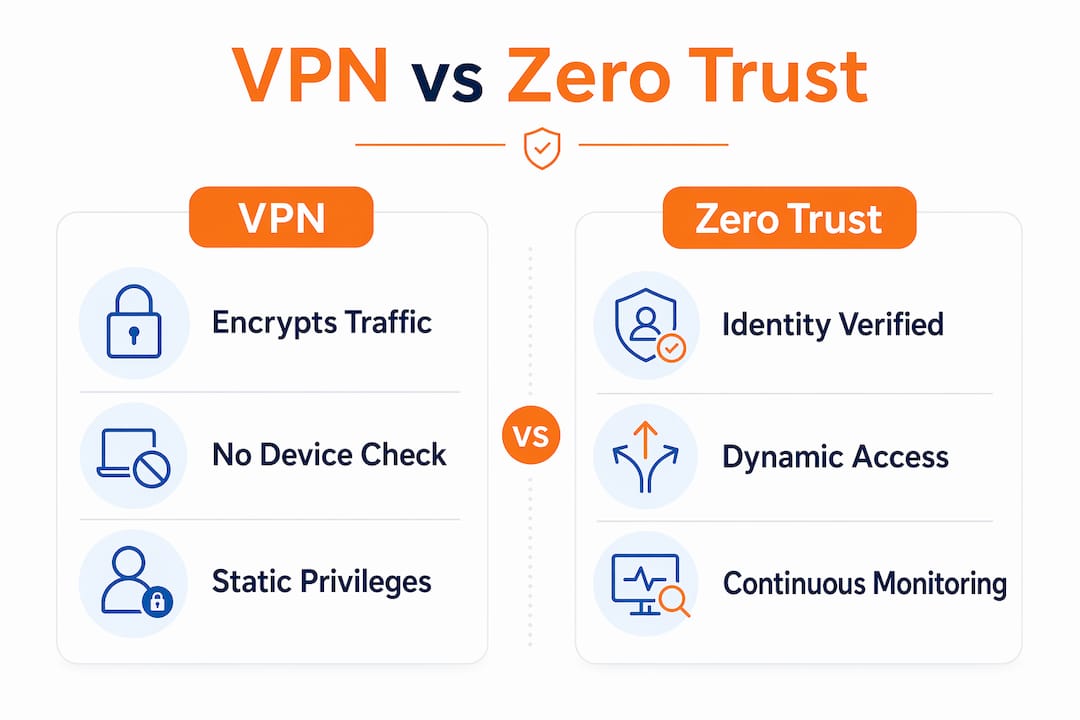
Best practices for ensuring safe, secure remote access
Strong identity and access management is the foundation. Every remote access request must require phishing-resistant MFA, and authorization must be granted at the resource level, not the network level. Logmeonce supports two-factor authentication and passwordless MFA methods that align with NSA and CISA guidance for remote access environments. Resource-level authorization means a finance contractor can reach the accounts payable system without touching HR databases or engineering repositories.
Device posture evaluation must happen before access is granted, not just at initial enrollment. The posture check should confirm patch status, anti-malware presence, disk encryption, and configuration baseline adherence. Bad device posture compromises remote access even with MFA in place, because active sessions can be hijacked from compromised endpoints. BYOD and contractor devices require the same posture standards as corporate-managed machines.
Continuous session monitoring closes the gap that authentication controls leave open. Monitoring VPN, endpoint, and identity telemetry reveals impossible travel events, unusual tool launches, and resource access spikes that indicate post-authentication compromise. A security posture assessment framework helps IT teams define what normal behavior looks like so anomalies trigger alerts rather than go unnoticed.
Pro Tip: Set a behavioral baseline for each remote access role during the first 30 days of deployment. Alerts calibrated to role-specific norms generate far fewer false positives than generic thresholds, which means your team actually investigates them.
The following steps represent the operational sequence IT teams should follow when building a safe remote access program:
- Inventory all remote access entry points. Identify every VPN gateway, RDP endpoint, and SSH server exposed to the internet. Use tools like Shodan to see what attackers already see.
- Enforce phishing-resistant MFA on every entry point. Migrate away from SMS and push-based methods to FIDO2 or certificate-based authentication.
- Implement device posture checks. Require patch currency, endpoint protection, and encryption before granting any session.
- Apply micro-segmentation and ZTNA. Replace broad network access with resource-specific authorization scoped to the user’s role and session context.
- Deploy continuous session monitoring. Collect telemetry from VPN, endpoint, and identity systems and alert on behavioral anomalies.
- Review and expire access rights on a defined cycle. Eliminate standing privileges for contractors and temporary accounts. Set automatic expiration for time-limited access grants.
- Patch remote access gateways within 24 hours of critical CVE disclosure. The window between disclosure and active exploitation is shrinking, as CVE-2026-50751 demonstrated.
How to evaluate if your remote access program is ready
Assessing your current posture starts with visibility. Run an external scan of your organization’s internet-facing infrastructure to identify exposed gateways, open RDP ports, and legacy protocol endpoints. Many organizations discover services they did not know were publicly accessible. That discovery alone often justifies the assessment effort.
Audit MFA quality and enforcement coverage next. Confirm that MFA is required for every remote access path, not just the primary VPN. Shadow IT connections, developer SSH tunnels, and vendor remote support tools frequently bypass MFA policies. Remote work security audits should include all access paths, not just the ones IT provisioned.
Review segmentation and access scope policies against the principle of least privilege. Ask whether each user role has access to only the resources it needs, and whether that access expires automatically. Authentication, endpoint trust, and authorization must be governed as a single lifecycle rather than separate controls to reduce risk. Organizations that manage these three elements in silos consistently show larger blast radii when breaches occur.
Measure operational metrics to gauge program maturity. Track mean time to patch critical gateway vulnerabilities, the percentage of remote sessions covered by behavioral monitoring, and the rate of access rights reviews completed on schedule. These numbers tell you whether your program operates at the speed threats demand. Planning for zero trust integration gives IT leaders a structured path to close the gaps that point-in-time assessments reveal.
Key Takeaways
Secure remote access is safe only when identity, device posture, and session governance are managed together as a single, continuous program rather than separate technical controls.
| Point | Details |
|---|---|
| VPN alone is insufficient | VPN encrypts traffic but does not enforce least privilege or verify device health post-login. |
| Phishing-resistant MFA is required | FIDO2 and PKI certificates prevent real-time phishing attacks that bypass SMS and push-based methods. |
| Device posture must be checked continuously | Patch status, anti-malware, and encryption must be verified before and during every remote session. |
| Zero trust limits blast radius | ZTNA scopes access to specific resources, reducing damage from any single compromised account. |
| Operational governance closes the gaps | Access expiration, patch speed, and behavioral monitoring determine whether a program is actually safe. |
Why remote access safety is a governance problem, not a technology problem
After years of watching organizations deploy VPNs, add MFA, and still suffer breaches, I am convinced the core issue is governance, not tooling. The technology to secure remote access has existed for years. FIDO2 authentication, ZTNA platforms, and behavioral monitoring are all mature and available. What fails is the operational discipline to enforce them consistently across every access path, every device type, and every user population.
The organizations I see struggle most are those that treat remote access security as a project with a completion date. They deploy a VPN with MFA, check the compliance box, and move on. Six months later, a contractor account with standing privileges and an unpatched laptop becomes the entry point for a ransomware attack. The technology did not fail. The governance did.
Zero trust is the right architectural direction, but it is not a product you buy and install. It is a set of principles you apply incrementally, starting with your highest-risk access paths and working outward. I recommend IT leaders identify the three remote access entry points with the broadest network reach and apply resource-level authorization to those first. That single change reduces blast radius more than any additional authentication layer.
The other lesson I keep returning to is the speed requirement. CVE-2026-50751 showed that ransomware groups can operationalize a critical VPN vulnerability within days of public disclosure. A patch management process that runs on a monthly cycle is not compatible with that threat timeline. Remote access infrastructure needs a dedicated fast-track patching process, separate from the standard change management queue.
— Mike
Logmeonce cybersecurity solutions for safer remote access
Organizations that need to close the gaps between authentication, device posture, and session governance have a direct path forward with Logmeonce.

Logmeonce delivers cybersecurity solutions that address the full remote access security lifecycle, from passwordless and phishing-resistant MFA to zero trust identity controls and continuous session oversight. The platform supports FIDO2-aligned authentication, device posture integration, and single sign-on governance designed for distributed workforces. IT teams can enforce resource-level authorization and monitor access behavior without building a custom security stack from scratch. For organizations evaluating whether their current remote access program meets the standard that NIST and CISA recommend, Logmeonce provides a structured starting point with measurable controls.
FAQ
What makes secure remote access safe?
Secure remote access is safe when it combines phishing-resistant MFA, device posture verification, and resource-level authorization managed as a continuous lifecycle. No single technology achieves safety on its own.
Is a VPN enough to protect remote access?
A VPN is not enough on its own. VPNs encrypt traffic but do not enforce least privilege, verify device health, or monitor post-authentication behavior, all of which are required for safe remote access.
What are the biggest secure remote access risks?
The biggest risks are misconfigured or exposed gateways, credential theft through phishing, compromised endpoints with active sessions, and unpatched gateway vulnerabilities exploited by ransomware groups.
How does zero trust improve remote access security?
Zero trust grants access only after verifying identity, device posture, and session context, then scopes that access to specific resources. This limits lateral movement and reduces the blast radius from any single compromised account.
How often should organizations review remote access rights?
Access rights should be reviewed on a defined cycle, typically quarterly for standard users and monthly for privileged or contractor accounts. Standing privileges that outlast their business purpose are a persistent and preventable risk.
Recommended


