


 Password Manager
 Identity Theft Protection

 Team / Business
 Enterprise
 Government
 MSP
MSP


TL;DR:
- Cloud storage security combines encryption, access controls, and continuous monitoring to prevent unauthorized data access. Regular automated audits and strong key management are essential to maintaining effective security practices. Adopting a zero-trust approach, with phishing-resistant authentication and policy automation, significantly reduces the risk of breaches.
Cloud storage security is defined as the combination of encryption, access controls, and continuous monitoring that prevents unauthorized access to data stored on remote servers. Human error causes 80% of data breaches, making identity and access management the most critical layer in any cloud security strategy. Standards like AES-256 for data at rest and TLS 1.2/1.3 for data in transit form the technical backbone of protecting cloud information. Knowing how to secure cloud storage is no longer optional for individuals or organizations. It is a baseline requirement for anyone who stores sensitive data off-premises.
What are the fundamental controls to secure cloud storage?
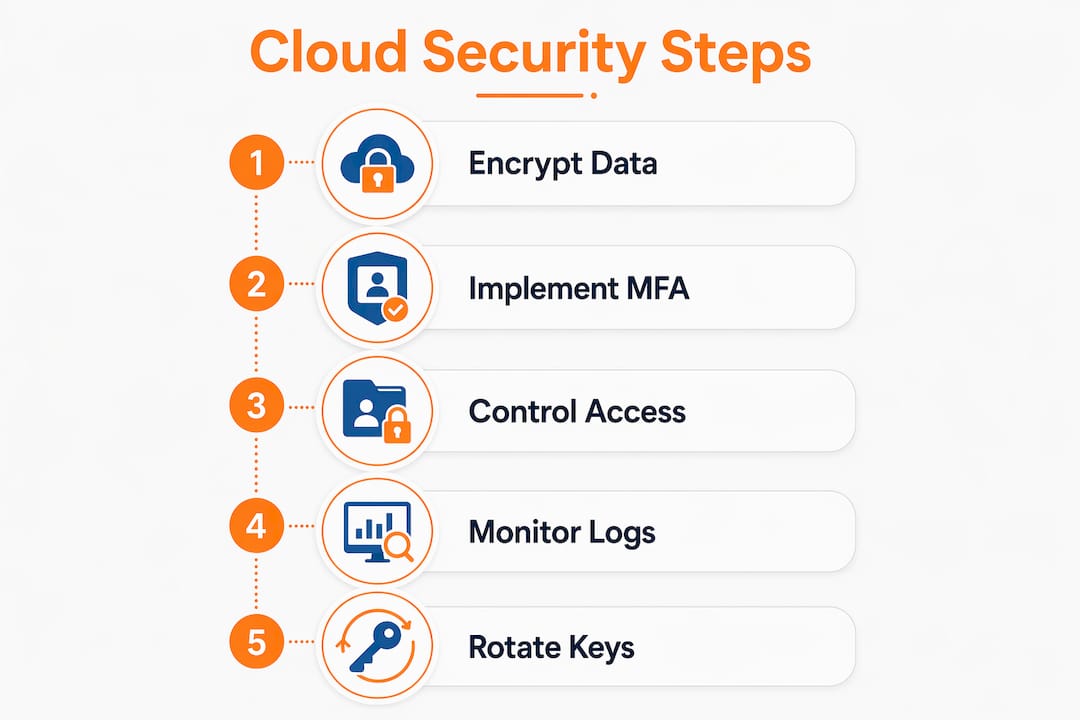
Encryption paired with strict access control and continuous auditing forms the foundation of effective cloud data protection. Without all three working together, any one layer can fail and expose your data.

Encryption at rest and in transit
AES-256 encryption with customer-managed keys is the recommended standard for protecting data at rest in cloud environments. TLS 1.2 or TLS 1.3 protects data while it moves between your device and the cloud server. Skipping either layer leaves a gap that attackers can exploit. Most enterprise cloud platforms support both standards natively, but you must verify that they are actually enabled, not just available.
Multi-factor authentication and identity management
Multi-factor authentication (MFA) is a verification method that requires users to prove their identity through two or more independent factors before gaining access. FIDO2 hardware keys and platform biometrics provide phishing-resistant MFA that outperforms SMS codes or app-based one-time passwords. SMS-based MFA can be intercepted through SIM-swapping attacks, which makes it a weak choice for protecting sensitive cloud accounts. Logmeonce offers passwordless MFA that removes the weakest link, the password itself, from the authentication chain entirely.
Access policies and the principle of least privilege
- Grant each user or service account only the permissions required for their specific role.
- Apply default-deny policies that block public access to storage buckets unless explicitly required.
- Review and revoke unused permissions on a scheduled basis, at minimum quarterly.
- Separate administrative accounts from standard user accounts to limit blast radius if credentials are compromised.
Pro Tip: Set up automated alerts for any permission change that grants public read or write access to a storage bucket. Most breaches involving cloud storage start with a misconfigured bucket, not a sophisticated attack.
Logging and monitoring for audit and incident response
Comprehensive logging captures every access event, permission change, and configuration update in your cloud environment. Without logs, you cannot reconstruct what happened after a breach or prove compliance during an audit. Enable logging at the storage bucket level, not just at the account level, to capture granular activity. Pair logs with real-time alerting so your team gets notified immediately when suspicious patterns appear, such as a single account downloading thousands of files in minutes.
Which tools and practices help maintain cloud security continuously?
One-time security configurations degrade over time. Cloud environments change constantly as teams add services, update permissions, and deploy new workloads. Continuous monitoring and automation are the only reliable ways to keep your security posture intact.
-
Deploy a cloud security posture management (CSPM) tool. CSPM tools continuously scan your cloud configuration against security benchmarks like CIS Controls and flag deviations automatically. They remove the need for manual periodic audits, which leave clouds vulnerable between review cycles.
-
Automate key usage auditing. Track when encryption keys are used, by whom, and from where. Anomalous key usage, such as a key accessed from an unfamiliar IP address at 3:00 AM, is a strong indicator of compromise.
-
Implement policy-as-code. Write your security policies as code and integrate them into your CI/CD pipeline. This means every new infrastructure deployment is automatically checked against your security rules before it goes live.
-
Build incident response playbooks. Define exactly what steps your team takes when a specific alert fires. A playbook for “public bucket detected” should include immediate remediation steps, not just a notification.
-
Schedule threat modeling reviews. Revisit your threat model every six months or after any major architecture change. Cloud environments evolve, and your threat assumptions must evolve with them.
Pro Tip: Treat your cloud security configuration like code in version control. Every change should be tracked, reviewed, and reversible. This makes it far easier to identify when and how a misconfiguration was introduced.
How can you implement encryption and key management effectively?
Encryption is only as strong as the key management behind it. A well-encrypted file protected by a poorly managed key is still vulnerable. Performing a data discovery scan before applying encryption controls is a foundational first step. You cannot protect data you do not know exists.
Server-side vs. client-side encryption
| Method | Who controls the key | Best for | Trade-off |
|---|---|---|---|
| Server-side encryption | Cloud provider | Ease of use, low overhead | Provider can theoretically access your data |
| Client-side encryption | You, before upload | Maximum control and privacy | Adds complexity; key loss means data loss |
| Customer-managed keys (CMKs) | You, via key management service | Compliance-heavy environments | Requires disciplined key rotation practices |
Client-side encryption offers stronger control by encrypting data before it ever reaches the cloud provider’s servers. The trade-off is real: if you lose the key, you lose the data permanently. Customer-managed keys (CMKs) give you control without requiring you to manage the raw cryptographic infrastructure yourself.
Hardware security modules and key rotation
Hardware security modules (HSMs) are physical or cloud-hosted devices that store encryption keys in tamper-resistant hardware. They prevent keys from being exported in plaintext, which eliminates a major attack vector. Key rotation, the practice of replacing encryption keys on a defined schedule, limits the damage if a key is ever exposed. A 90-day rotation cycle is a common baseline for high-sensitivity environments. Logmeonce’s cloud storage encryption capabilities integrate key management practices that align with these standards.
What are common mistakes in cloud storage security?
The most damaging cloud storage mistakes are not exotic attacks. They are predictable configuration errors that go undetected for months.
- Default public buckets. Cloud storage services often default to private, but a single misconfiguration can expose an entire bucket to the public internet. Attackers actively scan for open buckets using automated tools.
- Overly permissive IAM roles. Granting broad permissions because it is faster than scoping them precisely is the most common IAM mistake. A compromised account with broad permissions becomes a master key for the attacker.
- One-time security audits. Configuration drift requires continuous automated scans. A cloud environment that passed a security audit in january may be fully exposed by march due to routine changes.
- Ignoring secure cloud file sharing settings. Sharing a file via a link that anyone can access defeats all other security controls. Always set expiration dates and access restrictions on shared links.
- Skipping data classification. Not all data needs the same level of protection. Without classification, teams either over-protect low-risk data or under-protect sensitive records.
“Overly complex security controls lead to risky user workarounds that diminish overall security posture. The best security is the security people actually use.”
Balancing protection with usability is not a compromise. It is a design requirement. When security controls are too cumbersome, users find ways around them, and those workarounds create the exact vulnerabilities you were trying to prevent. The goal is controls that are strict enough to be effective and simple enough that no one feels the need to bypass them.
Key Takeaways
Securing cloud storage requires layered defenses combining AES-256 encryption, phishing-resistant MFA, least-privilege access, and continuous automated monitoring to protect data against both external attacks and internal misconfigurations.
| Point | Details |
|---|---|
| Encryption is the baseline | Use AES-256 at rest and TLS 1.2/1.3 in transit; verify both are active, not just available. |
| MFA must be phishing-resistant | FIDO2 hardware keys or biometrics outperform SMS codes against modern credential attacks. |
| Least privilege limits damage | Scope every permission to the minimum required and audit unused access quarterly. |
| Continuous monitoring beats audits | Automated CSPM tools catch configuration drift that periodic manual reviews always miss. |
| Key management determines encryption strength | Rotate encryption keys on a defined schedule and store them in HSMs to prevent plaintext exposure. |
Why layered defense is the only cloud security strategy that holds
I have reviewed cloud security incidents across organizations of every size, and the pattern is almost always the same. The breach was not caused by a failure of encryption technology. It was caused by a failure of process. A key was never rotated. A bucket was left public after a test. An admin account had permissions that were granted two years ago and never reviewed.
The zero-trust model is the right mental framework here. Assume that any account, device, or service could be compromised at any moment. Design your controls so that a single compromised credential cannot move laterally through your environment and reach sensitive data. That assumption forces you to build the right controls: granular permissions, continuous monitoring, and strong authentication at every layer.
The organizations that get cloud security right do not have more sophisticated tools. They have better habits. They treat security configuration as a living document, not a one-time project. They automate what can be automated and review what cannot. They test their incident response playbooks before they need them. Logmeonce’s zero-trust identity model reflects exactly this philosophy, building access controls that assume nothing and verify everything.
The future of cloud security belongs to phishing-resistant authentication and policy-as-code. If your organization is still relying on passwords and quarterly manual audits, you are already behind. Start with the controls that address the highest-probability failures first: MFA, least-privilege access, and automated configuration monitoring.
— Mike
Logmeonce cloud security tools for your protection strategy
Protecting your cloud data requires more than a single tool. It requires a coordinated set of controls that work together across authentication, encryption, and access management.

Logmeonce brings these controls together in one platform. Its cybersecurity suite covers cloud storage encryption, passwordless MFA, single sign-on, and dark web monitoring, giving individuals and organizations a unified defense layer. The platform’s zero-trust access controls mean that every login is verified, every session is scoped, and no account carries more access than it needs. Audit logging is built in, so compliance reporting does not require a separate tool. For teams that need to move fast without cutting corners on security, Logmeonce provides the structure to do both. Explore the full platform and see how it fits your cloud security strategy.
FAQ
What does “securing cloud storage” actually mean?
Securing cloud storage means applying encryption, access controls, and monitoring to prevent unauthorized access to data stored on remote servers. The industry term for this practice is cloud data security, which covers both technical controls and operational processes.
Is cloud storage secure by default?
Cloud storage is not fully secure by default. Most providers encrypt data at rest, but default configurations often allow overly broad access permissions and may not enforce MFA, which leaves accounts vulnerable to credential-based attacks.
What is the best encryption standard for cloud data?
AES-256 is the recommended standard for encrypting data at rest in cloud environments. TLS 1.2 or TLS 1.3 protects data in transit between your device and the cloud server.
How does multi-factor authentication improve cloud storage security?
MFA requires users to verify their identity through a second factor beyond a password, which blocks most credential-based attacks. Phishing-resistant methods like FIDO2 hardware keys provide stronger protection than SMS or app-based codes.
What is configuration drift and why does it matter?
Configuration drift occurs when a cloud environment’s security settings change over time due to routine updates, new deployments, or human error. Automated posture management tools detect and flag drift before it creates exploitable vulnerabilities.
Recommended
- test cloud encryption – LogMeOnce
- Secure Drive: An Unbreakable Cloud Storage Solution
- How to Protect Your Information While Using the Cloud – LogMeOnce
- Cloud Data Storage FAQs: Can the Cloud Be Hacked? – LogMeOnce


