


 Password Manager
 Identity Theft Protection

 Team / Business
 Enterprise
 Government
 MSP
MSP


TL;DR:
- Phishing now utilizes AI, making attacks more realistic and harder to detect.
- Basic checks include verifying sender addresses and hovering over links before clicking.
- Combining automated tools with employee awareness and reporting practices creates the strongest defense.
A perfectly formatted email lands in your inbox. It uses your company logo, references a real project you’re working on, and asks you to verify your login credentials through what looks like a legitimate link. Your instinct says something is off, but you’re buried in work. One click later, your credentials are compromised. This is not a hypothetical. As phishing attacks grow more sophisticated and AI-powered, even experienced IT professionals and security-conscious employees are getting caught. This guide walks you through exactly how to identify phishing attempts at every level, from basic red flags to advanced detection techniques, so your organization can stay ahead of attackers.
Key Takeaways
| Point | Details |
|---|---|
| Phishing is evolving rapidly | Modern phishing attacks use AI and multiple channels, making them harder to spot with old methods. |
| Check sender and links | Always scrutinize the sender’s address and hover over links before clicking to catch common red flags. |
| Advanced attacks need extra steps | Verify suspicious messages with a second channel and stay alert for highly personalized or non-email attacks. |
| Tech plus training work best | Automated detection helps, but ongoing human awareness and team drills are crucial for staying secure. |
| Empower your team | Encourage a security-minded culture where everyone reports and discusses phishing attempts openly. |
Understanding phishing: Types, tactics, and trends
Phishing is no longer just a poorly written email claiming you’ve won a prize. Today, it is a precision attack method spanning email, voice calls, SMS, QR codes, and social platforms. Each channel requires a different detection mindset, and attackers are constantly evolving their approach.
The numbers are striking. 82.6% of phishing emails are now AI-generated, and those AI-crafted messages achieve a 54% click rate compared to just 12% for traditional phishing. That is not a small gap. It means attackers using AI are more than four times as effective at getting employees to take the bait.
Here is a breakdown of the main phishing types your team needs to recognize:
| Type | Channel | Key characteristic | Detection difficulty |
|---|---|---|---|
| Email phishing | Mass, generic | Low to medium | |
| Mobile phishing tactics | SMS (smishing) | Short, urgent links | High |
| Voice phishing (vishing) | Phone call | Real-time social pressure | High |
| QR code (quishing) | Any medium | Visual redirect | Very high |
| AI-driven spear-phishing | Email/social | Personal, flawless | Very high |
| Business Email | CEO/CFO impersonation | High |
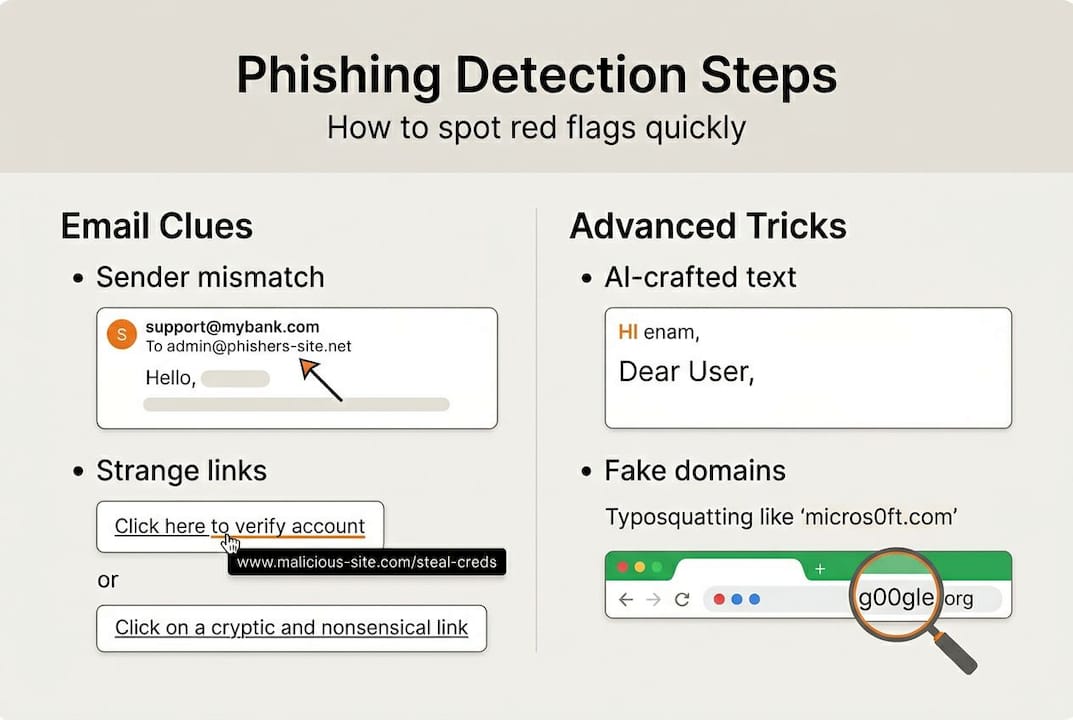
Beyond email, phishing has expanded into territory that many enterprise security tools do not fully cover. Advanced phishing tactics now include spear-phishing, which uses personal or organizational data gathered through reconnaissance, whaling that targets executives, homograph domains that look visually identical to real ones, and the abuse of legitimate platforms like SharePoint or OneDrive to host malicious content.
Key phishing warning signs across channels:
- Messages that create urgency or threaten account suspension
- Links that do not match the displayed text when you hover over them
- QR codes in unexpected emails, physical flyers, or messages
- Voice callers who pressure you to act immediately without verification
- Messages arriving from platforms you do not normally use for that type of communication
Polymorphic phishing, where the malware or payload changes its signature automatically to evade filters, is also on the rise. Security filters that rely on known signatures can miss these entirely. Detection now depends on behavioral analysis, context awareness, and, critically, the trained instincts of every person in your organization.
Step 1: Check the basics—sender, links, and message details
Every employee needs a reliable first-pass checklist, even before any automated tool weighs in. These foundational checks take seconds and catch a significant share of attacks before they do damage.
Start with the sender’s email address. Check sender email addresses carefully for slight misspellings, unusual domains, or mismatches between the display name and the actual address. An email from “support@paypa1.com” or “hr@your-company.co” instead of your actual company domain is a red flag. Many attackers count on people reading the display name and not the raw address.

Then look at every link before clicking. Always hover over links to reveal the real destination before clicking. If the visible text says “Bank of America” but the URL shows a string of random characters or a foreign domain, do not click. The same applies to buttons embedded in emails.
Here is a quick inspection process to run on any suspicious message:
- Check the “From” field for exact domain match to the claimed sender
- Read the subject line for excessive urgency, unusual formatting, or generic language
- Look at the greeting, “Dear Customer” instead of your name is a warning sign
- Read the body carefully for contextual oddities, even perfect grammar can carry logical inconsistencies
- Before clicking any link, hover or long-press (on mobile) to see the actual URL
- Do not open unexpected attachments, especially .zip, .exe, or macro-enabled Office files
- If credentials or financial action are requested, stop and verify through a separate channel
Attachments are a major attack vector in enterprise environments. A malicious PDF or a macro-embedded spreadsheet can deliver ransomware or credential harvesters without any further user interaction once opened. Cloud attack risks are especially high when compromised credentials give attackers access to shared cloud environments.
Pro tip: Set up email clients to display the full sender address by default, not just the display name. This one configuration change across your organization removes a major advantage attackers rely on.
AI has complicated some of these checks. Perfect grammar and flawless formatting no longer mean a message is safe. But foundational checks still matter because many attacks, especially lower-effort campaigns, rely on these exact oversights.
Step 2: Advanced detection—AI threats, social engineering, and edge cases
Once you have mastered the basics, you need techniques that hold up against the most convincing attacks. These are the ones that fool security teams, not just general employees.
AI-generated phishing does not make the mistakes that used to make phishing so easy to spot. No typos. No odd phrasing. Content tailored to your role, recent activities, or company projects using publicly scraped data. That is the reality your team faces.
A useful lens to apply:
If an email asks for any action involving credentials, financial transfers, or sensitive data, treat the request as unverified until you confirm it through a completely separate channel, regardless of how authentic it looks.
Here is a comparison of traditional versus advanced phishing to help your team understand the difference:
| Feature | Traditional phishing | AI-driven/spear-phishing |
|---|---|---|
| Grammar quality | Poor to moderate | Perfect |
| Personal detail | Generic | Name, role, recent events |
| Click rate | ~12% | Up to 54% |
| Domain used | Obviously fake | Look-alike or legit platform |
| Filter evasion | Low | High (polymorphic) |
Spear-phishing attacks targeting executives, often called whaling, pull data from LinkedIn, company websites, press releases, and even calendar data leaked through breaches. The attacker crafts a message that references real meetings, real vendors, or real organizational priorities. Standard spam filters do not flag these.
Homograph attacks are equally deceptive. These use Unicode characters that look identical to standard Latin letters, so “apple.com” may actually be “аpple.com” with a different character. Only inspecting the raw URL reveals the difference. These are commonly used to abuse otherwise legitimate-looking domains.
For non-email vectors, IT security tips consistently recommend treating every unsolicited voice call, text, or QR code as potentially suspicious. Train your team to never provide credentials or approve financial transactions over the phone without an established, pre-agreed verification protocol.
Pro tip: Use a strong password guideline policy paired with multi-factor authentication so that even if credentials are captured, attackers cannot use them without the second factor.
Step 3: automated tools, verification methods, and team readiness
No single tool stops every phishing attack. The best defense layers automated detection, manual checks, and a team culture that treats reporting as a strength, not an admission of weakness.
On the automation side, machine learning models are impressive on paper. ML phishing models reach 95 to 99% accuracy on controlled benchmarks. But real-world email environments have very different base rates. When only 0.05% to 5% of messages are actual phishing, even a highly accurate model generates a meaningful number of false negatives, meaning real attacks that slip through.
| Detection layer | What it catches | What it misses |
|---|---|---|
| Email spam filter | Mass phishing, known bad domains | Novel domains, AI-crafted content |
| ML behavioral analysis | Pattern anomalies | Low-volume targeted attacks |
| Cloud protection tools | File scanning, sandboxing | Zero-day payloads |
| Human review | Context, relationships, intent | Volume at scale |
This is why verification steps matter. Here is what every employee should do when they receive a suspicious message:
- Do not click anything in the message
- Open a fresh browser window and manually type the sender’s organization URL to check legitimacy
- Call or message the alleged sender through a known, trusted contact method
- Report the message to your IT or security team through your organization’s defined channel
- If credentials were already entered, alert your team immediately so they can act fast
Simulated phishing drills are one of the most effective tools available to enterprise teams. Running quarterly tests using realistic scenarios, including AI-generated emails, helps you measure real-world susceptibility and identify which teams or roles need more focused training.
Business safety tools combined with two-factor authentication create a strong safety net. Even if a phishing attempt captures a password, multi-factor authentication blocks unauthorized access in the majority of cases.
Pro tip: Create a one-click reporting button in your email client so employees can flag suspicious messages without friction. The easier you make reporting, the more attacks your security team will catch before they spread.
Why phishing detection is a human-machine partnership
Here is what most security articles get wrong: they treat users as the weakest link that technology needs to compensate for. That framing is outdated and counterproductive.
Filters, AI detection, and automated sandboxing are powerful, but they work reactively. They catch what they have seen before. A well-crafted spear-phishing email from a domain registered that morning, sent from a platform your filters trust, will get through. At that moment, your employee’s judgment is the only defense.
Organizations that build a cybersecurity strategy around informed, empowered users consistently outperform those that rely solely on technology. The shift is cultural. When employees feel safe reporting a potential mistake without fear of blame, threats surface faster. When leadership models the “pause and verify” habit, it spreads across teams.
The organizations that get phishing defense right treat every user as an active security partner. They invest in frequent, realistic training. They build clear, low-friction reporting processes. And they make security awareness a shared responsibility rather than an IT department problem. Technology handles the volume; people catch the exceptions.
Next steps: strengthen your defenses with LogMeOnce
Knowing how to spot phishing is step one. Having the tools to prevent a successful attack from causing real damage is step two. That is where integrated security infrastructure matters.

Enterprise cybersecurity solutions from LogMeOnce help organizations combine password security, multi-factor authentication, and dark web monitoring into one platform. If phishing does capture credentials, LogMeOnce’s password management advantages and set up two-factor authentication features ensure attackers cannot move further into your systems. From protecting individual employee accounts to securing enterprise-wide access, LogMeOnce gives your security team the layered protection it needs to stop phishing at every stage.
frequently asked questions
What are the most common signs of a phishing attempt?
Look for email mismatches, unexpected links, urgent requests for credentials, or messages using generic greetings instead of your actual name.
How can AI-generated phishing emails be detected?
AI phishing looks flawless with no grammar errors, so focus on verifying context, inspecting URLs manually, and confirming requests through a separate, trusted communication channel.
Are there automated tools to detect phishing automatically?
ML models reach 95-99% accuracy on benchmarks, but real-world performance drops significantly, so always pair automation with manual review and a team reporting process.
What should I do after receiving a suspected phishing message?
Do not click any links or open attachments. Report the message to your IT or security team immediately using your organization’s designated reporting channel.
How often should employees receive phishing awareness training?
At minimum, quarterly training with periodic simulated phishing tests keeps awareness sharp and helps identify which employees or departments need additional support.


