


 Password Manager
 Identity Theft Protection

 Team / Business
 Enterprise
 Government
 MSP
MSP


Every IT manager knows the headache of users juggling endless passwords across growing business applications. This complexity not only frustrates teams but also exposes gaps in data protection as organizations integrate with partners or expand globally. By adopting federated identity management, your enterprise can centralize authentication, simplify access for users, and elevate security—giving each application the flexibility to authorize without sacrificing control over sensitive company identities.
Key Takeaways
| Point | Details |
|---|---|
| Federated Identity Management Enhances Security | It centralizes authentication while allowing distributed authorization, simplifying user credential management. |
| Single Sign-On (SSO) Improves User Experience | Users authenticate once and gain access to multiple applications, reducing password fatigue and help desk requests. |
| Different Federation Architectures Suit Various Needs | Choose between Hub-and-Spoke, Mesh, or Broker models based on your organization’s specific requirements and growth trajectory. |
| Adopt a Phased Approach for Implementation | Start with critical applications to build confidence and ensure smooth integration before expanding organization-wide. |
What Federated Identity Management Means
Federated identity management solves a real problem that IT managers at mid-sized enterprises face every day: credential sprawl. When your organization uses multiple applications, partners with external vendors, or expands across departments, users end up managing dozens of different usernames and passwords. Federated identity management addresses this by allowing your team to authenticate users once and grant access across multiple systems and organizations through a single verified identity. Rather than forcing every connected application to maintain its own user database and password requirements, a federated approach centralizes verification while distributing authorization decisions across your infrastructure. This distinction matters because it means you keep control of who your users are while allowing individual applications to make their own authorization choices.
At its core, federated identity management works through two essential components: the Identity Provider (IdP) and the Service Provider (SP). Your IdP handles authentication, verifying that the person trying to access resources really is who they claim to be. It issues identity tokens that confirm this verification. The Service Provider is the application or system your users want to access—it trusts the IdP to do the authentication work and makes authorization decisions based on the token the IdP provides. Think of it like airport security paired with individual airline gates. Security performs the verification once at the entrance, and then each airline’s gate staff trusts that verification to let passengers board without re-checking identification.

What distinguishes federated identity from traditional approaches is the flexibility it provides. Historically, IT teams deployed what’s called “perimeter security”—separate identity systems managed independently within each department or application. This meant users reset passwords constantly, security teams managed multiple identity stores, and onboarding new employees consumed hours of administrative work. With federation, users leverage one set of credentials across different websites and services connected through trust agreements between organizations. Your users experience what’s known as Single Sign-On (SSO) functionality extended beyond your company walls. They log in once in the morning and access their email, project management tools, customer portals, and partner systems without entering credentials again. This simplification reduces password fatigue, lowers the risk of credential theft from weak reused passwords, and dramatically improves the user experience across your enterprise.
For mid-sized enterprises specifically, federation transforms how you handle growth and integration. When you acquire a smaller company or partner with vendors, federation lets you grant access to their systems without the chaos of manual account creation and password distribution. Your security team maintains control through the IdP while respecting each connected organization’s autonomy. You can adjust permissions, revoke access, and monitor authentication attempts from a centralized location. This approach also simplifies compliance audits because you have a clear record of who accessed what and when, all flowing through your identity provider.
Pro tip: Start federation with your most critical applications and user populations before expanding organization-wide; this phased approach lets you test your IdP configuration, train your team, and build confidence with limited risk exposure.
Types and Core Components of Federation
Federation isn’t one-size-fits-all. Different organizations need different architectural approaches depending on their size, complexity, and existing infrastructure. Understanding the main federation models helps you choose what works for your mid-sized enterprise’s growth trajectory and technical constraints.
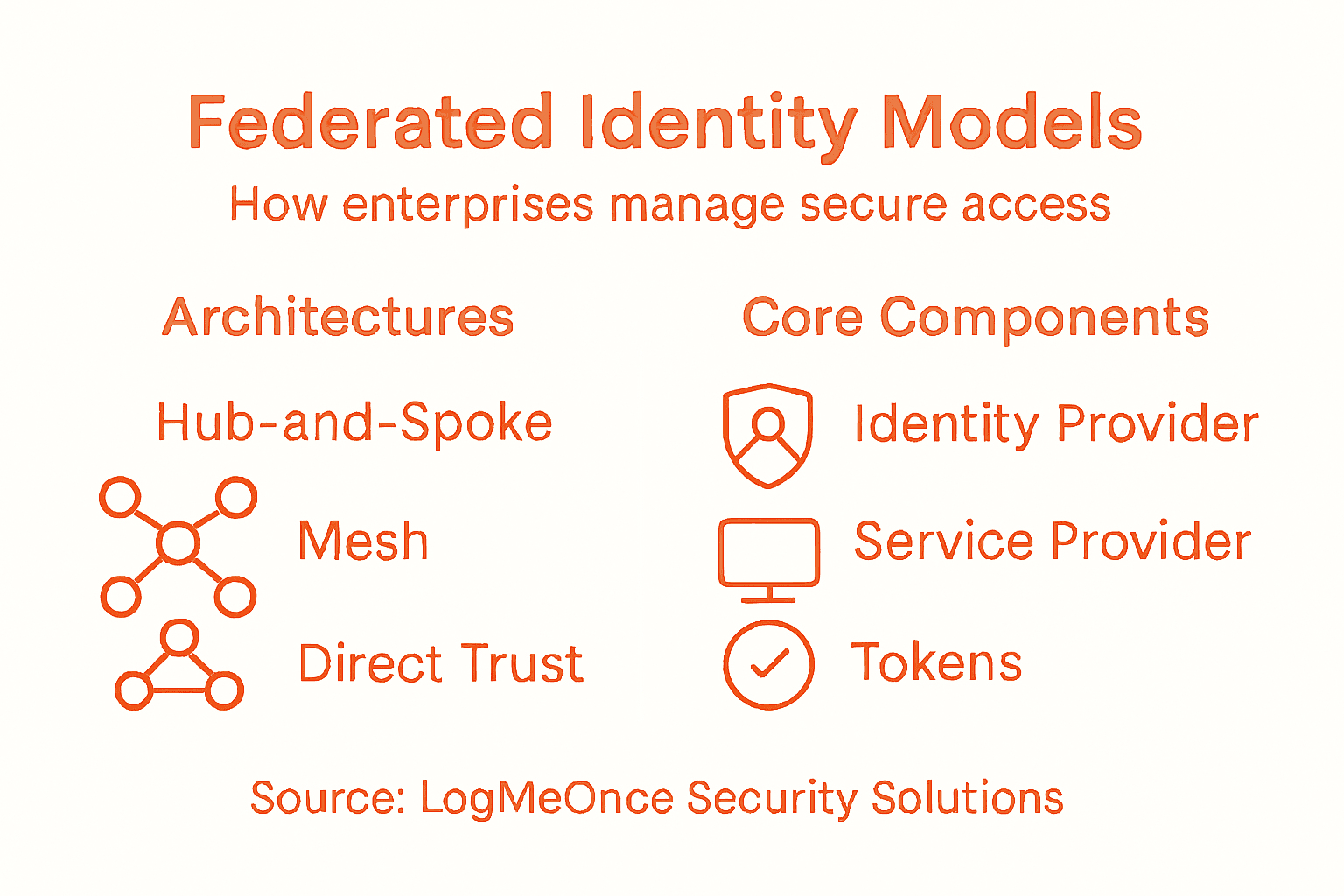
Three primary federation architectures dominate enterprise deployments. Hub-and-spoke architecture centralizes everything around one identity provider. Your organization acts as the hub, authenticating all users, while connected applications and partner organizations function as spokes. This model works well when you control most of the infrastructure and want tight governance. You maintain visibility over every authentication event and can enforce consistent policies across all connected systems. However, it creates a single point of failure and can become a bottleneck as you scale. Mesh federation distributes trust across multiple identity providers that connect to each other directly. Think of it as peer-to-peer identity management where any IdP can authenticate for any other IdP. This approach scales better and provides redundancy, but requires more sophisticated trust agreements and monitoring. Broker models introduce a middle layer that mediates trust between organizations. The broker translates between different IdP protocols and manages federation agreements. This works when you need to connect legacy systems that don’t speak the same identity language, though it adds complexity to your architecture.
To better understand federation architectures, here’s a concise comparison of the most common models used by enterprises:
| Architecture Model | Central Control | Scalability | Best Fit For |
|---|---|---|---|
| Hub-and-Spoke | Strong, centralized | Moderate | Controlled environments |
| Mesh | Distributed, peer-to-peer | High | Multi-partner ecosystems |
| Broker | Middle-layer mediation | Flexible | Legacy or mixed systems |
Regardless of which model you select, federated systems rely on specific core components working together. Identity Providers authenticate your users and issue digital identity tokens, which are cryptographically signed credentials that prove authentication occurred. Service Providers consume these tokens and make authorization decisions about what authenticated users can access. Trust frameworks establish the rules governing which IdPs and SPs can participate in the federation. These frameworks document security requirements, compliance obligations, and dispute resolution procedures. Your organization and its partners must agree to operate within these frameworks.
The protocols carrying identity information between components have evolved significantly. Industry-standard protocols like OAuth 2.0, OpenID Connect, SAML, and WS-Federation enable this interoperability across diverse platforms. OAuth 2.0 handles delegated authorization, allowing users to approve third-party applications without sharing passwords. OpenID Connect adds authentication on top of OAuth 2.0, verifying user identity while OAuth authorizes access. SAML (Security Assertion Markup Language) predates the others and remains common in enterprise environments, especially in government and finance. WS-Federation serves primarily enterprise and government agencies. Each protocol has strengths in different scenarios. Your IdP and SPs must support compatible protocols to communicate effectively.
Pro tip: Start your federation journey by mapping which protocols your current systems support, then choose an architecture that leverages existing compatibility rather than requiring forklift migrations of your authentication infrastructure.
How Federated Authentication Works
The magic of federation happens through a carefully orchestrated dance between three parties: the user, the service provider they want to access, and the identity provider that verifies who they are. Understanding this flow helps you appreciate why federation simplifies life for both your users and your IT team. When a user attempts to access an application or service, they don’t hand over credentials to that application directly. Instead, the service provider recognizes the user needs authentication and initiates a redirect to your trusted identity provider.
Here’s the step-by-step process. Your user opens their browser and navigates to a business application they need to use. That application is configured to trust your organization’s identity provider. The application doesn’t recognize the user yet, so it generates an authentication request and redirects the browser to your IdP with information about where to send the response once authentication succeeds. Your user arrives at the IdP’s login page and enters their credentials. The IdP verifies the username and password against its directory. If authentication succeeds, the IdP creates a security token, which is a digitally signed package containing claims about the user’s identity. These claims might include the user’s name, email, department, role, and other attributes relevant to authorization decisions. The IdP sends this token back to the user’s browser along with a redirect instruction pointing back to the original application.
The service provider receives the token from your browser and performs validation. The SP validates the token’s digital signature to ensure it genuinely came from the trusted IdP and hasn’t been tampered with during transit. The SP examines the token’s claims to determine whether this user has permission to access specific resources or features. A user marked as “Finance Department, Manager” might get access to budget reports, while “Engineering Department, Developer” gets access to code repositories. The SP grants access based on these authorization decisions, not by re-authenticating the user. Your user receives a session cookie or token from the SP that keeps them logged in without needing to authenticate again for that service.
What makes this powerful for mid-sized enterprises is what happens next. If the user wants to access another federated application, they don’t need to log in again. Their browser still carries authentication context from the first login. Many IdP implementations support Single Sign-On caching, meaning the IdP remembers it already authenticated this user and skips the login page on the second application’s redirect. The user goes from needing to authenticate once per application to authenticating once per session, period. This reduces friction, lowers help desk password reset tickets, and improves productivity significantly. Your security team maintains control throughout because every authentication attempt flows through your identity provider where you log and monitor access patterns.
The security model here decouples two distinct operations. Your IdP handles authentication, which answers the question: is this person really who they claim to be? Your service providers handle authorization, which answers: what is this authenticated person allowed to do? This separation means your authentication policies stay consistent across all applications while each application retains autonomy over what authenticated users can access. A compromised application doesn’t expose your authentication system because the application never sees user credentials. The IdP remains protected in your secure infrastructure, and tokens expire after set timeframes, limiting exposure if a token somehow gets stolen.
Pro tip: Implement token expiration policies that balance security with user experience; shorter expirations enhance security but trigger more re-authentications, while longer expirations improve usability but increase breach window timeframes.
Key Standards and Protocols Explained
Federation works only when different systems speak the same language. That’s why industry standards and protocols matter so much. Without them, your identity provider couldn’t communicate securely with applications built by different vendors, running on different platforms, hosted in different clouds. These standards are the Rosetta Stones of federated identity, enabling organizations to interoperate without reinventing authentication every time. Understanding what each protocol does helps you make informed decisions about which technologies to implement in your infrastructure.
SAML stands for Security Assertion Markup Language and has been the enterprise standard for nearly two decades. It uses XML to package identity information into digitally signed assertions that one system sends to another. When your user authenticates through an IdP using SAML, the IdP creates an XML document containing claims about the user’s identity, signs it cryptographically, and sends it to the service provider. The SP verifies the signature, extracts the claims, and grants access accordingly. SAML excels in traditional corporate environments where you control both the IdP and many of the SPs. Government agencies and financial institutions rely heavily on SAML because of its maturity and robust security features. The downside is complexity. SAML involves more overhead than newer protocols and requires more configuration.
OAuth 2.0 approaches the problem differently. Instead of asserting identity, OAuth focuses on delegated authorization. Imagine a user wants to allow a third-party application to access their photos stored in another service without giving the third-party application their password. OAuth lets the user approve this access directly with the storage service, which issues a token granting specific permissions. The third-party application receives the token but never sees the password. This proves invaluable when you integrate with Software-as-a-Service platforms and partner applications. However, OAuth alone doesn’t verify identity; it only verifies authorization. Many organizations pair OAuth with another protocol for complete authentication.
OpenID Connect solves this gap by building on top of OAuth 2.0. OpenID Connect adds an identity layer to OAuth’s authorization capabilities, giving you both authentication and authorization from a single protocol. It’s become the standard for consumer applications and modern cloud platforms. When you log into applications using Google or Microsoft accounts, you’re using OpenID Connect. For mid-sized enterprises moving toward cloud-first architectures, OpenID Connect often makes more sense than SAML because it’s lighter weight and easier to implement with modern application frameworks.
WS-Federation represents another enterprise approach, primarily used in Microsoft-centric environments and government systems. It emerged as an alternative to SAML and shares similar XML-based approaches but integrates more tightly with Windows and .NET infrastructure.
Here is a summary of core federation protocols and typical use cases to guide your selection:
| Protocol | Main Purpose | Typical Use Case |
|---|---|---|
| SAML | Enterprise authentication | Internal apps, regulated sectors |
| OAuth 2.0 | Delegated authorization | Cloud apps, third-party APIs |
| OpenID Connect | Auth + identity layer | Modern web and mobile apps |
| WS-Federation | Microsoft integration | Government, enterprise IT |
Beyond these core protocols, federated frameworks like eIDAS, REFEDS, and Kantara provide governance structures that define trust agreements, security requirements, and interoperability rules. These frameworks specify how identity providers should vet users, what level of assurance they should provide, and how service providers should validate credentials. They’re particularly important in government and regulated industries where compliance matters.
Here’s what matters for your organization: SAML works best if you run traditional enterprise applications and need robust, established security. OAuth 2.0 and OpenID Connect fit better if you’re adopting cloud services and modern applications. WS-Federation makes sense if you’re deeply invested in Microsoft technologies. Most mid-sized enterprises end up supporting multiple protocols because they work with vendors using different standards. Your identity provider needs to support the protocols your connected applications use.
Pro tip: When evaluating identity providers, test protocol support for your actual application portfolio before committing; mismatched protocol support becomes expensive to fix after deployment.
Benefits and Challenges for IT Managers
Federation transforms how mid-sized enterprises manage user access, but it’s not a magic solution that eliminates all problems. You gain significant advantages while inheriting new responsibilities. Understanding both sides helps you make realistic decisions about implementation and set proper expectations with leadership and your team.
The Benefits
The productivity gains are immediate and measurable. Your users stop asking for password resets because they authenticate once and access everything. Help desk tickets for forgotten passwords drop significantly. One mid-market IT director reported a 67% reduction in authentication-related support requests within three months of federation deployment. That frees your team to focus on strategic work rather than reactive password management. Your organization onboards new employees faster because account provisioning becomes automated. A single identity record propagates across all connected systems instead of manual account creation in each application.
Security improves when done correctly. Centralized authentication means you control password policies from one place instead of battling inconsistent requirements across multiple applications. You can enforce multifactor authentication universally without reconfiguring each system individually. Your security team gains visibility into every authentication attempt flowing through your identity provider, enabling threat detection and anomaly identification. You can revoke access instantly by disabling an account at the IdP level, which immediately affects all connected services. This matters tremendously when employees leave or change roles.
Cost savings compound over time. You reduce infrastructure expenses by consolidating identity stores. You cut licensing costs for redundant authentication systems. You minimize expensive security breaches caused by weak credential management. You reduce staff time spent managing duplicate identity records and synchronizing data across systems.
The Challenges
But federation introduces complexity your team must manage. Federated environments create security challenges including weak password practices, insider threats, and uneven security standards among partners. When you federate with external partners, you’re trusting their security practices. A vendor with poor password policies or inadequate multifactor authentication becomes your vulnerability. You can’t control their internal systems; you can only enforce standards at the federation boundary.
Governance becomes messier. You need clear agreements defining who can federate with whom, what data flows between systems, and how disputes get resolved. Different partners may require different trust levels or claim attributes. One vendor might need to know employee department while another needs only basic email verification. Managing these exceptions requires formal policies and governance structures that slow deployment.
Privacy complications emerge quickly. When you federate, user identity data flows between organizations. Each transfer creates potential exposure and requires compliance with regulations like GDPR. You need clear data processing agreements with every federated partner specifying how identity information gets used, stored, and deleted. Auditing these flows becomes mandatory but complex.
Technical debt accumulates silently. Coordinating protocol versions across multiple identity providers and service providers creates version management headaches. When one partner upgrades their IdP, compatibility breaks unless you upgrade simultaneously. Integration testing multiplies with each new federated partner because you must verify interoperability across different platforms and configurations.
Trust becomes the underlying challenge. Federation requires trusting partners to maintain security standards you can’t directly control. A partner’s breach doesn’t just expose their data; it potentially compromises the trust mechanism that lets their users access your resources. You need incident response plans addressing what happens when a federated partner experiences a security event.
Pro tip: Start federation pilots with internal applications and trusted partners before expanding to less critical vendors; this staged approach lets you build governance structures and incident response procedures while limiting blast radius if problems emerge.
Comparing Federation With Traditional SSO
Traditional Single Sign-On and federated identity management sound similar at first glance. Both let users log in once and access multiple applications. But they operate under fundamentally different architectures, and that difference matters tremendously for IT managers deciding which approach fits their organization.
Traditional SSO keeps everything within your organization’s boundaries. Your identity provider lives on your network or in your private cloud. Your applications trust only your IdP. Users authenticate once against your internal directory, receive a session token, and that token grants access to all connected applications. Think of it like a building with one security checkpoint and multiple doors inside. Security screens visitors once at the entrance, then those visitors move freely between internal doors. This works perfectly when you control the entire ecosystem. All your applications run on infrastructure you manage. All your users are employees of your company. Your security team maintains consistent standards everywhere.
Federation breaks those boundaries intentionally. Your identity provider still authenticates users, but now external service providers trust your authentication without hosting the authentication logic themselves. More importantly, you can trust external identity providers too. Users from partner organizations can access your applications using their own company’s credentials through federation protocols. Your applications don’t need to know how to authenticate everyone; they trust that whoever sends a valid token from a trusted IdP has already been verified. This transforms how you operate when you need to grant access to contractors, customers, or partner employees.
Key Architectural Differences
Traditional SSO requires all applications to integrate with your single identity provider. Every application must be configured to trust your specific IdP, speak your chosen protocol, and redirect authentication to your systems. You control the entire chain. Federation enables applications to trust multiple identity providers simultaneously. An application might accept authentication tokens from your organization’s IdP, a partner’s IdP, and a third-party identity service. This flexibility matters when you integrate with vendors who have their own IdP. Instead of forcing vendors to authenticate through your system, federation lets their users authenticate through their own systems.
Scaling differs dramatically. With traditional SSO, as you add more applications, they all connect to your central IdP. Your IdP becomes the critical bottleneck. Every authentication request flows through your infrastructure. Federation distributes load. Different applications can authenticate users through different identity providers. Your organization’s IdP handles your employees. Partner organizations’ IdPs handle their users. No single system becomes overloaded.
Security models diverge too. Traditional SSO means compromise of your IdP compromises everything. All your applications stop working. All users lose access. Your entire organization grinds to a halt. Federation compartmentalizes risk. If a partner’s IdP gets compromised, your applications can continue operating using your own IdP. You can revoke trust in that partner’s IdP without affecting other federated relationships.
When to Choose Each
Choose traditional SSO when you run a relatively contained environment. Your applications number in the dozens rather than hundreds. Your users are mostly employees. You want simplicity and don’t need to interoperate with external organizations. Traditional SSO delivers elegance and straightforward management.
Choose federation when you need to grant access to people outside your organization. You partner with vendors whose users need your applications. You acquire companies and want to gradually consolidate their identity infrastructure with yours. You operate in regulated industries where different organizations need to prove they authenticate users to specific standards. Federation’s complexity buys you flexibility that traditional SSO can’t provide.
Many mid-sized enterprises actually deploy both. They run traditional SSO for internal employees, connecting all corporate applications. Simultaneously, they use federation to allow partner and customer access without forcing those external users into their internal identity system. This hybrid approach provides security for internal operations while enabling external collaboration.
| Characteristic | Traditional SSO | Federation |
|---|---|---|
| Scope | Single organization | Multiple organizations |
| IdP Trust | One IdP | Multiple trusted IdPs |
| External user support | Requires manual account creation | Native support |
| Scalability | Centralized bottleneck | Distributed |
| Risk containment | Single point of failure | Compartmentalized |
| Implementation complexity | Lower | Higher |
| Partner collaboration | Cumbersome | Seamless |
Pro tip: Audit your current application portfolio and external partnership requirements before choosing between traditional SSO and federation; if you have zero external integrations now but plan significant partner integrations in the next 18 months, federation’s upfront complexity pays dividends through easier scaling.
Strengthen Your Federated Identity Management with LogMeOnce Security Solutions
Managing federated identity introduces clear benefits but also brings significant challenges such as complex governance, security risks from external partners, and technical overhead. If your organization struggles with these critical pain points like credential sprawl, multi-protocol integration, and secure user access across multiple domains, LogMeOnce offers a comprehensive identity management platform designed to tackle exactly these issues. From seamless Single Sign-On to advanced multi-factor authentication and encrypted cloud storage, our solutions reduce password fatigue and improve your security posture while keeping user experience simple.

Discover how you can empower your team to securely connect employees, partners, and customers under one trusted identity framework with LogMeOnce. Act now to streamline your federation journey with industry-leading protocols support and real-time monitoring designed for mid-sized enterprises and beyond. Visit LogMeOnce to claim your free trial and safeguard your enterprise access today. Learn more about our passwordless MFA and cloud encryption features, and transform your federated authentication approach into a competitive advantage.
Frequently Asked Questions
What is federated identity management?
Federated identity management is a system that allows users to authenticate once and gain access to multiple connected applications and services without needing separate usernames and passwords for each one.
How does federated identity management improve user experience?
It simplifies the login process by providing Single Sign-On (SSO) capabilities, allowing users to log in once and access multiple applications seamlessly, reducing password fatigue and the frequency of help desk requests for password resets.
What are the main components involved in federated identity management?
The two key components are the Identity Provider (IdP), which handles authentication and issues identity tokens, and the Service Provider (SP), which relies on the IdP for authentication and makes authorization decisions based on the tokens received.
What are the benefits of using federated identity management for mid-sized enterprises?
Federated identity management reduces credential sprawl, improves security through centralized authentication, speeds up onboarding processes, lowers help desk costs, and enhances compliance and audit capabilities by keeping a clear record of user access across systems.
Recommended
- Government Ficam Identity and Access Management-2 – LogMeOnce
- Identity and Access Management Software | LogMeOnce


