


 Password Manager
 Identity Theft Protection

 Team / Business
 Enterprise
 Government
 MSP
MSP


TL;DR:
- Dark web protection mainly provides early detection of exposed credentials, enabling quick responses before misuse occurs. Monitoring alerts facilitate prompt action like changing passwords and enabling MFA, significantly reducing theft risks. Effective protection relies on rapid response protocols, layered security measures, and comprehensive monitoring beyond simple email scans.
Most people assume dark web protection means their stolen data gets deleted. It doesn’t. Once your credentials or personal information appear on the dark web, they stay there. The real dark web protection advantages are speed, awareness, and your ability to respond before criminals convert your data into fraud. Dark web monitoring scans non-indexed forums, marketplaces, and breach data around the clock to alert you the moment your information surfaces. What you do next determines how much damage actually occurs.
Key takeaways
| Point | Details |
|---|---|
| Early detection is the core advantage | Monitoring alerts you to exposed credentials before criminals use them for fraud or account takeover. |
| Speed determines damage levels | Stolen data gets tested and resold within hours, so fast response directly reduces financial and identity theft losses. |
| Alerts need action to work | Changing passwords, enabling MFA, and monitoring accounts after an alert converts warnings into actual protection. |
| Identity-level monitoring beats email scans | Comprehensive scanning of SSNs, phone numbers, and financial data catches more exposure than email-only tools. |
| Layered security multiplies protection | Combining monitoring with password management, MFA, and credit freezes creates defenses that work even when one layer fails. |
Dark web protection advantages and how monitoring actually works
Dark web monitoring tools scan non-indexed forums and marketplaces to alert users promptly about credential exposure for quicker protective action. They crawl areas of the internet that standard search engines never reach, including private forums, paste sites, and criminal marketplaces where stolen data gets traded. When a tool finds your email address, password hash, Social Security number, or financial data tied to your identity, it sends you an alert.
That alert is not the end of the process. It’s the starting gun. The advantage isn’t that your data disappears. The advantage is that you now know before the criminal has used it.
Here’s what effective dark web security features actually give you:
- Continuous scanning of breach databases, malware logs, and forums rather than periodic snapshots
- Identity-level alerts that flag your email addresses, phone numbers, passwords, and financial account numbers
- Threat intelligence feeds that businesses use to correlate fresh stolen data with active security incidents
- Response guidance that tells you exactly which accounts are at risk and what to do next
The gap between alert-only services and full protection suites matters significantly. A service that says “your email was found” without telling you which breach it came from, which password was exposed, or what to do next leaves you guessing. Monitoring alone isn’t enough. Rapid remediation and user education are what translate alerts into actual security improvements. Google’s own dark web report service was shut down in early 2026 partly because it offered alerts with limited guidance on what users should actually do next.
Pro Tip: When evaluating a monitoring service, ask one question before anything else: does it tell you which specific password was exposed, or just that your email was found? Specific credential data lets you act precisely. Vague alerts lead to vague responses.
For businesses, the advantage goes further. Security teams use dark web intelligence to anticipate ransomware attacks and fraud by correlating fresh stolen credentials with active systems. When a company’s employee logins appear in a malware log, that’s a warning that ransomware may deploy within days. Catching that signal early changes the outcome entirely.
The economics of stolen data and why timing matters
The dark web is not a static archive. It’s an active marketplace with supply, demand, and pricing structures. Fresh credentials sell for significantly more than stale ones. A valid credit card with billing address and CVV might sell for $15 to $30 on day one. By week three, if it’s been flagged by the issuing bank, it’s worth nothing.
Credentials surface in malware logs days before ransomware deploys, making timely monitoring critical for organizations. The window between data theft and data use is often measured in hours, not days.
| Data Type | Typical Time to Monetization | Protection Priority |
|---|---|---|
| Banking login credentials | 2 to 6 hours after listing | Immediate password change and MFA |
| Credit card numbers | 1 to 24 hours | Card freeze and fraud alert |
| Social Security numbers | Days to weeks | Credit freeze and identity monitoring |
| Corporate VPN logins | 12 to 48 hours | Password rotation and access review |
| Email and password combos | Hours, via credential stuffing | Password change across all reused accounts |
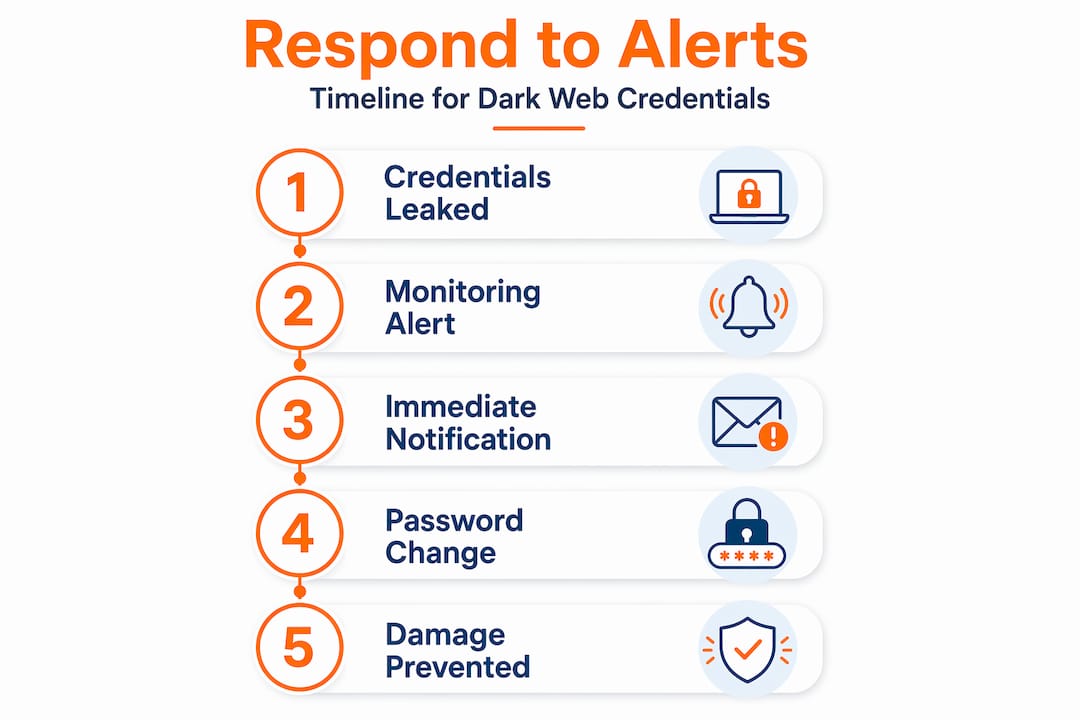
The value of stolen data depreciates quickly, which makes timing the central factor in capturing defensive advantages from dark web protection. If a monitoring service alerts you within 30 minutes of your credentials appearing in a forum, and you change your password within the next hour, the attacker’s window to use that data closes before they act.
Practical measures that disrupt the monetization window include rotating passwords immediately after alerts, applying least-privilege access policies in business environments so compromised accounts have limited reach, and enforcing MFA on all sensitive systems so stolen passwords alone aren’t enough to get in.
Pro Tip: Set up monitoring alerts to go to your phone via push notification, not just email. Email alerts can sit unread for hours. A phone notification while you’re at your desk means you can respond within minutes.
What to do after dark web exposure is detected
Knowing your data is out there is useful. Acting on it correctly is what protects you. Many people freeze when they receive a dark web alert, unsure of the right sequence of steps. The order matters.
- Change the exposed password immediately on the affected account and any other account where you reused it. Credential stuffing attacks rely on reuse, so one exposed password can unlock dozens of accounts.
- Enable multifactor authentication on every account that supports it, starting with email, banking, and any account linked to payment information. MFA blocks attackers even when stolen credentials leak onto the dark web.
- Audit your active sessions in email, banking, and social media accounts. Look for logins from unfamiliar devices or locations and revoke them.
- Place a fraud alert or credit freeze with the three major credit bureaus if financial data or your Social Security number was exposed. A credit freeze is free and prevents new accounts from being opened in your name. Account freezes add a measurable layer of protection that attackers cannot easily bypass.
- Monitor financial accounts daily for at least 30 days after exposure. Fraudulent charges often appear small at first as criminals test the card before larger transactions.
- Report the incident if identity theft has already occurred. Victims follow personalized recovery plans through FTC’s IdentityTheft.gov to document losses and dispute fraudulent activity.
Experian recommends swift protective actions once breached data is found to reduce financial and identity theft damage. Speed here is not optional. It’s what separates a minor inconvenience from months of identity theft cleanup.
One common pitfall: people change only the password directly mentioned in the alert and ignore related accounts. If your Gmail password was exposed, attackers will immediately try that same password against your bank, Amazon, PayPal, and LinkedIn. Check every account that shares the same credentials.
Pro Tip: Comprehensive identity-level monitoring is more effective than email-only scans for modern identity theft risks. Make sure your monitoring service tracks your Social Security number, phone number, and financial account numbers, not just your email address.
Privacy tools and realistic OPSEC expectations
Tor is the most widely known tool associated with accessing the dark web privately. It routes your traffic through multiple relays, masks your IP address, and includes anti-fingerprinting features that make browser identification harder. These are real protections that reduce tracking meaningfully.
But Tor’s design masks IP addresses while mistakes in endpoint or account reuse can expose user identities, making strict OPSEC essential. Tor is a tool, not a guarantee.
The most common mistakes that break Tor-provided privacy:
- Logging into personal accounts while using Tor, which ties your real identity to your anonymous session immediately
- Reusing usernames or email addresses across regular browsing and Tor-based activity
- Cross-contaminating devices, such as using the same machine for both personal use and anonymous research
- Ignoring endpoint hygiene, like having malware on your device that logs keystrokes regardless of which browser you use
Operational security must enforce strict identity separation and endpoint hygiene to preserve any anonymity Tor provides. A single slip, such as logging into a personal account once during a Tor session, can link your real identity to everything you did in that session.
The practical takeaway for most users is straightforward. If you’re using dark web access for research or monitoring purposes, keep that activity on a dedicated device or virtual machine with no personal accounts attached. Combining good monitoring tools with strict identity separation gives you far more protection than either approach alone.
Choosing the right dark web protection solution
The market ranges from basic email scanners to fully integrated security platforms. Understanding the differences helps you pick a service that actually reduces your risk rather than just sending notifications.

Standalone scanning tools check whether your email has appeared in known breaches. They’re better than nothing but miss the majority of how identity theft actually happens. Integrated protection suites go further by scanning for full identity profiles, providing step-by-step remediation, and combining multiple security layers into one platform.
Features that separate effective services from basic ones:
- Continuous monitoring rather than periodic scans (daily or less frequent checks miss fast-moving data)
- Identity-level data coverage beyond email, including SSN, phone, financial accounts, and medical IDs
- Actionable alerts with specific breach details, affected credentials, and prioritized response steps
- Integration with password management so you can rotate credentials immediately after an alert
- MFA enforcement tools that activate automatically as part of a breach response workflow
| Solution Type | Coverage | Remediation Guidance | Best For |
|---|---|---|---|
| Email breach scanner | Email only | None | Basic awareness only |
| Identity monitoring service | Email, SSN, financial | Moderate | Individuals post-exposure |
| Business threat intelligence feed | Corporate credentials, domain | Detailed | Security teams and enterprises |
| Integrated security suite | Full identity and credentials | Hands-on, automated | Businesses and proactive users |
Dark web monitoring return on investment is highest when alerts trigger coordinated responses including password rotation, MFA enforcement, and least-privilege policies. A platform that handles all of that in one place compounds the advantages dramatically. It also reduces the risk that comes from relying on a single third-party vendor. Third-party monitoring services can be discontinued or have data sunsetted, which means your internal response workflows need to be solid enough to work independently of any one vendor.
When evaluating vendors, ask whether they provide a dark web domain scan for business assets and whether their alerting integrates with your existing identity management infrastructure. A tool that fits into your existing workflow gets used. One that requires a separate login and manual checking gets ignored during the most critical moments.
My honest take on what actually works
I’ve seen organizations spend considerable money on dark web monitoring dashboards that nobody checks. The alerts stack up, the inbox fills, and by the time someone looks at the notification, the attacker has been inside the network for 11 days. Monitoring is only as good as the response it triggers.
What I’ve found actually moves the needle is treating dark web alerts like smoke alarms, not weather reports. A smoke alarm doesn’t tell you it might rain. It tells you there is fire and you need to move now. When a credential appears in a dark web feed, the right response is immediate, structured, and practiced in advance.
In my experience, the businesses that handle dark web exposures best are not the ones with the most sophisticated monitoring. They’re the ones who’ve documented a response runbook. Change these passwords, notify these teams, review these access logs, escalate if these conditions are met. That clarity turns a scary alert into a manageable incident.
The misconception I keep running into is that better tools solve the problem. They help. But a well-configured password manager, a strict MFA policy, and a team that knows what to do when an alert fires will outperform a fancy monitoring dashboard paired with no plan. Layer your protection and practice your response. That combination is what the dark web protection advantages actually deliver.
— Mike
How Logmeonce protects you from dark web threats
Logmeonce brings together the security layers that make dark web protection actually work. The platform’s password management tools let you generate, store, and rotate credentials immediately when a breach alert fires, so you’re never scrambling to remember what to change. Built-in two-factor authentication means stolen passwords alone cannot unlock your accounts, closing the most common attack vector that dark web exposure creates.

Logmeonce also offers cloud storage encryption that protects sensitive data even if systems are compromised, plus integrated monitoring with alerts tied directly to your identity profile. For individuals and businesses that want protection that goes beyond a notification, Logmeonce connects every layer from credential management to breach response in one platform.
FAQ
What are the main dark web protection advantages?
The core advantages are early detection of exposed credentials, fast alerting that enables immediate response, and threat intelligence that helps individuals and businesses stop fraud before it occurs.
Can dark web protection remove my data from the dark web?
No. Once data appears on the dark web, it cannot be deleted. Protection services focus on alerting you to exposure so you can change credentials and reduce damage before attackers use the data.
How quickly should I respond to a dark web alert?
Immediately. Stolen credentials can be tested and sold within hours of appearing in dark web forums, so changing your passwords and enabling MFA within the first hour of an alert significantly reduces your risk.
What should businesses look for in a dark web monitoring tool?
Businesses need continuous monitoring of corporate credentials and domain assets, identity-level alerts with specific breach details, and integration with existing password management and MFA systems for coordinated response.
Does using a VPN protect me from dark web threats?
The advantages of using VPNs include masking your IP address and encrypting your connection, but VPNs do not prevent your credentials from being stolen in breaches or appearing on the dark web. They work best as one layer in a broader security setup.
Recommended
- The Benefits of Dark Web Monitoring for Businesses – LogMeOnce
- Identity Theft Protection & Dark Web Scan – LogMeOnce
- Dark web email scan – LogMeOnce


