


 Password Manager
 Identity Theft Protection

 Team / Business
 Enterprise
 Government
 MSP
MSP

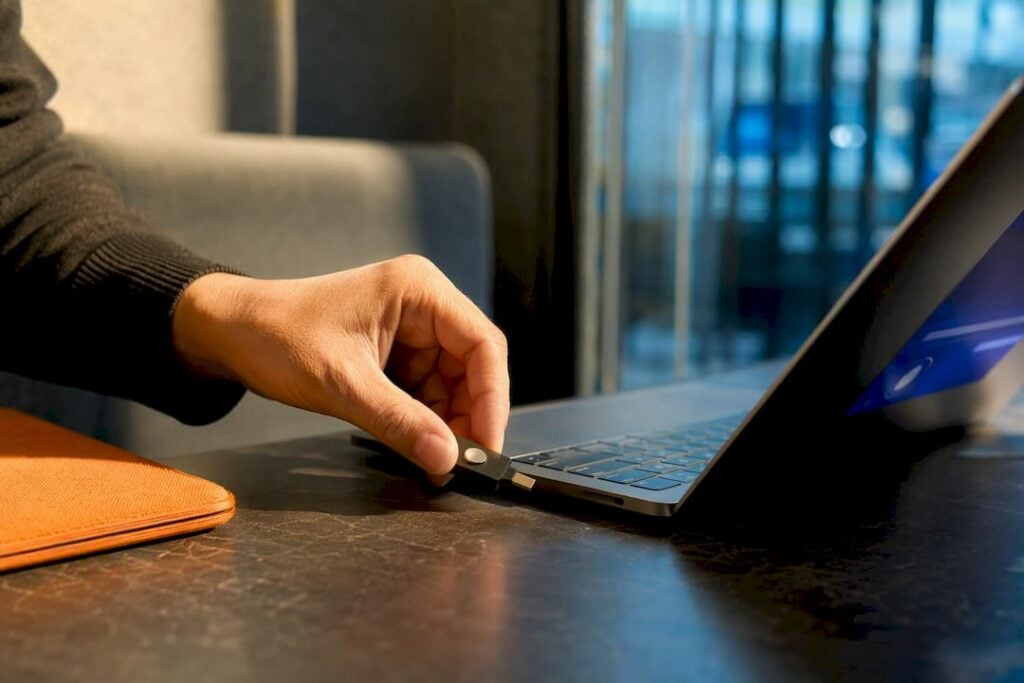
Secure remote access strengthens your security posture while it keeps work moving: it shrinks the attack surface, blocks the credential attacks that cause most breaches, and lets employees stay productive from anywhere. The benefits come from three control categories working together: identity verification (MFA, conditional access), device posture checks, and encrypted sessions. Below, each benefit maps to a specific control an IT team can put in place, starting this month.
TL;DR:
- Implementing multi-factor authentication and device posture checks significantly reduces credential theft and insider threats, blocking over 99% of automated attacks.
- Zero Trust architectures limit lateral movement by granting access to individual applications and continuously verifying trust levels, unlike traditional VPNs.
- Layering security controls like EDR, MDM, and encrypted sessions improves breach resilience, operational efficiency, and compliance audit readiness.
- Starting with MFA and encryption establishes a low-friction foundation before gradually deploying more advanced controls to prevent user bypass.
- LogMeOnce offers integrated identity verification, password management, and encryption solutions tailored for organizations seeking streamlined secure remote access.
The Benefits of Secure Remote Access, Ranked by Impact
Some of these benefits show up on a security dashboard. Others show up on a P&L. Both matter, and the strongest remote access programs treat them as the same project rather than two competing priorities.
Security-first benefits:
- Reduced unauthorized access. Requiring identity verification before granting network entry stops the single most common breach vector: stolen or guessed credentials.
- Attack-surface reduction. Per-application access (instead of full network access) means a compromised laptop exposes one app, not the whole environment.
- Encrypted transit. Data moving between a remote device and company servers stays unreadable to anyone intercepting it, whether that’s a coffee shop network or a compromised router.
- Least-privilege access. Employees reach only the systems their role requires, which limits what an attacker can do even after getting in.
- Multi-factor authentication as a baseline. Microsoft’s own security research found that adding one extra authentication factor blocks more than 99% of account compromise attempts, making MFA the single highest-leverage control on this list.
- Device posture checks. Access decisions that factor in whether a device is patched, encrypted, and free of known malware catch risk before it reaches your network, not after.
Business-first benefits:
- Faster IT support and lower mean time to repair. Technicians can remotely diagnose and fix issues without waiting for a device to physically arrive at a help desk.
- Sustained employee productivity. Workers keep full application access from home, a client site, or an airport lounge, without VPN drops or clunky workarounds that push them toward unsafe shortcuts.
- Cost savings on incident response. Fewer successful intrusions mean fewer investigations, fewer forensic bills, and less downtime to absorb.
- Business continuity during disruptions. Whether it’s a weather event, a facility closure, or a pandemic-style disruption, a business that already runs securely remote doesn’t stall.
- Regulatory and compliance support. Encrypted sessions and access logging give compliance teams the audit trail regulators expect.
Concern about remote work security isn’t hypothetical hand-wringing. Statista’s survey data shows elevated concern levels around remote work security, which tracks with why IT budgets keep shifting toward identity and endpoint controls rather than perimeter firewalls alone.
How Secure Remote Access Shuts Down Real Attack Patterns
Most remote-access breaches follow a predictable script: an attacker steals or phishes a password, logs in from an unrecognized device, and moves laterally until they find something valuable. Each stage has a specific control that stops it.
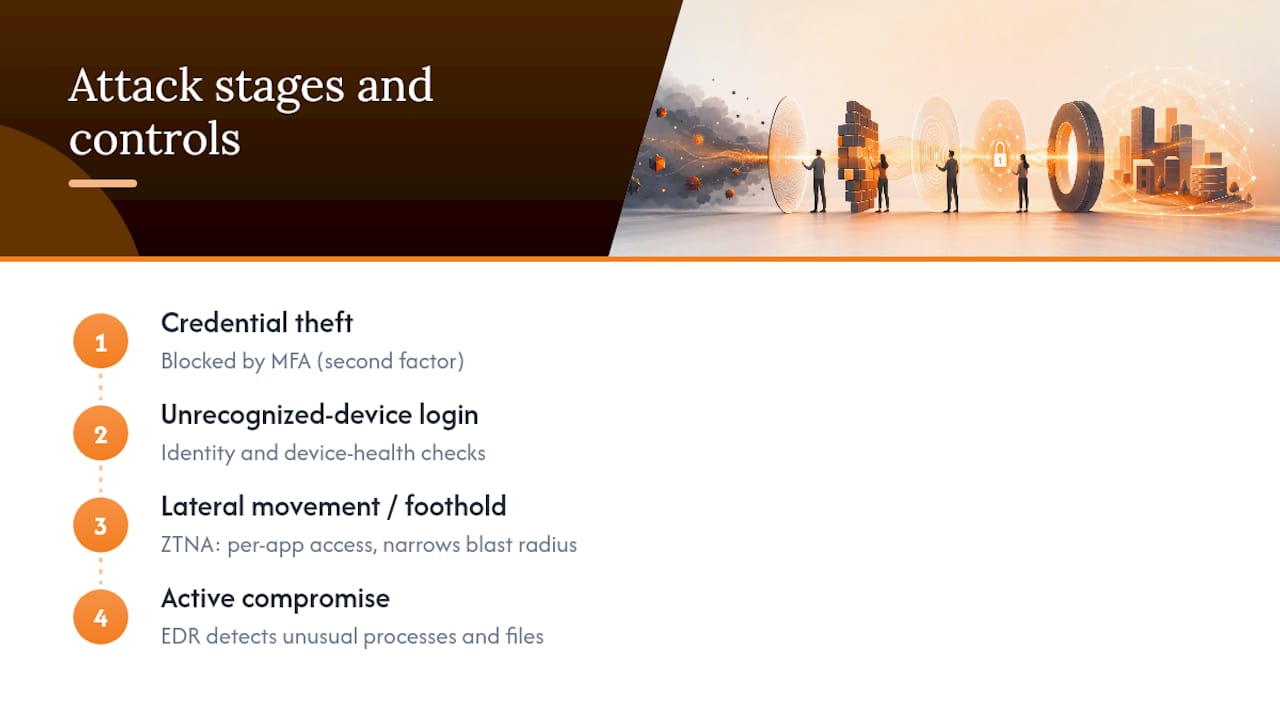
Credential theft is the opening move in the majority of these incidents, and it’s also the easiest to defeat. Microsoft’s research on account attacks found that a single additional authentication factor blocks the vast majority of automated credential attacks, because most attacks rely on password reuse or brute-force guessing, neither of which survives a second factor.
Once an attacker has a foothold, the next question is how far they can travel. Traditional VPNs grant broad network access once a session opens, which is precisely why a single compromised VPN credential can expose far more than it should; security teams sometimes call this a wide “blast radius.” Zero Trust Network Access (ZTNA) architectures narrow that radius by granting access to individual applications rather than the whole network, and by continuously reevaluating trust instead of granting it once at login. Microsoft’s Zero Trust guidance frames this as “never trust, always verify”: identity, device health, and context all get checked, repeatedly, not just at the login screen.
Endpoint detection and response (EDR) tools cover the stage attackers reach after they’re inside: they watch for the unusual process launches and file movements that signal an active compromise, closing the gap between intrusion and detection.
None of this is free of trade-offs. ZTNA setups take longer to deploy correctly than a VPN concentrator, and legacy applications sometimes resist per-app access models. The FTC’s guidance for small businesses is blunt about the fundamentals regardless of architecture: secure the VPN, require MFA, and protect endpoints. Skip any one of those, and the more sophisticated controls built on top of them lose most of their value.
What Secure Remote Access Does for Your Bottom Line
Security controls that only reduce risk are a hard sell to a CFO. The ones worth prioritizing also show up in operational metrics.
Remote troubleshooting is the clearest example. When support staff can securely connect into a remote desktop session, they diagnose and fix problems without shipping a laptop back to headquarters or waiting for an on-site visit, which directly cuts mean time to repair. Industry commentary on secure remote access, including analysis from OpenVPN, points to the same pattern: organizations that secure remote work well tend to report productivity and cost benefits alongside the security gains, rather than trading one for the other.
Several other operational effects compound over time:
- Continuity during disruptions. A workforce that already operates securely from anywhere doesn’t lose a week to a closed office or a weather event.
- Ransomware resilience. Backup and versioning built into a secure remote access strategy mean a compromised endpoint doesn’t necessarily mean lost data.
- Legacy application access. Remote desktop and virtualization let organizations keep using older line-of-business software without exposing it directly to the internet.
- Hiring flexibility. Recruiting isn’t limited to commuting distance once remote work doesn’t carry outsized security risk.
None of this requires choosing between “secure” and “fast.” The organizations that get this right treat the two as the same design goal.
Choosing the Right Mix of Access Technologies
No single technology delivers every benefit above. The right combination depends on team size, regulatory exposure, and how much legacy infrastructure you’re carrying.
A small team with modest compliance requirements often does fine starting with a VPN paired with mandatory MFA. It’s fast to deploy and covers the fundamentals the FTC lays out. But VPNs grant broad access once connected, so as headcount or risk grows, that broad-access model becomes the weak point rather than the solution.
Where each technology earns its place:
- VPN + MFA — solid entry point for small teams with straightforward network needs.
- ZTNA — grants per-application access with continuous verification, ideal for regulated industries or any team with sensitive data spread across cloud and on-premises systems. Modern protocols like WireGuard offer lighter, faster encrypted tunnels than older VPN protocols, which helps performance at scale.
- EDR — monitors endpoint behavior after access is granted, catching compromise that identity controls alone can’t see.
- MDM/UEM — enforces device posture (encryption, patch level, screen lock) before a device is trusted at all.
- Remote desktop/VDI — keeps sensitive data in the data center by transmitting only screen images to the user’s device, a pattern especially useful for regulated industries and legacy applications.
Performance matters as much as security here. VPN concentrators have hard connection limits, and latency climbs as remote headcount grows, while ZTNA’s per-app model scales more gracefully because it doesn’t route all traffic through one chokepoint. A practical migration path is to layer ZTNA onto your highest-risk applications first, keep the VPN for legacy systems that resist per-app models, and shrink VPN scope gradually rather than ripping it out overnight.
Your Rollout Plan: What to Fix First
Security programs stall when teams try to deploy everything at once. Sequence matters more than completeness.
- 0 to 30 days: Enforce MFA across all remote logins, turn on full-disk encryption for every laptop, publish clear home Wi-Fi security guidance, and roll out a password manager for shared and individual credentials.
- 1 to 3 months: Deploy EDR on all endpoints, enroll devices in MDM/UEM, and turn on auto-patching with conditional access policies that check device health before granting entry.
- 3 to 12 months: Migrate your highest-risk applications to ZTNA, stand up continuous monitoring and incident response, run phishing simulations with real training follow-up, and implement backup and versioning for ransomware recovery.
- Ongoing governance: Enforce least privilege, review access permissions quarterly, and track KPIs like mean time to repair, phishing click-through rate, and unauthorized access incidents.
Pro Tip: Start with the controls that add the least friction for employees, MFA and a password manager, before layering in stricter device checks. Early wins build the trust you’ll need later when you ask users to accept more scrutiny.
How LogMeOnce Maps to This Checklist
Every control on that roadmap has a corresponding software category, and Logmeonce covers most of them under one identity umbrella rather than as separate point tools. Passwordless MFA replaces the weakest link in most breaches, the reused or phished password, with a stronger verification method. A team password manager eliminates the credential reuse that makes lateral movement possible in the first place. Cloud storage encryption keeps files unreadable in transit and at rest, and dark web monitoring flags exposed credentials before attackers weaponize them.
For IT leaders deciding between an integrated identity suite and a stack of separate point tools, the honest answer depends on team size and existing infrastructure: smaller teams generally gain more from consolidation, while enterprises with established EDR and MDM investments may prefer to add identity as one more integrated layer rather than replace what already works.
Where Secure Remote Access Meets Compliance Requirements
Regulators care less about which specific technology you deploy and more about whether you can prove access was controlled and data stayed protected. Secure remote access architectures generate exactly the evidence compliance frameworks ask for.
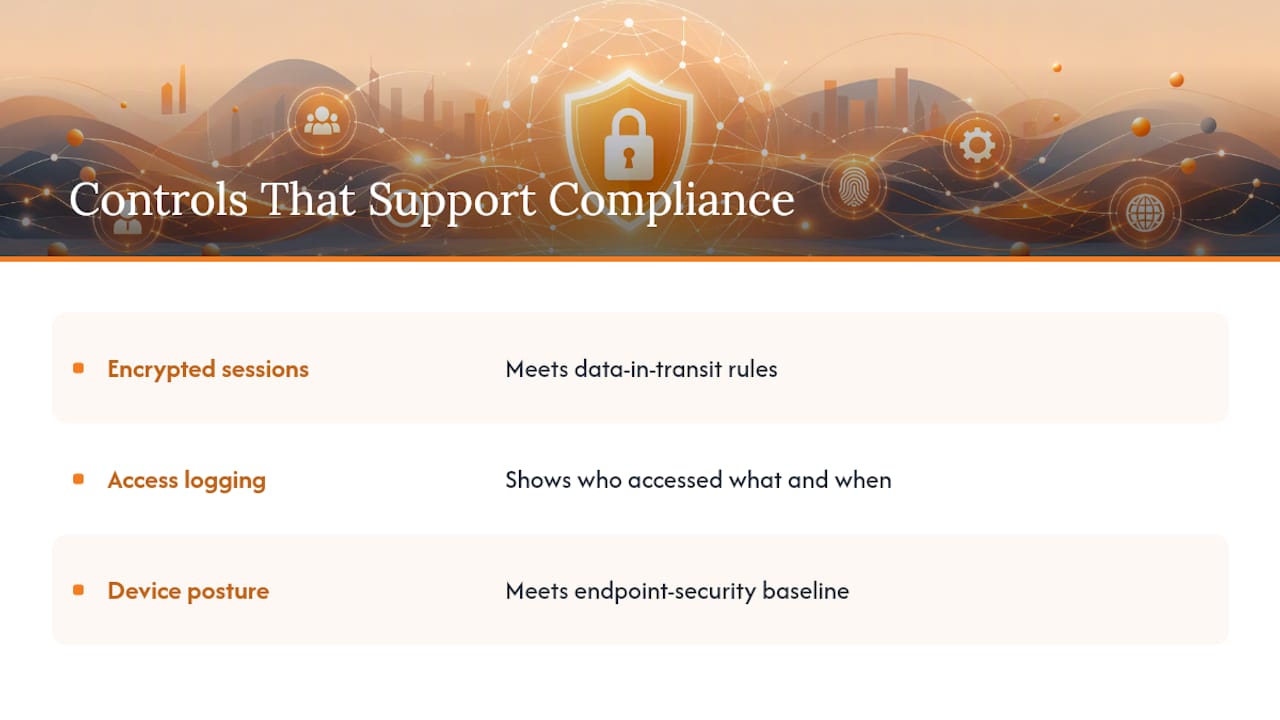
Encrypted sessions satisfy data-in-transit requirements that show up across healthcare, financial services, and government contracting rules. Access logging, a byproduct of identity-based controls like conditional access, gives auditors the trail they need to confirm who accessed what and when. Device posture checks support requirements around endpoint security that many frameworks now treat as baseline rather than optional.
The compliance benefit compounds with the security benefit rather than sitting separately from it. A ZTNA deployment that logs every access decision and enforces least privilege isn’t just harder to breach, it’s also easier to audit, because the system already tracks the exact information an auditor would otherwise have to reconstruct manually. Organizations in regulated industries, healthcare providers handling patient data, financial firms bound by data protection rules, government contractors under specific access mandates, tend to get the clearest return from this overlap because their audit burden is heaviest.
None of this replaces legal or compliance counsel for your specific regulatory obligations. But the technical controls that reduce breach risk are largely the same ones that make an audit go faster, which is a rare case where security and paperwork pull in the same direction.
Where Most Companies Get the Trade-Off Wrong
The gap between a secure remote access rollout that sticks and one that gets quietly bypassed almost always comes down to friction. Research on flexible work settings has found a real tipping point where overly strict controls provoke noncompliant workarounds, employees sharing passwords or using personal devices to route around a clunky system. The fix isn’t looser security. It’s sequencing: earn trust with low-friction wins like MFA before asking users to accept stricter device checks.
— Mike
Getting Started With LogMeOnce
LogMeOnce brings together the identity controls this article recommends, passwordless MFA, encrypted password management, cloud storage encryption, and dark web monitoring, under one login instead of scattered across separate vendor dashboards. That matters most for teams past the initial MFA rollout who need device-aware access without stitching together three or four separate tools.

If you’re still running on shared spreadsheets for credentials, start with the password manager built for teams and layer in passwordless authentication once adoption settles in. Businesses evaluating a broader rollout can compare seat-based options on the business pricing page, where Teams and Business plans have specific prices listed. For a side-by-side look at every plan, including the free Premium tier, the pricing and comparison page breaks down what’s included at each level. Either page is a reasonable place to start a trial before committing to a full deployment.
Sources
- Secure remote and hybrid work with Zero Trust | Microsoft Learn
- Statistic: Cybersecurity concern level in remote work | Statista
- One simple action you can take to prevent 99.9 percent of account attacks | Microsoft Security Blog
- The New Reality of Knowledge Work: Impact of Flexible Work Settings on Organizational Cybersecurity | Springer
FAQ
What Are the Advantages of Using Remote Access?
Secure remote access lets employees work from anywhere without widening the attack surface, since identity checks, device posture verification, and encryption travel with the connection rather than depending on a trusted office network. It also speeds up IT support because technicians can troubleshoot devices remotely instead of waiting for physical access.
What Are the Benefits of Secure Access Specifically, as Opposed to Basic Remote Access?
Basic remote access just opens a connection; secure access verifies who’s connecting, checks whether their device is healthy, and encrypts everything in between. That distinction is why Microsoft’s Zero Trust model treats identity and device posture as continuous checks, not a one-time login gate.
What Should You Do to Maintain Secure Remote Access?
Start with MFA and full-disk encryption, since those two controls close the majority of common entry points at low cost. From there, layer in EDR for endpoint monitoring, MDM for device compliance, and periodic access reviews so permissions don’t quietly expand over time.
How Secure Is Remote Access, Really?
It depends entirely on the controls behind it. A VPN with no MFA is genuinely risky, while a Zero Trust setup with MFA, device posture checks, and encrypted sessions blocks the overwhelming majority of common attacks, given that one added authentication factor alone stops more than 99% of automated account attacks.
Does LogMeOnce Support Secure Remote Access for Businesses?
Yes. Logmeonce’s passwordless MFA, team password manager, and cloud storage encryption directly support the identity and encryption layers a secure remote access strategy needs, with business plans detailed on the business pricing page.
Recommended
- How to Increase Remote Work Security to Protect Sensitive Data
- How Secure is Logmeonce ?
- Team Password Manager


