


 Password Manager
 Identity Theft Protection

 Team / Business
 Enterprise
 Government
 MSP
MSP


Run your password through a legitimate checker and you’ll get one of three verdicts: weak (crack in minutes, likely reused or breached), moderate (survives casual guessing but not a leaked database), or strong (high entropy, no dictionary matches, no breach hits). If the result comes back weak or moderate, stop reading and change it now with a generator and a password manager. If it’s strong but reused anywhere else, that still counts as a fail.
TL;DR:
- Passwords with fewer than 28 bits of entropy are unsafe, especially against offline attacks that can guess billions of hashes per second.
- Running a password check online is safe if the analysis is conducted entirely in your browser and breach checks use k-anonymity methods.
- Even strong, high-entropy passwords lose their security if reused across multiple accounts, making breach detection and unique credentials essential.
- Combining a password manager, multi-factor authentication, and breach monitoring provides far better security than relying on password strength alone.
- Regularly updating passwords only if compromised or suspicious activity occurs is better than forced periodic resets that often weaken overall security.
How to Test a Password Safely and Read the Report
Most password checkers grade a password on four things: entropy in bits, an estimated time-to-crack, dictionary or pattern matches (like “Password1!” or your dog’s name plus a birth year), and a breach check against known leaked credential lists. Entropy measures unpredictability. A random string might hit 70 bits, while “Sunshine2024” barely clears 20, because a cracking tool tries common substitutions first.
The safest way to run a password strength checker is to never type your real, active password into a tool you don’t fully trust. Trusted checkers run the analysis entirely in your browser rather than on a server, and reputable ones say so directly. CSA Singapore’s Internet Hygiene Portal explicitly notes its checker is client-side and educational, and advises against entering real credentials on unfamiliar sites.
A few rules keep testing safe:
- Test a variant of your password (swap a digit or symbol) instead of the live one.
- Confirm the tool runs client-side before typing anything sensitive. Open your browser’s developer tools and check the network tab. No outbound calls means nothing left your machine.
- Treat certain results as urgent: an exact match in a breach database, entropy under roughly 28 bits, or a flag as a top-10,000 common password all mean change it today, not this weekend.
What Makes a Password Strong: Entropy, Length, and Passphrases
Entropy is just a measure of how many guesses an attacker would need on average before landing on your password. Every extra random character roughly doubles that number. That’s why length beats cleverness: swapping an “o” for a “0” barely moves the needle, but adding four more random characters can turn a crackable password into one that would take centuries to brute force.
Password strength is typically measured in entropy, or bits. For everyday accounts, aim for 12 to 16 characters minimum. For anything sensitive, like your primary email, banking, or a password manager’s master password, push to 16 to 20 or more, or use a passphrase of six to eight random words.
Here’s the trade-off most people miss: a random 16-character string like xQ7$mK9vP2#nR4wL is harder to crack than most passphrases of the same length, but nobody can type that from memory without errors. A passphrase like “harbor velvet cactus thunder plaza” is easier on your hands and nearly as strong, provided the words are chosen randomly rather than pulled from a familiar sentence. This is exactly the trade-off a password manager erases. Once a manager stores and autofills your credentials, you only need to remember one strong master passphrase, and every other password can be maximally random because you’ll never type it manually.
What the Score Means: Online vs. Offline Attacks
A strength meter’s time-to-crack number is only as good as the assumption behind it, and that assumption is the attack type. Two very different scenarios produce wildly different risk levels for the exact same password.
- Online guessing happens against a live login form, where rate limits and lockouts throttle an attacker to maybe a handful of attempts per second. A moderate password can survive this for years.
- Offline cracking happens after an attacker steals a database of password hashes, usually from a breach, and runs them through GPU clusters at billions of guesses per second with no rate limit at all.
That gap is why a password that looks “strong enough” against a login screen can fall apart in hours once its hash leaks. Meters that only show a color bar without explaining which scenario they’re modeling leave you guessing about your actual exposure. Accounts tied to email recovery, financial access, or admin privileges deserve the higher end of the entropy range specifically because a breach anywhere in that chain becomes a fast offline attack rather than a slow online one.
Is It Safe to Check Your Password Online?
Yes, if the tool follows two specific practices: client-side processing and k-anonymity for breach checks. Client-side means the analysis, and any password generation, happens inside your browser using the Web Crypto API’s crypto.getRandomValues function rather than the weaker Math.random, and nothing is transmitted or stored on a remote server.
Breach checking works differently, since it has to compare your password against a database that lives somewhere else. Legitimate services solve this with k-anonymity: your browser hashes the password with SHA-1, then sends only the first five characters of that hash to the server. The server returns every hash that starts with those five characters, and your browser finishes the comparison locally. Have I Been Pwned’s password checker uses exactly this method, so your full password, and even your full hash, never leaves your device.
Watch for the opposite pattern:
- A checker that asks for your username or email alongside the password.
- A tool that requires you to “create an account” before checking anything.
- Any site that sends the complete password or full hash to its server instead of a partial one.
Pro Tip: Open your browser’s network tab (right-click, “Inspect,” then “Network”) before you test a password. If you see any request firing off the moment you type, close the tab.
How to Fix a Weak Password Right Now
- Generate a replacement immediately. Use a tool with real client-side entropy, either a random 16+ character string or a six to eight word passphrase, and never reuse a password from another account.
- Store it in a password manager and turn on MFA. Once the manager holds it, you never need to type or remember it again, and multi-factor authentication stops a leaked password from being enough on its own, a recommendation NIST’s authentication guidelines back explicitly.
- Rotate credentials only when there’s a reason to. NIST specifically advises against forced periodic resets for their own sake, since they push people toward weaker, more predictable patterns. Change a password when a breach checker flags it, when you notice suspicious login activity, or after sharing access with someone who no longer needs it.
| Step | Action | Why it matters |
|---|---|---|
| 1 | Generate a new 16+ char password or 6 to 8 word passphrase | Maximizes entropy without relying on memory |
| 2 | Save it in a password manager, enable MFA | Removes reuse risk and adds a second barrier |
| 3 | Rotate only after a breach flag or suspicious login | Matches NIST guidance against pointless resets |
Why Password Managers and Passwordless MFA Matter More Than the Score
A single strong password is a good start. It’s also not the finish line, because the real failure mode isn’t one weak password. It’s the same decent password reused across a dozen accounts. A password manager removes the incentive to reuse anything, since it generates and autofills a unique high-entropy credential for every single login, and the only thing you personally have to remember is one strong master passphrase.
Passwordless multi-factor authentication goes a step further by removing the shared secret from the equation entirely for many logins, so there’s nothing for a breach database to leak in the first place. Layer in dark web monitoring, and you get a warning when your email or credentials surface in a new breach, often before an attacker has gotten around to using them. That’s the difference between reacting to a leak and getting ahead of it.
Password Strength vs. Password Uniqueness: Not the Same Thing
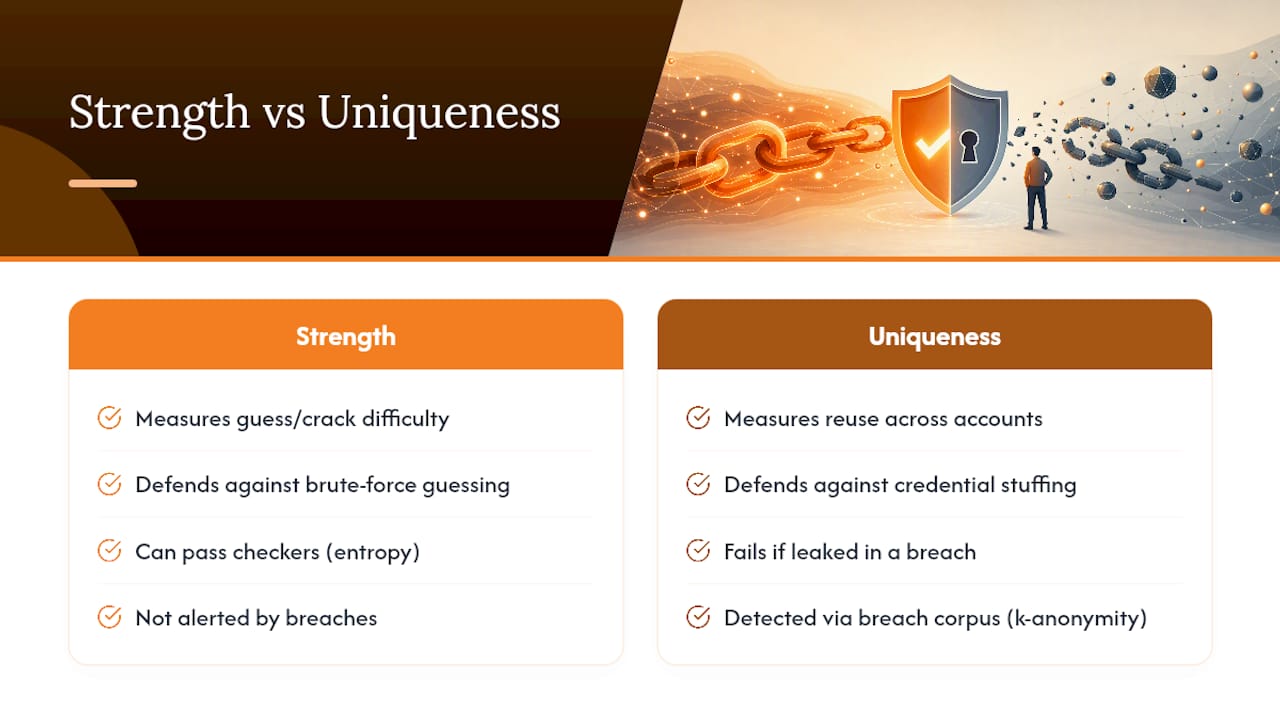
A common mix-up: a strong password and a safe password are not automatically the same thing. Strength measures how hard a single password is to guess or crack in isolation. Uniqueness measures whether that password exists anywhere else, on any other account you’ve ever created.
Here’s why the distinction matters in practice. Say you build a genuinely strong 18-character passphrase with high entropy. It passes every checker with flying colors. Now say you use that exact same passphrase on your email, your bank, and a random forum you signed up for in 2019 that later got breached. The moment that forum’s database leaks, your “strong” password is sitting in a criminal’s spreadsheet, ready to be tried against your email and bank login through a technique called credential stuffing. Strength didn’t protect you. Uniqueness would have.
This is precisely why breach checks matter alongside entropy scores. A checker can tell you a password is mathematically hard to guess, but it can only tell you the password has been compromised if that exact string shows up in a known breach corpus, which is what the k-anonymity method described earlier is built to detect. Neither strength nor uniqueness alone covers you completely. You need a password that’s both hard to crack and used nowhere else, which in practice means you need a system, not a memory trick, and that’s the entire reason password managers exist: they make uniqueness effortless at the exact moment strength would otherwise make it impossible to remember.
How Password Checkers Fit Into Your Broader Security Setup
A password checker is a diagnostic, not a defense system on its own. It works best as one input feeding into tools that actually act on what it finds. A password manager, for instance, often has strength analysis built directly into its dashboard, scanning every stored credential and flagging which ones are weak, reused, or old, then letting you regenerate and update them in a couple of clicks rather than testing each one manually.
Breach monitoring services extend that same idea forward in time. A checker tells you your password’s status right now. Dark web monitoring watches for your email or credentials showing up in new breach dumps going forward, so you’re not stuck manually rerunning checks every few months hoping to catch a leak. Some setups tie this directly to multi-factor authentication policy: a flagged or breached password can automatically trigger a forced MFA challenge or a required reset on next login, rather than waiting for you to notice.
Single sign-on systems change the calculus differently. When one strong, high-entropy credential unlocks dozens of connected apps, that one password’s strength score matters enormously more than it would for a throwaway account, because a single failure point now has a much bigger blast radius. That’s also exactly why SSO setups tend to pair with mandatory MFA and passwordless options rather than relying on password strength alone.
None of this requires expensive infrastructure for an individual user. A password manager with a built-in health check, paired with a free breach-monitoring alert on your primary email, covers the same ground enterprise security teams pay for at scale.
Password Reuse Is the Real Vulnerability Checkers Try to Catch
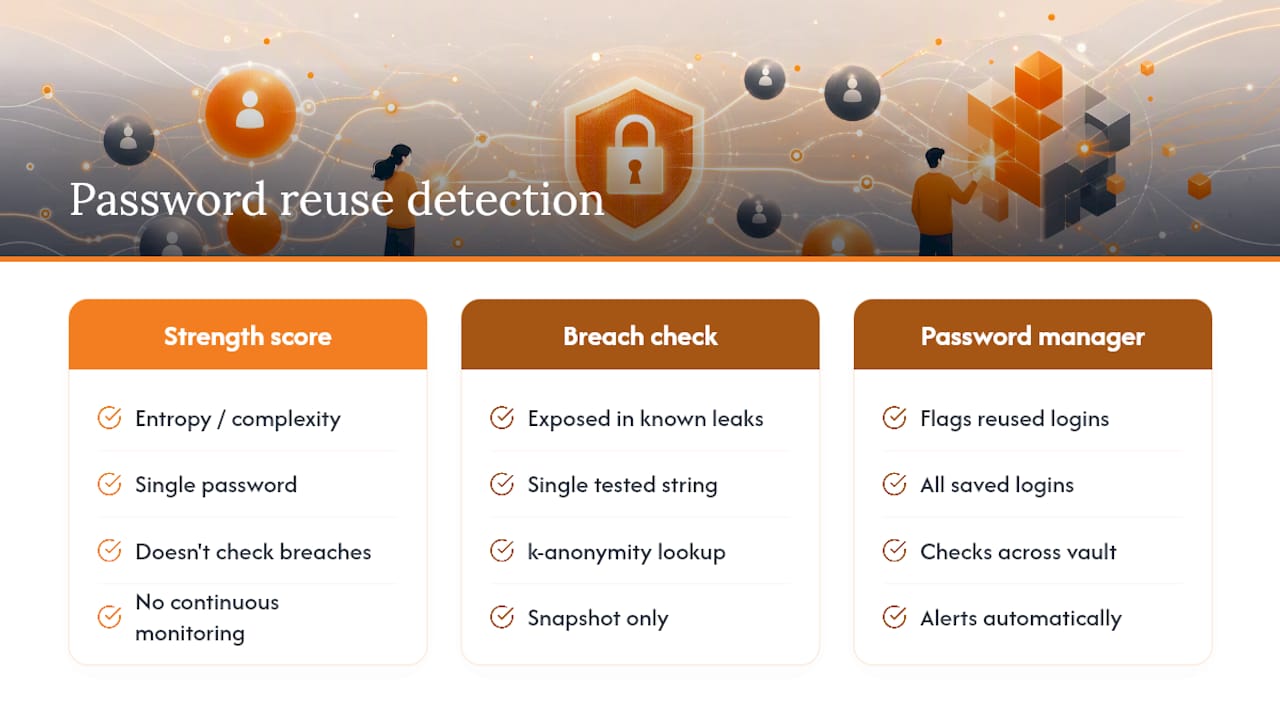
Strength scores get the attention, but reuse is what actually gets accounts hacked at scale. Here’s the mechanism: attackers don’t need to crack your password if they already have it from a completely unrelated breach. They take leaked username and password pairs from one hacked service and run them against hundreds of other sites automatically, betting that you used the same login somewhere else. It’s called credential stuffing, and it works often enough to be one of the most common account takeover methods, precisely because so many people reuse logins across sites without realizing which of those sites has already been breached.
A password checker addresses part of this through breach detection. When you run your password through a k-anonymity based checker like Have I Been Pwned, it’s not just testing strength in the abstract; it’s checking whether that exact string has already appeared in a known leak, regardless of how “strong” it mathematically looks. A 20-character password with excellent entropy that’s been exposed in three prior breaches is a liability, not an asset.
But a single check is a snapshot, not a subscription. It confirms the status of the one password you tested at the moment you tested it. It says nothing about the eleven other accounts where you might have used a close variation. That’s the gap password managers close: most flag reused credentials across your entire saved vault automatically, so you catch the pattern instead of hoping you remember every site you’ve ever logged into.
What Password Checkers Can’t Tell You
A checker can’t see your account’s actual attack surface, which is often the bigger risk. It has no visibility into whether your email provider enforces MFA, whether your recovery phone number was ported to a new SIM, or whether a support agent at some company you use can be socially engineered into resetting your account without ever touching your password.
It also can’t judge context. “CorrectHorseBattery2026” might score well on raw entropy while still being guessable to anyone who knows you follow a specific webcomic. Automated strength math doesn’t know your inside jokes, your pet’s name, or your favorite band, so it can miss passwords that are personally predictable even when they look statistically random.
Breach checks have a related blind spot: they can only flag what’s already in a known leaked dataset. A password compromised in a breach that hasn’t been discovered or published yet, or one stolen through malware, phishing, or a keylogger rather than a mass database dump, won’t show up as compromised no matter how good the checker is. Clean results mean “not found in known breaches,” not “definitely safe.”
Finally, no checker can stop reuse it doesn’t know about, can’t detect phishing pages that harvest a perfectly strong password the moment you type it, and can’t account for weak security questions or SMS-based recovery options that bypass your password entirely. Treat a clean scan as one data point, not a clean bill of health.
What Actually Moves the Needle on Password Security
The conventional advice, get a green checkmark on a strength meter and move on, misses the point entirely. A strong-looking password that’s reused across five accounts is worse than a slightly weaker password you use nowhere else, because the reused one turns a single unrelated breach into five compromised accounts instead of one.
What the evidence here actually supports is this: entropy matters, but it’s the floor, not the ceiling. The real gains come from uniqueness (never repeating a credential), breach awareness (knowing when a password you use has already leaked), and a second factor that doesn’t depend on the password holding up at all. Most people fixate on making one password clever instead of making every password disposable, which is the mindset a password manager forces on you by default.
If you take one thing from this, prioritize getting a manager generating unique random credentials for every account before you spend more time hand-crafting a “perfect” memorable password. The clever password you’re proud of is also the one you’ll be tempted to reuse. That temptation, not raw entropy, is where most real-world account takeovers start.
— Mike
Stop Guessing and Start Locking Down Every Account
Testing one password is a good first move. Fixing all of them at once is what actually closes the door on credential stuffing and breach fallout. Combine a password manager, passwordless MFA, and dark web monitoring in one place to ensure that credentials are unique and high-entropy by default, with alerts when accounts appear in new leaks to stay ahead of potential damage.

Instead of manually testing and replacing passwords one at a time, you can let a manager handle generation, storage, and autofill while passwordless MFA removes the shared secret from your riskiest logins entirely. Explore Logmeonce’s password management benefits to see how the pieces fit together, or head straight to Logmeonce’s cybersecurity solutions to start a trial and get your accounts covered today.
Sources
- Password Strength Checker – W3Schools
- CSA Singapore | Internet Hygiene Portal | Password Checker
- Local password generator with real entropy, passphrase mode and zero network calls
- Have I Been Pwned — Passwords
- NIST SP 800-63B
Recommended
- Lock and Key: Understanding the Risks of a Weak Password
- Common Mistakes That Lead to a Bad Password


