


 Password Manager
 Identity Theft Protection

 Team / Business
 Enterprise
 Government
 MSP
MSP

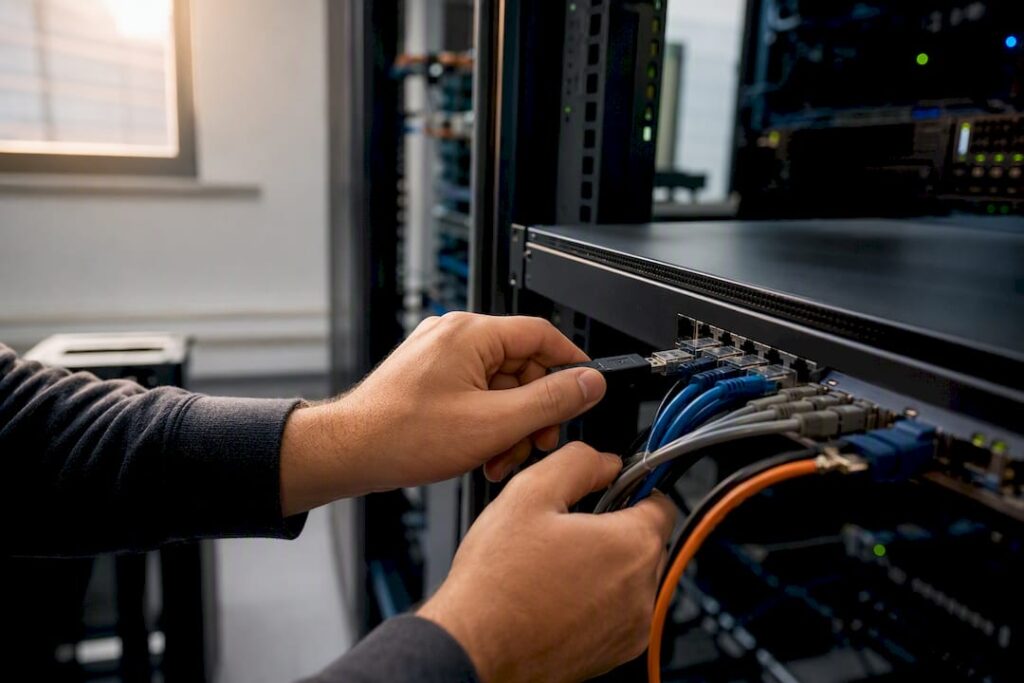
Secure remote access gives authorized users controlled, continuously verified entry to only the resources they need, nothing more. It works by combining four layers: strong identity verification through MFA and SSO, device posture checks before connection, least-privilege access scoped per application, and continuous monitoring once a session is live.
If you only fix four things this quarter, fix these:
- Require phishing-resistant MFA for every remote login, no exceptions for executives or vendors.
- Check device health (patch level, EDR status, disk encryption) before granting network access.
- Replace broad VPN tunnels with per-application access wherever you can.
- Log and correlate remote session activity so anomalies surface in minutes, not weeks.
The single metric worth watching weekly: the percentage of privileged sessions still authenticated with SMS or push-only MFA instead of phishing-resistant methods. Drive that number toward zero first.
Key Takeaways
Secure remote access succeeds when strong identity, device posture checks, least-privilege access, and continuous monitoring work together as one system, not four separate projects.
| Point | Details |
|---|---|
| Identity comes first | Phishing-resistant MFA and SSO close the credential gaps attackers exploit most often. |
| Match technology to risk | Pilot ZTNA for high-risk apps, keep VPN for legacy systems, add SASE for distributed scale. |
| Posture checks need remediation paths | Failed device checks should route to a quarantine network, not a flat denial. |
| Correlate telemetry, don’t silo it | Identity, endpoint, and network logs together catch what any single source misses. |
| Logmeonce strengthens the identity layer | Passwordless MFA, SSO, and dark web monitoring address the credential risks covered throughout this guide. |
Why Secure Remote Access Matters Now
Hybrid work didn’t just add remote users. It multiplied the number of unmanaged devices, home routers, and personal laptops touching corporate data every day. Every RDP port, SSH endpoint, or remote-management tool exposed to the internet is a door someone is actively testing.
The exploitation pattern is consistent: attackers steal or guess credentials, hijack an active session, then move laterally once inside. CISA’s guidance on remote access software documents how threat actors increasingly co-opt legitimate remote-access tools rather than building custom malware, which makes detection harder because the traffic looks routine.
The business fallout goes beyond a single breach. Data loss triggers regulatory notification requirements, incident remediation pulls engineers off roadmap work for weeks, and cyber-insurance premiums climb after a claim.
Watch these signals for elevated risk:
- Spikes in failed authentication attempts from the same account or IP range.
- VPN sessions with unusually long duration or high data transfer volume.
- Logins from geographies inconsistent with a user’s normal pattern.
- New or unrecognized devices connecting with valid credentials.
VPN vs. ZTNA vs. SASE: Which Access Model Fits?
None of these technologies is obsolete, but they solve different problems, and picking the wrong one for a given workload is how organizations end up with either unnecessary friction or unnecessary risk.
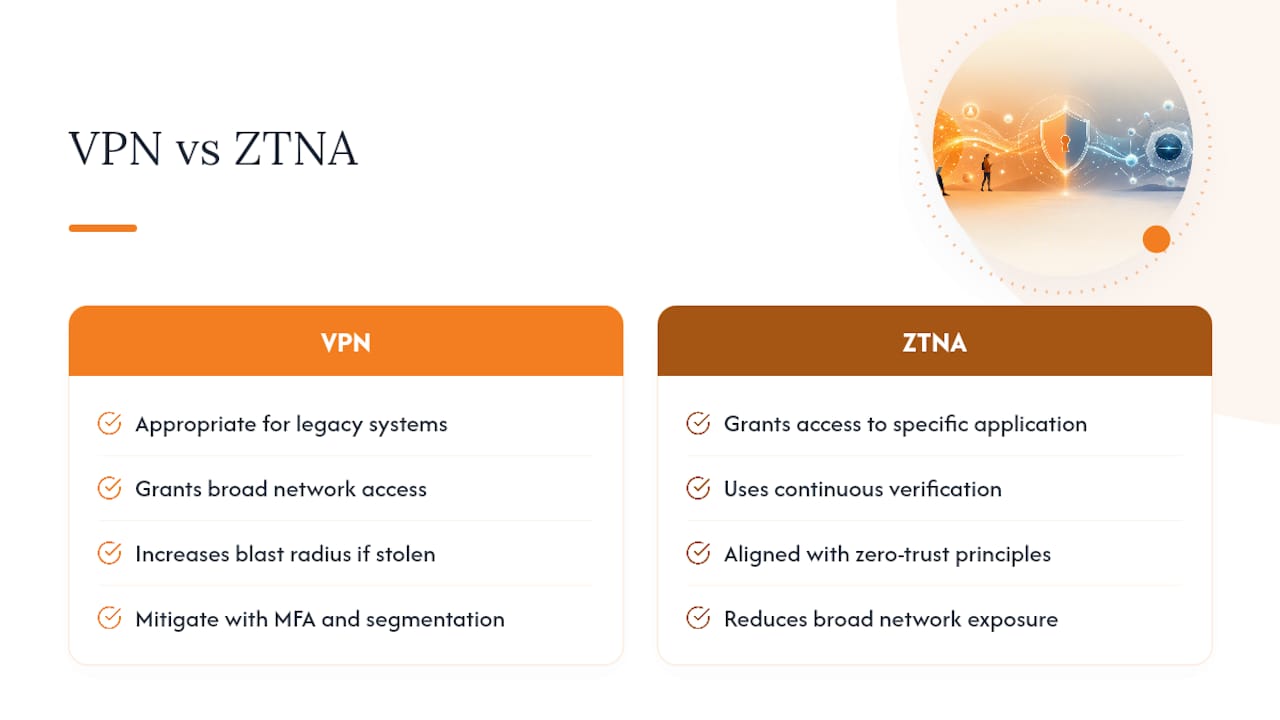
VPN builds an encrypted tunnel between a device and the network, then typically grants broad access to everything behind it. That’s the core weakness: one compromised VPN credential can expose far more than the attacker needs. VPN still makes sense for legacy applications that can’t support modern authentication brokers, or for smaller networks where segmentation would cost more than it’s worth.
ZTNA (Zero Trust Network Access) flips the model. Instead of connecting a user to the network, it connects a user to a specific application, after verifying identity and device posture continuously, not just at login. Cisco’s framing of secure remote access places ZTNA squarely inside zero-trust principles: every request gets checked, every time, regardless of where it originates. The practical benefit is a shrunk blast radius. If credentials get stolen, the attacker reaches one app, not the whole subnet.
SASE (Secure Access Service Edge), and its security-focused subset SSE, converge networking and security into a single cloud-delivered service. It’s the right call when you’re managing access at scale across many locations and need consistent policy enforcement without backhauling traffic through a data center.
A workable migration path looks like this:
- Pilot ZTNA first on your highest-risk applications: finance systems, source code repositories, admin consoles.
- Keep VPN running for legacy systems that genuinely can’t be retrofitted yet.
- Layer in SASE/SSE services once you need consistent policy across distributed offices or a growing remote workforce.
Treat this as a multi-year program, not a rip-and-replace weekend, and instrument telemetry across both old and new access paths during the transition.
Ten Best Practices to Secure Remote Access
- Enforce phishing-resistant MFA. FIDO2 security keys or certificate-based authentication beat SMS and push notifications, which remain vulnerable to real-time phishing and push-fatigue attacks.
- Centralize authentication with SSO. One identity provider means one place to enforce policy, revoke access, and audit logins, instead of chasing credentials scattered across a dozen apps.
- Run device posture checks before granting access. Confirm patch level, endpoint protection status, and disk encryption before a device ever touches production data.
- Apply least-privilege, per-application access. Stop granting network-wide access when a user only needs one internal tool.
- Harden your protocols. Use IKEv2/IPsec with modern ciphers for VPN, key-based authentication for SSH, and a broker in front of RDP rather than exposing it directly.
- Encrypt end-to-end. Eliminate unencrypted internal traffic flows wherever legacy systems allow it.
- Segment the network. Micro-segmentation limits how far an attacker can move even after a successful breach.
- Correlate telemetry across sources. Identity logs, endpoint data, and network flows tell a fuller story together than any single source alone.
- Control third-party access tightly. Vendors and contractors get time-limited, audited credentials, never standing access that outlives the engagement.
- Train users on a recurring cadence. Annual training doesn’t stick; quarterly refreshers on phishing and credential hygiene do.
Pro Tip: Audit your third-party vendor accounts this month. Standing credentials for contractors who left a project six months ago are one of the most common findings in remote-access security reviews, and they’re the easiest fix on this entire list.
SentinelOne’s hardening guidance backs items 1, 5, and 6 specifically, noting that protocol-level hardening closes gaps that policy alone can’t.
How to Roll Out Secure Remote Access: A Phased Checklist
- Classify your resources. Sort applications and data by sensitivity, then decide which access pattern (VPN, ZTNA, brokered access) fits each tier.
- Set pilot success criteria. Define measurable KPIs before you start: reduction in broad-tunnel sessions, time-to-detect anomalies, and the share of privileged sessions using phishing-resistant MFA.
- Select a pilot cohort. Choose one team or one high-risk application, instrument full telemetry, and validate that posture checks actually block noncompliant devices.
- Test automated responses. Confirm that a failed posture check triggers remediation, not a support ticket that sits for three days.
- Expand in phases. Roll out to additional teams only after the pilot hits its KPIs, with clear rollback criteria if something breaks.
- Operationalize. Build dashboards for ongoing visibility, write incident playbooks before you need them, and set a patching cadence you’ll actually follow.
Pro Tip: If a device fails its posture check, don’t just deny access outright. A limited remediation network path, one that lets the device reach patch servers and nothing else, keeps users productive while staying compliant, an approach echoed in TechTarget’s enterprise remote access guidance.
Managing Endpoints and BYOD Without Opening New Risks
Company-managed devices should always be the default for remote access to sensitive systems. When BYOD is unavoidable, constrain what those devices can reach rather than treating them like corporate hardware.

Every device, managed or not, needs to pass baseline posture checks: current patches, active endpoint detection and response (EDR), full-disk encryption, and an approved operating system version. A device that fails any of these shouldn’t get a blanket “access denied.” Route it to a quarantined network segment where it can pull the missing patch or install the required agent, then re-check automatically.
For mobile devices and contractor equipment, mobile device management (MDM) and containerization keep corporate data separated from personal apps and files. That separation matters most when an employee leaves. Wiping a container is clean; wiping someone’s personal phone is a legal headache. Our guide on increasing remote work security covers these tradeoffs in more depth, including how to handle personal devices that access company email.
- Prioritize managed devices for any system handling regulated or sensitive data.
- Require the same posture checks (patching, EDR, encryption) regardless of who owns the device.
- Build a remediation path, not a hard block, for failed checks.
- Use MDM containerization to separate corporate and personal data on mobile devices.
Monitoring and Incident Response for Remote Sessions
Most detection failures happen at the seams: a VPN log that shows a connection but no context about which resource was accessed, or an EDR alert that never gets matched to the identity behind it. Fixing that means pulling identity logs, VPN/ZTNA session data, endpoint telemetry, and network flow data into one correlated view, a point SentinelOne’s guidance makes directly.
Watch for these correlation patterns:
- Impossible travel: a login from New York followed by one from Singapore twelve minutes later.
- Rapid, large-scale downloads immediately after authentication.
- Command patterns inconsistent with a user’s normal role or job function.
When something trips, automated mitigations should fire immediately: kill the session, force reauthentication, or block the source network range while a human investigates.
Your incident playbook needs four steps in order: contain the session, preserve forensic evidence before anything gets overwritten, rotate any credentials that might be compromised, and remediate the endpoint before it reconnects.
Pro Tip: Test your “kill session” automation quarterly in a controlled scenario. A response rule that’s never been fired outside a tabletop exercise usually has a bug nobody’s found yet.
Governance and Training That Make Controls Stick
Technology controls decay without policy behind them. Your remote-access policy needs acceptable-use language, a clear authorization workflow for requesting new access, explicit contractor and vendor clauses, and stated consequences for violations.
Access reviews shouldn’t be an annual scramble. Quarterly reviews tied to role changes catch the stale permissions that accumulate when people switch teams or leave contractor engagements. Refresh training on a similar cadence, covering phishing recognition, credential handling (our piece on sharing passwords securely with employees is a useful reference here), and what to do when a device is lost or stolen.
- Require signed acceptable-use agreements before granting any remote access.
- Review access rights quarterly, tied to role and employment status changes.
- Refresh security training at least twice a year, more often for high-privilege users.
- Build audit evidence requirements into every third-party remote-access contract.
How Logmeonce Supports These Controls
The controls above depend on identity infrastructure that actually holds up under daily use, and that’s the layer Logmeonce is built around. Passwordless MFA removes the SMS and push-notification weaknesses discussed earlier, while single sign-on centralizes authentication instead of scattering it across dozens of app logins.
Cloud storage encryption protects data once a remote session accesses it, and dark web monitoring flags credential exposure before attackers can use it for the lateral movement described earlier in this guide. For teams managing shared access, a team password manager closes the gap between “least privilege” as a policy statement and least privilege as daily practice.
- Passwordless MFA reduces phishing and push-fatigue exposure.
- SSO centralizes and simplifies authentication management.
- Cloud storage encryption protects data in remote sessions.
- Dark web monitoring flags compromised credentials early.
| Point | Details |
|---|---|
| Identity is the foundation | Phishing-resistant MFA and SSO close the most exploited credential gaps. |
| Encryption protects data in use | Cloud storage encryption limits exposure even during a compromised session. |
What Most Remote Access Advice Gets Backward
Most guidance on this topic treats zero trust as a product you buy rather than a posture you build over years. That’s the biggest gap between conventional advice and what actually works: organizations that wait for a “complete” ZTNA rollout before touching VPN-protected legacy systems stay exposed far longer than those who run both in parallel and instrument telemetry across each.
The other overrated idea is that MFA alone solves the credential problem. It doesn’t, if that MFA is SMS or simple push approval. Push-fatigue attacks succeed constantly against organizations that checked the “MFA enabled” box without asking which kind.
If you take one thing from this guide, prioritize the remediation path over the access decision itself. Denying a noncompliant device outright just pushes users toward shadow IT workarounds. Give them a supervised path back to compliance, and your posture checks actually get followed instead of resented.
Get Your Remote Access Identity Layer Right
Everything in this guide comes back to one weak point most breaches exploit: credentials. You can harden VPN protocols, segment your network, and deploy ZTNA for every high-risk app, but if authentication still relies on SMS codes or a single shared password, you’ve left the front door unlocked.

Logmeonce replaces that weak point with passwordless MFA, single sign-on, and dark web monitoring that flags compromised credentials before they turn into a lateral-movement incident. For IT teams managing a mix of employees, contractors, and BYOD devices, that means one identity layer instead of a patchwork of logins to audit and revoke. Visit the Logmeonce cybersecurity page to see how the platform maps to the controls covered in this guide, and start a trial to test passwordless authentication against your own remote access environment before your next access review.
Frequently Asked Questions
What is secure remote access, in simple terms?
It’s controlled, verified access for authorized users to only the specific resources they need, rather than open access to an entire network. Strong identity checks, device health verification, and continuous monitoring work together to enforce that control.
Is VPN still safe to use for remote access?
VPN remains appropriate for legacy systems that can’t support modern access brokers, but it grants broad network access by default, which increases blast radius if credentials are stolen. Pairing VPN with strong MFA and network segmentation reduces that risk significantly.
What’s the difference between ZTNA and a traditional VPN?
ZTNA grants access to a specific application after continuous verification, while VPN typically connects a user to the broader network. That difference is why [Cisco frames ZTNA](https://www.cisc o.com/site/us/en/learn/topics/security/what-is-secure-remote-access.html) as more aligned with zero-trust principles than traditional VPN architecture.
How often should remote access permissions be reviewed?
Quarterly reviews tied to role changes catch stale permissions faster than an annual audit, especially in organizations with frequent contractor turnover or internal team moves.
What should happen if a device fails a security posture check?
Route it to a limited remediation network where it can install required patches or agents, rather than denying access outright. That keeps users productive while enforcing your security baseline.
Sources
- Guide to Securing Remote Access Software – CISA
- 10 enterprise secure remote access best practices – TechTarget
- Remote access security best practices – SentinelOne
- What is secure remote access? – Cisco
Recommended


