


 Password Manager
 Identity Theft Protection

 Team / Business
 Enterprise
 Government
 MSP
MSP


The most secure free password managers share three traits: zero-knowledge encryption, an independently audited codebase, and flexible backup options that don’t leave you locked out. If you want the short answer, here it is: an open-source, zero-knowledge vault with a published audit is the most trustworthy archetype available at no cost. The specific tool you choose depends on whether you want cloud sync, local control, or a hybrid.
Here are the five archetypes worth considering:
- Open-source offline vault (KeePass / KeePassXC): Your encrypted database never touches a server you don’t control.
- Zero-knowledge open-source cloud vault (Bitwarden): Audited code, cloud sync, and a free tier that works across devices.
- Privacy-first hosted vault (Proton Pass): Built by the team behind ProtonMail, with end-to-end encryption and a strong privacy track record.
- Single-device free vault (NordPass / RoboForm): Polished apps with solid encryption, but free plans restrict sync to one device.
- Logmeonce free plan: Zero-knowledge architecture, passwordless MFA, dark web monitoring, and cloud encryption included at no cost — the publisher’s own option, and a genuinely competitive free offering.
Which free password managers are the most secure right now?
Several tools represent strong free options for individual users in the United States. Each block covers the security model, free-plan limits, and the honest tradeoffs.
KeePass / KeePassXC: open-source offline vault
Bottom line: Maximum data sovereignty, zero provider dependency, and a security model that earned a formal ANSSI CSPN certification — the French national cybersecurity agency’s first-level security certification — for an open-source offline implementation. That kind of government-level validation is rare in consumer software.
Your encrypted .kdbx database lives on your device. AES-256 or ChaCha20 encryption protects it, and the entire codebase is public. Bruce Schneier has long argued that open-source cryptographic implementations benefit from broader peer review, which accelerates vulnerability discovery. KeePassXC is the actively maintained, cross-platform fork most U.S. users should choose over the original KeePass.
Free plan: Unlimited passwords, no device limit on the local file, no cloud account required. Sync between devices requires you to move the database file manually or through a third-party service like Syncthing or an encrypted cloud container.
Pros: No server-side attack surface; fully audited and open-source; no subscription, ever.
Cons: Setup takes effort; sync is manual; losing the database file or forgetting the master password means permanent data loss.
Best for: Privacy maximizers, security professionals, and anyone who refuses to trust a cloud provider with their vault.
Bitwarden: zero-knowledge open-source cloud vault
Bottom line: The strongest combination of open-source transparency and cloud convenience in the free password manager category. Bitwarden’s code is publicly available on GitHub, it has completed multiple independent third-party security audits, and its zero-knowledge model means even Bitwarden’s servers can’t read your vault.
The free tier allows unlimited passwords across unlimited devices — a meaningful advantage over most competitors. Browser extensions, desktop apps, and mobile apps are all included. TOTP-based two-factor authentication is supported on the free plan, and hardware security key support (FIDO2/WebAuthn) is available.
Free plan: Unlimited passwords, unlimited devices, one-to-one sharing with one other user. Advanced 2FA options and encrypted file attachments require a paid plan.
Pros: Fully audited; open-source; generous free tier; self-hosting option available for technical users.
Cons: Self-hosting requires server administration skills; the UI is functional but not the most polished.
Best for: Users who want cloud sync and open-source assurance without paying anything.
“Open-source transparency is not a guarantee of security, but it raises the bar because many eyes can inspect crypto implementations and report issues faster.” — Bruce Schneier
Proton Pass: privacy-first hosted vault
Bottom line: Proton Pass uses end-to-end encryption for every field in a vault entry — not just the password, but also usernames, URLs, and notes. Most password managers encrypt only the password field at rest; Proton Pass encrypts the metadata too, which meaningfully reduces what a server breach could expose.
Built by the team behind ProtonMail and ProtonVPN, the product carries credibility from Proton’s established privacy track record. The free plan is genuinely usable: unlimited passwords, unlimited devices, and passkey support included.
Free plan: Unlimited passwords, unlimited devices, limited to two vaults and ten hide-my-email aliases. No sharing on the free tier.
Pros: Full metadata encryption; strong privacy brand; passkey support; unlimited devices on the free plan.
Cons: Newer product with a shorter audit history than Bitwarden; sharing requires a paid plan.
Best for: Privacy-conscious users who want cloud sync and trust the Proton ecosystem.
NordPass and RoboForm: single-device free vaults
Both tools use XChaCha20 encryption and have completed independent security audits. NordPass comes from the team behind NordVPN and uses a zero-knowledge model. RoboForm has been around since 1999 and has a long track record of form-filling accuracy.
The catch on both free plans: sync is limited to a single device. That restriction has a real security implication. When users can’t sync easily, they tend to work around it — writing passwords down, reusing them, or storing them in plaintext. Security reviewers consistently note that cloud sync reduces user maintenance burden and the risky workarounds that come with friction.
Best for: Users who primarily work on one device and want a polished, audited app without paying.
Logmeonce free plan: zero-knowledge with MFA and dark web monitoring
Bottom line: Logmeonce’s free plan goes further than most free tiers on security features. Zero-knowledge architecture means your master password never leaves your device in readable form. The free plan includes passwordless MFA options, dark web monitoring, and cloud encryption — features that typically sit behind a paywall elsewhere.
Logmeonce also supports FIDO2/WebAuthn hardware keys and passkeys, and the platform covers browser extensions, desktop, and mobile. The password management benefits page details the full feature set available at no cost.
Free plan: Unlimited passwords, cloud sync, MFA, dark web monitoring, and single sign-on support included.
Pros: Unusually rich free tier; passwordless login options; dark web monitoring at no cost; strong MFA support.
Cons: Closed-source, so independent code review is limited compared to Bitwarden or KeePassXC.
Best for: Individual users who want a feature-rich free vault with strong MFA and don’t require open-source code access.
Pro Tip: Whatever manager you choose, enable MFA on day one — before you import a single password. Setting it up after the fact is when most users skip it.
How do you choose the most secure free password manager for your situation?
Start with one question: do you need cloud sync across multiple devices, or are you comfortable managing your own backup? That single answer narrows the field immediately.
Security priority checklist
Work through these eight checks before committing to any free vault:
- Audit status: Has the vendor published an independent third-party security audit with findings and remediation notes? A whitepaper alone is not an audit.
- Zero-knowledge proof: Does the vendor’s documentation confirm that your master password is never transmitted or stored in readable form?
- MFA support: Does the free plan include at least TOTP-based 2FA? Hardware key (FIDO2/WebAuthn) support is a stronger signal.
- Passkey / FIDO2 support: Passkeys are the emerging standard for phishing-resistant authentication. Free plans that include them are ahead of the curve.
- Backup and recovery options: Can you export an encrypted backup? What happens if you lose your master password? Is there a recovery key or emergency access option?
- Device sync limits: A free plan that restricts sync to one device pushes users toward insecure workarounds. Know the limit before you commit.
- Privacy policy on telemetry: Does the vendor collect usage analytics? What data leaves your device, and can you opt out?
- Update cadence: How quickly does the vendor patch disclosed vulnerabilities? Check the public changelog or GitHub commit history.
Red flags to avoid
- No MFA option on the free plan.
- Encryption model described only in marketing language with no technical whitepaper.
- No export function or locked-down recovery that requires contacting support.
- No public response to past CVEs (Common Vulnerabilities and Exposures).
- Privacy policy that reserves the right to share anonymized usage data with third parties.
Pro Tip: Before importing your passwords, search the vendor’s name plus “CVE” or “security incident” on the National Vulnerability Database at nvd.nist.gov. A vendor with disclosed and patched CVEs is often more trustworthy than one with zero disclosures — silence can mean no one is looking.
How we evaluated these free password managers
Every tool in this article was assessed against the same criteria. No vendor paid for placement.
- Security model: Encryption algorithm (AES-256, XChaCha20, or equivalent), key derivation function (PBKDF2, Argon2), and zero-knowledge architecture documentation.
- Independent audits: Third-party audit reports with named firms, disclosed scope, and published findings. Vendor-commissioned whitepapers were noted but weighted lower.
- Open-source status: Whether the full client and server code is publicly available and actively maintained.
- MFA and passkey support: Which authentication methods are available on the free tier specifically, not just on paid plans.
- Backup and recovery: Export formats, emergency access options, and what happens at account recovery.
- Update cadence: Frequency of security patches and public response to disclosed vulnerabilities, reviewed via changelogs and public repositories.
- Privacy policy: Data collection scope, telemetry opt-out availability, and third-party sharing clauses.
- Device and password limits: Free-tier caps that affect real-world security behavior.
- Sources: Vendor documentation, government certification records (ANSSI CSPN), independent security reports, published whitepapers, and editorial hands-on review of each app’s setup flow and security settings.
One honest limitation: some vendors commission audits under NDA, meaning findings are never published. Where that was the case, the tool was noted as “audit claimed, not publicly verified” and weighted accordingly. A claim of an audit without a published report carries less weight than a disclosed one.
Cloud-hosted vs. local password managers: which is actually safer?
The honest answer is that neither is categorically safer. The right choice depends on your threat model and your willingness to take on operational responsibility.
| Dimension | Cloud-hosted vault | Local / offline vault |
|---|---|---|
| Attack surface | Provider infrastructure + your device | Your device and backup media only |
| Backup responsibility | Provider handles server-side; user handles export | Entirely on the user |
| Sync convenience | Automatic across all devices | Manual (file transfer or third-party sync) |
| Recovery options | Account recovery, emergency access, support | Master password only; no recovery without backup |
| Update cadence | Vendor-pushed, often automatic | User must apply updates manually |
| Third-party exposure | Provider’s infrastructure and staff | None, unless you use a cloud sync service |
For most individual users, PCMag’s security guidance reflects the practical consensus: a zero-knowledge cloud offering with an audited code path provides the best balance of security and convenience. Local and offline vaults are the right call when legal requirements, regulatory control, or total data sovereignty is the priority.
Scenario guidance:
- Frequent multi-device user: A zero-knowledge cloud vault (Bitwarden or Proton Pass) is the practical choice. Automatic sync removes the friction that leads to insecure workarounds.
- Privacy maximizer who refuses cloud storage: KeePassXC with a local database, backed up to an encrypted USB drive stored separately from the device. No server ever sees your data.
- Non-technical user who wants minimal maintenance: A hosted zero-knowledge vault with automatic updates and account recovery options. The tradeoff is provider dependency, but the alternative — a misconfigured local setup with no backup — is a worse security outcome.
Pro Tip: The safest hybrid approach: use a zero-knowledge cloud vault as your primary manager, then export an encrypted backup of your vault monthly and store it in a separate encrypted container (VeraCrypt works well) on a USB drive kept offline. You get cloud convenience with a recovery option that doesn’t depend on the provider.
What do free password managers actually collect about you?
Privacy policies vary more than the marketing suggests. Zero-knowledge encryption protects your vault contents, but it says nothing about what the app collects around your usage.
Bitwarden’s privacy policy is among the most transparent in the category. It collects basic account data and usage analytics, but the open-source codebase means independent researchers can verify what data actually leaves the client. Proton Pass takes a stricter stance, consistent with Proton’s broader privacy philosophy — minimal telemetry and no advertising partnerships.
Closed-source tools require more trust. When you can’t inspect the client code, you’re relying entirely on the vendor’s policy statements. That’s not necessarily a dealbreaker, but it’s a meaningful difference from an audited open-source tool. Check specifically for: whether analytics are opt-in or opt-out, whether the policy permits sharing “anonymized” data with third parties, and whether the policy covers the mobile app separately from the desktop client (they sometimes differ).
One thing zero-knowledge architecture does not protect: metadata. Some managers encrypt only the password field, leaving URLs, usernames, and entry titles visible to the provider. Proton Pass is notable for encrypting all entry fields, including metadata. That distinction matters when a server breach occurs — an attacker who can’t read passwords can still learn which sites you use.
How quickly do these tools respond to security vulnerabilities?
Update cadence is one of the most underrated security criteria for free password software. Past vulnerability analyses confirm that password managers are not immune to security flaws — but they still provide far stronger protection than reusing passwords or storing them in plaintext, provided users keep software current.
Bitwarden’s open-source model means the community can identify and report issues independently of the vendor. The GitHub repository shows a consistent pattern of rapid patch releases following disclosed vulnerabilities. KeePassXC similarly benefits from public code review, and its changelog documents security fixes with CVE references.
Closed-source tools are harder to evaluate. NordPass and RoboForm both have published security incident responses, but without public code, the community depends on the vendor’s own disclosure timeline. Proton Pass is partially open-source on the client side, which helps.
The practical takeaway: enable automatic updates on whatever manager you use. A patched vulnerability is a closed door; an unpatched one on a tool that holds every password you own is a serious exposure. Check the vendor’s security page or public changelog at least quarterly.
What MFA options do these free password managers support?
Multi-factor authentication on your password manager is the single highest-leverage security step you can take. If an attacker gets your master password, MFA is the last line of defense before they own every account in your vault.
Modern secure managers increasingly support FIDO2/WebAuthn and hardware security keys like YubiKey, which provide phishing-resistant authentication that TOTP codes can’t match. Here’s how the free tiers stack up:
- Bitwarden: TOTP-based 2FA and email verification on the free plan; hardware key (FIDO2/WebAuthn) support available.
- Proton Pass: TOTP 2FA supported; passkey support included on the free tier.
- KeePassXC: MFA is handled at the database level — you can require a key file in addition to the master password, and hardware key (YubiKey/HMAC-SHA1) integration is supported.
- NordPass: TOTP 2FA on the free plan; hardware key support on paid plans only.
- RoboForm: TOTP 2FA available on the free plan.
- Logmeonce: Passwordless MFA options, TOTP, and FIDO2/WebAuthn hardware key support on the free plan — one of the most complete MFA offerings at no cost. The password manager security overview covers the technical architecture in detail.
Hardware keys are the gold standard. If you own a YubiKey or similar FIDO2 device, prioritize a manager that supports it on the free tier.
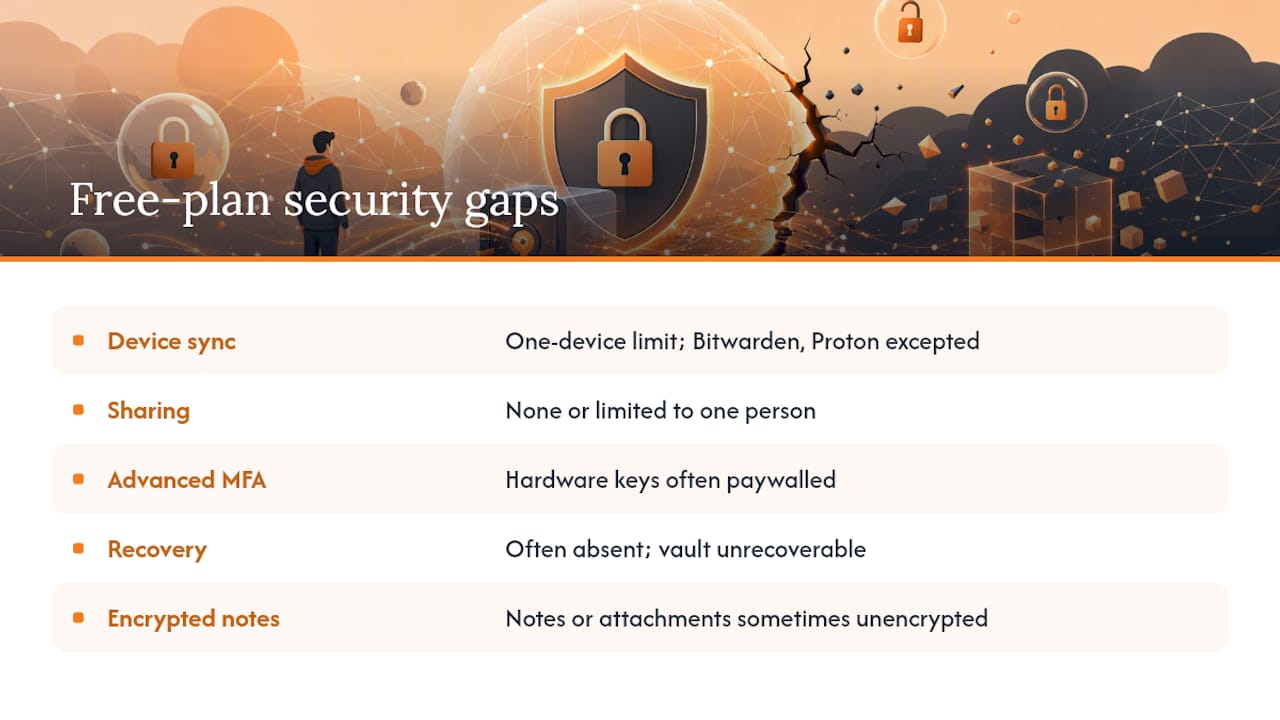
What security features do free plans actually leave out?
Free plans are genuinely useful, but the gaps matter. Observed patterns across free-tier offerings show that the most common restrictions fall into a few categories.
Device sync limits are the most consequential. When a free plan restricts sync to one device, users who need access on phone and laptop face a choice: pay up, use two separate vaults (a security disaster), or find a workaround. Bitwarden and Proton Pass are the notable exceptions with unlimited device sync on the free tier.
Sharing restrictions affect families and couples. Most free plans allow zero secure sharing or limit it to one other person. Storing a shared password in a text message or email to get around this is a far worse outcome than the restriction itself.
Advanced MFA is sometimes paywalled. Hardware key support in particular tends to appear only on paid plans — NordPass is an example. If you own a YubiKey, verify free-tier compatibility before committing.
Emergency access and account recovery are frequently absent on free plans. If you lose your master password with no recovery option, your vault is gone. Before importing anything, confirm what recovery options exist and set them up.
Encrypted file attachments and secure notes with full encryption are often restricted. Some free plans store notes in plaintext or with weaker encryption than the password fields. Check the technical documentation, not the marketing page.
The risks of free password manager plans are real but manageable. The key is knowing the limits before you rely on the tool.
Key Takeaways
The most secure free password manager combines zero-knowledge encryption, an independently published audit, and MFA support — with Bitwarden and Logmeonce offering the strongest free tiers for cloud sync users.
| Point | Details |
|---|---|
| Zero-knowledge + audit = baseline | Only consider free managers that document zero-knowledge architecture and have published independent audit results. |
| Cloud vs. local tradeoff | Cloud vaults offer convenience and automatic updates; local vaults give full data sovereignty but put backup entirely on you. |
| MFA is non-optional | Enable TOTP or hardware-key MFA immediately — it’s the last defense if your master password is compromised. |
| Free-plan limits affect security | Device sync caps push users toward insecure workarounds; Bitwarden and Proton Pass offer unlimited devices at no cost. |
| Logmeonce free plan | Includes zero-knowledge encryption, passwordless MFA, dark web monitoring, and cloud encryption at no cost. |
The part most security guides skip
Free password managers get compared on features. Rarely on failure modes.
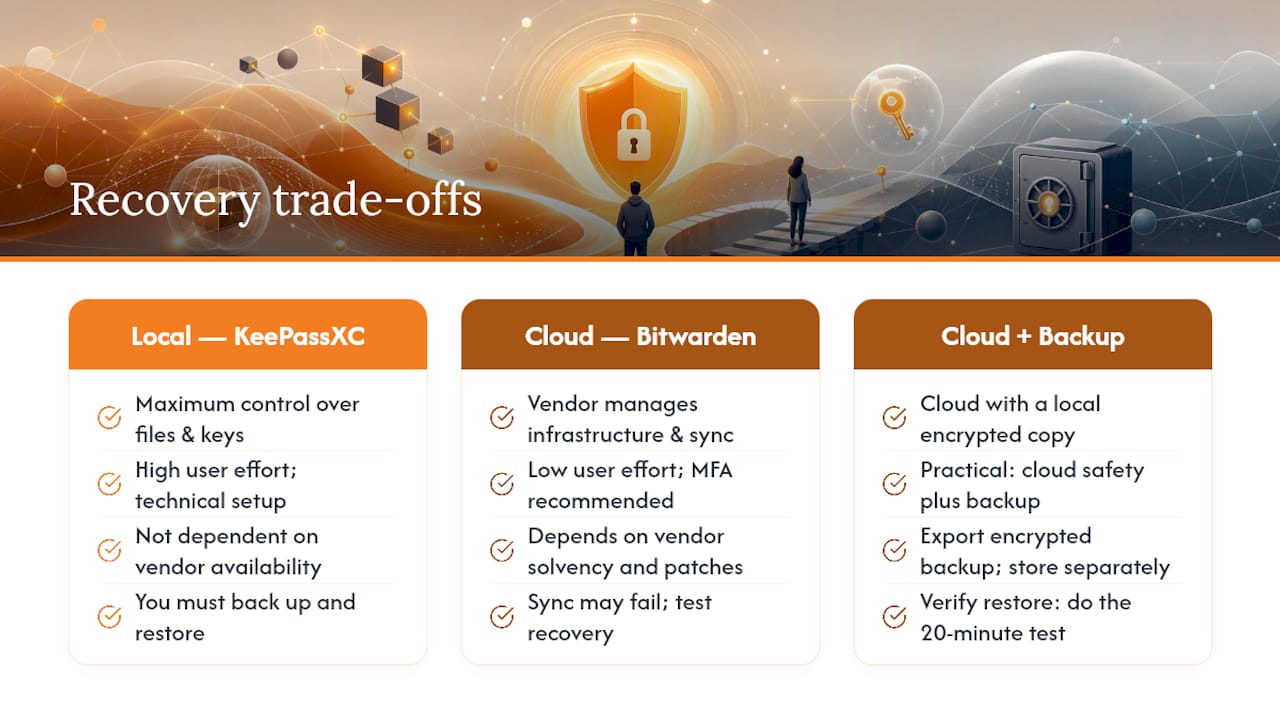
The real risk with any free vault isn’t the encryption algorithm — AES-256 and XChaCha20 are both strong enough that the algorithm is almost never the weak point. The risk is the recovery path. What happens when you lose your master password? What happens when the vendor shuts down a free tier, as several have done in recent years? What happens when you switch phones and discover your vault didn’t sync?
Most users find out the answers to those questions at the worst possible moment. The right approach is to stress-test your recovery workflow before you need it: export an encrypted backup, store it somewhere separate from your primary device, and actually try to restore from it. That 20-minute exercise is worth more than any feature comparison.
Open-source tools like KeePassXC give you the most control over that workflow, but they also demand the most from you. A zero-knowledge cloud vault like Bitwarden or Logmeonce handles the infrastructure, but you’re trusting the vendor to stay solvent, stay honest, and keep patching. Neither model is perfect. The question is which failure mode you’re better equipped to handle.
For most individual users, the answer is cloud with a local backup copy. Not because cloud is safer in theory, but because a well-maintained cloud vault with MFA enabled is safer in practice than a local vault with no backup that gets lost when a hard drive fails.
Logmeonce offers a free plan worth trying
Most free password managers make you choose between security and features. Logmeonce doesn’t. The free plan includes zero-knowledge encryption, passwordless MFA, dark web monitoring, and cloud encryption — the kind of feature set that typically costs money elsewhere. For individual users coming from this comparison, that’s a meaningful difference: you get enterprise-grade security controls without a subscription.

Logmeonce supports FIDO2/WebAuthn hardware keys, passkeys, and TOTP on the free tier, and the cloud encryption architecture is documented for users who want to verify the technical claims. Dark web monitoring alerts you when your credentials appear in a breach — a feature most free vaults reserve for paid plans.
The free plan is available at logmeonce.com. Sign up, enable MFA on the first login, and run a dark web scan on your existing email addresses. Those two steps take under five minutes and immediately raise your security baseline.
Authoritative sources and further reading
For readers who want to verify technical claims or go deeper on specific topics:
- Bruce Schneier’s security blog — Expert commentary on open-source cryptography and security transparency. Best for understanding why open-source matters in cryptographic tools.
- PCMag password manager coverage — Practical editorial guidance on cloud vs. local tradeoffs and free-plan limitations. Best for quick user guidance.
- PC Matic: Password managers found vulnerable — Analysis of past vulnerabilities and recommended user practices. Best for understanding update cadence and incident response.
- Logmeonce: How secure are password manager tools — Publisher-side technical overview of password manager security architectures.
- Logmeonce: Are password managers safe? — Practical guide to evaluating and validating password manager security. Best for users working through the selection checklist.
- Logmeonce password management benefits — Full feature breakdown of the Logmeonce free and paid plans.
This article provides general security guidance for informational purposes. It is not a substitute for professional cybersecurity advice. Verify current feature availability and plan terms directly with each vendor before making a decision.
Recommended
- Are Password Managers Safe? How to Find a Secure Password Manager
- How secure are password manager tools – LogMeOnce


