


 Password Manager
 Identity Theft Protection

 Team / Business
 Enterprise
 Government
 MSP
MSP


TL;DR:
- Password reset automation reduces ticket volume and costs by enabling self-service workflows that verify user identities. It enhances security through MFA and biometric verification, replacing weak knowledge-based questions and reducing social engineering risks. Implementing SSPR builds organizational trust for broader ITSM automation and supports zero trust security models for remote workforces.
Password reset automation is defined as the use of software workflows to verify user identity and restore account access without manual help desk intervention. The primary advantage is direct: organizations that automate this process cut ticket volumes by up to 50% and free IT staff for higher-value work. Manual resets carry a hard cost of approximately $70 per incident, and at scale that figure becomes a significant budget line. The industry term for the broader practice is self-service password reset (SSPR), and it sits at the intersection of IT service management (ITSM) and identity security. Platforms like Microsoft Entra ID and Logmeonce have made SSPR a standard capability, not a luxury.
What are the password reset automation advantages for IT operations?
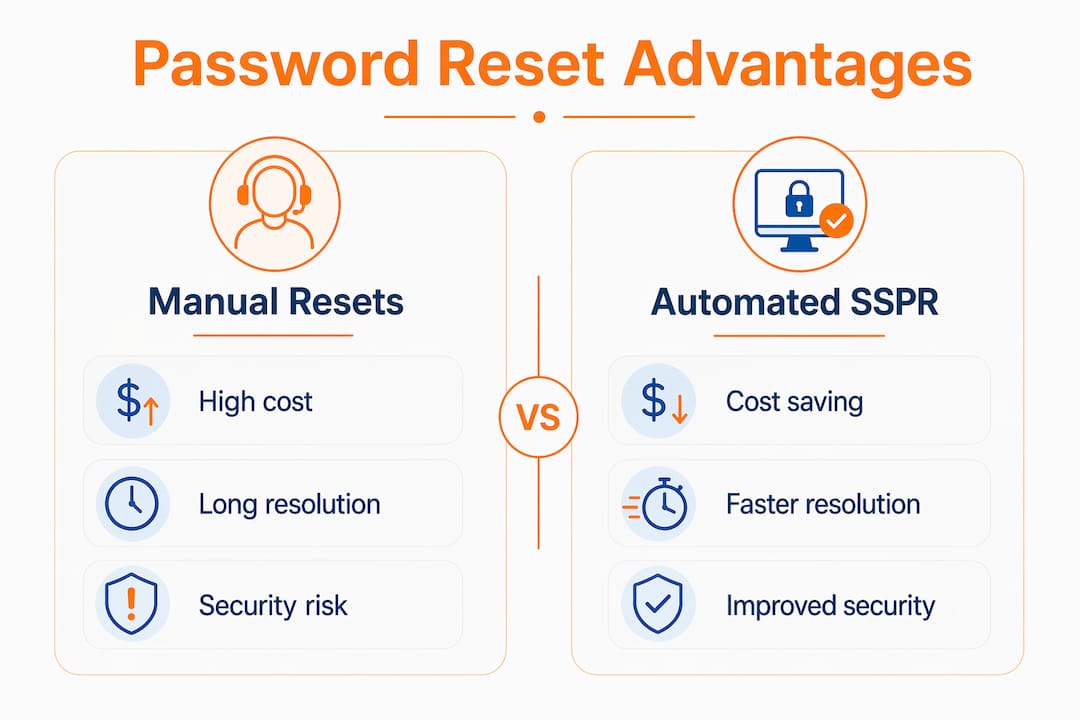
Automated password resets remove the most repetitive task from the help desk queue. Password-related tickets consistently rank as the single highest-volume category in enterprise IT, and each one requires a technician to stop, verify, and act. Automation handles that entire sequence without human involvement, which means faster resolution and lower labor cost.

The financial case is straightforward. At $70 per manual reset, an organization processing 500 resets per month spends $35,000 monthly on a task that software can handle in seconds. That figure does not include the indirect cost of the employee sitting locked out and unproductive while waiting for a technician.
Speed is the second major gain. Automated workflows reduce mean time to resolution for password incidents from hours to minutes. Users regain access through a self-service portal, often before a ticket would even reach the queue under a manual process.
Integration depth determines how much efficiency you actually capture. SSPR systems connect to Active Directory, LDAP directories, and cloud identity services, so a reset in the portal propagates instantly across every linked system. Centralized identity stores with MFA enforcement give IT teams a single governance point rather than scattered manual processes. Logmeonce provides this kind of enterprise password management integration, linking self-service resets to centralized policy controls.
Pro Tip: Treat SSPR as your first automation project, not your last. IT teams that master password reset automation report increased confidence in tackling more complex ITSM workflows afterward.
- Ticket volume reduction of up to 50% after SSPR deployment
- Labor cost savings of approximately $70 per avoided manual reset
- Faster mean time to resolution through self-service portals
- Centralized governance via Active Directory and cloud identity integration
- Foundation for broader ITSM automation initiatives
What are the security benefits of automating password resets?
Automated password resets improve security when they are built on identity verification rather than knowledge-based questions. The old model asked users to answer “What was your first pet’s name?” That approach is trivially defeated by social engineering or data exposed in a breach. Modern SSPR replaces it with MFA and biometric verification, which are far harder to fake.
Microsoft Entra ID draws a clear line between self-service password reset and account recovery. SSPR applies when a user knows their identity but has forgotten their password. Account recovery applies when the user has lost access to their authentication methods entirely. Both processes benefit from automation, but account recovery carries higher risk and requires stricter identity proofing through certified providers.
The security philosophy shift here is significant. Automated account recovery moves trust from what you know to who you are. That shift closes the gap that attackers exploit when they call a help desk and impersonate an employee. A technician under pressure can be socially engineered. A biometric verification workflow cannot.
“Automation must be rigorously coupled with MFA and biometric identity proofing to avoid automating social engineering attack vectors where adversaries impersonate users. Without strict policy anchoring, automated reset workflows can inadvertently make impersonation easier, not harder.”
The risks to avoid are equally clear. An SSPR system with weak verification methods does not improve security. It creates a new, scalable attack surface. Without proper MFA enforcement, an attacker who knows a target’s email address can trigger a reset and intercept it. Logmeonce addresses this directly through its two-factor authentication layer, which ties every reset to a verified second factor.
- Replaces knowledge-based questions with MFA and biometrics
- Eliminates the social engineering risk present in manual help desk resets
- Enforces consistent policy across every reset, not just the ones a technician remembers to check
- Creates an audit trail for every access recovery event
- Reduces the attack surface when properly configured with strict verification
What practical challenges exist when implementing SSPR?
The biggest implementation risk is deploying automation without tightening the verification policy first. Organizations sometimes rush to reduce ticket volume and configure SSPR with minimal friction, which means minimal security. The result is a system that is convenient for attackers as well as legitimate users.
User adoption is the second obstacle. Employees who have never used a self-service portal often default to calling the help desk out of habit. IT teams that skip the communication and training phase see lower adoption rates and fail to capture the expected cost savings. The technology works, but the behavior change requires active management.
Technical integration also creates friction during rollout. Legacy systems that do not support modern identity protocols need middleware or workarounds to connect to an SSPR portal. Organizations running hybrid environments with both on-premises Active Directory and cloud identity services must synchronize password policies across both, or users encounter inconsistent behavior.
Pro Tip: Run a pilot with one department before a full rollout. Measure ticket volume, resolution time, and user satisfaction for 30 days. The data from that pilot will justify the broader investment and surface integration issues before they affect the whole organization.
- Audit your current verification methods before enabling automation. Weak methods must be replaced, not carried over.
- Communicate the self-service portal to all employees before launch, with clear instructions and a short walkthrough video.
- Map every system that requires password synchronization and confirm each one connects to the central identity store.
- Set lockout and rate-limiting policies on the SSPR portal to prevent brute-force attempts against the reset workflow itself.
- Review the signs your organization needs a team password manager before selecting an SSPR platform, since the two capabilities often overlap in enterprise tools.
How does SSPR fit into broader ITSM and zero trust frameworks?
Password reset automation does not exist in isolation. It is the entry point to a larger automation strategy. IT teams that automate SSPR first build the organizational confidence and technical infrastructure needed to automate more complex workflows, such as account provisioning, access reviews, and incident response.
Zero trust security models treat every access request as unverified until proven otherwise. SSPR aligns naturally with this principle because it forces identity verification at the moment of highest vulnerability: when a user has lost control of their credentials. Automated, identity-verified recovery is a zero trust control, not just a convenience feature. Logmeonce’s zero trust security framework integrates SSPR with continuous identity verification across the session lifecycle.
Remote and hybrid workforces make this integration non-negotiable. A distributed employee locked out of their account at 11 PM cannot walk to an IT office. Automated recovery supports remote productivity by providing secure, 24/7 account access without requiring physical presence or after-hours technician coverage.
| Capability | Manual process | Automated SSPR |
|---|---|---|
| Resolution time | Hours (queue-dependent) | Minutes (self-service) |
| Cost per incident | ~$70 | Near zero at scale |
| Security consistency | Technician-dependent | Policy-enforced every time |
| Remote workforce support | Limited by hours and location | 24/7, location-independent |
| Audit trail | Inconsistent | Complete and centralized |
The table above illustrates why SSPR is not just an efficiency play. It is a governance upgrade. Every reset follows the same policy, generates the same log entry, and applies the same verification standard regardless of which employee is affected or what time it happens.
Key Takeaways
Password reset automation delivers its full value only when strict identity verification is built into every workflow, not added as an afterthought.
| Point | Details |
|---|---|
| Cost reduction is immediate | Manual resets cost approximately $70 each; automation eliminates that cost at scale. |
| Security requires MFA | SSPR without strong verification creates new attack vectors instead of closing old ones. |
| Integration drives governance | Connecting SSPR to Active Directory and cloud identity stores enforces consistent policy across all systems. |
| SSPR enables broader automation | IT teams use password reset automation as a low-risk starting point for wider ITSM automation. |
| Remote work demands it | Distributed workforces need 24/7 self-service recovery that does not depend on technician availability. |
Why most organizations underestimate what SSPR actually changes
I have watched IT teams deploy self-service password reset and declare victory the moment ticket volume drops. That is the wrong finish line. The real value shows up six months later, when those same teams realize they have built the infrastructure and the organizational trust to automate the next ten workflows on their backlog.
The security argument is where I see the most consistent blind spot. Decision-makers focus on cost savings and miss the fact that a poorly configured SSPR system is a social engineering gift. Attackers do not need to call your help desk anymore if your reset portal accepts a security question as proof of identity. The weakness of passwords as a security control is well documented, and SSPR only helps when it moves past passwords entirely as the verification mechanism.
The organizations that get this right treat SSPR as an identity security project, not an IT cost project. They involve the security team from day one, set MFA as a non-negotiable requirement, and measure success by both ticket reduction and verification strength. That framing changes the conversation with leadership and produces a system that actually improves the security posture rather than just shifting where the risk sits.
— Mike
Logmeonce and automated password management for IT teams
Logmeonce provides a full suite of cybersecurity and password management tools built for organizations that need SSPR, MFA, and identity governance in one platform. Its self-service reset capabilities connect directly to enterprise identity stores, enforce multi-factor authentication at every recovery point, and generate centralized audit logs for compliance teams.

IT teams evaluating automated password reset solutions will find that Logmeonce covers the full lifecycle: from initial authentication through account recovery and ongoing password management benefits that reduce both risk and operational overhead. The platform supports remote and hybrid workforces with 24/7 self-service access, zero trust integration, and flexible deployment options for SMEs and large enterprises alike.
FAQ
What is self-service password reset (SSPR)?
Self-service password reset is an automated workflow that lets users verify their identity and restore account access without contacting the help desk. It replaces manual technician-assisted resets with policy-enforced, MFA-backed verification.
How much does manual password reset cost per incident?
Manual password resets cost organizations approximately $70 per incident. Automation eliminates that cost at scale and can reduce help desk ticket volumes by up to 50%.
Does password reset automation improve security?
Yes, when built on MFA and biometric verification rather than knowledge-based questions. Automation enforces consistent policy on every reset, removing the social engineering risk present in manual help desk processes.
What is the difference between SSPR and account recovery?
SSPR applies when a user has forgotten their password but still has access to their authentication methods. Account recovery applies when a user has lost access to those methods entirely and requires stricter identity proofing through certified providers.
How does SSPR support zero trust security?
SSPR aligns with zero trust by requiring verified identity at the moment of account access recovery. Every reset triggers a verification challenge rather than granting access based on assumed identity, which is the core principle of zero trust architecture.
Recommended
- Team Password Manager | – LogMeOnce
- 6 Signs It’s Time to Invest in a Team Password Manager
- 7 Benefits of Using Password Management Software – LogMeOnce


