


 Password Manager
 Identity Theft Protection

 Team / Business
 Enterprise
 Government
 MSP
MSP


TL;DR:
- A security audit systematically evaluates an organization’s controls, policies, and configurations to identify vulnerabilities and compliance gaps. It requires defining scope, building a comprehensive asset inventory, combining automated and manual testing, and prioritizing findings based on business impact. Proper documentation, staff walkthroughs, and follow-up remediation ensure actionable results and enhanced security posture.
A security audit is a systematic evaluation of your organization’s security controls, policies, and configurations to identify vulnerabilities, compliance gaps, and remediation priorities. Known formally as an Information Security Audit, this process draws on standards like ISO 27001, NIST SP 800-53, and CIS Critical Security Controls to give your findings credibility and structure. Whether you’re an IT professional running your first internal review or a business owner preparing for a compliance assessment, knowing how to conduct a security audit correctly separates a useful exercise from a checkbox activity.
How to conduct a security audit: scope and objectives first
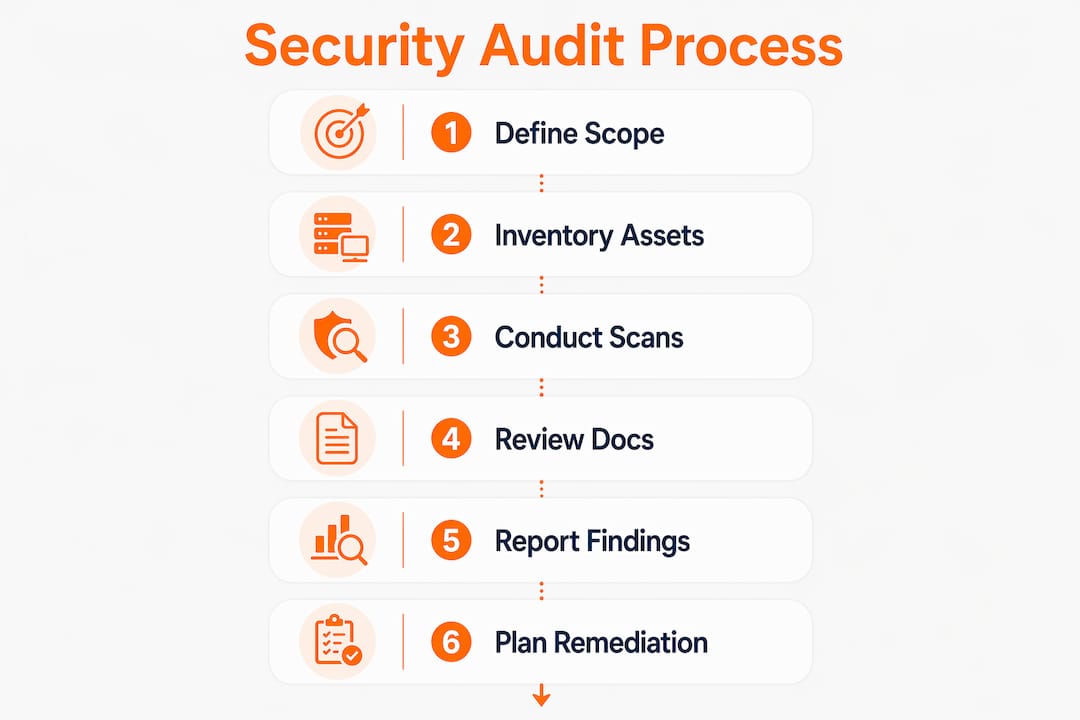
Defining the audit scope and objectives is the foundational first step that aligns your team, tools, and timeline before a single scan runs. Without a defined scope, audits sprawl, miss critical systems, or generate findings that no one has authority to fix.
Start by answering four questions:
- What systems are in scope? Name specific networks, servers, cloud environments, and applications. Exclude what is explicitly out of bounds, such as third-party SaaS platforms under vendor control.
- What is the audit objective? Choose from compliance verification (ISO 27001, SOC 2, HIPAA), risk reduction, or vulnerability discovery. Each objective shapes which tests you run.
- What does success look like? Define measurable criteria: a complete asset inventory, a prioritized vulnerability list, or a gap analysis against NIST SP 800-53 controls.
- Who owns the audit? Assign an audit lead, a technical tester, and a business stakeholder. ISO 27001 Clause 9.2 requires competent, objective auditors and documented reporting to demonstrate ISMS effectiveness.
Pro Tip: Write a one-page audit charter before you start. It forces agreement on scope, timeline, and deliverables from every stakeholder, and it becomes your first piece of audit evidence.
Scope creep is the most common reason audits fail to produce usable results. A tightly scoped audit of your Active Directory environment will yield more actionable findings than a vague “audit everything” mandate that runs out of time before reaching your cloud infrastructure.
What should your asset inventory include?
Performing a complete asset inventory is the prerequisite that feeds every subsequent audit phase, from vulnerability scanning to log review. You cannot audit what you do not know exists.
Follow this sequence to build a defensible inventory:
- Catalog physical assets. Document servers, workstations, network devices, and storage systems. Include hardware model, OS version, and physical location.
- Map virtual and cloud assets. List virtual machines, containers, cloud instances (AWS EC2, Azure VMs, GCP Compute), and serverless functions. Cloud provider consoles and tools like AWS Config make this faster.
- Enumerate software and services. Use tools like Nmap for network discovery and Netstat for active connections. Document every application, service, and open port.
- Audit user accounts. Pull a full account list from Active Directory or your identity provider. Flag service accounts, dormant accounts, and accounts with elevated privileges.
- Discover shadow IT. Scan for unauthorized devices and applications that employees use without IT approval. Shadow IT is a frequent source of unpatched vulnerabilities and data leakage.
The inventory output directly guides your scanning phase. Nmap results tell your vulnerability scanner which hosts to target. Your user account list tells your access control review where to look for privilege creep. Skipping this step means your technical assessment will have blind spots.
What technical assessment techniques do auditors use?
A practical audit combines automated scans with human-led reviews to uncover misconfigurations and control gaps that scanners alone will miss. Relying exclusively on automated tools produces a vulnerability list, not a security assessment.

The table below compares the two primary assessment approaches:
| Technique | What it finds | Primary tools |
|---|---|---|
| Automated vulnerability scanning | Known CVEs, missing patches, open ports, weak cipher suites | Nessus, OpenVAS, Lynis |
| Manual configuration review | Misconfigurations, logic flaws, policy deviations | NIST NCP checklists, CIS Benchmarks |
| Penetration testing | Exploitable attack paths, privilege escalation routes | Metasploit, Burp Suite |
| Access control review | Excessive permissions, dormant accounts, MFA gaps | Active Directory, IAM consoles |
Run your vulnerability scanner (Nessus or OpenVAS) against the asset list you built in the previous phase. Then layer in manual checks: review Role-Based Access Control (RBAC) assignments, confirm Multi-Factor Authentication (MFA) is enforced on all privileged accounts, and verify user account lifecycle management removes access within 24 hours of termination.
NIST’s National Checklist Program provides configuration checklists for hundreds of IT products. These checklists answer two critical audit questions: “Is this system configured correctly?” and “Has it been changed since the last audit?” Using them reduces rework and generates direct evidence of configuration compliance.
Log monitoring is where most audits underperform. CIS Critical Security Control v8.1 recommends retaining audit logs for at least 90 days and conducting at least weekly reviews. Centralizing logs into a SIEM like Splunk or Microsoft Sentinel makes that review practical and improves forensic capability. Review the most essential network security tools to identify which scanning and monitoring solutions fit your environment.
Pro Tip: After your automated scan, manually verify at least five high-severity findings before reporting them. Scanners generate false positives, and reporting an unfounded critical vulnerability destroys your credibility with leadership.
Why documentation review and staff walkthroughs matter
Audits also require reviewing documentation and conducting interviews to confirm that written policies match daily practice. A firewall policy document that says “all inbound traffic is blocked by default” means nothing if the actual firewall ruleset contradicts it.
The documents you need to collect and review include:
- Security policies and standards. Acceptable use policy, password policy, data classification policy, and remote access policy.
- Network diagrams and architecture documents. Confirm they reflect the current state, not a two-year-old design.
- Incident response plans. Verify they name current staff, contain up-to-date contact information, and have been tested within the past 12 months.
- Change management records. Cross-reference recent changes against your asset inventory to identify undocumented modifications.
Staff walkthroughs go beyond document review. Walk through a control implementation with the person responsible for it. Ask a system administrator to show you how they provision and deprovision user accounts. Watch the process live. This is where you discover that the written procedure requires manager approval, but in practice accounts are created on verbal request.
Effective audit evidence requires four types to build a defensible case: inquiry (interviews), observation (watching controls operate), inspection (reviewing artifacts like logs and screenshots), and re-performance (independently executing the control yourself). Relying on screenshots alone produces superficial conclusions. Combining all four types produces findings that hold up under scrutiny. The importance of staff interviews in verifying actual security behavior is consistently underestimated by first-time auditors.
How to analyze findings, report vulnerabilities, and plan remediations
Audit findings should be prioritized by criticality and translated into clear remediation guidance for every stakeholder, from the CISO to the department manager who owns the affected system. A report that lists 200 vulnerabilities without prioritization gets filed and forgotten.
Use a severity-based categorization framework:
| Severity | Definition | Remediation timeline |
|---|---|---|
| Critical | Exploitable remotely, no authentication required | 24 to 72 hours |
| High | Significant data exposure or privilege escalation risk | 7 to 14 days |
| Medium | Limited impact, requires local access or user interaction | 30 days |
| Low | Informational, minimal direct risk | Next scheduled maintenance window |
For each finding, your report must include: a plain-language description of the vulnerability, the business impact if exploited, specific remediation steps, and a named owner responsible for the fix. Translating technical findings into business impact is what separates a useful report from a technical dump. “Unpatched Apache server” means little to a CFO. “An unpatched web server could expose customer payment data and trigger PCI DSS fines” gets budget approved.
Schedule a follow-up audit 60 to 90 days after the initial report to verify that critical and high findings have been remediated. Continuous monitoring, not a single annual audit, is what actually reduces risk over time. Review your organization’s vulnerability disclosure policy to understand how findings should be handled and communicated internally and externally.
Key takeaways
A security audit produces defensible, actionable results only when it combines structured scope definition, complete asset inventory, automated and manual technical testing, policy review, and prioritized remediation reporting.
| Point | Details |
|---|---|
| Define scope before testing | Document in-scope systems, objectives, and success criteria in a written audit charter. |
| Build a complete asset inventory | Use Nmap and cloud consoles to catalog every device, account, and application before scanning. |
| Combine automated and manual testing | Pair Nessus or OpenVAS scans with manual RBAC reviews and NIST checklist-based configuration checks. |
| Collect four evidence types | Use inquiry, observation, inspection, and re-performance to build findings that withstand scrutiny. |
| Prioritize findings by business impact | Assign severity levels and named owners, then schedule a follow-up audit within 90 days. |
What most security audit guides get wrong
I have reviewed and contributed to dozens of security audits across industries ranging from financial services to healthcare, and the pattern that consistently undermines audit quality is the same: teams treat the automated scanner report as the finished product.
Nessus or OpenVAS will give you a list of known CVEs and missing patches. That list is a starting point, not a conclusion. The real audit work happens when a qualified person asks why a critical patch has not been applied for six months, walks through the change management process, and discovers that the approval workflow is broken. No scanner finds that.
The second consistent failure is log monitoring. Every organization I have reviewed claims to monitor logs. Almost none of them can demonstrate weekly reviews, 90-day retention, or SIEM alerting on the specific events that matter. CIS CSC 8 is explicit on this, yet it remains the most under-tested control in practice.
My practical advice: build a repeatable security audit checklist tied to NIST SP 800-53 or CIS Controls before you run your first scan. That checklist becomes your audit program. It makes each subsequent audit faster, more consistent, and far easier to defend to auditors, regulators, or a board that wants to know whether last year’s findings were actually fixed. The investment in structure pays back every single time.
— Mike
Strengthen your security posture with LogMeOnce
Conducting a thorough security audit reveals exactly where your access controls, authentication practices, and data protection need work. LogMeOnce translates those findings into direct solutions.

LogMeOnce’s password management platform addresses the access control gaps most audits surface, including shared credentials, weak passwords, and unmanaged service accounts. Its two-factor authentication tools help you close MFA gaps identified during your access control review, and cloud storage encryption protects sensitive data assets your audit has cataloged. Explore the full range of cybersecurity solutions LogMeOnce offers to support your post-audit remediation plan.
FAQ
What is a security audit?
A security audit is a formal evaluation of an organization’s information systems, policies, and controls against a defined standard such as ISO 27001, NIST SP 800-53, or CIS Controls. Its purpose is to identify vulnerabilities, verify control effectiveness, and produce a prioritized remediation plan.
How often should you perform a security audit?
Most compliance frameworks require at least one formal audit per year, but high-risk environments benefit from quarterly reviews of critical controls. CIS Critical Security Control v8.1 recommends weekly log reviews as a continuous audit activity between formal assessments.
What tools are used in a security audit?
Common tools include Nessus and OpenVAS for vulnerability scanning, Nmap for network discovery, Lynis for Linux configuration auditing, and Splunk or Microsoft Sentinel for log analysis. NIST National Checklist Program checklists provide configuration baselines for specific IT products.
What is the difference between a security audit and a penetration test?
A security audit evaluates whether controls exist and operate as intended across policies, configurations, and processes. A penetration test actively attempts to exploit vulnerabilities to determine how far an attacker could advance. Audits are broader; penetration tests go deeper on specific attack paths.
How do you prioritize findings from a security audit?
Categorize findings by severity (critical, high, medium, low) based on exploitability and business impact, then assign a named owner and a remediation deadline to each. Critical findings require remediation within 24 to 72 hours; medium findings can follow a 30-day timeline.
Recommended


