


 Password Manager
 Identity Theft Protection

 Team / Business
 Enterprise
 Government
 MSP
MSP


TL;DR:
- Most cloud breaches stem from misconfigurations and human errors, not technical flaws.
- Shared responsibility requires organizations to proactively manage data, access policies, and controls.
- Effective cloud security depends on continuous verification, automation, and adherence to the CIA triad principles.
Most IT teams assume their cloud provider handles security. That assumption is costing companies millions. 45% of cloud intrusions result in immediate extortion attempts, while 7% originate from misconfigured application assets. Understanding how cloud security helps your organization means recognizing that the provider secures the infrastructure, but your team owns everything built on top of it. Data classification, access policies, identity governance — those fall on you. This article breaks down how cloud security works, what it actually protects, and how to put it to work for your compliance and risk management program.
Key Takeaways
| Point | Details |
|---|---|
| Cloud security is a shared duty | Providers secure infrastructure; your team owns data, access controls, and identity governance. |
| Zero Trust reduces breach risk | Applying least-privilege access addresses the 80% of breaches caused by human error. |
| Automation beats manual audits | Automated compliance monitoring catches 85% more issues than periodic manual reviews. |
| CIA triad guides security design | Confidentiality, integrity, and availability are the three principles every cloud control should support. |
| Compliance requires more than encryption | Encryption alone is insufficient; risk analysis, access controls, and audit logging are also required. |
How cloud security helps: the CIA triad explained
Before evaluating any cloud security tool or policy, you need a framework to judge it against. The CIA triad provides that foundation. It stands for confidentiality, integrity, and availability, and every meaningful control in a cloud environment maps to at least one of these three goals.
Confidentiality means that only authorized users can read sensitive data. In practice, this requires encryption, strict identity controls, and role-based access policies that limit who sees what.
Integrity means that data remains accurate and unaltered. Cloud security enforces integrity through:
- Cryptographic hashing to detect unauthorized changes to files or databases
- Immutable audit logs that record every access and modification event
- Version controls that allow rollback if data is tampered with or corrupted
Availability means that systems and data remain accessible when your business needs them. This involves redundancy, distributed storage, and automated failover to maintain uptime even during a targeted attack.
When you evaluate any cloud security product or policy against these three principles, it becomes much easier to spot gaps. A tool that encrypts data at rest but ignores access logging covers confidentiality without touching integrity. That is a gap. Mature cloud security addresses all three simultaneously and continuously.
Core cloud security technologies and how they work
Understanding how cloud security works at a technical level matters because the terminology shapes how your teams configure, audit, and communicate about controls.
Encryption: more than just flipping a switch
Cloud encryption protects data at rest (stored in buckets, databases, or file systems) and in transit (moving between services or to end users). Most cloud platforms offer server-side encryption by default. But default encryption is not the same as controlled encryption.

Customer-managed key architectures give your organization ownership over encryption keys, which matters for compliance frameworks like HIPAA and PCI DSS. The tradeoff is real: customer-managed keys introduce operational complexity and require a key management strategy. If your team loses a key, you lose the data. That operational burden is exactly why many companies skip it. Most regret it when an audit arrives.
Critically, encryption alone does not satisfy compliance. Auditors require evidence of risk analysis, access controls, and audit logging alongside it. Encryption is a prerequisite, not a finish line.
Identity and access management
Human error and negligence drive 80% of data breaches, which makes identity and access management (IAM) the highest-leverage control in cloud security. IAM governs who can access which resources, under what conditions, and for how long. Zero Trust architecture builds on IAM by assuming no user or device is trusted by default, even inside the network perimeter.
In a Zero Trust model, every access request is verified continuously. A developer who authenticated at 9 a.m. does not receive persistent access for the rest of the day. Each resource request is evaluated against policy in real time. This approach directly addresses the Zero Trust security principles that reduce the blast radius when credentials are compromised.
Pro Tip: Apply least-privilege access by default. Every user, service account, and API key should have only the permissions required for its specific function. Review and revoke excess permissions quarterly.
Compliance automation and threat detection
Manual compliance audits are slow, error-prone, and expensive. Manual compliance processes cause 95% of failures due to misconfiguration, and automation reduces audit preparation time by 70% while cutting remediation time by 90%. Policy-as-code frameworks like Terraform, combined with Kubernetes security policies, enforce compliance continuously rather than at point-in-time audit snapshots.
Real-time threat detection adds the reactive layer. When anomalous behavior occurs, such as a service account accessing an unusual region or a sudden spike in API calls, automated detection triggers incident response playbooks without waiting for human review. Speed of detection directly determines the scope of damage.
The shared responsibility model: who owns what
The most dangerous belief in cloud security is that your provider handles it all. They do not. The shared responsibility model divides security obligations based on service type, and misunderstanding those boundaries is a direct path to compliance failures.
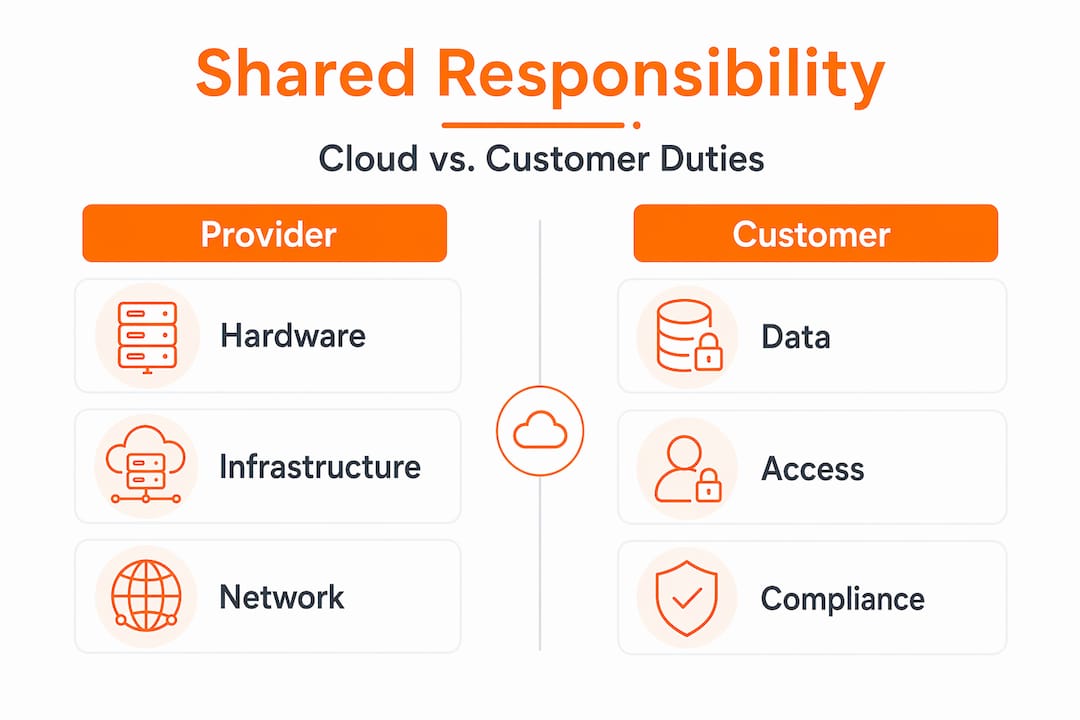
| Service Model | Provider Manages | Customer Manages |
|---|---|---|
| IaaS | Physical hardware, hypervisor, networking | OS, applications, data, IAM, firewall rules |
| PaaS | Infrastructure, runtime, middleware | Application code, data, user access |
| SaaS | Everything except usage configuration | Data classification, user permissions, integrations |
As the table shows, the higher up the stack you go with SaaS, the less infrastructure you manage. But data classification and user access remain your responsibility regardless of service model. Cloud providers secure physical infrastructure and hypervisor layers, but customers retain ownership of identity governance, access control policies, and data classification.
Here is a common gap: an organization deploys a SaaS application, assumes the vendor’s SOC 2 certification covers their data security obligations, and never configures role-based access controls. The vendor is compliant. The customer’s data is exposed. This scenario plays out regularly, and regulators do not accept “our vendor is certified” as a defense during an audit.
Pro Tip: Map your cloud service inventory against the shared responsibility model annually. For each service, document explicitly what your team owns and what the provider covers. Treat gaps as open risks, not assumptions.
Cloud security, risk management, and regulatory compliance
This is where why is cloud security essential becomes concrete for business leaders and compliance officers. Cloud security is not just about stopping attackers. It is about managing risk systematically and demonstrating that management to regulators.
Automated compliance monitoring catches 85% more security issues than periodic manual audits. For organizations operating under HIPAA, PCI DSS, or GDPR, continuous monitoring means violations are caught and remediated before they become findings on an audit report. That matters because regulatory fines are tied to the duration and scope of exposure, not just the fact of it.
The risk management benefits extend beyond compliance:
- Reduced breach surface. Least-privilege access and network microsegmentation limit what an attacker can reach if credentials are compromised.
- Faster incident response. Automated detection paired with response playbooks cuts mean time to contain from days to hours.
- Business continuity. Distributed cloud architectures with automated failover keep operations running during incidents that would ground on-premise systems.
- Audit readiness. Continuous compliance logging means audit evidence is generated automatically, not assembled manually under deadline pressure.
Mature security programs that apply CIS Benchmarks and continuous posture management reduce attack vectors significantly compared to default configurations. Default is not secure. It is just convenient.
Best practices for leveraging cloud security effectively
Knowing the theory matters less than knowing what to do on Monday morning. Here is a practical sequence for IT teams working to strengthen their cloud security posture.
-
Adopt Zero Trust as an operating principle, not a product. Start by mapping all service accounts, human identities, and API integrations. Apply least-privilege access to each one. Use your cloud provider’s IAM tools to enforce session-based access rather than persistent permissions. Review cloud identity security configurations quarterly.
-
Automate compliance monitoring now. Stop relying on annual penetration tests and quarterly manual reviews. Implement policy-as-code tools that check configurations continuously. Mature security demands automated monitoring with response playbooks, not just encryption and basic MFA.
-
Consolidate your security tooling. Alert fatigue is real. When your team manages eight separate dashboards, critical alerts get missed. A unified security platform that centralizes visibility, detection, and remediation eliminates the blind spots that form between disconnected tools.
-
Align IT, security, and compliance teams around shared metrics. The most common organizational failure in cloud security is not technical. It is teams operating in silos with different definitions of “secure.” Monthly cross-functional reviews tied to shared KPIs fix this faster than any tool purchase.
Pro Tip: Before buying a new security tool, audit what you already have configured. Most organizations are underusing existing cloud-native controls. Full configuration of your current stack usually closes more gaps than adding a new product.
My take on where cloud security programs actually break down
I’ve reviewed cloud security programs across organizations ranging from 50-person startups to enterprise teams managing thousands of cloud assets. The technical failures are almost never the root cause. What I’ve consistently seen is that organizations treat cloud security as a compliance exercise rather than an operational discipline.
What I’ve found is that teams reach the minimum control set required to pass an audit, then stop. They encrypt storage, enable MFA, and check the compliance box. Three months later, a misconfigured S3 bucket exposes customer data because nobody owns the ongoing configuration review process. Checkbox compliance leaves organizations deeply vulnerable because mature security requires customer key management, automated detection, and incident response playbooks working together.
The shared responsibility model compounds this. I’ve seen IT leaders genuinely surprised to learn that their SaaS vendor’s security certifications do not protect against a rogue admin in their own organization. That gap is not the vendor’s fault. It is a knowledge problem.
My honest advice: stop measuring your security program by what you have deployed and start measuring it by what you continuously verify. Static policies decay. Access creeps. Configurations drift. The organizations that consistently avoid major incidents are not the ones with the most tools. They are the ones with the most discipline around continuous verification and clear ownership.
— Mike
Strengthen your cloud security with LogMeOnce
Understanding the ways cloud security protects data is only useful if your organization has the tools to act on it. LogMeOnce gives IT teams and businesses practical controls that directly address the identity and access gaps where most breaches originate.

LogMeOnce’s password management platform removes the human error factor from credential management, applying Zero Trust principles to every login without friction for end users. Pair that with LogMeOnce’s two-factor authentication to enforce strong identity verification across every cloud application your team accesses. For data protection at the storage layer, LogMeOnce’s cloud storage encryption keeps sensitive files protected whether they are at rest or shared across teams. These controls work together to close the identity, access, and encryption gaps that compliance audits and attackers target most.
FAQ
What is cloud security and why does it matter?
Cloud security is the set of policies, technologies, and controls that protect data, applications, and infrastructure hosted in cloud environments. It matters because misconfigurations and human error account for the vast majority of cloud breaches.
How does the shared responsibility model affect my business?
The shared responsibility model means your cloud provider secures physical infrastructure, but your team owns data classification, identity governance, and access controls regardless of whether you use IaaS, PaaS, or SaaS.
Does encryption alone make cloud data secure?
No. Encryption alone does not satisfy compliance or fully protect data. It must be paired with risk analysis, role-based access controls, and audit logging to meet regulatory standards like HIPAA and PCI DSS.
How does Zero Trust improve cloud security?
Zero Trust eliminates persistent access by verifying every request continuously against policy. Because human error drives 80% of data breaches, removing implicit trust from user sessions significantly reduces breach risk.
What does automated compliance monitoring do that manual audits cannot?
Automated monitoring checks configurations continuously rather than at point-in-time snapshots. It catches 85% more security issues than manual audits and reduces remediation time by 90%, making it far more effective for ongoing compliance management.
Recommended
- 5 Reasons Cloud Encryption is Important for Every Business
- How to Protect Your Information While Using the Cloud – LogMeOnce
- Cloud Data Storage FAQs: Can the Cloud Be Hacked? – LogMeOnce


