


 Password Manager
 Identity Theft Protection

 Team / Business
 Enterprise
 Government
 MSP
MSP


TL;DR:
- Relying on weak or reused passwords is a misconception; password managers generate, store, and protect unique credentials at scale. They use encrypted vaults, MFA, and cross-device sync to enhance security, but their effectiveness depends on master password strength and proper configuration. Ultimately, password managers are vital tools that address human limitations, but awareness of their risks is essential for maintaining robust security practices.
Most people assume that picking a strong password and remembering it across a few important accounts is “good enough.” That belief is exactly what attackers count on. The modern digital life involves dozens, sometimes hundreds, of accounts, and manually managing unique credentials for each one is practically impossible without the right tool. Password managers exist not just to spare your memory, but to fundamentally change how credentials are created, stored, and protected. This guide cuts through the confusion and shows you exactly what password managers do, why they matter, and how to use one effectively.
Key Takeaways
| Point | Details |
|---|---|
| Unique passwords safely | Password managers let you use a unique strong password for every account without memorizing them. |
| Centralized encrypted vault | Your credentials are stored in one secure place, locked with your master password. |
| Reduced breach risk | Not reusing passwords means one hacked site won’t threaten your other accounts. |
| Some risks still remain | Password managers are much safer than manual methods, but choosing one with good security and using MFA is critical. |
| Enterprise advantages | Businesses gain better access control, credential sharing, and efficiency improvements. |
Why password management matters
The average person maintains far more online accounts than they realize. Research consistently shows that most users manage dozens of online accounts, many of them accessed infrequently and tied to sensitive personal or financial data. When you factor in work accounts, banking, e-commerce, social media, subscriptions, and government portals, the number can easily exceed 100.
The real danger is not having a weak password. It is reusing the same password, even a strong one, across multiple services. This creates a domino effect. If any one of those services suffers a data breach and your credentials are leaked, attackers immediately run those credentials against hundreds of other sites in an automated process called credential stuffing. One breach becomes ten.
Here is what makes this so dangerous in practice:
- Credential stuffing is automated. Attackers use bots that can test thousands of username and password combinations per second.
- Data breaches are common. Billions of credentials have been exposed in documented breaches across major platforms.
- Users rarely know they’ve been breached. By the time you hear about a breach, your credentials may already be for sale on dark web marketplaces.
- Password complexity does not matter if it is reused. A 20-character random string provides zero extra protection if it appears in multiple places.
NIST directly addresses this problem: NIST recommends password managers because they generate long, complex passwords and store them securely so users do not have to remember or write them down. The UK’s National Cyber Security Centre echoes this guidance, noting that unique passwords across services reduce risk significantly, and that doing this manually at scale is simply not realistic for most people.
The takeaway is clear: the password problem is not a memory problem. It is a scale problem. And scale requires a tool.
How password managers work: Core functions and security
A password manager is software that generates, stores, and fills in passwords on your behalf. At the heart of every password manager is an encrypted vault, a protected container for all your credentials. You unlock this vault with a single master password. Everything inside remains encrypted until you authenticate.

Here is a breakdown of the core features most password managers share:
| Feature | What it does | Why it matters |
|---|---|---|
| Password generation | Creates random, high-entropy passwords | Eliminates weak or predictable patterns |
| Encrypted vault | Stores credentials using strong encryption | Protects your data even if servers are breached |
| Autofill | Fills login forms automatically | Saves time and reduces phishing risk |
| Cross-device sync | Keeps credentials updated across all devices | Eliminates manual updates and reuse from inconvenience |
| Multi-factor authentication | Adds a second verification layer | Protects vault even if master password is stolen |
| Breach alerts | Notifies when stored credentials appear in breaches | Enables fast response to compromised accounts |
The technical security of a password manager depends heavily on how that vault is protected. NIST’s guidance makes this plain: concentrating credentials into a single vault works precisely because users only need to remember one strong master password. But that also means the master password itself, the key derivation function used to generate the encryption key, and the MFA configuration are all critical security variables.
Understanding how secure password manager tools are involves knowing that modern password managers typically use AES-256 encryption, which is military-grade, combined with zero-knowledge architecture. This means the provider cannot read your vault contents. However, as we discuss in the risks section, this claim comes with important nuances.
Pro Tip: Your master password should be a passphrase, not a word. A string like “BlueTeaWinterBridge47!” is far stronger than a random-looking password you actually found in a dictionary. Never reuse your master password anywhere else.
Knowing whether password managers can be hacked is a fair question, and the honest answer is that nothing is unhackable. But the risk calculus still strongly favors using one.
The real benefits: Unique, strong passwords made easy
The biggest practical benefit of a password manager is something that sounds simple but is actually hard to accomplish manually: giving every account its own unique, complex password.
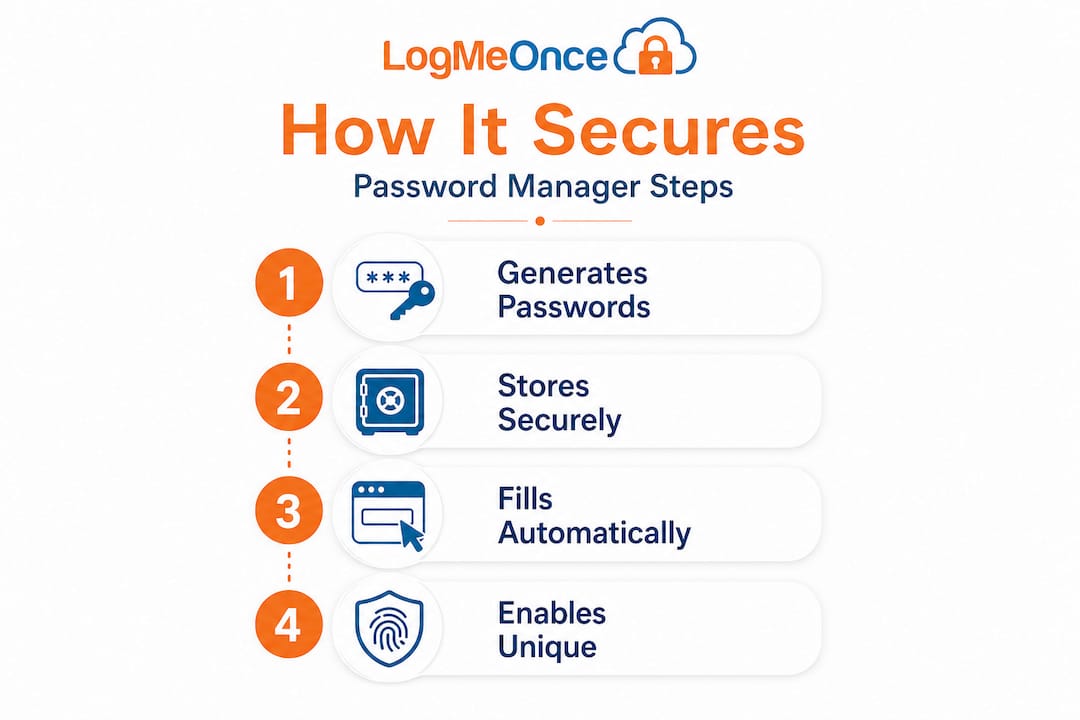
The NCSC frames this well, noting that the biggest security improvement for typical users comes from enabling unique, high-entropy passwords per site without the overhead of memorization. This insight is easy to overlook, but it changes everything. Once you stop reusing passwords, a single compromised account cannot cascade into multiple account takeovers.
Here is how the benefits compare between common approaches:
| Approach | Uniqueness | Convenience | Security level |
|---|---|---|---|
| Memorizing a few passwords | No | High | Low |
| Writing passwords down | Partial | Medium | Very low |
| Browser password storage | Yes | High | Moderate |
| Dedicated password manager | Yes | High | High |
For individuals, the benefits are clear. For organizations, the picture becomes even more compelling. Enterprise password manager benefits include secure credential sharing between team members, granular access controls, and audit logs that show who accessed what and when.
Here are the key business-level wins:
- Onboarding and offboarding. New employees get immediate access to required credentials, and departing employees can be removed without password resets across dozens of systems.
- Reduced IT helpdesk burden. Password resets are one of the most common IT requests. A password manager nearly eliminates them.
- Enforced password policies. Admins can require minimum password complexity and rotation schedules.
- Secure sharing. Credentials can be shared with specific people without ever revealing the actual password in plaintext.
Pro Tip: When choosing a tool for your organization, look carefully at the recovery and sharing workflows. These features matter most when things go wrong. Choosing the best password manager for your business means evaluating not just the feature list, but how the tool behaves under edge cases.
Risks and limitations: Not a silver bullet
No security tool eliminates all risk, and password managers are no exception. Being honest about the limitations helps you use them more effectively.
The most obvious risk is the master password itself. If your master password is weak, guessable, or reused, an attacker can gain access to your entire vault. That single point of failure is what makes master password hygiene so critical.
“Security experts caution that password managers are safer than password reuse but are not risk-free; certain implementation and feature choices, notably account recovery, sharing, and org features, can create pathways for vault compromise under strong threat models.” Source: Ars Technica
Beyond the master password, here are other real risks to understand:
- Server-side vulnerabilities. Even if the provider claims zero-knowledge architecture, a compromised server can potentially intercept vault data during sync operations.
- Weak recovery flows. Some products allow account recovery via email or phone, which introduces new attack vectors. A sophisticated attacker who controls your email can reset your vault access.
- Shared credential risks. In enterprise settings, shared vaults or poorly configured group access can allow credential exposure even without a breach.
- Browser extension vulnerabilities. Browser-based extensions can sometimes be exploited by malicious websites or extensions running in the same browser session.
Academic researchers have examined this systematically. Analysis of password manager vault security shows that zero-knowledge claims do not always hold when an attacker controls the server, including documented attacks against major commercial vendors.
Knowing these risks means you can take practical steps to reduce them. You can find a secure password manager by checking for independent security audits, transparent encryption disclosures, and a track record of responsible vulnerability disclosure.
How to maximize the benefits and minimize the risks
Understanding what password managers do and where they fall short puts you in a strong position to use one well. Here is a practical action plan for both individuals and organizations.
-
Choose a password manager with a documented security track record. Look for independent third-party audits, clear encryption specifications, and a history of transparent disclosure when vulnerabilities are found.
-
Create a long, unique master password. Use a passphrase that you do not use anywhere else. Consider writing it down and storing it physically in a secure location, like a safe. Your master password is too important to risk forgetting.
-
Enable multi-factor authentication immediately. MFA means that even if your master password is stolen, an attacker still cannot access your vault. Use an authenticator app rather than SMS when possible.
-
Import and audit all existing credentials. Most password managers offer a security audit dashboard. Use it to identify reused, weak, or old passwords and replace them systematically.
-
Review sharing and recovery settings. Understand exactly how your vault can be accessed without the master password. Disable recovery flows you are not actively using.
-
Sync across all your devices securely. The NCSC explicitly highlights that syncing credentials across devices solves a real problem: users who cannot access their vault on a secondary device often fall back on weak or reused passwords. Remove that excuse.
-
Schedule quarterly credential reviews. Passwords for critical accounts like banking, email, and work systems should be rotated at least annually. Your password manager makes this fast.
Pro Tip: If you manage a team, review your company password manager tips to ensure your deployment covers onboarding, access tiers, emergency recovery protocols, and regular audits.
Following these steps transforms a password manager from a convenience tool into a genuine security infrastructure component.
Why today’s password manager is only the beginning
Here is an opinion worth sitting with: password managers are remarkable security tools, but they are fundamentally a workaround for a broken system. Passwords themselves were never a great solution. They rely on human memory, human behavior, and human vigilance, all of which are exploitable. A password manager patches the worst vulnerabilities, but the patch is not the long-term answer.
The future points toward passwordless authentication: biometrics, hardware security keys, and device-based identity proofs that eliminate the shared secret entirely. Many platforms already support WebAuthn and passkeys, which let you authenticate without transmitting a password at all. Password managers are beginning to incorporate passkey management, acknowledging that the transition will be gradual.
But here is what conventional wisdom gets wrong: even when passwordless becomes mainstream, the habits you build with a password manager today will still matter. The discipline of using unique credentials, enabling MFA, auditing access, and reviewing recovery settings does not disappear when the technology shifts. It translates.
The bigger risk is complacency. Organizations that treat a password manager as a checkbox in a compliance list, rather than a living part of their security posture, will still get breached. The tool does not replace the thinking. Understanding the security of password manager tools is not a one-time exercise. It requires revisiting as the technology evolves and as new attack techniques emerge.
The most secure users and organizations are not the ones with the most sophisticated tools. They are the ones who actually understand what their tools do, where they fall short, and what human discipline is still required to fill the gaps.
Boost your security with a password manager from LogMeOnce
If this article has made one thing clear, it is that password security is not just about having a tool. It is about having the right tool, configured correctly, and backed by features that match your actual threat model.

LogMeOnce brings together comprehensive cybersecurity solutions including encrypted vault storage, cross-device sync, dark web monitoring, and advanced MFA options, all in one platform designed for both individuals and organizations. You can explore the full range of password management benefits and discover how LogMeOnce helps teams enforce strong credential practices without slowing anyone down. With powerful two-factor authentication features built in from the start, your vault stays protected even if your master password is ever exposed. Getting started is simple, and the security gains are immediate.
Frequently asked questions
Is it safe to trust all my passwords to a password manager?
Password managers are far safer than reusing passwords, but their security depends on your master password strength, MFA configuration, and the technical implementation of the tool you choose. Certain implementation choices around recovery and sharing can introduce additional risk.
What happens if I forget my master password?
Most password managers cannot recover your vault without the master password. Some offer alternative recovery options, but these can weaken security by introducing additional attack surfaces. NIST notes that the vault’s security model, including account recovery options, directly affects overall protection.
Can password managers be hacked?
Yes, they can be compromised, particularly through weak master passwords, flawed software, or server-side attacks. However, academic analysis of vault attacks confirms that most real-world attacks still target credential reuse outside of password managers rather than the vaults themselves.
How does using a password manager help my business?
A password manager makes it practical to use unique passwords for every system, securely share credentials among team members, and enforce company-wide password policies. As the NCSC confirms, unique passwords across services are the single biggest security improvement for most users, and a password manager is the only realistic way to achieve this at scale.
What is the difference between browser password storage and a dedicated password manager?
Dedicated password managers provide stronger encryption, independent security audits, cross-browser support, MFA for vault access, and enterprise management features that built-in browser storage simply does not offer. Browser storage is convenient but lacks the security depth and flexibility that individuals and organizations with serious security needs require.
Recommended
- How secure are password manager tools – LogMeOnce
- Data Security: The Incredible Benefits of Using a Password Manager
- Are Password Managers Safe? How to Find a Secure Password Manager
- Are password managers unhackable – LogMeOnce


