


 Password Manager
 Identity Theft Protection

 Team / Business
 Enterprise
 Government
 MSP
MSP


Passwordless authentication is a way to sign in without a typed password by using device-held cryptographic credentials tied to strong possession or inherence factors. Instead of matching a secret you memorized to one stored on a server, your device generates a unique key pair and keeps the private half locked on your hardware. The FIDO Alliance, together with the WebAuthn/FIDO2 standard, defines how this works across browsers, operating systems, and apps. Passkeys are the most visible consumer implementation of that standard today.
Quick orientation:
- Primary methods: passkeys (synced or device-bound FIDO credentials), hardware security keys (FIDO2/CTAP-compatible USB or NFC devices), and platform biometrics (Windows Hello, Face ID, Touch ID)
- Immediate benefits: phishing resistance by design, faster sign-ins, and no server-side password database to breach
- One honest caveat: migration complexity, especially account recovery design, takes real planning
Why passwords keep failing you
Passwords have three compounding problems: they are easy to steal, hard to manage, and expensive to support. Phishing, credential stuffing, brute-force attacks, and database breaches all exploit the same root flaw: a shared secret that lives on a server. Once that server is compromised, every reused password across every site becomes a liability.
The usability side is just as damaging. Password fatigue drives reuse, and reuse multiplies breach impact. Help desks at large organizations spend a significant portion of their time on password resets alone, pulling engineers and support staff away from higher-value work. The Microsoft Security team has documented how password-based sign-in creates friction that pushes users toward weaker choices over time.
The numbers from real deployments tell the story clearly. Intuit’s passwordless rollout, documented in a FIDO Alliance case study, achieved notably high authentication success rates and a substantial increase in sign-in speed compared to traditional password-plus-MFA flows. That gap between what passwords deliver and what users actually need is exactly what passwordless access systems are built to close.
Common password attack vectors:
- Phishing: users tricked into submitting credentials to fake sites
- Credential stuffing: breached username/password pairs tested across other services
- Brute force and dictionary attacks on weak or reused passwords
- Database breaches exposing hashed or plaintext passwords at scale
How passwordless authentication actually works
The core mechanism is public-key cryptography. During registration, your device generates a key pair: the public key goes to the service (the “relying party”), and the private key never leaves your device. When you sign in, the server sends a challenge, your device signs it with the private key, and the server verifies the signature using the public key it already holds. No shared secret crosses the network.
The critical shift: Traditional authentication stores a server-side secret that can be stolen at scale. Passwordless moves the secret onto user-controlled hardware, where it is unlocked locally by a PIN or biometric. A breach of the server’s database yields only public keys, which are useless to an attacker.
The private key is unlocked by a local factor, not transmitted anywhere. That local factor can be a PIN, a fingerprint, or a face scan. The biometric or PIN never leaves the device either. This is why FIDO credentials are bound to an origin: the key pair is registered to a specific domain, so a phishing site at a lookalike URL cannot replay your credentials to the real service.
Key terms to know:
- Relying party: the server or app requesting authentication
- Authenticator: the device or hardware token holding the private key
- Origin binding: credentials are cryptographically tied to a specific domain
- Challenge-response: the server issues a one-time challenge; the device signs it; the server verifies
Registration and authentication flows:
- User initiates registration on the relying party
- Device generates a public/private key pair for that specific origin
- Public key is stored by the relying party; private key stays on device
- At sign-in, server issues a cryptographic challenge
- Device unlocks private key via local PIN or biometric
- Device signs the challenge; signature is sent to server
- Server verifies signature with stored public key; access granted
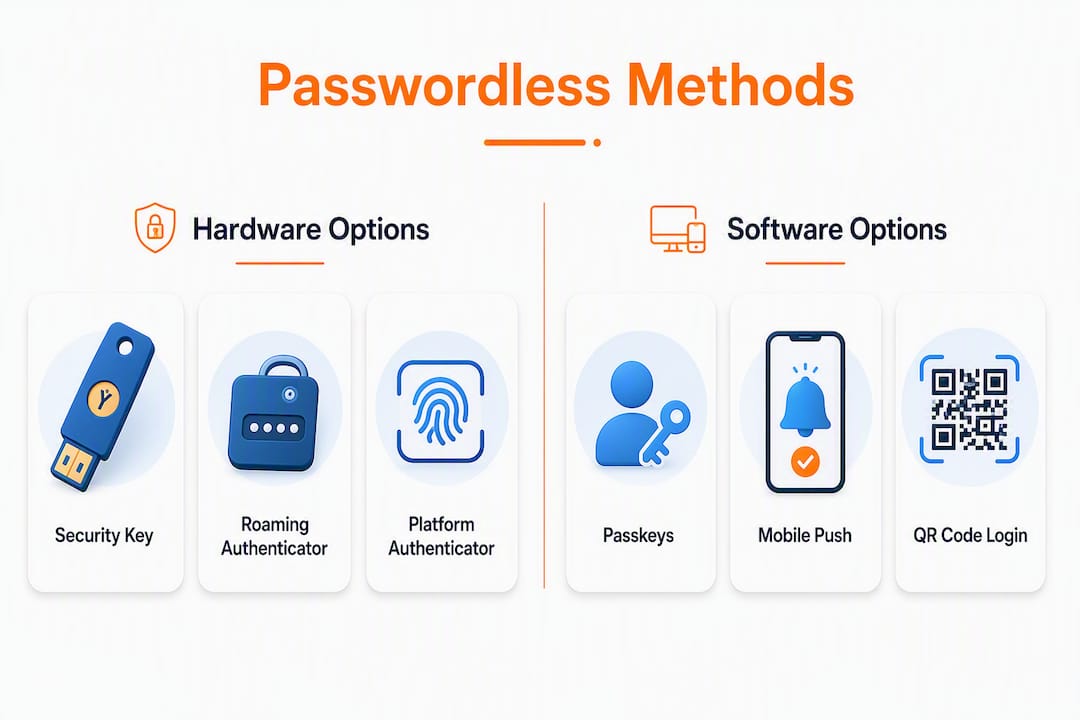
Common authenticators include platform authenticators (Windows Hello, Apple Face ID/Touch ID), roaming authenticators (FIDO2/CTAP-compatible USB, NFC, or Bluetooth security keys), and mobile authenticators (passkeys synced to a phone via iCloud Keychain or Google Password Manager).

What passwordless methods are available?
Not every method fits every situation. Here is how the main options compare.
| Method | Phishing resistance | Cross-device support | Recovery complexity | Best fit |
|---|---|---|---|---|
| Synced passkeys | High | High (cloud sync) | Moderate | Consumer apps, personal accounts |
| Device-bound passkeys | High | Low (single device) | High | High-assurance enterprise apps |
| Hardware security keys | Very high | Moderate (physical carry) | High | Privileged access, regulated industries |
| Platform biometrics | High | Low (device-specific) | Moderate | Everyday enterprise SSO |
| Mobile push/QR | Moderate | High | Low | Low-friction consumer flows |
Passkeys are FIDO credentials tied to a user’s account that unlock with the same method used to unlock the device. They can sync across devices via a platform’s cloud (iCloud Keychain, Google Password Manager) or stay bound to a single device for higher assurance. They replace classic OTP codes and SMS entirely, which is a meaningful security upgrade since SMS is vulnerable to SIM-swapping.
Hardware security keys (FIDO2/CTAP-compatible devices like YubiKey-style USB or NFC tokens) are roaming authenticators. They offer the highest phishing resistance because the key pair is stored in tamper-resistant hardware. The tradeoff is physical management: lost keys require a recovery path, and carrying a dongle is friction most consumer users will not accept.
Platform biometrics (Windows Hello, Face ID, Touch ID) are device-bound and use the device’s secure enclave. Fast and frictionless for daily use, but tied to that specific device. Replacing a phone or laptop requires re-enrollment.
Mobile push and QR-code flows send an approval prompt to a registered phone or display a QR code the phone scans. Logmeonce supports QR-code passwordless login as one of its sign-in options, which works well for web-to-mobile scenarios where users are already on their phone.
Pro Tip: For enterprise rollouts, start with platform biometrics for the broad user base and reserve hardware security keys for privileged accounts and administrators. That split covers 90%+ of your users with minimal friction while giving your highest-risk accounts the strongest protection.
How passwordless fits with MFA and SSO
Passwordless and MFA are not the same thing, and conflating them causes real deployment mistakes. Passwordless means no password is used. MFA means multiple independent factors are required. A passkey alone is technically single-factor (possession of the device plus local unlock). A passkey combined with a device certificate or a hardware token is passwordless MFA.

The strongest posture, per security practitioners, is passwordless methods integrated into a broader Zero Trust and context-aware policy. That means the authentication method is one input among several: device health, location, behavior, and session risk all feed into an adaptive access decision.
SSO extends a successful passwordless sign-in across multiple apps without re-prompting. The user authenticates once with a passkey or security key, and the SSO layer issues tokens to downstream applications. That combination, passwordless plus SSO, is where most organizations see the biggest productivity gain: one strong authentication event covers an entire workday’s worth of app access. Logmeonce’s passwordless MFA implementation is designed to slot into exactly this pattern.
Common integration patterns:
- Passwordless as the primary factor inside an MFA policy (passkey + device certificate)
- Passwordless SSO: single strong sign-in propagates across all connected apps
- Adaptive/risk-based step-up: low-risk sessions pass through; anomalous sessions trigger re-authentication
- Zero Trust: continuous verification, not just at login
Concrete benefits of going passwordless
Security is the headline benefit, but the operational and UX gains are what close the business case. Phishing resistance is built in at the protocol level: because FIDO credentials are origin-bound, a credential harvested from a phishing site is cryptographically useless on the real service. Credential stuffing attacks collapse entirely because there are no reusable passwords to stuff.
The Intuit case study numbers bear repeating: 95%–97% authentication success rates and a 70% increase in sign-in speed. For a consumer-scale service, that success-rate improvement alone translates to millions of fewer failed logins per month.
On the operational side, reduced password resets and fewer lockouts cut help-desk volume directly. Organizations that have completed passwordless rollouts consistently report lower support costs and measurably better user satisfaction scores. That is not a soft benefit: help-desk tickets have a real dollar cost per resolution.
Summary of key benefits:
- Phishing resistance by cryptographic design, not user vigilance
- No server-side password database to breach
- Faster, lower-friction sign-ins
- Fewer lockouts and password-reset tickets
- Improved authentication success rates at scale
- Reduced credential-stuffing and brute-force attack surface
A practical migration checklist
Migration rarely happens overnight. The FIDO Alliance recommends a phased approach: start with SSO integration and high-value apps, pilot specific device classes, and harden recovery flows before expanding. Legacy infrastructure and account recovery are the two most common blockers, and both require deliberate design work.
Phased migration checklist:
- Inventory all apps and identify which support WebAuthn/FIDO2 natively or via an SSO connector
- Audit device fleet for platform authenticator support (Windows Hello, Touch ID, Face ID) and CTAP compatibility
- Design enrollment UX: how users register their first authenticator and what happens on a new device
- Define and test recovery flows before any pilot goes live
- Update SSO connectors and identity provider policies to accept passwordless factors
- Pilot with a small, technically comfortable user group across representative device types
- Train the help desk on new enrollment and recovery procedures
- Expand to broader user groups by app priority (highest-risk apps first)
- Monitor for anomalous enrollment events and set alerts for unusual device registrations
- Retire password-based fallbacks for enrolled users once adoption thresholds are met
Rough timeline by organization size:
- Small (under 200 users): 4–8 weeks from pilot to full rollout
- Medium (200–2,000 users): 3–5 months including SSO integration and help-desk training
- Large (2,000+ users): 6–18 months for phased rollout across all app tiers
Pro Tip: Test your recovery flow before you test anything else. A weak recovery path, like email-only verification, can completely undermine the security gains from passwordless. Build recovery with out-of-band verification or staged approvals from day one.
The Intuit case study is a useful benchmark here: their 70% increase in sign-in speed came after a deliberate rollout that included enrollment UX design and recovery planning, not just flipping a switch.
Risks you need to plan for
Passwordless reduces classic password attacks but does not eliminate all threats. Attackers pivot to account recovery abuse, device compromise, and session theft when the password vector closes. Planning for those vectors is not optional.
Primary risks:
- Lost or stolen devices with weak device-lock PINs
- Weak recovery flows (email or SMS only) that become the new attack surface
- Device compromise via malware that can access the secure enclave or intercept biometric prompts
- Supply-chain or firmware attacks on hardware security keys
- Biometric false acceptance rates (low but nonzero on consumer-grade sensors)
- Session theft after a valid authentication event
Mitigation steps:
- Require strong device PINs and full-disk encryption as a baseline device policy
- Design recovery with out-of-band verification, staged approvals, or hardware-backed recovery tokens
- Use hardware attestation to verify authenticator integrity at enrollment
- Enforce device-binding policies for high-assurance apps; do not allow unmanaged devices
- Set session expiry and re-authentication windows appropriate to risk level
- Maintain an authenticator inventory and build a revocation process for lost or compromised devices
- Monitor for anomalous enrollment events (new device registered from an unusual location)
- Educate users on social-engineering attempts targeting recovery flows
A weak account recovery design can nullify passwordless security entirely: if recovery uses only email without strong verification, attackers will target that path instead of the credential itself.
Standards and technologies you should know
The passwordless ecosystem runs on a small set of interlocking specifications. Understanding how they fit together helps you evaluate vendor claims and make deployment decisions.
FIDO2 is the umbrella standard from the FIDO Alliance. It combines two components: WebAuthn and CTAP.
WebAuthn (Web Authentication API) is the W3C specification that defines how browsers and web applications communicate with authenticators. It is the client-side API that relying parties call to register and authenticate users.
CTAP (Client to Authenticator Protocol) defines how a browser or platform talks to a roaming authenticator, such as a USB security key. CTAP2 is the version that supports FIDO2 features including resident keys (the on-device credential storage that makes passkeys possible).
Passkeys are the consumer-friendly name for FIDO credentials. They can be synced across devices via a platform’s cloud or kept device-bound for higher assurance. Common authenticators include Windows Hello, Apple Face ID/Touch ID, Android biometrics, and hardware security keys.
How the stack fits together: The FIDO Alliance defines the standards. WebAuthn is the browser/app API. CTAP connects roaming hardware keys to the platform. Passkeys are the credential format that lives inside this stack. A deployment uses all four layers simultaneously.
Platform examples:
- Windows Hello: Microsoft’s platform authenticator using face, fingerprint, or PIN; FIDO2-certified
- Microsoft Authenticator: mobile app supporting passwordless push and FIDO2 sign-in for Microsoft accounts and Azure AD
- Security keys: FIDO2/CTAP-compatible USB, NFC, or Bluetooth hardware tokens for roaming authentication
Interoperability note: Synced passkeys depend on platform trust. An iCloud Keychain passkey does not automatically transfer to an Android device. Cross-platform sync requires either a shared password manager that supports passkeys or re-enrollment on the new platform. For enterprise deployments, this means device management and enrollment policies matter as much as the authentication standard itself.
Pro Tip: Check the FIDO Alliance conformance and certification list before purchasing hardware security keys. Certified devices have passed interoperability testing; uncertified devices may work in limited scenarios but can fail across browsers or operating systems.
Key Takeaways
Passwordless authentication eliminates shared server-side secrets by using device-held FIDO2 credentials, making phishing attacks cryptographically impossible and cutting authentication failure rates to under 5% in documented enterprise deployments.
| Point | Details |
|---|---|
| Core mechanism | Device-held public/private key pairs replace server-stored passwords; private keys never leave the device. |
| Phishing resistance | FIDO credentials are origin-bound, so a lookalike phishing site cannot replay captured credentials. |
| Proven UX gains | Intuit’s FIDO deployment achieved 95%–97% success rates and a 70% increase in sign-in speed. |
| Migration priority | Start with high-risk apps and SSO integration; harden recovery flows before expanding to all users. |
| Logmeonce | Logmeonce provides passwordless MFA, SSO integration, and QR-code login to support phased adoption. |
The part most guides skip: recovery is the real work
Most passwordless explainers spend 90% of their words on the cryptography and about two sentences on recovery. That is backwards. The cryptographic model is elegant and well-proven. The hard part, the part that determines whether your deployment actually improves security or just shifts the attack surface, is what happens when a user loses their device.
If your recovery path is “click a link in your email,” you have not improved your security posture. You have just moved the weakest link from the password to the inbox. Attackers know this. Account takeover via recovery flow abuse is already a documented attack pattern, and it will become more common as passwordless adoption grows.
The organizations that get this right treat recovery as a first-class security design problem, not an afterthought. That means out-of-band verification, staged approvals for high-value accounts, and hardware-backed recovery tokens for privileged users. It also means user education: people need to understand that their device is now their credential, and losing it without a recovery plan is the equivalent of losing a physical key to a vault.
The NIST guidance on digital identity has long emphasized that authentication strength is only as good as the weakest path to account access. Passwordless raises the floor on the primary authentication path. Recovery planning is what raises the floor everywhere else.
Logmeonce makes passwordless adoption practical
Skipping passwords entirely sounds straightforward until you are staring at a list of 200 enterprise apps, a mixed device fleet, and a help desk that has never seen a passkey enrollment ticket. That gap between the standard and a working deployment is where most organizations stall.
Logmeonce is built to close that gap. Its cybersecurity platform covers passwordless MFA, single sign-on, cloud storage encryption, and dark web monitoring in one place, so you are not stitching together five separate tools to cover the identity stack. The passwordless MFA layer supports passkeys, QR-code login, and push-based authentication, and it connects to your existing SSO setup rather than replacing it.

For teams evaluating a move away from passwords, Logmeonce offers a free trial with enterprise plans available for larger deployments. The password management benefits page walks through the operational outcomes in detail. Start your free trial at logmeonce.com and see how far you can get before your next password reset ticket lands.
Useful sources and further reading
The sources below are organized by type: standards and primary references first, then case studies, then practical explainers.
Standards and primary references:
- FIDO Alliance: Passkeys overview — the authoritative source on FIDO2 credentials, passkey sync, and device-bound behavior
- NIST SP 800-63-3 discussion (NIST blog) — NIST’s digital identity framework, the US government standard for authentication assurance levels
- Microsoft Security: Passwordless authentication — Microsoft’s implementation guidance covering Windows Hello, Microsoft Authenticator, and FIDO2 security keys
- Passwordless authentication (Wikipedia) — general reference covering history, methods, and technical overview
Case studies:
- Intuit ROI from passwordless customer authentication (FIDO Alliance) — documented outcomes: 95%–97% success rates, 70% sign-in speed improvement
Practical explainers:
- What is passwordless authentication? (Cloudflare Learning) — accessible overview of authenticator types and deployment considerations
- What is passwordless authentication? (Palo Alto Networks) — covers phishing resistance, Zero Trust integration, and risk mitigations
- 5 Benefits of Passwordless Authentication (TechRepublic) — practitioner-focused summary of security and productivity benefits

Nicole’s, journey in the tech industry is marked by a passion for learning and an unwavering commitment to excellence. Whether it’s delving into the latest software developments or exploring innovative computing solutions, Nicole’s expertise is evident in her insightful and informative writing style. Her ability to connect with readers through her words makes her a valuable asset in any technical communication endeavor.


