


 Password Manager
 Identity Theft Protection

 Team / Business
 Enterprise
 Government
 MSP
MSP


TL;DR:
- Stolen credentials are a primary driver of cyber breaches, making password-only security insufficient. Implementing strong, phishing-resistant two-factor authentication significantly reduces attack success and enhances organizational security. Proper deployment, user education, and compliance alignment are essential to maximize 2FA’s protective benefits.
Stolen credentials are the skeleton key of modern cybercrime. According to Verizon’s 2024 DBIR findings, stolen credentials are involved in 24% of breaches this year and 31% over the past decade, with 77% of web application attacks enabled by compromised login data. That means your users’ passwords are not failing occasionally. They are failing constantly, predictably, and at scale. For IT managers and security officers, the takeaway is urgent: password-only security is no longer a defensible posture. This guide explains exactly why two-factor authentication (2FA) has become a required standard, which methods work best in enterprise environments, and how to deploy it without operational chaos.
Key Takeaways
| Point | Details |
|---|---|
| Passwords are not enough | Most modern breaches exploit stolen or weak credentials, making traditional passwords alone an organizational risk. |
| 2FA disrupts attack chains | Implementing 2FA blocks up to 99% of automated attacks and cuts ransomware risks in half. |
| Choose strong 2FA methods | Hardware keys and authenticator apps provide much stronger protection than SMS-based 2FA. |
| Compliance requires it | NIST and other standards increasingly demand multi-factor authentication for sensitive organizational data. |
| Continuous security is vital | Even with 2FA, ongoing monitoring, user education, and upgrades are critical to defend against evolving threats. |
The real risks: Why passwords alone no longer suffice
Most IT professionals already know passwords are imperfect, but the scale of the problem is still underestimated. Attackers today do not manually guess passwords. They buy them in bulk from dark web marketplaces, use automated tools to test millions of combinations per second, and weaponize phishing kits that mimic login pages with frightening accuracy.
The business case for 2FA becomes obvious when you look at the numbers. Credential stuffing and phishing account for a dominant share of enterprise breaches year over year, not occasional incidents. Three contributing factors make this worse for organizations:
- Credential reuse: Employees routinely use the same password across personal and work accounts. One breach on a consumer site instantly puts corporate systems at risk.
- Phishing sophistication: Modern phishing kits use real-time proxies that forward stolen credentials before a user even realizes something is wrong.
- Automation at scale: Credential stuffing tools can test thousands of username/password pairs against a login endpoint in minutes, exploiting accounts silently.
“Attackers don’t break in. They log in.” This phrase, popularized in security circles, captures why the human factor is the most targeted weak link in any organization’s defense.
Understanding why 2FA matters starts with accepting that no password policy, no matter how strict, can reliably stop an attacker who already has the credentials. Complexity requirements and rotation policies help at the margins. They do not stop phishing. They do not stop credential stuffing. A second authentication factor does.
How two-factor authentication blocks today’s most common attacks
2FA works by requiring something you know (a password) plus something you have (a device or token) or something you are (a biometric). Even if an attacker obtains your password through phishing or a data breach, they still cannot log in without that second factor.
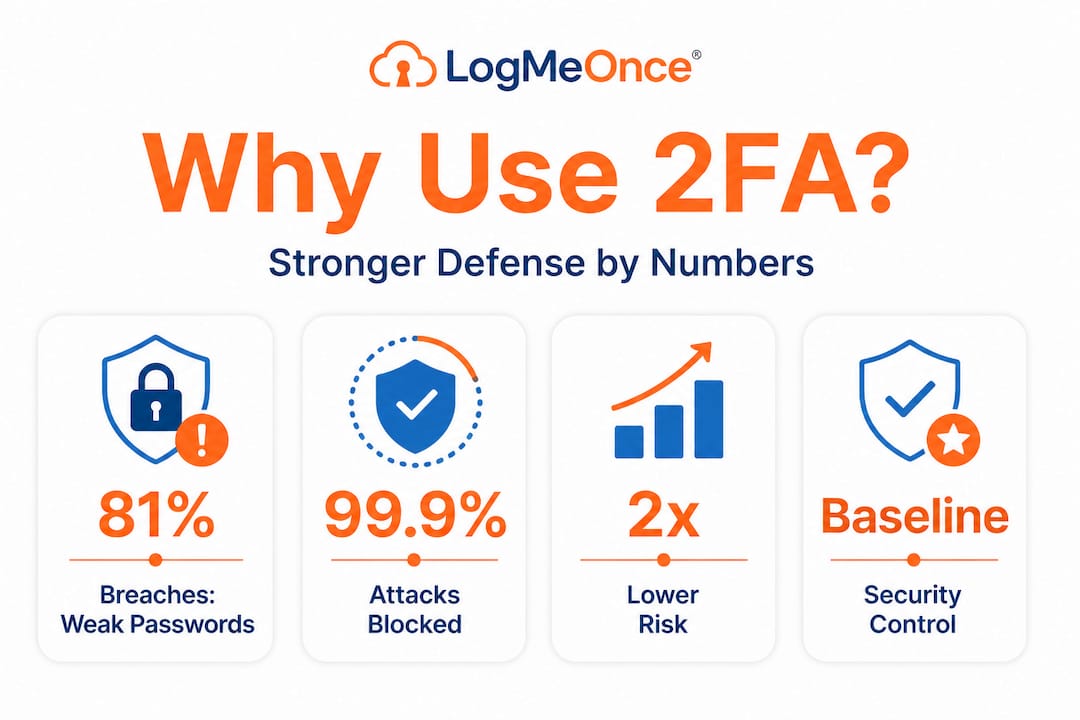
The real-world impact is striking. Google’s 2SV auto-enrollment led to a 50% decrease in compromised accounts, and researchers report that 2FA blocks 99.9% of automated attacks. These are not theoretical numbers. They represent what happens when you remove the attacker’s ability to coast on stolen credentials alone.
A study on MFA effectiveness found that MFA reduces unauthorized access risk by 45 to 98.5%, blocks 96 to 99% of phishing and credential stuffing attempts, and makes organizations 50% less likely to suffer a ransomware incident. Here is how 2FA disrupts the most common attack types:
- Credential stuffing: Attackers use leaked password lists to try logging in. With 2FA, a valid password alone grants nothing.
- Phishing: Even if a user enters credentials on a fake login page, the attacker does not have the second factor and cannot proceed.
- Brute force: Automated password guessing becomes worthless. The second factor is out of reach.
- Account takeover via breach data: Leaked credentials from third-party breaches cannot open corporate accounts protected by 2FA.
| Attack type | Password-only defense | With 2FA enabled |
|---|---|---|
| Credential stuffing | Easily bypassed | Blocked without second factor |
| Phishing | Highly vulnerable | Attacker lacks OTP or hardware key |
| Brute force | Depends on policy | Practically eliminated |
| Breach data reuse | No protection | Credential alone insufficient |
Pro Tip: If you are prioritizing where to start, apply 2FA first to privileged accounts, admin panels, VPN access, and email. These are the highest-value targets for attackers and the most damaging when compromised.
Keeping accounts safe with 2FA is no longer a best-practice recommendation. It is a baseline control. Understanding what 2FA actually is helps IT teams communicate its value to leadership and end users alike.
Comparing 2FA methods: Which is right for your organization?
Not all 2FA methods are created equal. Some are highly secure and phishing-resistant. Others are better than nothing, but carry significant weaknesses that sophisticated attackers actively exploit. Choosing the right method depends on your risk profile, budget, and user base.
Here is an honest breakdown of the main options:
- TOTP (Time-based One-Time Password): Generated by authenticator apps like Google Authenticator or Authy. Follows RFC 6238 and produces a code that expires every 30 seconds. Stronger than SMS, but can be phished in real time if an attacker uses a proxy that forwards codes instantly.
- Hardware security keys (FIDO2/WebAuthn): Physical devices like YubiKey that require physical presence at login. These are genuinely phishing-resistant because they cryptographically bind to the legitimate site’s domain. An attacker running a fake login page simply cannot intercept anything useful.
- SMS one-time passwords: A code is sent to a registered phone number. Widely deployed and easy to use, but SMS 2FA was bypassed in 90% of Twilio-related incidents. SIM swapping, where an attacker convinces a mobile carrier to transfer your number to a new SIM, accounts for 10% of 2FA breaches. Real-time phishing kits can also intercept SMS codes before they expire.
- Push notifications: An app sends an approval request to the user’s device. Convenient but vulnerable to “MFA fatigue” attacks, where attackers flood users with push requests until someone approves one by mistake.
| Method | Phishing resistance | SIM swap risk | User friction | Deployment cost |
|---|---|---|---|---|
| FIDO2 hardware key | Very high | None | Low (after setup) | Higher |
| TOTP app | Medium | None | Medium | Low |
| Push notification | Medium | Low | Very low | Low to medium |
| SMS OTP | Low | High | Low | Low |
Exploring 2FA implementation options from a security-first lens means recognizing that SMS should be treated as a fallback, not a primary method, especially for admin or privileged accounts.
Pro Tip: For organizations in regulated industries like finance or healthcare, hardware security keys aligned with FIDO2 should be your target standard for all privileged users. The upfront cost is offset quickly when you calculate the average breach cost savings.
Meeting compliance and aligning with NIST standards
Regulatory frameworks are catching up to the reality of credential-based threats. NIST Special Publication 800-63B, the definitive guide on digital identity, now mandates MFA at higher assurance levels known as AAL2 and AAL3. AAL2 requires at least two distinct authentication factors. AAL3 requires hardware-based phishing-resistant authenticators.
For most enterprise environments, here is a practical regulatory alignment checklist:
- Inventory all authentication touchpoints: Map every login point in your environment, including cloud apps, VPNs, admin consoles, and remote access tools.
- Classify by sensitivity: Apply higher assurance levels to systems handling PII, financial data, or critical infrastructure.
- Evaluate current methods against NIST guidelines: If SMS is your primary second factor on high-value systems, you are likely out of step with AAL2 requirements.
- Document your authentication policy: Auditors and cyber insurance underwriters increasingly require written evidence of MFA controls.
- Plan phishing-resistant authenticator rollout: Even if you are not yet at AAL3, a roadmap toward hardware keys or passkeys demonstrates proactive compliance.
- Review periodically: Authentication threats evolve. NIST recommends continuous evaluation, not a one-time setup.
NIST information security policies provide a solid framework for organizations building or auditing their authentication controls.
“Multi-factor authentication is not optional for systems handling sensitive data. It is the minimum bar, and regulators are starting to enforce that view.”
Beyond checkboxes, aligning with NIST builds organizational resilience. Frameworks like SOC 2, HIPAA, and PCI DSS all either mandate or strongly recommend MFA. Cyber liability insurers have begun requiring documented MFA controls before issuing or renewing policies. The compliance angle is no longer separate from the business risk conversation.
Deploying 2FA successfully: Pitfalls and practical strategies
Understanding which method to use and which standards to follow is valuable. But deployment is where most organizations stumble. Technical rollouts are rarely the hard part. User adoption, edge cases, and operational continuity are where plans break down.
Here are the most important deployment considerations, drawn from real-world rollouts:
- Prioritize phishing-resistant methods for high-value accounts first. FIDO2 hardware keys and passkeys offer the strongest protection for privileged users, service accounts, and anyone with access to sensitive data. Start there, then broaden rollout to the rest of the organization.
- Protect your TOTP secrets with envelope encryption. If you are running TOTP in-house, the seed secrets must be encrypted at rest and in transit. A compromised secrets store can let attackers generate valid codes for any account.
- Implement rate limiting on login endpoints. Even with 2FA enabled, excessive failed login attempts should trigger lockouts or alerts. Rate limiting stops automated attacks and buys time for your security team to respond.
- Plan for lost or unavailable devices. Every user will eventually lose a phone, forget a hardware key, or change their number. Build a verified recovery process before you deploy, not after the first support ticket arrives.
- Run a phased rollout with a pilot group. Choose a technically proficient team for the first deployment wave. Gather feedback, fix friction points, and document common issues before scaling to the whole organization.
- Communicate the “why” to users. Employees who understand that 2FA protects both their work and personal data from attackers are significantly more cooperative during rollout. A brief internal communication campaign pays dividends in adoption rates.
The business value of deploying 2FA extends beyond breach prevention. Reduced incident response costs, lower cyber insurance premiums, and faster audit cycles all improve the return on investment for 2FA programs.
Pro Tip: When a user loses a hardware key or device, require identity verification through a separate, pre-approved channel (like a video call with IT) before restoring access. Attackers frequently target account recovery processes as a bypass route.

The uncomfortable truth: 2FA is essential, but not invincible
Here is what we at LogMeOnce think the security industry does not say clearly enough: 2FA is one of the highest-impact controls you can deploy, and it is still beatable if you pick the wrong method or get complacent.
Real-time phishing attacks using adversary-in-the-middle (AiTM) proxies can bypass non-hardware 2FA, capturing both passwords and one-time codes in the same session. SMS codes and even TOTP codes can be stolen this way before they expire. These are not theoretical edge cases. AiTM phishing kits are openly sold on cybercrime forums and used in targeted attacks against enterprise credentials.
NIST recognized this problem. That is why AAL3 exists and why the industry is moving toward passkeys and hardware security keys as the preferred standard. Physical possession of a hardware key cannot be remotely stolen. Its cryptographic handshake is domain-bound, so a fake login page receives nothing it can use.
Our perspective: treat 2FA as a critical layer in your defense, not the final one. Organizations that deploy TOTP and consider the job done are better off than those with no second factor, but they are not done. Advanced 2FA solutions that include phishing-resistant authenticators, anomaly detection, and continuous authentication monitoring are the next logical step. Security is a living practice. Review your authentication controls at least annually, track emerging attack techniques, and update your methods accordingly.
The gap between “we have 2FA” and “we have secure 2FA” is where attackers are winning right now. Close it deliberately.
Strengthen your security posture with enterprise-grade 2FA solutions
Knowing that 2FA is essential is one thing. Actually deploying it in a way that is scalable, compliant, and manageable across a real organization is another challenge entirely.

LogMeOnce gives IT managers and security teams the tools to deploy, manage, and audit 2FA at enterprise scale. From cybersecurity solutions built for organizations of all sizes to robust two-factor authentication options that align with NIST AAL2+ requirements, LogMeOnce covers the full authentication stack. Paired with industry-leading password management benefits, the platform reduces credential risk while keeping user experience simple and consistent. Whether you are starting your 2FA program or upgrading from SMS to phishing-resistant methods, LogMeOnce makes the transition practical, not painful.
Frequently asked questions
How does two-factor authentication protect against credential stuffing?
2FA blocks most credential stuffing attacks by requiring a second, non-password factor attackers cannot access, even when passwords are leaked. MFA blocks 96 to 99% of phishing and credential stuffing attempts in practice.
Is SMS 2FA still safe for organizational use?
SMS 2FA carries significant vulnerabilities, including SIM swapping and real-time interception. SMS 2FA was bypassed in 90% of Twilio-related incidents, so security teams should prefer app-based TOTP or hardware security keys for sensitive systems.
What does NIST recommend for enterprise 2FA?
NIST recommends multi-factor authentication for all higher-sensitivity applications, ideally using phishing-resistant methods. NIST SP 800-63B defines AAL2 and AAL3 requirements, with AAL3 mandating hardware-based authenticators for the highest-risk environments.
How quickly can organizations see the impact of 2FA?
The impact is rapid and measurable. Google’s 2SV auto-enrollment produced a 50% decrease in compromised accounts shortly after rollout, demonstrating that 2FA delivers results from day one of deployment.
Recommended
- What is 2FA? The Importance of Two Factor Authentication
- The Business Benefits of Two-Factor Authentication – LogMeOnce
- What Is Two-Factor Authentication? – LogMeOnce


