


 Password Manager
 Identity Theft Protection

 Team / Business
 Enterprise
 Government
 MSP
MSP


Single Sign-On (SSO) lets a user authenticate once with a central Identity Provider and then access every connected application without logging in again. The IdP issues a signed token or assertion that each Service Provider validates independently. No credential re-entry, no per-app password prompts.
The short version:
- Primary benefit: One login grants access to dozens of apps, cutting password fatigue and help-desk overhead.
- Primary risk: The IdP becomes a high-value target. If it’s compromised, every connected app is exposed.
- Non-optional control: MFA must be enforced at the IdP before you enable SSO broadly, per guidance from TechTarget and NIST SP 800-63B.
- Key standards: SAML 2.0, OpenID Connect (OIDC), OAuth 2.0, and Kerberos cover the vast majority of real-world deployments.
- Vendor reference: Logmeonce supports SSO alongside passwordless MFA, cloud encryption, and dark web monitoring.
Key Takeaways
SSO works best when MFA is enforced at the IdP before any Service Provider is connected, and when directory data is clean before the first integration goes live.
| Point | Details |
|---|---|
| SSO definition | A user authenticates once with an IdP; a signed token grants access to every connected SP. |
| MFA is mandatory | Enforce MFA at the IdP before enabling SSO; one compromised credential otherwise unlocks every app. |
| Protocol selection | Use SAML 2.0 for mature enterprise apps, OIDC for modern web and mobile apps; most orgs need both. |
| Start with an app audit | The average organization uses over 100 SaaS tools; inventory them before choosing an IdP. |
| Logmeonce recommendation | Logmeonce handles both federated SSO and non-federated password management from a single platform. |
How does single sign-on actually work?
SSO has three moving parts: the Identity Provider (IdP), the Service Provider (SP), and the user agent (almost always a browser or native app). A user directory, typically LDAP or Active Directory, sits behind the IdP and holds the canonical identity records.
The SP-initiated flow
- The user tries to access a protected resource at the SP (say, a SaaS HR tool).
- The SP detects no valid local session and redirects the user to the IdP with an authentication request.
- The IdP checks whether the user already has an active session. If not, it presents a login screen (and MFA challenge).
- After successful authentication, the IdP generates a signed assertion or token and posts it back to the SP’s Assertion Consumer Service (ACS) URL.
- The SP validates the signature, extracts user attributes, creates a local session, and grants access.
The IdP-initiated flow
The IdP-initiated path skips steps 1 and 2. The user logs into the IdP portal first, then clicks an app tile. The IdP generates the assertion immediately and posts it to the SP. This flow is simpler but slightly less secure because there’s no SP-generated request ID to validate against.
Where sessions live and why it matters. The IdP maintains a master session, usually stored as a cookie scoped to the IdP’s domain. Each SP maintains its own shorter-lived local session. Cloudflare describes authentication tokens as temporary ID cards that services validate before granting access. The practical problem: IdP sessions often last several hours while SP sessions expire much sooner. When the SP session expires, the browser silently re-validates against the IdP without prompting the user. That’s the “magic” of SSO. But if the IdP session is revoked (say, after an employee termination), SP sessions that haven’t expired yet may still be active until they time out. That gap is where offboarding automation matters.
Pro Tip: Set SP session lifetimes shorter than IdP session lifetimes and configure Single Logout (SLO) so that terminating the IdP session propagates revocation to all SPs. Not every SP implements SLO reliably, so audit each integration individually.
Which protocol should you use: SAML, OIDC, OAuth2, or Kerberos?
SAML is XML-based and built for enterprise web apps; OIDC runs on OAuth2 and uses JSON Web Tokens, making it far more developer-friendly for modern stacks. Most organizations end up running both because their app portfolio spans generations.
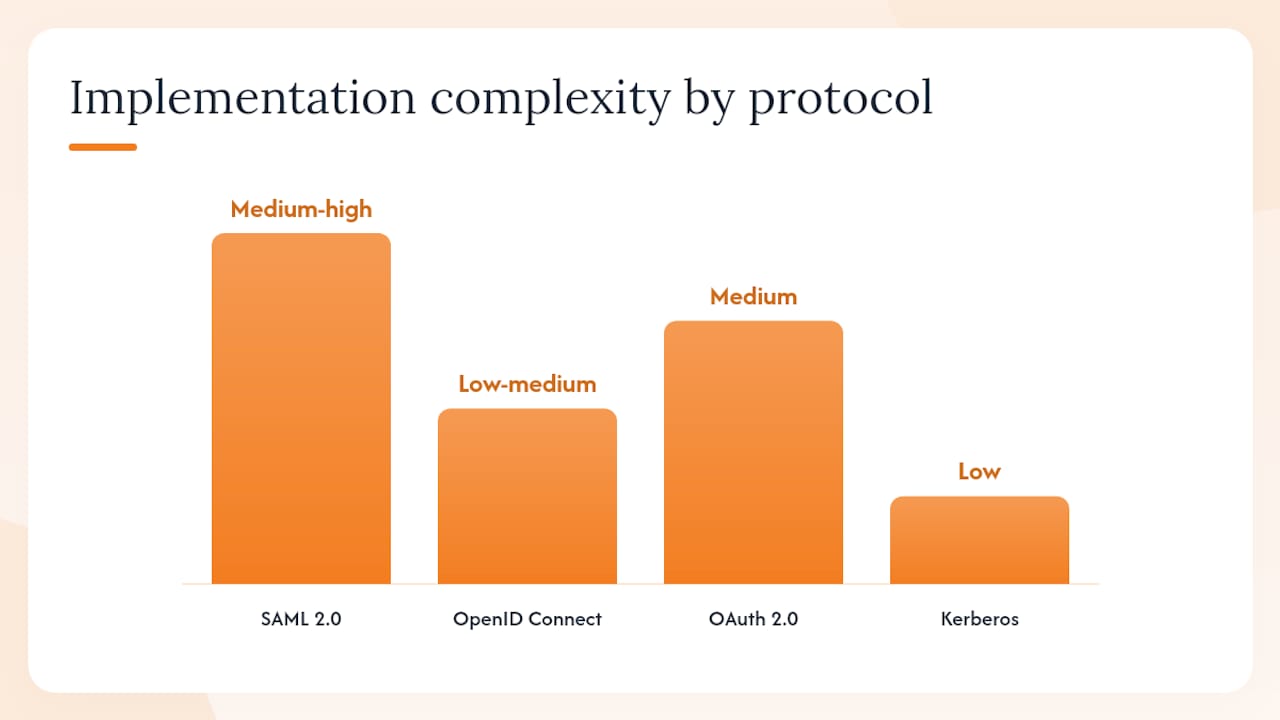
| Protocol | Token format | Typical use case | Implementation complexity | Example app category |
|---|---|---|---|---|
| SAML 2.0 | XML assertion | Mature enterprise SaaS, HR/ERP systems | Medium-high (XML parsing, metadata exchange) | Legacy enterprise web portals |
| OpenID Connect | JWT (JSON Web Token) | Modern web apps, mobile apps, APIs | Low-medium (REST-friendly, well-documented SDKs) | Cloud-native SaaS, developer tools |
| OAuth 2.0 | Access token (opaque or JWT) | Delegated authorization (not authentication alone) | Medium (scopes, grant types vary) | Third-party API access, mobile apps |
| Kerberos | Kerberos ticket | Windows domain, on-premises AD environments | Low for Windows shops (built-in), high otherwise | Internal Windows apps, file shares |
Token security considerations apply to every protocol. Assertions and tokens must be signed, and responses should also be signed when the protocol supports it. Token lifetimes should be short: access tokens in OIDC flows typically expire in 15–60 minutes. Replay attacks are mitigated by including a unique request ID (SAML’s InResponseTo attribute, OIDC’s nonce) that the SP checks on receipt. Clock skew between IdP and SP servers causes validation failures more often than most teams expect; keep clocks synchronized via NTP and allow a small tolerance window (typically 5 minutes) in your SP configuration.
Microsoft Entra ID documents federation via SAML and OIDC alongside password-based SSO and linked SSO as distinct options, each suited to different app types. Password-based SSO is a fallback for apps that can’t speak federation protocols at all.
What are the real benefits of SSO for your organization?
The most direct benefit of SSO is eliminating repeated credential entry, which cuts both password fatigue and the volume of password-reset help-desk tickets. For IT teams, the operational gains go further.
- Centralized access control: Provisioning and deprovisioning happen at the IdP, not app by app. Remove a user from the directory and their SSO access to every connected app stops.
- Simplified audit trails: Authentication events flow through one system, making compliance reporting for HIPAA, SOC 2, and CCPA significantly cleaner. Instead of pulling logs from 30 separate apps, you query the IdP.
- Reduced attack surface from weak passwords: Users who only need to remember one strong credential tend to choose better passwords and are less likely to reuse them across personal accounts.
- Better user experience: Employees spend less time on login screens and fewer cycles on MFA prompts per day, since the IdP session handles re-authentication transparently.
- Faster onboarding: A new hire gets directory access and immediately inherits SSO access to every app their group is authorized for, often in minutes rather than hours of IT ticket work.
For U.S. organizations subject to HIPAA, SSO supports the Technical Safeguards requirement for unique user identification and automatic logoff by centralizing both controls at the IdP. CCPA compliance benefits similarly: a single access log is easier to audit for data access requests than fragmented per-app logs.
The flip side of centralization is concentration risk, covered in the next section. The security and productivity case for SSO is strong, but it only holds if the IdP itself is hardened.
What security risks come with SSO and how do you mitigate them?
Centralizing authentication is a trade-off. The IdP becomes the single most valuable target in your environment. A stolen IdP credential or a compromised IdP session gives an attacker access to every connected application simultaneously.
The principal risks:
- IdP as a single point of failure: If the IdP goes down, users lose access to all federated apps at once. Plan for IdP high availability and document break-glass procedures.
- Credential theft with broad blast radius: One phished password unlocks everything. This is why MFA at the IdP is not optional.
- Session hijacking: A stolen IdP session cookie grants the same broad access as the credential itself. Enforce short session lifetimes, bind sessions to IP or device fingerprint where possible, and use HTTPS everywhere.
- SLO fragility: Single Logout is inconsistently implemented across SPs. Some apps don’t honor SLO requests, leaving orphaned sessions after a user is terminated.
- Phishing targeting the IdP login page: Attackers who know your IdP URL can craft convincing phishing pages. Phishing-resistant MFA (hardware security keys, passkeys) closes this gap more reliably than TOTP.
Controls to verify before go-live:
- MFA enforced at the IdP for all users, with no bypass paths
- TLS 1.2+ on all IdP endpoints, with certificate expiry monitoring
- Signing certificates rotated on a defined schedule, well before expiry
- WAF rules protecting the IdP login endpoint
- SIEM integration for IdP authentication logs (failed logins, anomalous access patterns)
- Incident response playbook that includes IdP compromise as a scenario
- Break-glass admin accounts that bypass SSO (with their own MFA and audit logging)
Pro Tip: Enable MFA at the IdP before you connect your first SP. Rolling it out after SSO is live means users are already accustomed to single-factor access, and the change triggers more friction and more exceptions requests.
Where does SSO fit well and where does it fall short?
SSO is a strong fit for environments with multiple SaaS applications, a managed user directory, and a need for centralized access governance. It’s less useful, or actively problematic, in a few specific situations.
Strong use cases:
- Enterprise SaaS consolidation: companies running 50+ cloud apps see the biggest productivity and governance gains.
- B2B partner federation: two organizations can federate their IdPs so partner users access shared resources without separate accounts.
- Workforce SSO for education: universities and K-12 districts use SSO to give students and staff access to dozens of tools from a single institutional login.
- Managed device environments: SSO combined with device trust (certificate-based or MDM-enrolled) creates a strong zero-trust posture.
Where SSO runs into limits:
- Apps that don’t support SAML or OIDC require a workaround (password-based SSO or a password manager proxy).
- Regulatory contexts that require session separation between systems, such as certain financial trading platforms, may prohibit SSO by policy.
- Very small organizations with fewer than five apps often find the IdP setup overhead exceeds the benefit; a password manager alone may be sufficient.
- Vendor SLO reliability varies widely. Some SaaS apps claim SLO support but don’t actually terminate sessions on receiving a logout request.
Quick decision checklist. An app is a good SSO candidate if it supports SAML 2.0 or OIDC, has a configurable ACS/redirect URI, and allows attribute-based access control. If it fails any of those, plan for a password-based SSO fallback or a federation proxy.
How to set up SSO: a step-by-step implementation checklist
A practical SSO rollout follows seven core steps: audit your apps, choose an IdP, clean your directory, connect apps, enforce MFA, run a pilot, and monitor. Here’s how that maps to an operational checklist with timing and cost context.
-
Audit your application portfolio. List every app employees use, note whether each supports SAML, OIDC, or neither, and flag the ones with the highest login frequency. The average organization uses over 100 SaaS tools, so this step takes longer than most teams expect. Budget 1–2 weeks for a thorough inventory.
-
Choose your IdP and integration method. Evaluate IdPs on protocol support (SAML + OIDC at minimum), MFA options, directory sync (SCIM), pricing per user, and U.S. data residency if required. Decide whether you’ll use federation, password-based SSO, or a hybrid.
-
Clean your user directory. Stale accounts, duplicate entries, and inconsistent attribute values (email format, department names) cause attribute mapping failures later. Fix them now. This step is unglamorous but skipping it causes the most post-launch support tickets.
-
Configure the IdP. Set session lifetimes, MFA policies, group structures, and attribute release rules. Define which groups get access to which apps. Configure certificate signing and set a calendar reminder for renewal 60 days before expiry.
-
Register your first Service Provider. Start with a low-risk, non-critical app. Exchange metadata (for SAML) or register the redirect URI (for OIDC). Map the attributes the SP expects (typically email, display name, group membership).
-
Test both flows. Run SP-initiated and IdP-initiated logins. Test with a valid user, an invalid user, and a user in the wrong group. Verify that attribute mapping produces the correct values at the SP. Check that SLO works if the SP supports it.
-
Run a staged pilot. Start with a small group (10–20 users, ideally from IT or a volunteer cohort) on your highest-priority apps. Collect feedback on login failures, unexpected logouts, and MFA friction. A staged pilot catches integration misconfigurations before they affect the whole company.
-
Phased rollout. Expand by department or app tier. Communicate the change to users before it goes live, including what to do if SSO fails (fallback URL, help-desk contact).
-
Monitor and maintain. Review IdP authentication logs weekly in the first month. Set alerts for spike in failed logins. Rotate signing certificates before expiry. Audit group memberships quarterly.
Timeline: A pilot covering a few apps typically takes several weeks to achieve stable production. Full rollout across many apps with custom connectors can take several months. Custom integrations for apps without native federation support add the most time and cost.
Cost considerations: IdP licensing runs from free tiers (suitable for small teams) to per-user-per-month enterprise pricing. Internal labor for the app inventory and integration work is usually the largest cost. Third-party consulting for custom SAML or OIDC connectors adds $5,000–$30,000 depending on complexity, though that range is a general market estimate rather than a fixed figure.
Common pitfalls:
- Attribute mapping errors (SP expects
email, IdP sendsmail) are the most frequent cause of login failures. - ACS URL or redirect URI typos break the entire flow silently.
- Clock skew over 5 minutes causes assertion validation failures that look like random intermittent errors.
- Certificate rollover failures happen when a new certificate is deployed at the IdP before the SP’s metadata is updated. Always update SP metadata first.
SSO vs. password managers: what’s the difference?
True SSO and “same-sign-on” are often confused. Same-sign-on means using the same username and password across multiple systems. The credentials are replayed each time. True SSO uses token-based session authentication: the user authenticates once, and a signed token travels to each SP. No credential is ever sent to the SP directly.
Password managers complement SSO rather than compete with it:
- For federated apps: SSO handles authentication entirely. The password manager has no role in the login flow.
- For non-federated apps: Apps that don’t support SAML or OIDC need credentials replayed. A password manager fills that gap, storing and autofilling strong unique passwords for each app.
- For offboarding: When an employee leaves, revoking their IdP account cuts SSO access immediately. But non-federated apps still need individual password changes or account deactivation. A password manager integrated with your offboarding workflow handles those.
During an SSO rollout, you’ll almost certainly have a mixed environment: some apps federated, some not. The practical approach is to run SSO for every app that supports it and use a password manager for the rest, with a plan to migrate the remainder as vendors add federation support.
How Logmeonce maps to the SSO implementation checklist
Logmeonce covers both sides of the mixed environment problem. Its SSO capability handles federated authentication for apps that support standard protocols, while its password management layer handles credential replay for apps that don’t.
Here’s how Logmeonce features map to the checklist items above:
- MFA enforcement (step 4): Logmeonce supports passwordless MFA, including biometric and hardware token options, satisfying the MFA-before-SSO requirement.
- Non-federated app fallback (step 2): The password management layer handles apps that can’t speak SAML or OIDC, keeping them inside a managed security perimeter.
- Cloud encryption: Logmeonce applies encryption to stored credentials and cloud data, relevant to token storage security and audit log protection.
- Dark web monitoring: Logmeonce monitors for compromised credentials associated with your accounts, providing an early warning if IdP credentials appear in breach data.
- Logging and monitoring (step 9): Logmeonce provides access logs that support compliance reporting for HIPAA and SOC 2 environments.
- Offboarding automation: Centralized credential management means deprovisioning a user in Logmeonce cuts access to both federated and non-federated apps in one action.
For IT teams running the checklist, Logmeonce reduces the gap between “apps that support SSO” and “apps that need a workaround” by handling both categories from a single platform.
What the SSO setup process actually gets right
SSO is one of the most impactful identity controls an organization can deploy. The productivity case is real, the compliance benefits are concrete, and the security posture improves when MFA is enforced at the IdP. But the conventional advice around SSO tends to undersell two things.

First, the directory cleanup step (step 3 in the checklist) is where most rollouts stall. Teams underestimate how much inconsistent attribute data they’ve accumulated. A user whose email in Active Directory doesn’t match their email in the HR system will fail SSO logins in ways that are hard to diagnose without good logging. Fix the data before you connect a single SP.
Second, the “SSO is a security risk” framing is technically accurate but practically misleading. Yes, the IdP is a high-value target. But the alternative, dozens of apps each with their own weak passwords and no centralized revocation, is objectively worse. The concentration risk is manageable with MFA and proper session management. The distributed risk of password sprawl is much harder to contain.
The reader who gets the most from SSO is the one who treats it as an identity governance project, not just a login convenience feature. The checklist, the protocol selection, the certificate lifecycle, the offboarding automation: these are the parts that determine whether SSO actually improves your security posture or just makes logins faster.
Logmeonce covers both federated and non-federated apps in one platform
Most SSO guides stop at the federated apps and leave you to figure out the rest. The reality is that a typical organization has a mix: some apps speak SAML or OIDC natively, and others never will. Logmeonce handles both from a single platform, so your security perimeter doesn’t have a gap where the legacy apps live.

For the federated apps, Logmeonce provides SSO with passwordless MFA, satisfying the MFA-before-SSO requirement that every security framework recommends. For the non-federated apps, the password management layer stores and replays strong unique credentials, keeping those apps inside a managed, auditable perimeter. Cloud encryption protects stored credentials and log data. Dark web monitoring flags compromised credentials before attackers use them. And when an employee leaves, one deprovisioning action cuts access across both federated and non-federated apps simultaneously.
Logmeonce suits individuals who want a single secure login across their personal app stack, and IT teams who need centralized governance across a mixed enterprise environment. Start a free trial at Logmeonce to see how the platform maps to your specific app inventory.
Sources
- How to Set Up Single Sign-On (SSO): Step-by-Step Guide
- The Complete Guide to Implementing Single Sign-On (SSO) · Start with Identity


