


 Password Manager
 Identity Theft Protection

 Team / Business
 Enterprise
 Government
 MSP
MSP


Passkeys built on FIDO2/WebAuthn and device-bound hardware keys are the strongest passwordless option available, resisting phishing in ways passwords never could. Magic links, push approvals, and one-time codes fill in for lower-risk logins, while single sign-on ties it all together for managed employees. For most organizations, the safe default is passkeys or hardware keys for anything sensitive, with lighter methods reserved for low-stakes access. Resources are a reasonable starting point for teams piloting the shift.
TL;DR:
- Passkeys and hardware security keys offer the highest phishing resistance due to device-bound cryptographic authentication; they are essential for high-privilege accounts.
- Synced passkeys provide convenience by roaming across devices through cloud storage but may reduce the security benefits needed for regulated environments.
- Proper fallback processes, including multi-channel verification and activity logging, are crucial to maintain security and prevent social engineering attacks during attacks.
- Enrolling and recovering passwordless accounts should start with pilot groups, with careful planning for device compatibility, backup strategies, and support workflows.
- The security level of passwordless methods aligns with NIST standards, with hardware keys typically reaching the highest assurance level (AAL3).
Real Examples Of Password-Free Security In Action
Each passwordless method plays out differently depending on who’s logging in and what they’re trying to reach. Here’s what the actual flow looks like for six common approaches.
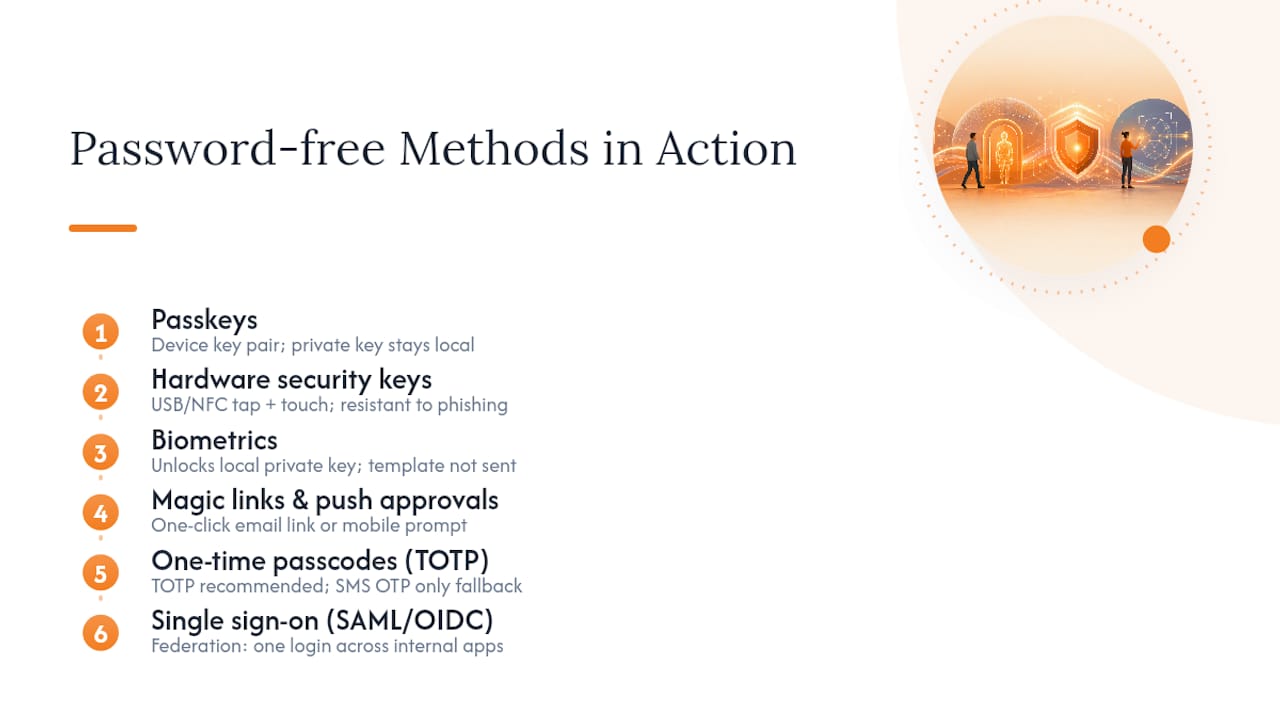
Passkeys. A user registers a passkey once, and the device generates a public/private key pair. The private key never leaves the device. On future logins, the server sends a challenge, the device signs it locally, and access is granted without a password ever changing hands. Retailers use this for customer accounts, enterprises use it for employee login on managed laptops, and IT teams increasingly require it for admin consoles because it kills credential stuffing outright. This challenge-response model is the backbone of what Wikipedia describes as passwordless authentication: a system built on possession of a key, not memory of a secret.
Hardware security keys. A physical device like a USB or NFC key requires a tap or insertion plus a touch gesture. Privileged admins with access to production systems or financial infrastructure are the classic use case, since a hardware key can’t be phished remotely. Distribution and recovery are the catch. Someone has to issue keys, replace lost ones, and keep a backup key on file for every high-privilege account.
Biometrics. Fingerprint or face scans don’t authenticate you to a server. They unlock the private key stored locally, and no biometric template gets transmitted anywhere. That distinction matters for privacy compliance, and it’s why Cloudflare’s explainer on passwordless authentication treats biometrics as a local gate rather than a network credential. LogMeOnce’s own passwordless photo login works on this same principle.
Magic links and push approvals. A user enters an email address, gets a one-click link, and signs in. Push approval works similarly through a mobile app prompt. Both are fast and low-friction, which makes them common for newsletter portals, community forums, and other low-assurance consumer flows.
One-time passcodes. TOTP codes from an authenticator app are far more resistant to interception than SMS OTP, which depends entirely on carrier and network security. Use TOTP as a secondary factor; treat SMS OTP as a fallback of last resort.
Single sign-on. Federation through SAML or OIDC lets one login session cover dozens of internal apps. It’s the natural fit for managed workforces where IT already controls the device fleet.
How These Methods Stack Up Against NIST And FIDO2 Standards
Cryptographic phishing resistance comes from binding a key to a specific device and a specific origin. A stolen password can be replayed anywhere. A stolen passkey signature can’t, because the private key never leaves the hardware or secure enclave that generated it. This is the core design principle behind FIDO2/WebAuthn, and it’s why regulators and standards bodies treat these methods differently from anything password-based.
Pro Tip: When evaluating a vendor’s passwordless claims, ask specifically which NIST Authenticator Assurance Level their default configuration meets, not just whether they support “passwordless.”
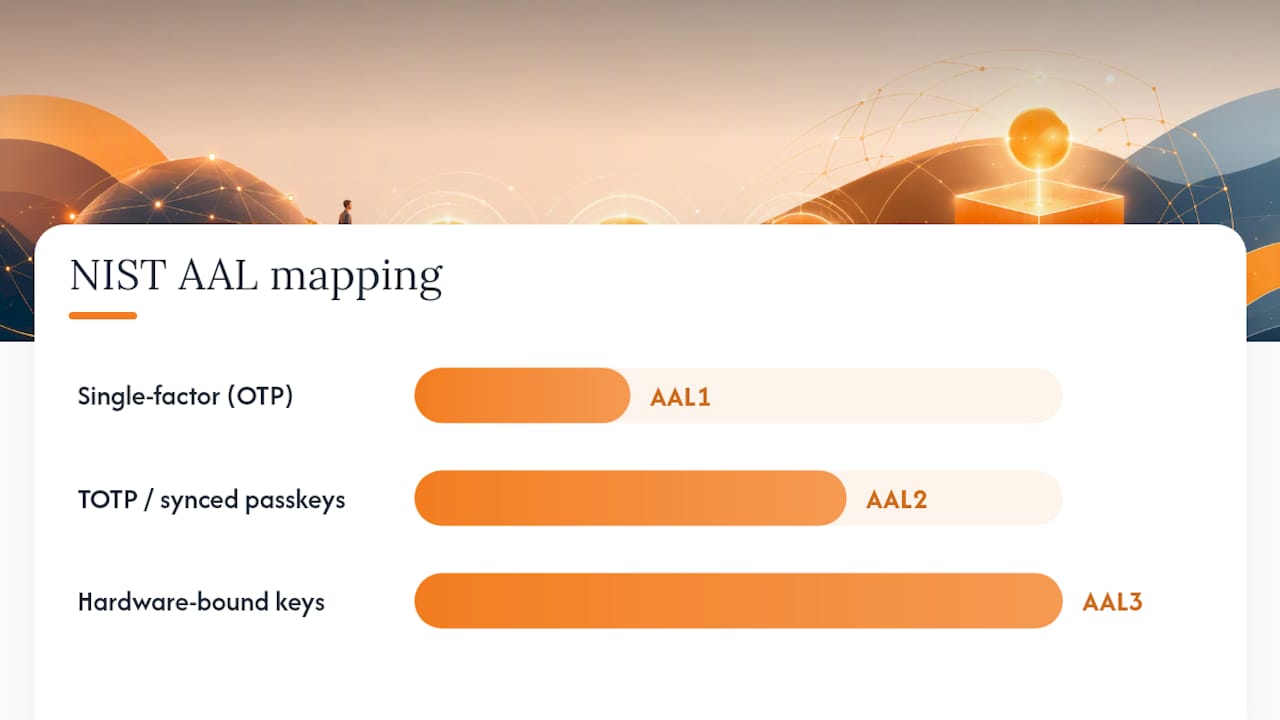
NIST SP 800-63 gives a rough map for where each method lands:
- AAL1: Single-factor methods, including many magic-link and basic OTP implementations.
- AAL2: TOTP-based multi-factor setups and some synced passkey configurations.
- AAL3: Hardware-bound authenticators, such as device-bound passkeys and dedicated security keys, that resist verifier impersonation.
Synced passkeys, which roam across devices through iCloud Keychain or Google Password Manager, trade some of that hardware binding for convenience. That’s a reasonable call for consumer apps. It’s a harder sell for regulated environments where custody of the private key needs to stay off a third-party cloud, a trade-off worth weighing before standardizing on synced passkeys enterprise-wide.
Choosing The Right Passwordless Method For Each User Group
Not every account needs the same authentication weight. The framework below breaks users into four groups and assigns a default method to each, based on the risk they carry if compromised.
- Privileged admins. Use device-bound hardware keys or platform passkeys tied to a managed device. No exceptions, no email-based fallback for this group.
- Managed employees. Pair SSO with passkeys on company-issued hardware. This covers the bulk of daily logins without adding friction.
- Contractors and partners. Push-based approval or TOTP works well here, since device management is inconsistent across external organizations.
- Consumer customers. Magic links or passkeys depending on the sensitivity of the account; banking apps warrant passkeys, a content newsletter doesn’t.
Fallback rules deserve as much design attention as the primary method. A help desk that resets access after a five-minute phone call defeats the entire point of hardware-bound authentication. Require identity verification through a second channel, log every fallback event, and cap how many times a single account can use the fallback path before triggering a manual security review. Track enrollment rates, fallback frequency, and help-desk ticket volume monthly. A rising fallback rate almost always signals a device-support gap, not a user-behavior problem.
What It Actually Takes To Roll Out Passwordless Access
Enrollment usually starts with a pilot group, not a company-wide switch. Staged rollout by department gives IT time to catch device compatibility issues before they turn into a flood of help-desk tickets, particularly in BYOD environments where phone models and OS versions vary widely.
Recovery planning is where most rollouts stumble. Synced passkeys simplify recovery because the credential lives in a cloud keychain, but that convenience comes with the custody trade-off already mentioned. Device-bound keys need a documented backup authenticator and a help-desk verification process that doesn’t just take someone’s word for it over the phone.
Support volume shifts rather than disappears. Password-reset tickets drop sharply, but new ticket types show up: lost hardware keys, biometric enrollment failures on older devices, and passkey sync issues across platforms.
Cost planning should account for:
- Hardware key issuance and replacement for privileged accounts.
- Identity orchestration or SSO licensing.
- Engineering time for integrating WebAuthn into existing login flows.
On monitoring, instrument four things from day one: enrollment completion rate, fallback usage, authentication failure patterns, and any spike in recovery requests tied to a single IP range or device fingerprint.
Where LogMeOnce Fits Into A Passwordless Rollout
LogMeOnce’s product line maps fairly directly onto the methods covered above. Passwordless MFA and biometric photo login cover the device-bound and biometric-gate categories, while built-in single sign-on addresses the managed-workforce segment. Cloud encryption and dark web monitoring round out the identity-protection side once credentials are no longer the weak link.
For teams comparing this against a traditional two-factor setup, the two-factor authentication breakdown is worth reading first, since it clarifies where 2FA ends and true passwordless MFA begins. Technical details on encryption and architecture are covered on the how secure is LogMeOnce page, and a broader walkthrough of the shift away from passwords is available in this passwordless authentication overview.
The Gap Between Passwordless Marketing And Passwordless Reality
Most vendors sell passwordless as a single feature you switch on. It isn’t. It’s a set of methods with different assurance levels, and the mistake I see most often is enterprises rolling out passkeys for customer login while leaving the help desk’s identity verification process untouched. That gap becomes the new attack surface. A phishing-resistant credential is worthless if a social engineer can still talk a support agent into a reset.
The conventional advice, “go passwordless, get more secure,” skips the part that actually determines outcomes: fallback design. Organizations that treat recovery paths as seriously as the primary authenticator see real security gains. Those that bolt passkeys onto an unchanged support process mostly just move the risk around.
If you’re prioritizing one thing first, make it this: audit your account recovery process before you audit your login method. The login is rarely where the breach happens anymore.
— Mike
Start A Passwordless Pilot Without Overhauling Your Stack
Rolling out hardware keys and passkeys from scratch takes engineering time most IT teams don’t have sitting idle. A platform packages passwordless MFA, SSO, and biometric login into one platform, so a pilot group can be running on device-bound authentication in days rather than months of custom WebAuthn integration.
[IMAGE OMITTED]
You can see the specific benefits laid out on the LogMeOnce password management benefits page, including how the free trial applies to passwordless MFA and SSO together. If your rollout also touches sensitive file storage, the cloud storage encryption option is worth checking during the same evaluation. Start the trial, enroll a small pilot group on passkeys or hardware keys, and measure the fallback rate before expanding to the rest of the organization.
Sources
Recommended
- Enterprise Password Management
- How Secure is Logmeonce?
- The Finesses of Enterprise Password Management


