


 Password Manager
 Identity Theft Protection

 Team / Business
 Enterprise
 Government
 MSP
MSP


TL;DR:
- Your digital identity is increasingly targeted by cyberattacks, making protection essential for everyone.
- Key measures include using strong passwords, enabling MFA with hardware keys or authenticators, and coordinating annual privacy audits.
Your digital identity is under more pressure than ever. Cyberattacks targeting identities rose 32% in early 2026, putting roughly 1 in 3 individuals at serious risk. Knowing how to protect digital identity is no longer optional for tech-savvy people. It is a necessity for anyone with a bank account, a social media profile, or an email address. This guide walks you through the exact steps to lock down your digital life, from foundational knowledge to daily habits that actually work.
Key Takeaways
| Point | Details |
|---|---|
| Your digital identity is a target | Credentials, device data, and browsing history all combine to make you identifiable and vulnerable. |
| Strong passwords are non-negotiable | Passwords of 12+ characters reduce unauthorized access risk by 90%. |
| Not all MFA is created equal | Push-based MFA has seen a 217% surge in fatigue attacks. Hardware keys and authenticator apps are safer. |
| Freeze beats monitoring | A credit freeze proactively blocks new account fraud. Credit monitoring only alerts you after it happens. |
| Ongoing audits matter | Regular permission audits and data broker opt-outs are among the most overlooked protection steps. |
What makes up your digital identity
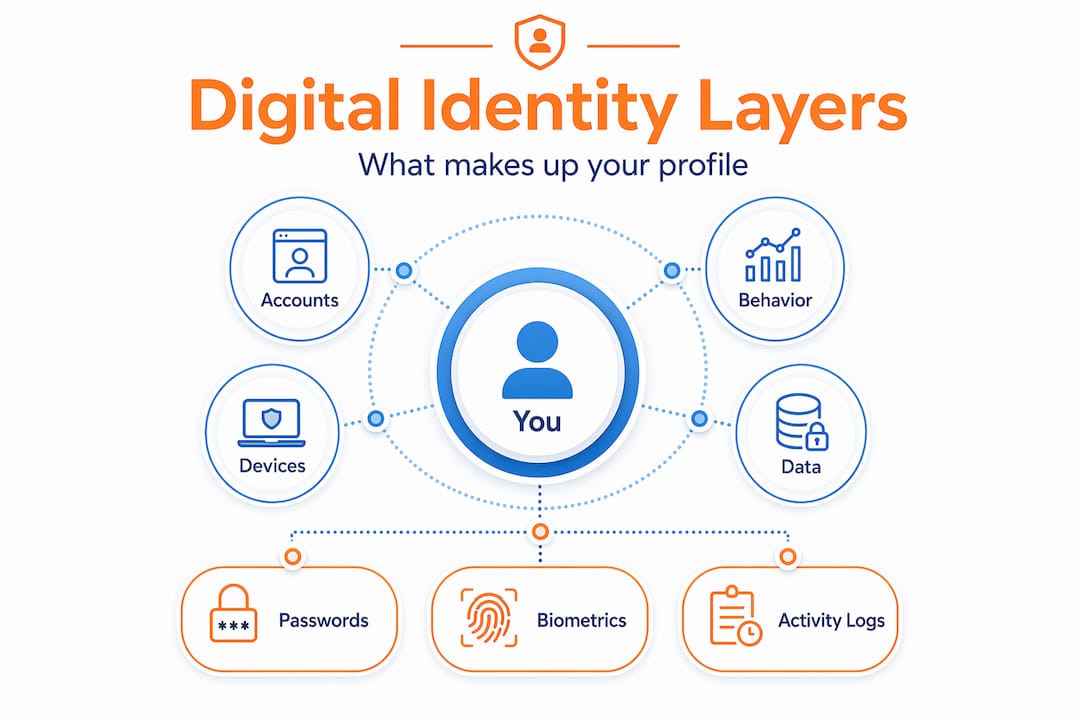
Most people think of their digital identity as a username and password. It is far more than that. Your digital identity includes your login credentials, email addresses, financial account numbers, device identifiers, IP address history, social media profiles, and even your browsing and purchase behavior. Taken together, these pieces form a detailed picture that attackers can use to impersonate you, open credit accounts in your name, or sell your data on dark web markets.
Attackers use several methods to steal this information:
- Phishing emails and fake login pages that trick you into surrendering credentials directly
- Credential stuffing, where stolen passwords fuel 38% of data breaches by exploiting password reuse across sites
- Data broker aggregation, where your personal details are collected from dozens of public and semi-public sources and sold
- Social engineering, including AI-generated deepfake voice calls that mimic people you trust
- Oversharing on social media, which hands attackers answers to common security questions without any hacking required
Understanding these attack vectors is the starting point for learning how to safeguard personal data. You cannot defend against threats you do not recognize.
Preparing to secure your identity
Before you can execute any protection strategy, you need the right tools and mental model in place. Think of this as building your defensive foundation.
Password management comes first. A dedicated password manager generates and stores unique, complex passwords for every account so you never reuse credentials. This single step eliminates the core risk behind credential stuffing attacks. When choosing one, look for strong password management features like encrypted storage and autofill that works across browsers and devices.

Multi-factor authentication (MFA) is mandatory, but your choice of method matters. Not all MFA is equal. MFA reduces account compromise risk by 99.9%, but push-notification MFA has seen a 217% rise in fatigue attacks, where attackers spam approval requests until a tired user taps “allow.” Authenticator apps that generate time-based codes are significantly safer. Hardware security keys are the gold standard.
Privacy tools give you legal leverage. The Global Privacy Control browser signal legally requires websites in 11 U.S. states to honor your opt-out of data sales as of 2026. Enabling GPC in your browser or via a privacy-focused extension is a two-minute step with real legal teeth.
Here is a preparation checklist to work through before moving to daily practices:
- Choose and set up a reputable password manager
- Enable MFA on every account that supports it, prioritizing authenticator apps or hardware keys
- Enable Global Privacy Control in your browser settings
- Audit which devices have access to your accounts and revoke any you no longer use
- Review your Wi-Fi and home router security settings, including changing default admin passwords
Pro Tip: When setting up MFA, prioritize your email account first. If an attacker controls your email, they can reset every other account password through it.
How to protect your digital identity in daily practice
This is where most guides stop at the obvious. The steps below go further and address the specific threats reshaping digital security in 2026.
Step 1: Freeze your credit at all three bureaus
A credit freeze is the single most effective step to block new account fraud. Credit freezes must be placed separately with Equifax, Experian, and TransUnion. Each bureau issues a PIN or password to lift the freeze when you legitimately apply for credit. Store these PINs in your password manager, not in a text file on your desktop. A freeze does not affect your credit score and costs nothing.
Step 2: Replace push-based MFA with stronger alternatives
Hardware security keys and code-based authenticators provide stronger protection than push-based MFA. Go through your most critical accounts, including financial institutions, your primary email, and work accounts, and switch the MFA method from push notifications to an authenticator app or a physical key. This one change removes the most exploited MFA vulnerability in use today.
Step 3: Tighten social media and online sharing habits
Here is a comparison of behaviors that look harmless versus what they actually expose:
| Behavior | What it seems like | What it actually exposes |
|---|---|---|
| Posting your birthday | A celebration | Answer to a common security question |
| Sharing your hometown | Personal context | Verifiable identity detail for social engineering |
| Tagging your location live | Sharing an experience | Real-time location data for physical risk |
| Listing your employer publicly | Professional networking | Data for targeted spear-phishing attacks |
| Using “public” profile settings | Visibility for connections | Full access to data brokers and scrapers |
Review your privacy settings on each platform every six months. Set profiles to private where possible, and never answer security questions with real, guessable answers.
Step 4: Understand the limits of common privacy tools
VPNs encrypt traffic and hide your IP address, but the moment you log into any account, that account links your activity back to your identity. A VPN is one layer of protection, not a complete solution. Similarly, incognito mode only prevents local history storage. Your internet service provider, employer network, and the websites you visit can still track you in private browsing mode. These tools require layered support from strong credentials, MFA, and privacy signals to be meaningful.
Pro Tip: Combine a VPN with GPC-enabled browsing and a separate email alias for account signups. Each layer independently reduces your trackable surface area.
Step 5: Recognize and resist phishing attempts
Phishing has gotten more convincing in 2026 because AI-driven threats now include deepfake voice calls from numbers you recognize. If a call, text, or email creates urgency around clicking a link or confirming your credentials, stop. Navigate to the service’s website directly and verify the situation. Phishing-resistant authentication methods, like passkeys and hardware keys, remove the credential entirely from the equation.
Ongoing vigilance: monitoring and auditing
Setting up protection is not a one-time event. Your digital footprint changes constantly, and threats evolve faster than most security advice. Here is what ongoing protection looks like in practice:
- Monitor your credit reports at least once a quarter through AnnualCreditReport.com, watching for accounts or inquiries you do not recognize
- Review account login history on email, banking, and social accounts monthly. Most platforms show recent logins with device and location data
- Run app permission audits on your phone every 60 days. Remove any app that has access to your microphone, location, or contacts without a clear reason
- Opt out of data brokers through manual requests or a data removal service. Regular audits and data broker opt-outs measurably reduce your exposure to identity theft
- Set up alerts on all financial accounts for transactions over a threshold you define, even one dollar
If you suspect your identity has already been compromised, act immediately. Freeze your credit, change passwords starting with email, report to the FTC at IdentityTheft.gov, and notify your bank. Early detection dramatically limits the damage. For a deeper look at specific recovery steps, LogMeOnce covers preventing identity theft online in detail.
Here is a quick reference for monitoring frequency:
| Activity | Recommended frequency |
|---|---|
| Credit report review | Quarterly |
| Account login history check | Monthly |
| App permission audit | Every 60 days |
| Data broker opt-out review | Every 6 months |
| Password strength audit | Annually or after any breach |
My perspective on where identity security is actually heading
I’ve spent years watching organizations and individuals treat security as a checklist. Buy a VPN, enable two-factor authentication, done. What I’ve learned is that this mindset is exactly what attackers count on. The threat model in 2026 is genuinely different from three years ago.
Deepfake voice calls, autonomous phishing agents, and AI that can analyze your social profiles to craft personalized attacks have made the old rules insufficient. Push-based MFA, which most people still rely on, is now a liability more than a safeguard. What I’ve found actually works is shifting toward phishing-resistant, hardware-bound authentication. Passkeys and FIDO2-compliant hardware keys do not send anything an attacker can intercept.
The privacy law changes around Global Privacy Control are the underreported story here. Most people have no idea that enabling a browser signal can legally require sites in over a dozen states to stop selling their data. That is real leverage, and it takes two minutes to activate.
My honest take: the balance between privacy and convenience has permanently shifted. The tools that offer both, like good password managers and passwordless MFA, are now mature enough that the convenience excuse for weak security has expired. Stop tolerating it for yourself.
— Mike
How LogMeOnce protects your identity end to end

LogMeOnce brings together the core tools this article covers under one platform. Its password management suite generates strong unique credentials, stores them with encrypted protection, and autofills across all your devices. The built-in multi-factor authentication goes beyond push notifications, supporting passwordless login and phishing-resistant authentication methods that match the security standards outlined in this guide. Whether you are an individual protecting personal accounts or a professional managing organizational access, LogMeOnce’s cybersecurity platform gives you layered protection without requiring you to stitch together a dozen separate tools. Start a free trial and see how much of your exposure you can close in under an hour.
FAQ
What is the most effective way to protect your digital identity?
Combining a password manager, phishing-resistant MFA, and a credit freeze at all three bureaus covers the most critical attack vectors. No single tool is sufficient on its own.
Does a credit freeze hurt your credit score?
No. A credit freeze has no effect on your existing credit score. It only prevents new lines of credit from being opened without your explicit approval.
Is push-based MFA safe enough in 2026?
Push-based MFA is significantly weaker than it was previously. Fatigue attacks exploiting push MFA rose 217%, making authenticator apps or hardware keys a much safer choice for protecting your accounts.
What does Global Privacy Control actually do?
GPC sends a browser signal telling websites you do not consent to the sale of your personal data. In 11 states, honoring that signal is legally required, making it one of the few privacy tools with direct legal enforcement behind it.
How do I know if my identity has already been stolen?
Watch for unfamiliar accounts on your credit report, unexpected bills or collection notices, login alerts from locations you do not recognize, and rejections for credit you did not apply for. Check your credit reports at AnnualCreditReport.com immediately if any of these occur.
Recommended
- Identity Theft Protection & Dark Web Scan – LogMeOnce
- Identity Theft Protection – LogMeOnce
- How to Prevent Identity Theft Online – LogMeOnce


