


 Password Manager
 Identity Theft Protection

 Team / Business
 Enterprise
 Government
 MSP
MSP


TL;DR:
- Password generators use cryptographically secure algorithms to create unpredictable, strong passwords that resist modern attacks.
- They operate locally using validated CSPRNGs, rejection sampling, and shuffling to ensure high entropy and randomness.
A password generator is a tool that creates random, secure passwords by combining cryptographically secure randomness with user-selected character sets to maximize strength and unpredictability. Understanding how password generators work is the first step toward replacing weak, recycled credentials with passwords that actually hold up against modern attacks. For individuals and small business owners, this knowledge is not optional. Data breaches cost real money, and the root cause is almost always a weak or reused password.
How password generators work: the core mechanics
Password generators produce credentials through a two-step process: selecting characters from a defined set and assembling them in an unpredictable order. The character set typically includes uppercase letters, lowercase letters, digits, and symbols. The generator draws from this pool using a cryptographically secure pseudorandom number generator, or CSPRNG, which is the industry-standard term for the algorithm class that makes this process trustworthy.

CSPRNGs gather entropy from hardware sources such as mouse movements, keyboard timing, and operating system random pools. That entropy feeds the algorithm, making the next output statistically impossible to predict beyond a 50/50 guess. This is a fundamentally different guarantee than what a standard pseudorandom generator offers.
The output is then filtered and assembled. A generator enforcing “at least one symbol” uses rejection sampling to meet that rule without skewing the probability of any character appearing. The result is a password that no human could have invented and no pattern-matching attack can easily crack.
What algorithms make password generators secure?
The single most important technical decision in any password generator is the choice of random number generator. Basic generators built on functions like JavaScript’s Math.random are insecure. Math.random’s state can be deduced from its outputs, meaning an attacker who observes enough values can predict future ones.
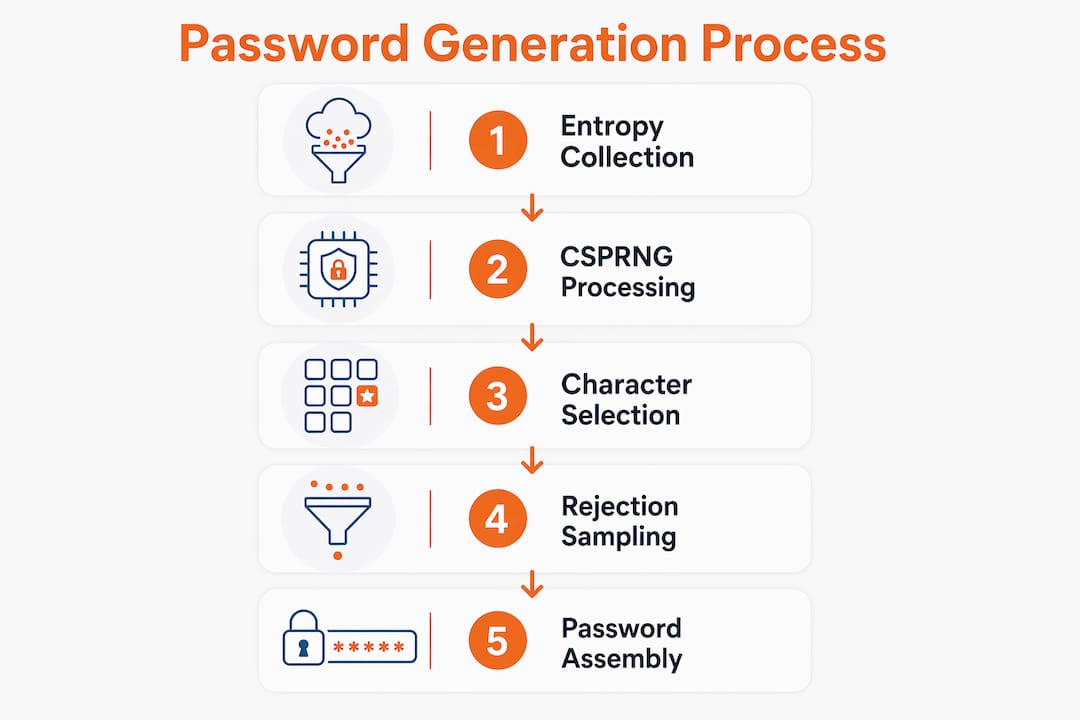
Reputable generators use the Web Crypto API’s crypto.getRandomValues in browsers, or OS-level sources like /dev/urandom on Linux systems. These CSPRNGs pass the next-bit test, a formal standard that confirms no attacker can predict the next output with better than 50% accuracy.
Two additional techniques separate a well-built generator from a mediocre one:
- Rejection sampling: When mapping random bytes to a character set, a naive modulo operation introduces modulo bias, making some characters appear more often than others. Rejection sampling discards biased values and resamples until the distribution is uniform.
- Fisher-Yates shuffle: After character selection, the generator shuffles the assembled string using the Fisher-Yates algorithm. Skipping the shuffle makes the first characters of a password predictable, which attackers can exploit with targeted heuristics.
- Entropy targets: Security researchers recommend targeting 70 or more bits of entropy for general-purpose passwords. A 16-character password drawn from a full character set easily clears this bar.
Pro Tip: Open your browser’s developer tools and check the Network tab while generating a password on any web-based tool. A trustworthy generator shows zero outgoing requests. If you see data leaving your device, close the tab immediately.
Why are generated passwords stronger than human-created ones?
Human beings are terrible at randomness. When asked to create a password, most people place capital letters at the start, symbols at the end, and substitute numbers for letters in predictable ways (“@” for “a,” “3” for “e”). Human-generated passwords follow patterns that cracking software is specifically trained to exploit.
Password cracking tools use heuristics. They try dictionary words first, then common substitutions, then known patterns. A generated password drawn from a uniform distribution contains none of these patterns. Every character position is statistically independent of every other.
Length matters more than most people realize:
- An 8-character password with mixed symbols can be cracked faster than a 16-character lowercase-only generated password.
- Password length drastically improves brute-force resistance because each added character multiplies the search space exponentially.
- A 16-character generated password is computationally infeasible to brute-force with current hardware.
“Length is more critical than complexity. A 16-character password with only lowercase letters often has higher entropy than an 8-character one with mixed symbols. Focusing on length is the most reliable path to brute-force resistance.”
The practical implication for small business owners is direct. Requiring employees to create their own passwords, even with complexity rules, produces predictable credentials. Requiring generated passwords of 16 or more characters eliminates that vulnerability entirely. For guidance on creating strong passwords, the underlying principle is always the same: remove human choice from the equation.
How do password generators protect your privacy on devices and browsers?
The safest password generators never send your password anywhere. Client-side generators run entirely in the browser using HTTPS, and the password is assembled in local memory without any network call. This architecture means there is no server to compromise and no transmission to intercept.
Here is how to verify a generator is actually client-side:
- Open the generator page in your browser.
- Press F12 to open developer tools and click the “Network” tab.
- Generate a password and watch for any outgoing requests.
- A trustworthy generator shows no network activity during generation.
- If requests appear, the tool is sending data externally and should not be trusted.
Local browser generators use cryptographic APIs that draw entropy directly from the operating system. No password leaves the device. This local generation minimizes exposure to interception or server compromise, which is the primary risk with server-side alternatives.
Password generators fit naturally into the broader ecosystem of password manager tools. The generator creates the credential. The manager stores it, syncs it across devices, and fills it automatically on the correct site. Neither function is complete without the other.
Pro Tip: Always access web-based generators over HTTPS. The padlock icon in your browser’s address bar confirms the connection is encrypted, which prevents anyone on the same network from intercepting the page or its scripts.
What are the best practices for using password generators effectively?
Choosing the right settings matters as much as choosing the right tool. A generator with poor defaults produces weak passwords even when the underlying algorithm is sound.
Setting the right parameters
Start with length. Set a minimum of 16 characters for any account that holds financial, health, or business data. For accounts you never need to type manually, 20 or more characters costs nothing and adds significant protection. Entropy targets of 70+ bits are the accepted benchmark for general security.
Character set selection requires a practical balance. Including all four character types (uppercase, lowercase, digits, symbols) maximizes entropy per character. Some services block certain symbols, so test your generated password before saving it. If a site rejects symbols, compensate by increasing length.
Passphrases as an alternative
For credentials you must memorize, such as a master password or a device login, a passphrase is the better choice. Passphrases built from random words offer strong entropy and are far easier to recall than a string like “k#9Lm!2Qr.” Four or five unrelated words chosen randomly produce a credential that is both memorable and resistant to attack.
Pairing generators with password managers
A generated password you cannot remember is only useful if something else remembers it for you. Password managers paired with generators provide the complete solution: the generator creates the credential, and the manager stores and fills it. Managers also protect against phishing by autofilling credentials only on verified domains. A fake login page gets nothing because the manager does not recognize the URL.
For small business owners, this combination replaces the single most common security failure: employees reusing one memorable password across multiple accounts. For help remembering passwords securely, the answer is almost always a password manager paired with a strong generated master passphrase.
Checklist for choosing a trustworthy generator
- Confirms client-side operation with zero network calls during generation
- Uses a documented CSPRNG such as
crypto.getRandomValues - Applies rejection sampling to avoid modulo bias
- Applies Fisher-Yates shuffle after character selection
- Loads over HTTPS with no third-party tracking scripts
- Integrates with or exports to a reputable password manager
Key Takeaways
Password generators produce secure credentials by combining CSPRNGs, rejection sampling, and Fisher-Yates shuffling to eliminate human bias and resist every major class of password attack.
| Point | Details |
|---|---|
| CSPRNG is non-negotiable | Generators must use crypto.getRandomValues or equivalent; Math.random is insecure. |
| Length beats complexity | A 16-character generated password resists brute force better than an 8-character complex one. |
| Client-side generation is safer | No network calls means no server to compromise and no transmission to intercept. |
| Shuffle prevents structure | Fisher-Yates shuffle after character selection removes predictable positional patterns. |
| Pair with a password manager | Generators create credentials; managers store, sync, and autofill them on verified sites only. |
Why I think most people are solving the wrong password problem
Most security advice focuses on password complexity rules: add a symbol, capitalize a letter, avoid dictionary words. Those rules exist because they are easy to enforce in a policy document. They do not reflect how attacks actually work.
After spending years watching how credential breaches unfold, the pattern is consistent. Attackers do not brute-force individual accounts character by character. They buy leaked credential databases, run them through heuristic crackers, and harvest reused passwords across services. Complexity rules do almost nothing against that threat model. Length and uniqueness do everything.
The shift I would push every small business owner to make is simple. Stop thinking about password rules and start thinking about password generation plus storage. A 20-character generated password stored in a password manager is not just better than a complex human-created one. It is categorically different in the protection it offers. The autofill feature alone eliminates phishing as a viable attack vector, because the manager will not fill credentials on a domain it does not recognize.
The tools to do this correctly exist and are not expensive. The gap is almost always awareness, not access. Understanding the mechanics behind generation is what closes that gap.
— Mike
Logmeonce brings password generation and management together
Logmeonce integrates strong password generation directly into its cybersecurity platform, giving individuals and small businesses a single place to create, store, and manage credentials. The platform generates passwords using cryptographically secure methods and stores them with encrypted cloud backup, so nothing is ever accessible in plain text.

Logmeonce also includes autofill protection that fills credentials only on verified domains, which blocks phishing attempts at the point of entry. For small business owners managing multiple accounts and team members, the password management benefits extend to centralized control, audit logs, and multi-factor authentication. Getting started takes minutes, and the free tier covers the core features most individuals need.
FAQ
What is a CSPRNG and why does it matter?
A CSPRNG, or cryptographically secure pseudorandom number generator, produces random values that cannot be predicted from previous outputs. Password generators must use one because standard random functions like Math.random are predictable and can be reverse-engineered by attackers.
How long should a generated password be?
Security researchers recommend a minimum of 16 characters for sensitive accounts, with 70 or more bits of entropy as the target. Longer passwords resist brute-force attacks exponentially better than shorter ones, regardless of character complexity.
Are web-based password generators safe to use?
Web-based generators are safe when they operate entirely client-side over HTTPS and make no network calls during generation. You can verify this by checking the browser’s Network tab while generating a password and confirming no data leaves your device.
What is the difference between a passphrase and a generated password?
A passphrase is a sequence of random words that provides strong entropy and is easier to memorize. A generated password is a random string of mixed characters that offers maximum entropy per character but is harder to recall without a password manager.
Do I need a password manager if I use a generator?
A password manager is the necessary complement to a generator. Generators create strong credentials, but managers store them securely, sync them across devices, and autofill them only on verified websites, which protects against phishing attacks that a generator alone cannot prevent.
Recommended
- How to Create a Strong Password – LogMeOnce
- Is it wise to use Safari’s password generator? – LogMeOnce


