


 Password Manager
 Identity Theft Protection

 Team / Business
 Enterprise
 Government
 MSP
MSP


For security-conscious organizations, the right answer to “free offline password manager” is not a local vault sitting on one device. It is a cloud-hosted, enterprise-grade identity and password platform with offline-capable access, NIST-aligned credential handling, and SSO/MFA built in. The immediate next step: run a 4–8 week pilot of Logmeonce’s free tier, focused specifically on SSO integration, MFA enforcement, encrypted vault behavior, and offline-access scenarios before any org-wide commitment.
Three reasons this framing matters:
- NIST SP 800-63B requires verifiers to store credentials in forms resistant to offline attacks and explicitly supports password manager and autofill workflows.
- CISA’s IAM best practices recommend identity federation and SSO to eliminate local accounts, centralize control, and enable enterprise-grade auditing.
- Standardizing on a single password manager with autofill and shared vaults cuts credential reuse by 65%, per Protectyr’s analysis.
What does “free offline password manager” actually mean for enterprises?
Most search results for this phrase return consumer-grade, local-only vaults. That is not what this article covers, and it is not what regulated businesses or government agencies need.
Here, the term means a cloud-hosted, enterprise-grade password and identity security platform that offers a free tier or pilot period and supports offline-capable access to encrypted vaults on enrolled, authorized devices. Think Logmeonce’s enterprise suite: SSO, MFA, encrypted cloud vaults, RBAC, and admin audit logs, with the ability to access cached credentials when connectivity is interrupted.
What this article explicitly excludes:
- Local-only, open-source vaults that store data exclusively on a single device with no centralized management.
- Consumer-only tools with no SSO connectors, no SCIM/AD provisioning, and no compliance evidence.
- Any product that cannot produce a SOC 2 report, pen-test summary, or documented zero-knowledge architecture.
The enterprise framing changes every evaluation priority. A government agency or regulated business needs RBAC, audit logs, provisioning integrations, and verifiable encryption. A free tier that lacks those controls is not a free enterprise solution; it is a consumer product with an enterprise price tag waiting to happen.
What security fundamentals should you verify before trusting any platform?
The foundation is how the vendor stores your credentials. NIST SP 800-63B is explicit: verifiers must store credentials in a form resistant to offline attacks, using salted, iterated, memory-hard key derivation functions (KDFs) such as Argon2id or bcrypt. If a vendor cannot tell you which KDF they use and what their iteration parameters are, that is a disqualifying gap.

Zero-knowledge or end-to-end encryption (E2EE) architecture limits what the vendor can see. The master key never leaves the client in plaintext, so a database breach exposes only ciphertext. Verify this claim in the vendor’s security whitepaper or independent pen-test report, not just their marketing page.
Password length matters more than complexity. Modern guidance consistently shows that long random passphrases resist brute-force attacks better than short, complex strings. A good platform supports passphrases of 64+ characters and passphrase-based account recovery without forcing arbitrary rotation.
Checklist for vendor security validation:
- Salted and hashed verifiers with documented KDF and iteration parameters.
- Encryption at rest (AES-256 or equivalent) and in transit (TLS 1.2+).
- Client-side key generation for zero-knowledge architecture.
- Secure autofill that resists form-hijacking and phishing injection.
- Independent pen-test report or vulnerability disclosure program URL.
Pro Tip: Ask the vendor for their KDF specification in writing before the pilot. A vendor that hedges on this question almost certainly cannot produce a SOC 2 Type II report either.
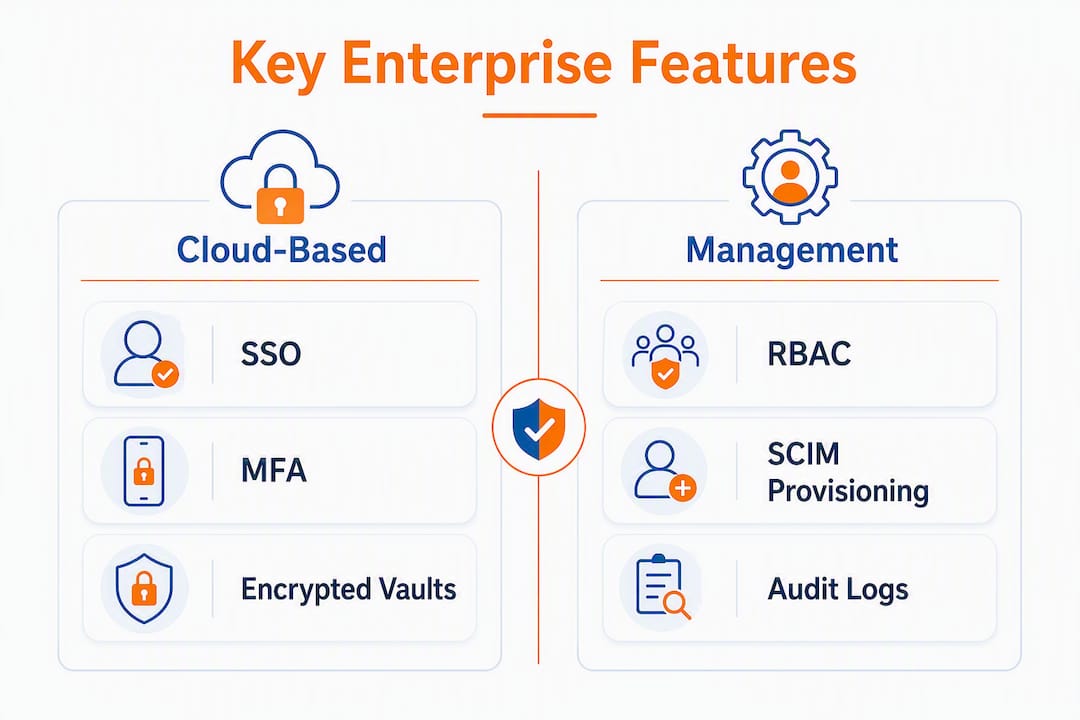
Which enterprise features should a cloud-based solution include?
A platform that calls itself enterprise-grade needs to deliver on a specific set of controls, not just a polished UI. Here is what the non-negotiables look like in practice.
SSO and MFA are table stakes. CISA’s IAM guidance is direct: identity federation and SSO eliminate local accounts, centralize control, and make enterprise MFA enforceable. SAML 2.0 and OIDC support are the minimum; OAuth 2.0 for modern app integrations is expected.
Encrypted cloud vaults with client-side keying mean the vendor holds ciphertext, not plaintext. Shared vaults for teams need the same encryption model, not a weaker one.
RBAC and SCIM/AD provisioning determine whether you can actually manage 500 users without doing it by hand. Role-based access control lets you scope vault access by department or clearance level. SCIM or Active Directory provisioning automates onboarding and, critically, offboarding.
Offline-capable access should work like this: an enrolled device holds a locally encrypted cache, access expires after a configurable window, and the device can be remotely wiped if lost. Synchronization conflicts on reconnect need a documented resolution policy.
Additional features worth confirming:
- Admin audit logs with tamper-evident records and configurable retention.
- Session controls (timeout, concurrent session limits, device trust).
- Secure autofill with browser extension support across major browsers.
- API/webhook hooks for incident response integration.
- Centralized compliance reporting artifacts (SOC 2 evidence, pen-test summaries).
What do free tiers actually include, and what should you test?
Free tiers are useful for proving integration, not for running production workloads. Most enterprise-grade platforms cap free plans at a small user count, restrict SCIM/SSO connectors to paid tiers, and offer no SLA or dedicated support. That is fine for a pilot. It becomes a problem when teams skip the pilot and go straight to production on a free plan.
Common free-tier limits to watch:
- User caps (often 5–25 users) that prevent realistic load testing.
- Limited RBAC, meaning you cannot test department-level vault scoping.
- SSO connectors or advanced MFA methods gated behind paid plans.
- No compliance evidence (SOC 2, pen-test reports) available to free-tier customers.
- Shared vault limits that do not reflect production team structures.
Pilot test checklist to run before procurement:
- Verify SSO integration end-to-end using SAML or OIDC with your identity provider.
- Test SCIM or AD provisioning: add a user, change a role, deprovision, and confirm vault access terminates.
- Simulate offline access: disconnect a device, attempt vault access, reconnect, and verify sync.
- Review audit log completeness: confirm every login, vault access, and admin change is recorded.
- Request SOC 2 or equivalent compliance evidence and check whether it is available at your tier.
- Test support responsiveness with a non-trivial technical question.
For a deeper look at enterprise password management trade-offs, the evaluation criteria shift significantly once you move beyond a free tier.
How do you deploy and migrate to a cloud-based identity platform?
A realistic timeline: pilot runs 2–6 weeks, expanded trial 1–3 months, phased production rollout 3–6 months. The range depends on user count, SSO complexity, and how many legacy local accounts need migration.
- Discovery. Inventory all applications, local accounts, and shared credentials. Identify SSO-eligible apps and flag any that require legacy authentication.
- Configure SSO and provisioning. Set up SAML/OIDC with your identity provider. Configure SCIM or AD sync. Test automated provisioning with a small group before expanding.
- Data import and vault mapping. Import existing credentials using the vendor’s migration tool. Map shared credentials to the correct RBAC roles and team vaults.
- Device enrollment and offline-policy testing. Enroll devices, configure offline cache expiration, and test remote wipe. Document the sync-conflict resolution behavior.
- Security validation. Collect pen-test summaries and SOC 2 artifacts. Run your own vulnerability review of the integration layer. Confirm KDF parameters match documented specs.
- Phased user onboarding. Start with IT and security (10–20 users), expand to early adopters (up to 50), then roll out by department. Keep a rollback plan for import failures.
Managed cloud security services reduce the operational burden of this process by providing continuous monitoring and identity governance, which matters most during the transition window when both old and new systems are live.
Which compliance and trust signals should you require?
Before deploying any free-tier enterprise solution in a regulated environment, demand these artifacts in writing:
- SOC 2 Type II report covering security, availability, and confidentiality trust service criteria.
- Independent pen-test summary from a named third-party firm, dated within the past 12 months.
- Vulnerability disclosure program with a public URL and documented response SLAs.
- Zero-knowledge or E2EE architecture documentation that explains key generation, storage, and access.
- FedRAMP authorization or active pursuit for government workloads; HIPAA BAA for healthcare; PCI DSS attestation for cardholder data environments.
- SAML/OIDC and SCIM/AD documentation with tested integration guides for major identity providers.
- Audit-log retention policy that meets your regulatory minimum (often 1–3 years).
Centralized policy enforcement through managed cloud security helps organizations maintain consistent controls across HIPAA, PCI DSS, and GDPR requirements, which is exactly what a single enterprise password platform should deliver.
How do you evaluate vendors and spot red flags?
Run every candidate through this checklist before shortlisting:
- Encryption model: are keys generated client-side, or does the vendor hold plaintext at any point?
- KDF and hashing: can they name the algorithm, version, and iteration count in writing?
- SSO/MFA: SAML 2.0, OIDC, and hardware authenticator (FIDO2/WebAuthn) support confirmed?
- Provisioning: SCIM 2.0 or AD connector tested against your identity provider?
- Audit logs: tamper-evident, exportable, and retained for your compliance window?
- Third-party attestations: SOC 2 Type II and pen-test report available to your tier?
Red flags that should end the evaluation:
- Vendor refuses to share pen-test results or cannot produce SOC 2 documentation.
- Platform depends on local accounts with no SSO enforcement path.
- Forced password rotation with no MFA enforcement (NIST SP 800-63B explicitly discourages arbitrary rotation).
- Opaque key-management claims with no technical documentation.
- No public vulnerability disclosure program.
Procurement questions to ask before signing:
- What are your incident response SLAs and notification timelines?
- Where is data physically stored, and can we restrict it to US regions?
- What are the export controls for offline caches if we offboard?
- What does pricing look like at 500, 1,000, and 5,000 users after the pilot ends?
Pro Tip: Ask for a reference customer in your industry vertical who has completed a full SSO/SCIM integration. A vendor with real enterprise deployments will have one ready.
For a structured approach to choosing the right business password manager, the selection criteria map directly to the checklist above.
What does a practical pilot plan look like for security teams?
Keep the pilot scoped and instrumented. A broad rollout with no pass/fail criteria is how organizations end up locked into a platform they never properly validated.
Pilot design:
- Scoped group: IT/security team plus 10–50 early adopters from a single department.
- Timeframe: 4–8 weeks.
- Success criteria: SSO pass rate above 99%, MFA adoption at 100% of enrolled users, audit log completeness verified for all vault access events, incident-response latency under your documented SLA.
Key stakeholders to involve from day one:
- Security lead (owns pass/fail criteria and threat model review).
- Identity engineer (owns SSO/SCIM configuration and testing).
- Help-desk lead (owns user support and adoption friction tracking).
- Procurement (owns contract review and pricing trajectory analysis).
- Vendor technical contact (owns escalation and artifact delivery).
Immediate actions:
- Enable the vendor free tier and configure SSO with your identity provider.
- Run SCIM or AD provisioning end-to-end with a test group.
- Test offline-access scenarios: cache expiration, remote wipe, and sync on reconnect.
- Collect SOC 2 and pen-test artifacts from the vendor.
- Schedule a 30-day security review with your security lead and identity engineer.
Enterprise password management done right reduces credential risk and simplifies identity lifecycle management, but only when the pilot is instrumented with real pass/fail gates.
Key Takeaways
A cloud-hosted, enterprise-grade platform with offline-capable access meets enterprise needs only after verification of NIST-aligned credential handling, zero-knowledge encryption, SSO/MFA integration, and third-party attestations.
| Point | Details |
|---|---|
| NIST-aligned credential storage | Vendors must use salted, iterated KDFs (e.g., Argon2id) resistant to offline attacks per NIST SP 800-63B. |
| Free tiers are for pilots, not production | Most free plans lack enterprise RBAC, SCIM connectors, SLAs, and SOC 2 evidence needed for regulated workloads. |
| 65% credential reuse reduction | Standardizing on one manager with autofill and shared vaults cuts credential reuse by 65%, per Protectyr’s analysis. |
| Run an instrumented pilot | Use a 4–8 week scoped pilot with clear pass/fail gates: SSO pass rate, MFA adoption, audit log completeness. |
| Logmeonce as the evaluation benchmark | Logmeonce’s enterprise suite covers SSO, MFA, encrypted cloud vaults, RBAC, and offline-capable access for structured pilot testing. |
The gap most enterprise rollouts fall into
The failure mode I see most often is not a technical one. Teams spend weeks evaluating encryption models and KDF parameters, get everything right on paper, and then skip the offline-edge-case testing entirely. A user in a low-connectivity environment tries to access a vault credential, the cache has expired, and suddenly the help desk is fielding calls about a “broken” password manager. That single friction point can derail adoption faster than any security gap.
The second common mistake is underestimating provisioning complexity. SCIM looks straightforward until you hit a legacy application that does not support it, or an AD structure with nested groups that the platform handles differently than expected. A pilot that does not stress-test provisioning is not a pilot; it is a demo.
When the technical gates in this article are met, a cloud-hosted identity platform genuinely reduces credential risk and simplifies the identity lifecycle. The platform does the heavy lifting that no local vault can: centralized rotation, remote wipe, audit-quality logs, and MFA enforcement across every application. The key is treating the free tier as a structured evaluation, not a shortcut to skip procurement rigor.
Logmeonce covers the enterprise evaluation criteria directly
Security teams that have worked through this checklist will recognize that Logmeonce’s enterprise suite is built around exactly these requirements. SSO via SAML and OIDC, mandatory MFA including passwordless options, encrypted cloud vaults with client-side key management, RBAC, SCIM/AD provisioning, and admin audit logs are all part of the platform, not paid add-ons bolted on later.

The free tier gives your team a real pilot window to test SSO integration, offline-access behavior, and vault encryption before any procurement decision. Collect the SOC 2 and pen-test artifacts during that window, run the provisioning stress tests, and measure against the pass/fail criteria above. That is the evaluation path that holds up in a security review.
Start your structured pilot at Logmeonce’s cybersecurity platform and validate the platform against your organization’s specific compliance and identity requirements.
Useful sources and further reading
- NIST SP 800-63B: Digital Identity Guidelines — Authentication and Lifecycle Management — primary reference for credential storage requirements, KDF guidance, and passphrase policy.
- CISA Identity and Access Management: Recommended Best Practices for Administrators — SSO/MFA operational guidance and the case for eliminating local accounts.
- Business Password Policy Guide | Protectyr — practical vendor feature matrices and the 65% credential-reuse reduction benchmark.
- What Are Managed Cloud Security Services? | Akamai — overview of centralized policy enforcement for HIPAA, PCI DSS, and GDPR compliance.
- Managed Cloud Services for Cybersecurity | Kritikalsolutions — rationale for managed, cloud-hosted identity platforms during migration.
- Collect SOC 2 Type II reports and independent pen-test summaries directly from your vendor during the pilot window, and validate KDF/hash parameters against NIST SP 800-63B before procurement.
Recommended
- Team Password Manager | – LogMeOnce
- Enterprise Password Management | Identity Management| LogMeOnce
- Password Managers | Business Total Security – LogMeOnce
- The Finesses of Enterprise Password Management

Shiva, with a Bachelor of Arts in English Language and Literature, is a multifaceted professional whose expertise spans across writing, teaching, and technology. Her academic background in English literature has not only honed her skills in communication and creative writing but also instilled in her a profound appreciation for the power of words.


