


 Password Manager
 Identity Theft Protection

 Team / Business
 Enterprise
 Government
 MSP
MSP


Over half of American businesses have experienced an email security incident within the past year. This growing threat puts sensitive information and daily operations at risk, making robust digital protection more important than ever. By understanding current risks and taking decisive steps, you can safeguard your communications and build stronger defenses against evolving cyberattacks.
Quick Summary
| Key Points | Explanations |
|---|---|
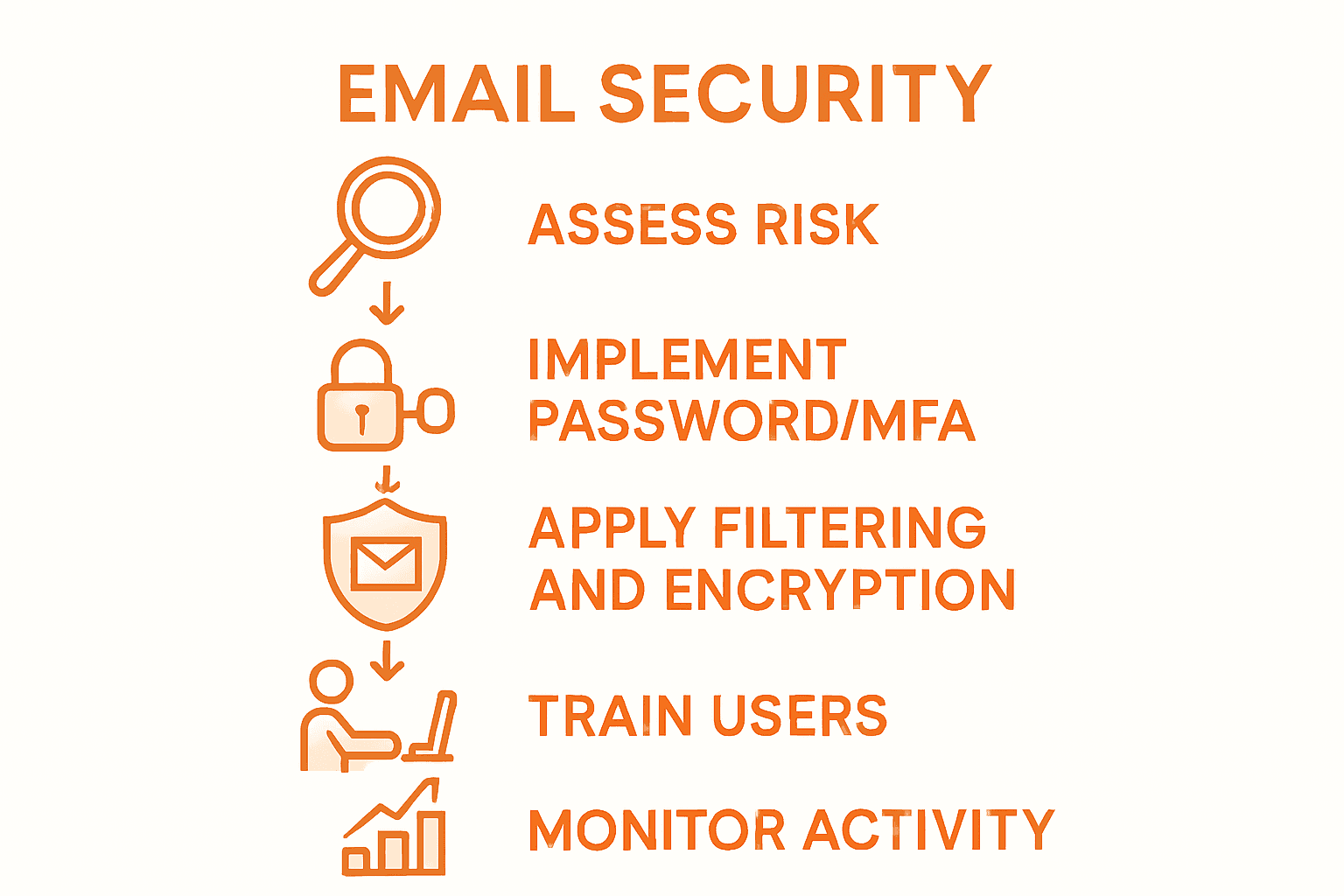
| 1. Conduct Regular Security Audits | Perform quarterly assessments to identify vulnerabilities and adapt to emerging threats effectively. |
| 2. Enforce Strong Password Policies | Require complex passwords and implement guidelines for password managers to prevent reuse and enhance security. |
| 3. Deploy Multi-Factor Authentication | Utilize MFA to add layers of security, ensuring secondary verification for critical system access. |
| 4. Train Employees on Cyber Threats | Provide regular training to enhance awareness of phishing tactics and encourage proactive reporting of suspicious emails. |
| 5. Monitor and Verify Security Settings | Regularly audit configurations and track activity to detect unusual patterns, ensuring responsive threat management. |
Step 1: Assess Current Email Security Risks
Assessing your current email security risks is the foundational step in protecting your digital communication channels. This critical process helps you identify potential vulnerabilities and develop a targeted strategy to strengthen your email defenses.
Begin by conducting a comprehensive audit of your existing email infrastructure. Certificate programs in cybersecurity training recommend systematically evaluating your current email security controls. Start by documenting your email platforms, user access protocols, and existing security measures. Analyze recent email traffic patterns, looking for unusual login attempts, unexpected attachments, or suspicious sender domains. Pay special attention to potential weak points like outdated password policies or lack of multi-factor authentication.
Review user behaviors and technological safeguards across your organization. Two-factor authentication and strong password practices play a crucial role in mitigating email security risks. Create a detailed risk assessment spreadsheet that tracks potential vulnerabilities such as unencrypted communications, shared accounts, and irregular user permissions. Consider running simulated phishing tests to evaluate employee awareness and response to potential security threats.
Pro tip: Schedule quarterly email security assessments to stay proactive. Regularly updating your risk evaluation process helps you adapt to emerging threats and maintain robust digital communication defenses.
Here’s a summary of common email security risks and their potential business impacts:
| Security Risk | Example Scenario | Possible Business Impact |
|---|---|---|
| Outdated password practices | Simple passwords reused | Higher risk of unauthorized access |
| Lack of multi-factor auth | Users log in with just a password | Easier for attackers to breach accounts |
| Unencrypted communications | Emails sent in plain text | Exposure of sensitive information |
| Irregular user permissions | Ex-employees retain access | Data leaks, compliance violations |
| Phishing email exposure | Users clicking malicious links | Financial or data loss |
Step 2: Implement Robust Password and MFA Policies
Strengthening your digital security requires implementing comprehensive password and multi-factor authentication (MFA) policies that create multiple layers of protection for your accounts and sensitive information. This critical step transforms your organization’s approach to access management and threat prevention.

Multi-factor authentication strategies have become essential in modern cybersecurity frameworks. Start by mandating complex password requirements across your organization: implement minimum length standards of 12 characters, require a mix of uppercase and lowercase letters, numbers, and special symbols. Encourage the use of passphrases instead of traditional passwords, which are inherently more secure and easier for users to remember. University security guidelines recommend utilizing password managers to generate and store unique credentials for each account, eliminating the risk of password reuse.
Next, deploy a comprehensive multi-factor authentication system that goes beyond simple password protection. Select MFA solutions that offer multiple verification methods such as biometric authentication, hardware tokens, or mobile app confirmations. Configure these systems to require secondary verification for access to critical systems, especially when users are logging in from unfamiliar networks or devices. Train your team on the importance of these additional security layers and establish clear protocols for authentication and account access.
Pro tip: Conduct regular security awareness training to ensure employees understand and consistently follow your new password and MFA policies. Periodic simulated authentication challenges can help reinforce best practices and identify potential vulnerabilities in your security approach.
Step 3: Configure Advanced Email Filtering and Encryption
Configuring advanced email filtering and encryption is your strategic defense against sophisticated cyber threats, creating a robust barrier that protects sensitive communications and prevents unauthorized data access. This crucial step transforms your email infrastructure from vulnerable to virtually impenetrable.
Strong authentication protocols require implementing multilayered email security mechanisms. Begin by selecting an enterprise-grade email filtering solution that offers comprehensive protection against phishing, malware, and spam. Configure advanced threat detection algorithms that analyze incoming messages for suspicious patterns, unusual sender behaviors, and potential malicious attachments. Set up dynamic content scanning that can identify and quarantine potentially dangerous emails before they reach user inboxes. Implement domain authentication protocols like SPF, DKIM, and DMARC to validate legitimate email sources and prevent email spoofing.
Next, deploy end-to-end encryption technologies that secure email communications from sender to recipient. Choose encryption solutions that integrate seamlessly with your existing email platforms, providing automatic protection for sensitive communications. Cybersecurity recommendations for businesses emphasize the importance of creating granular encryption policies that automatically protect emails containing specific keywords, financial information, or personally identifiable data. Train your team on recognizing encrypted versus unencrypted communications and establish clear protocols for handling sensitive information.
Pro tip: Regularly update your email filtering and encryption rules to adapt to emerging cyber threats. Conduct quarterly security audits to test and refine your email protection strategies, ensuring your defenses remain cutting edge.
The table below highlights key advanced email security technologies and their core functions:
| Technology | Key Function | Business Benefit |
|---|---|---|
| Advanced Filtering | Identifies and blocks threats | Reduces phishing and malware incidents |
| End-to-end Encryption | Secures emails in transit | Ensures privacy of sensitive data |
| Domain Authentication | Verifies sender legitimacy | Minimizes spoofing and impersonation |
| Threat Detection | Analyzes emails for shady patterns | Prevents sophisticated attack attempts |
Step 4: Train Users to Recognize and Report Threats
Effective cybersecurity depends on transforming your team into a human firewall capable of identifying and neutralizing potential email threats before they compromise your organization. This critical step turns your employees from potential security vulnerabilities into proactive defenders of your digital ecosystem.
Multi-factor authentication guidelines emphasize the importance of comprehensive security awareness training. Develop an interactive training program that teaches employees to recognize sophisticated phishing attempts, social engineering tactics, and suspicious email characteristics. Create simulated phishing scenarios that test user awareness and provide immediate feedback. Teach employees to identify red flags such as unexpected attachments, urgent language, requests for sensitive information, and mismatched sender email addresses. Establish a clear reporting protocol that empowers staff to quickly flag suspicious emails to your IT security team without fear of reprimand.
Password security best practices recommend ongoing education about digital hygiene. Implement quarterly training sessions that include real world examples of email threats, demonstrate the latest social engineering techniques, and provide practical skills for maintaining secure communication practices. Develop a reward system that recognizes and incentivizes employees who successfully identify and report potential security threats, creating a positive culture of cybersecurity awareness.
Pro tip: Create a monthly security newsletter with recent threat examples and quick, digestible security tips to keep cybersecurity top of mind for your entire organization.
Step 5: Verify Security Settings and Monitor Activity
Verifying security settings and monitoring email activity is your final line of defense against potential cyber intrusions, transforming passive protection into active threat detection. This crucial step ensures your email security infrastructure remains robust and responsive to emerging risks.
Authentication policy recommendations emphasize the importance of systematic security verification. Begin by conducting a comprehensive audit of your email security configurations, reviewing access controls, login protocols, and user permission settings. Implement automated monitoring tools that track unusual login patterns, geographic access variations, and suspicious account activities. Set up real time alerts for potential security breaches, including multiple failed login attempts, unexpected device connections, or access from unfamiliar IP addresses.
Cybersecurity guidelines for businesses recommend establishing a detailed activity logging system that captures comprehensive email interactions. Configure detailed audit logs that record timestamps, sender information, access locations, and device details for all email communications. Develop a centralized dashboard that provides instant visibility into your organization’s email security landscape, enabling quick identification and response to potential threats. Integrate advanced anomaly detection algorithms that can distinguish between legitimate variations in user behavior and genuine security risks.
Pro tip: Schedule monthly comprehensive security reviews that include a detailed analysis of your activity logs and security settings, ensuring your email protection strategies remain adaptive and effective.
Strengthen Your Email Security with Proven Solutions
The article highlights critical challenges such as outdated password practices, lack of multi-factor authentication, and vulnerabilities in email filtering and encryption that put your sensitive information at risk. It stresses the importance of comprehensive protection strategies including strong passwords, multi-factor authentication, advanced email filtering, and ongoing user training. These pain points reveal the need for a robust, easy-to-use security platform to safeguard your organization against evolving cyber threats.
At LogMeOnce, we understand the urgency of these challenges. Our cutting-edge cybersecurity suite offers passwordless multi-factor authentication, encrypted cloud storage, and real-time dark web monitoring to keep your data secure. Seamlessly integrate enhanced email protection and identity management tools designed for personal users, SMEs, and large enterprises. Take control of your digital security with proven solutions that simplify protection while maximizing defense.
Experience peace of mind now by exploring our comprehensive cybersecurity solutions.

Don’t wait until a breach happens—secure your emails and digital identity today. Visit LogMeOnce Resources to discover how our innovative features can transform your email security strategy and protect your organization against the most sophisticated threats. Start your free trial now and take the first step toward unstoppable protection.
Frequently Asked Questions
What are the first steps to assess my email security risks?
Start by conducting a comprehensive audit of your current email infrastructure. Document your email platforms, user access protocols, and existing security measures, then analyze recent email traffic patterns for unusual activities.
How can I implement strong password policies for my organization?
Mandate complex password requirements, including a minimum length of 12 characters with a mix of letters, numbers, and symbols. Encourage the use of password managers to create unique passwords for each account within 30 days.
What should I do to configure advanced email filtering?
Choose an enterprise-grade email filtering solution that detects phishing and malware. Implement dynamic content scanning to quarantine potentially dangerous emails before they reach user inboxes.
How can I effectively train employees to recognize email threats?
Develop an interactive training program that includes simulated phishing scenarios to test employee awareness. Conduct regular quarterly sessions that keep risks fresh in their minds and reinforce best practices for recognizing suspicious emails.
What are the best practices for monitoring email activity?
Audit your email security settings regularly and set up automated monitoring tools to track unusual login patterns and account activities. Ensure these evaluations include real-time alerts for potential breaches to act quickly when needed.
Recommended
- 7 Best Practices to Ensure Password Safety
- Professional IT Security Tips Everyone Can Benefit From
- How to Keep a Scalable Online Business Safe: Tools to Use and Things to Remember – LogMeOnce


