


 Password Manager
 Identity Theft Protection

 Team / Business
 Enterprise
 Government
 MSP
MSP


Single sign-on (SSO) delivers five concrete advantages that matter to IT and business decision-makers: stronger security through centralized policy enforcement, higher productivity from eliminating repeated logins, lower IT support costs, cleaner regulatory compliance, and easier cross-platform collaboration. If you are evaluating whether SSO belongs in your organization’s identity stack, the short answer is yes, and the reasons run deeper than simple convenience.
Here is what SSO actually changes for your organization:
- Security: Centralizes authentication so MFA and access policies apply uniformly across every connected app
- Productivity: Users sign in once and move freely between applications without re-entering credentials
- Cost savings: Fewer password reset tickets means less time and money spent on routine help desk work
- Compliance: Unified access logs make GDPR, HIPAA, and SOC 2 audits far less painful
- Collaboration: Partners and third-party users get controlled, consistent access to shared platforms
What is single sign-on and how does it work?
SSO is a centralized authentication service that lets a user verify their identity once and then access every assigned application without logging in again. The architecture relies on two core actors: an identity provider (IdP), which authenticates the user and issues a token, and service providers (SPs), which are the individual apps that accept that token as proof of identity.
The flow works like this: a user hits a protected app, gets redirected to the IdP, enters credentials there, and receives a signed authentication token. Every subsequent app the user visits checks that token rather than asking for a new password. Common protocols that carry this exchange include SAML 2.0 (dominant in enterprise web apps) and OpenID Connect (OIDC) (widely used for modern APIs and mobile apps).
Within an enterprise IT ecosystem, the IdP typically connects to an existing directory service such as Active Directory or LDAP. That connection means user provisioning and deprovisioning happen in one place. When an employee leaves, revoking access in the directory cuts off every connected application at once, not just the ones an admin remembers to update.
How SSO strengthens your organization’s security posture
The biggest security gain from SSO is not the single password. It is the ability to enforce consistent policies centrally rather than managing security settings app by app. When MFA lives at the IdP level, every application inherits it automatically. There is no gap where one legacy app skips the second factor because it was never configured.
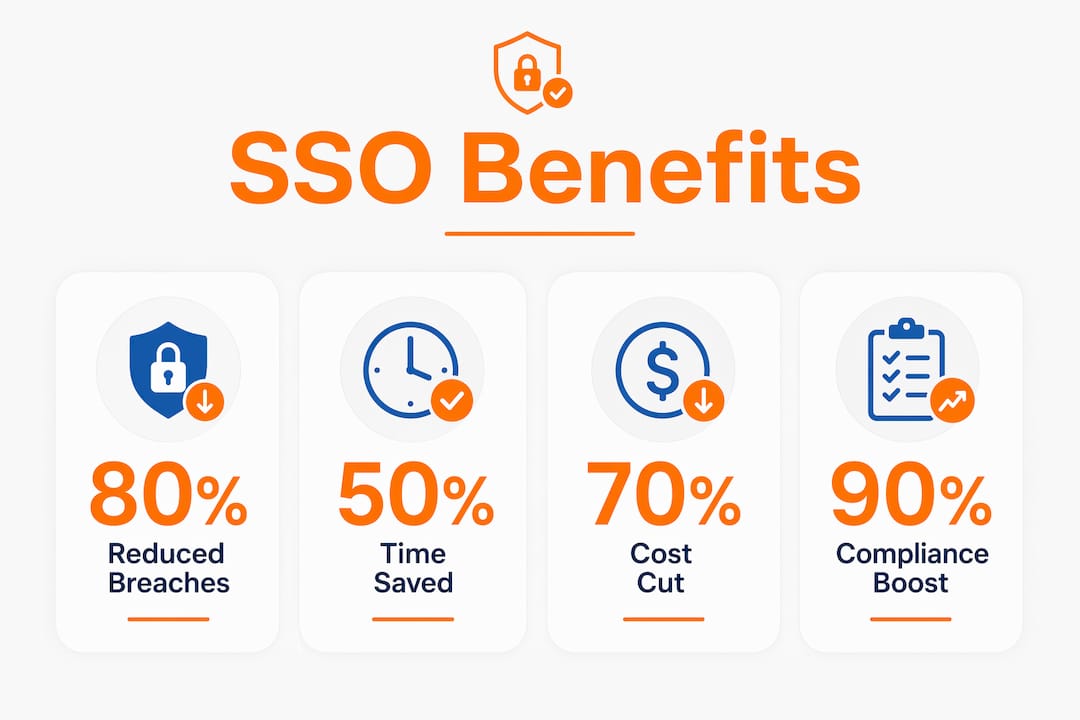
Password fatigue is a real attack vector. When users juggle a dozen separate credentials, they reuse passwords across services. SSO reduces password reuse by collapsing all those logins into one, which also makes it practical to enforce genuinely strong password requirements. A user who only needs to remember one credential is far more likely to make it a good one.
Phishing risk drops as well. When users are trained to enter credentials only at a single trusted portal, the attack surface for credential-harvesting pages shrinks. Fewer entry points means fewer opportunities for attackers to intercept a password mid-flow. SSO also keeps credentials stored internally under IT’s control rather than scattered across third-party app databases with unknown security practices.
How SSO enhances productivity and user experience
The productivity case for SSO is straightforward: users stop wasting time on authentication. No more forgotten passwords, no more “forgot my login” loops before a morning meeting, no more waiting on a help desk ticket to regain access to a tool needed right now.
Key productivity gains organizations typically see after SSO deployment:
- Faster app access: Users open any assigned application directly from a centralized portal without re-authenticating
- Fewer password resets: With one credential to manage, self-service reset requests drop sharply
- Higher adoption of approved tools: When approved apps are easy to reach, employees actually use them
- Reduced IT interruptions: Support teams field fewer authentication-related tickets, freeing time for higher-value work
- Consistent experience across devices: SSO tokens travel with the session, so switching from desktop to mobile does not force a new login
The My Apps portal in Microsoft Entra ID is a practical example of this in action: users see every assigned application in one place and launch any of them with a single click. That kind of centralized app discovery removes the friction that usually causes employees to find workarounds or simply not use a tool at all.
IT teams benefit just as much. When authentication is centralized, access management tasks, such as granting a new hire access to ten apps or revoking a departing contractor’s permissions, collapse into a single operation rather than ten separate ones.

Cost reduction advantages driven by SSO implementation
Password-related help desk requests are one of the most expensive routine IT tasks, and SSO cuts them at the source. Reduced password reset incidents translate directly into fewer support hours and lower operational costs, particularly in organizations where the help desk handles hundreds of tickets per month.
The savings extend beyond the help desk:
- Automated provisioning and deprovisioning: SSO integrations with HR systems can trigger access changes automatically when an employee joins, moves roles, or leaves, eliminating manual admin work
- Shadow IT reduction: When approved applications are easy to access, employees have less reason to sign up for unauthorized tools, which reduces the hidden costs of unsanctioned software licenses and security incidents
- Centralized auditing: One access log instead of many means less time spent pulling reports for compliance reviews or security investigations
- Faster onboarding: New employees reach full productivity sooner when they do not need separate credentials set up for each application
The ROI case for SSO tends to compound over time. The initial deployment cost is real, but the ongoing savings from reduced support volume, faster provisioning, and avoided shadow IT incidents accumulate every quarter.
Regulatory compliance benefits and enterprise readiness through SSO
SSO supports compliance with GDPR, HIPAA, and similar regulations by centralizing access logs and making anomaly detection far more practical. When every access event flows through a single IdP, security teams can spot unusual patterns, such as a user accessing sensitive data at 2 AM from an unfamiliar location, without correlating logs from a dozen separate systems.
That point from Microsoft cuts both ways. If you are an ISV building software for enterprise buyers, SSO as enterprise readiness is not optional. Enterprise procurement teams routinely require it as a baseline security control before signing a contract. Organizations that have already deployed SSO can demonstrate to auditors and customers alike that access controls are consistent, logged, and centrally managed.
Pro Tip: When preparing for a HIPAA or SOC 2 audit, export your IdP’s access logs for the audit period before the auditor asks. A clean, timestamped log from a single source is far easier to present than reconstructed logs from multiple apps.
Legacy applications are the main compliance complication. Apps that predate modern federation protocols may not support SAML or OIDC natively, requiring custom connectors or middleware to participate in SSO. That adds deployment complexity and cost, but leaving legacy apps outside the SSO perimeter creates compliance gaps that auditors will flag.
How SSO enables better collaboration across business ecosystems
SSO makes cross-organizational access manageable in a way that traditional credential sharing never could. When a partner company needs access to a shared project platform, SSO lets you grant that access through a federated identity arrangement rather than creating and managing a separate set of credentials for every external user.
Benefits that show up specifically in B2B and ecosystem contexts:
- Controlled partner access: External users authenticate through their own IdP, and your service provider accepts the federated token, keeping credential management on their side
- Faster third-party onboarding: New partners or contractors get access to exactly the applications they need without waiting for IT to provision accounts across multiple systems
- Consistent security policies across the ecosystem: MFA requirements and session timeout rules apply to external users just as they do to internal ones
- Simpler SaaS integration: Adding a new cloud application to an existing SSO setup is a configuration task, not a full deployment, which encourages adoption of approved tools
AWS describes SSO for cloud access as a key enabler of ecosystem productivity, particularly as organizations run more workloads across multiple cloud providers. A single identity layer that spans AWS, Microsoft 365, Salesforce, and custom internal apps removes the friction that otherwise slows down cross-platform work.

Potential risks and challenges of implementing SSO
SSO introduces a concentration risk that every IT architect needs to plan around. If the identity provider goes down, users lose access to every connected application simultaneously. A single point of failure at the IdP level is not theoretical. It is the most commonly cited operational risk in SSO deployments, and it requires high-availability architecture, geographic redundancy, and tested failover procedures to mitigate.
The other major challenge is scope. Not every application in a typical enterprise was built to support modern federation protocols. Legacy apps may require custom middleware or proxy connectors to participate in SSO, which adds cost and extends timelines. Organizations that underestimate this during planning often find the actual deployment takes longer and costs more than projected.
There is also a credential risk to acknowledge. SSO concentrates authentication into one set of credentials, which means those credentials become a high-value target. If an attacker compromises the primary SSO credential without MFA in place, they gain access to every connected application at once. This is why MFA at the IdP level is not a nice addition to SSO. It is the control that makes SSO safe to deploy at scale.
Finally, user behavior during the transition period can create gaps. Employees accustomed to separate logins may bypass the SSO portal for apps they already have saved credentials for, leaving those apps outside the monitored perimeter until IT enforces the redirect.
Scalability and integration considerations for SSO deployments
SSO architecture needs to be designed for growth from day one. An identity provider that handles 200 users cleanly may behave differently under the load of 5,000 concurrent authentications during a Monday morning login surge. Load testing the IdP before a full rollout is not optional.
Protocol choice matters for long-term scalability. SAML 2.0 works well for established enterprise web applications, but OIDC handles modern APIs, mobile apps, and microservices more naturally. Many organizations end up supporting both, which is manageable but requires clear documentation of which protocol each application uses.
Directory synchronization is the integration layer that most deployments underestimate. Keeping user attributes, group memberships, and role assignments synchronized between the HR system, the directory, and the IdP requires ongoing maintenance. Stale group memberships are a common source of over-permissioned accounts, which is exactly the kind of access control gap that compliance auditors look for.
Cloud-native SSO platforms generally handle scalability better than on-premises IdP deployments because the infrastructure scales automatically. For organizations running hybrid environments, the integration between cloud IdP services and on-premises directories needs careful design to avoid authentication latency that users will notice.
Logmeonce brings SSO, MFA, and password management together
Most organizations evaluating SSO quickly realize they also need tighter password management and MFA in the same platform. Logmeonce is built for exactly that combination: a single platform covering SSO and security policy enforcement, passwordless MFA, cloud storage encryption, and dark web monitoring, without requiring separate tools for each function.

Where standalone SSO tools leave gaps, such as password hygiene for apps outside the SSO perimeter or monitoring for compromised credentials on the dark web, Logmeonce fills them. The platform suits SMEs, large enterprises, and government agencies, with plans flexible enough to match the scale and compliance requirements of each. For IT teams that want centralized identity management without stitching together four separate vendors, Logmeonce is worth a direct look.
Explore the full password management benefits Logmeonce offers, or start a free trial to see how the platform handles your specific application mix.
Key Takeaways
SSO delivers its strongest value when MFA is enforced at the identity provider level, centralizing both access and security policy across every connected application.
| Point | Details |
|---|---|
| Centralized security enforcement | SSO lets IT apply MFA and access policies once at the IdP, covering every connected app automatically. |
| Productivity and support savings | Fewer credentials mean fewer password resets, lower help desk volume, and faster access for users. |
| Compliance and audit readiness | Unified access logs from a single IdP simplify GDPR, HIPAA, and SOC 2 audits significantly. |
| Single point of failure risk | IdP downtime cuts access to all apps at once; high-availability architecture is required to mitigate this. |
| Logmeonce platform | Logmeonce combines SSO, passwordless MFA, and dark web monitoring in one platform for enterprises and SMEs. |
Recommended

Sadia, with her Master of Computer Applications, stands at the intersection of technology and communication. Her academic background has endowed her with a deep understanding of complex technical concepts, which she skillfully simplifies for diverse audiences. Sadia’s extensive experience in both technical realms and writing enables her to translate intricate technical ideas into clear, engaging, and accessible content.


