


 Password Manager
 Identity Theft Protection

 Team / Business
 Enterprise
 Government
 MSP
MSP


Set at least two verified recovery methods, a phone number and a separate recovery email, then add an authenticator app or backup codes as a stronger second line of defense. That combination gives you redundancy if one channel fails, lets providers flag suspicious sign-in attempts faster, and speeds up recovery if you’re ever locked out. The one catch: most platforms enforce waiting periods before changes to your recovery information take full effect, so set this up before you need it, not after.
TL;DR:
- Using a combination of recovery phone, email, and a hardware authenticator or backup codes provides the most secure and reliable account recovery process.
- Recovery information updates can take up to seven days to take effect, and providers may send confirmation codes to old contact details during that period.
- Setting up recovery options before an account lockout occurs is crucial, as verification depends on familiar devices, networks, and historical signals.
- Relying solely on virtual numbers or simple methods increases vulnerability; physical SIMs and encrypted backup codes are more dependable.
- If recovery fails, gathering detailed device, password, and billing information and working through official support channels remains the best course before creating a new account.
Common Account Recovery Options and Their Trade-Offs
Every major platform draws from the same toolbox of account recovery methods, but each one carries different security and convenience trade-offs.
- Phone/SMS recovery: Fast and familiar, but vulnerable to SIM-swap attacks where a criminal ports your number to a new device. Fine as a backup channel, risky as your only line of defense.
- Recovery email: Works best when it’s a separate address you actually check, not another account tied to the same password or device you’re trying to recover.
- Authenticator apps and hardware keys: These generate time-based codes or require physical confirmation, and they don’t depend on your carrier at all. Backup codes, generated in advance and stored somewhere safe, cover you if you lose the device itself.
- Trusted or recovery contacts: Someone you designate who can vouch for you or receive a recovery prompt on your behalf.
- Device-based recovery: Providers often let you approve a sign-in from an already-trusted device, which is usually the fastest path back in.
- Selfie or video verification: Offered on some platforms as an extra identity check, though availability varies by account type and region.
Given that spread, the practical move is to make an authenticator app or hardware key your primary multi-factor authentication method, keep phone and recovery email as secondary channels, and store backup codes somewhere encrypted rather than in a screenshot on your phone.
Setting Up Google Account Recovery
Google keeps its recovery settings under Security > How you sign in to Google > Recovery options in your account dashboard.
- Add and verify a recovery phone number, then a recovery email that differs from your primary Gmail address.
- Consider setting up recovery contacts, and respond to any contact invitation before it expires, generally within about a week.
- Some accounts can add a selfie video for extra verification, though this feature has some account-type and regional limits.
- Avoid using a Google Voice number for recovery. It’s a virtual number and doesn’t behave the same way as a carrier-issued line during verification.
Changes to recovery info can take up to seven days to fully take effect, and Google may send confirmation codes to your old recovery info during that transition window.
Setting Up Apple Account Recovery
Apple lets you add a recovery contact on iPhone, iPad, or Mac. That person generates a recovery code you can use if you’re ever locked out.
- Try any device already signed into your Apple Account first. This is almost always the fastest path back in.
- If two-factor authentication blocks a password reset, Apple’s account-recovery process can take several days, and contacting Apple Support directly does not shorten the waiting time.
- Apple asks you to stop actively using other signed-in devices once recovery starts. Continuing to use the account can actually cancel the recovery request.
- If a family member has the Apple Support app installed, you can sometimes initiate recovery steps through their device.
Setting Up Microsoft Account Recovery
Microsoft’s recovery process runs through a dedicated form rather than a simple reset link.
- Confirm you still have access to an alternate email address linked to the account. The form asks for it directly.
- Gather recent passwords you remember using, along with names of devices you’ve signed in from and any billing or subscription details tied to the account.
- Try signing in from a device you’ve used before, since a familiar device or network often resolves the issue without a formal request.
- Submit the Microsoft account recovery form with as much of that detail as you can supply, then expect a follow-up email with next steps or a decision.
How Verification Actually Works, and Why It Takes Time
Account recovery is a security checkpoint, not a formality. Providers have to balance getting you back into your account against the far bigger risk of handing your account to someone impersonating you. That’s why familiar devices, browsers, and networks carry weight in an automated recovery decision. Signing in from your home Wi-Fi on the laptop you’ve used for two years sends a very different signal than a recovery attempt from an unfamiliar country on a browser the account has never seen.
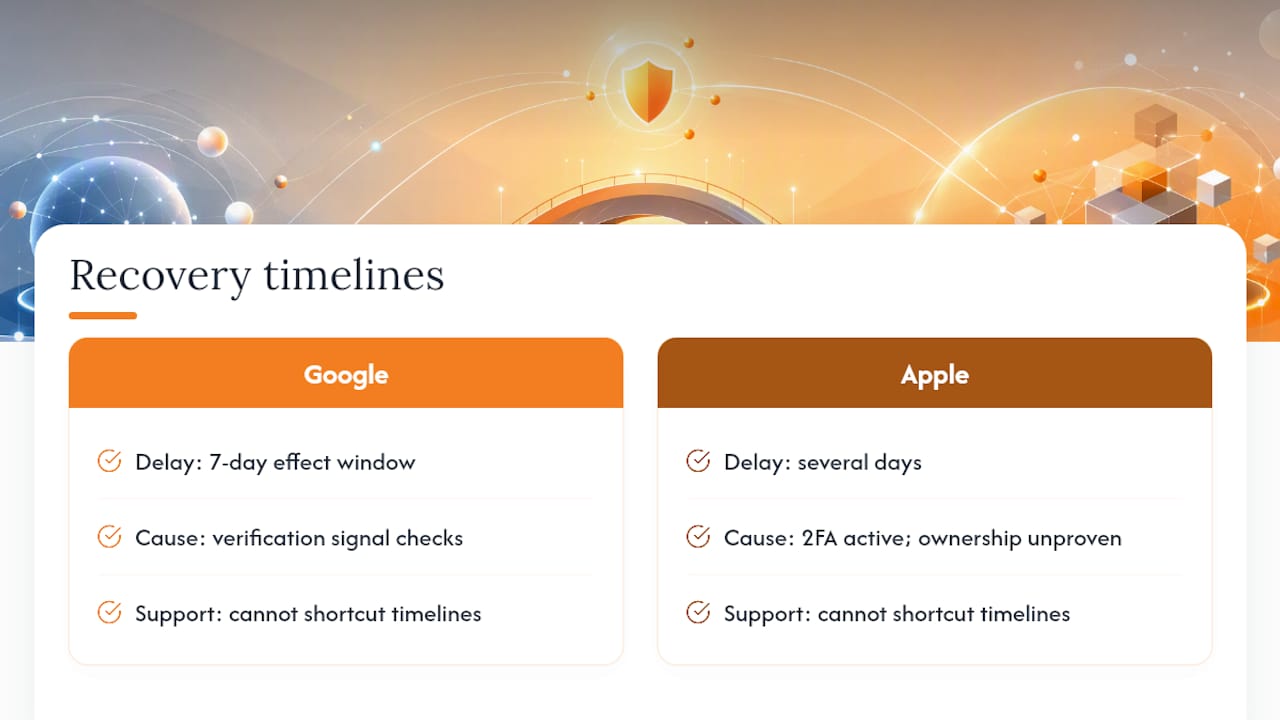
That verification logic explains the waiting periods baked into most platforms. Google documents a seven-day effect window for recovery info changes, and Apple’s process can stretch several days when two-factor authentication is active and you can’t otherwise prove ownership. Neither company can shortcut those timelines just because you call support.
Pro Tip: Update your recovery phone and email months before you switch carriers or close an old email account, not after. Once you’re locked out, changing recovery info from a stranger’s position is exactly the scenario these delays exist to prevent.
If a provider genuinely cannot verify you own the account, meaning no recovered device, no matching historical signals, no working recovery contact, recovery can become impossible. At that point, creating a new account with better recovery hygiene from day one is often the only realistic path forward.
Security Best Practices for Recovery Options
A handful of habits separate people who recover access in minutes from people who lose an account permanently.
- Turn on an authenticator app or hardware key as your main multi-factor method. NIST guidance favors these over SMS specifically because SMS can be intercepted or redirected through SIM swaps.
- Keep backup codes in an encrypted vault or a printed copy stored somewhere secure, never in an unencrypted note or screenshot.
- Use a recovery email you actually check, and revisit your recovery phone number whenever you switch carriers.
- Skip virtual-only numbers for recovery purposes. A physical SIM with carrier-level fraud protections holds up better under verification checks.
- Never share a one-time code or password with anyone, even someone claiming to represent official support. Legitimate providers never ask for that information over an unsolicited call or email.
- Revisit your recovery settings any time your contact information changes, not just when something goes wrong.
Pro Tip: A password manager that stores backup codes and recovery notes in an encrypted vault removes the temptation to keep that information in a plain text file or a phone screenshot, both common targets when a device gets compromised.
If Recovery Fails: What to Try Before You Give Up
Work through these steps roughly in order before assuming the account is unrecoverable.
- Sign in from a device, browser, and network you’ve used before. Try every password variation you remember, and check spam folders for a provider’s recovery emails you may have missed.
- Use any preconfigured recovery contacts or backup codes. If you’re submitting a formal request, gather old passwords, the account’s creation date, and any billing details in advance.
- Once formal recovery starts, expect a waiting period. Contact support only through the provider’s official site, never a third-party service offering to speed up recovery for a fee.
- If recovery genuinely isn’t possible, secure any linked accounts or payment methods tied to the lost one, then build a replacement account with stronger recovery habits from the start.
Why Layered Recovery Beats a Single Safety Net
Most lockouts trace back to one missing piece: an outdated recovery email, a phone number tied to a canceled plan, backup codes nobody can find. A password manager that stores backup codes and keeps recovery email and phone notes current removes a lot of that human error before a crisis hits. Logmeonce focuses on password management, passwordless MFA, cloud encryption, and dark web monitoring, which is the kind of infrastructure that sits underneath good recovery habits rather than replacing them. This perspective draws on published platform guidance and security standards, not proprietary testing or hands-on product data.
— Mike
How Logmeonce Supports Secure Account Recovery
Storing backup codes in a sticky note or a phone screenshot defeats the purpose of having them. A secure password manager gives you an encrypted vault for exactly that kind of sensitive recovery material, alongside passwordless multi-factor authentication you can set as your primary sign-in method instead of relying on SMS alone.

Some platforms also offer dark web monitoring, which flags exposed credentials before someone else uses them to trigger a fraudulent recovery attempt on your account. Between encrypted storage for recovery notes and built-in MFA support, keeping every recovery channel current becomes a five-minute check instead of a scramble after you’re already locked out. If you want a practical starting point for tightening your own setup, Logmeonce’s cybersecurity page walks through the features that support this kind of layered recovery plan, and it’s worth a look before you’re the one filling out a recovery form at midnight.
Sources
- How to use account recovery when you can’t reset your Apple Account password – Apple Support (AU)
- Help with the Microsoft account recovery form
- NIST SP 800-63B
FAQ
What Should I Do to Recover My Account?
Start with a device, browser, and network you’ve used before, since familiar signals speed up automated verification. If that fails, use any recovery contacts or backup codes you set up in advance, then submit the platform’s official recovery form with as much historical detail as you can provide.
Does Account Recovery Delete Everything?
No. Standard account recovery restores access to your existing account, including emails, files, and settings. Data loss typically only happens if you create a brand-new account because the original one couldn’t be verified.
What Are the Account Recovery Options for Gmail?
Gmail recovery relies on a verified recovery phone number and recovery email, plus optional recovery contacts and, on some accounts, selfie video verification. Changes to that information can take up to seven days to fully activate.
How Do I Get Out of Account Recovery?
If you regain access to your account or a signed-in device during the recovery process, you can typically cancel the request through the provider’s account settings. Continuing to actively use the account, particularly on Apple devices, can automatically cancel an in-progress recovery attempt.
Recommended


