


 Password Manager
 Identity Theft Protection

 Team / Business
 Enterprise
 Government
 MSP
MSP


Your password’s real security comes down to three things: length, uniqueness, and whether the account also requires multifactor authentication (MFA). If any password is short, reused, or protected by nothing else, it’s weak no matter how clever it looks. Enable MFA everywhere you can, stop reusing passwords, and run a breach check today.
TL;DR:
- Password length generally offers more protection than complexity rules, with 15 or more characters recommended for high-priority accounts.
- Reusing passwords multiplies breach risks, especially if they are predictable, like common pet names or keyboard patterns, highlighting the need for unique credentials.
- MFA, particularly authenticators or passkeys, provides significantly stronger security than SMS codes, so enabling MFA on all accounts is critical.
- Breach lookup services such as Have I Been Pwned use k-anonymity, allowing safe verification of password exposure without revealing your actual credentials.
- Using a password manager with a strong master passphrase and layered MFA effectively reduces the burden of remembering and managing complex, unique passwords.
How Do Password-Strength Checkers Actually Work?
Not all strength meters measure the same thing. The old-school kind checks for length, uppercase letters, digits, and symbols, sometimes called LUDS rules. It’s a checklist, not an analysis, so “Password1!” scores fine even though it’s one of the first guesses any attacker tries.
Better tools, built on estimators like zxcvbn, model how real attacks work. They flag dictionary words, keyboard patterns, dates, and common substitutions (swapping “a” for “@”) because attackers’ cracking software checks those first. These tools produce “time to crack” estimates, which are useful for comparison but shouldn’t be taken literally. They assume a specific attack method and hardware; a determined attacker with better tools can cut that estimate dramatically.
Breach lookups work differently. Reputable services like Have I Been Pwned use a k-anonymity method, sending only a partial hash of your password rather than the password itself, so the service never sees your actual credential.
- Rule-based checkers (LUDS): fast but easily fooled by predictable patterns.
- Pattern-aware estimators: catch dictionary words and common substitutions.
- Breach lookups: confirm whether a password is already public, regardless of how “strong” it looks.
Pro Tip: Never type a current, active password into a random strength-checking website. Use tools that explicitly state they compute locally or use k-anonymity, so your real password never leaves your device.
What Makes a Password Strong Enough to Trust in 2026?
CISA’s guidance boils strong passwords down to three traits: long, random, and unique. Length matters more than complexity rules ever did. NIST has moved away from forcing symbols and periodic resets, favoring long passphrases instead, because added length increases effective entropy more efficiently than special characters do.
Here’s a practical approach:
- Aim for at least 15 characters on anything important, or several random words if you’re building a passphrase by hand.
- Use true randomness, not patterns. “CorrectHorseBattery9!” beats “P@ssw0rd2026” because nothing about it is guessable, even though the second one “looks” more complex.
- Generate a passphrase with unrelated words, similar to Diceware, if you’re memorizing one manually. Random, unconnected words resist both dictionary attacks and guessing based on your life details.
- Let a password manager generate and store random strings for everything else. There’s no reason to memorize 200 different passwords when software can hold them for you.
- When a site forces awkward constraints (an 8-character max, no symbols allowed), pad the password with extra random characters up to the limit and treat that account as lower priority for reuse of anything sensitive.
The goal isn’t to memorize more; it’s to memorize less and let a system carry the load.
Why Do Compromised Passwords Cause So Much Damage?
Reuse is the single biggest multiplier of password risk. Once one site gets breached, attackers run those exact username and password pairs against banks, email providers, and shopping sites in what’s called credential stuffing. If you used the same password in three places, one leak becomes three compromised accounts.
Password reuse dramatically increases takeover risk, since breach databases like Have I Been Pwned exist specifically because leaked credentials get reused against unrelated sites.
Attackers also lean on predictable human habits: birthdays, pet names, sequential keyboard runs like “qwerty123,” and sports teams. These patterns show up constantly in cracked password lists, which is exactly why cracking dictionaries include them by default.
Prioritize protection in this order:
- Email first. It’s the recovery point for almost every other account you own.
- Banking and financial accounts second.
- Your password manager’s master passphrase third, since it now guards everything else.
How Do You Actually Protect Your Accounts?
Fixing password security isn’t about willpower. It’s about picking the right tools and letting them do the repetitive work. The U.S. Secret Service recommends pairing a password manager with multifactor authentication as the practical baseline, because passwords alone, no matter how strong, are a single point of failure.
MFA methods aren’t equal. SMS codes are better than nothing, but they’re vulnerable to SIM-swapping and interception. Authenticator apps are stronger, and phishing-resistant options like passkeys or hardware security keys are strongest of all, since they can’t be tricked by a fake login page the way a typed code can.
Here’s a step-by-step order of operations:
- Secure your email account first, with a long unique password and MFA. Everything else recovers through it.
- Enable MFA on every account that offers it, prioritizing authenticator apps or passkeys over SMS where available.
- Import your existing passwords into a password manager and let it flag weak or reused ones automatically.
- Run a full vault audit to catch duplicates, short passwords, and anything that shows up in breach data.
- Replace flagged passwords one by one, starting with financial and email accounts.
Pro Tip: Protect the password manager itself with a 5 to 6 word Diceware-style passphrase and hardware-backed MFA. That one credential now guards everything else, so it deserves the strongest protection you have.
Password managers and passkeys aren’t just convenient. They shift the burden of remembering complex, unique strings from your memory, which is unreliable, to software and hardware, which isn’t.
How Do You Check If a Password Has Been Breached?
Checking exposure safely takes minutes. Have I Been Pwned lets you search by email address or password using k-anonymity, meaning it never receives your full password, only a partial hash. That distinction matters if you’re deciding whether a tool is safe to use at all.
Most password managers now include built-in security audits that flag weak, reused, or breached credentials automatically, without you pasting anything into a browser tab.
- Search your email on a reputable breach-check service rather than typing in full passwords on unfamiliar sites.
- Run your password manager’s built-in audit to catch duplicates and weak entries across every saved login.
- If something turns up compromised, change that password everywhere it was reused, not just on the breached site.
- Enable MFA on the affected account immediately, and prioritize email and banking accounts in your cleanup.
- Never paste live credentials into a random online “checker” that doesn’t disclose how it handles your data.
LogMeOnce’s Take: A Practical Checklist to Lock Things Down
LogMeOnce Resources covers password management extensively because the fixes here aren’t complicated, they’re just neglected. Most people know reuse is risky. Few actually go fix it across 40 accounts without a tool doing the heavy lifting.
A short checklist gets you most of the way there:
- Pick a password manager and import your existing logins in one sitting.
- Build one strong master passphrase using random, unrelated words.
- Turn on MFA or passkeys wherever the option exists, starting with email and banking.
- Run a vault audit and fix flagged passwords in order of priority, not all at once.
Zero-knowledge password manager designs mean even the provider can’t read your stored passwords, which matters if you’re wondering whether centralizing your credentials creates a new risk. It shifts the risk to a system built to resist it, rather than leaving it spread across sticky notes and browser autofill.
Why the Standard Password Advice Still Fails Most People
The conventional advice, “use symbols, change it every 90 days,” was never wrong exactly. It was just aimed at the wrong problem. Complexity rules make passwords harder to remember and easier to predict once you know the pattern people fall into: capitalize the first letter, add “!” at the end, swap an “o” for a “0.” Attackers know these patterns better than most users do.
What actually moves the needle is boring by comparison: length, uniqueness, and MFA. That’s it. No amount of symbol-stuffing compensates for reusing the same eight characters across twenty sites.
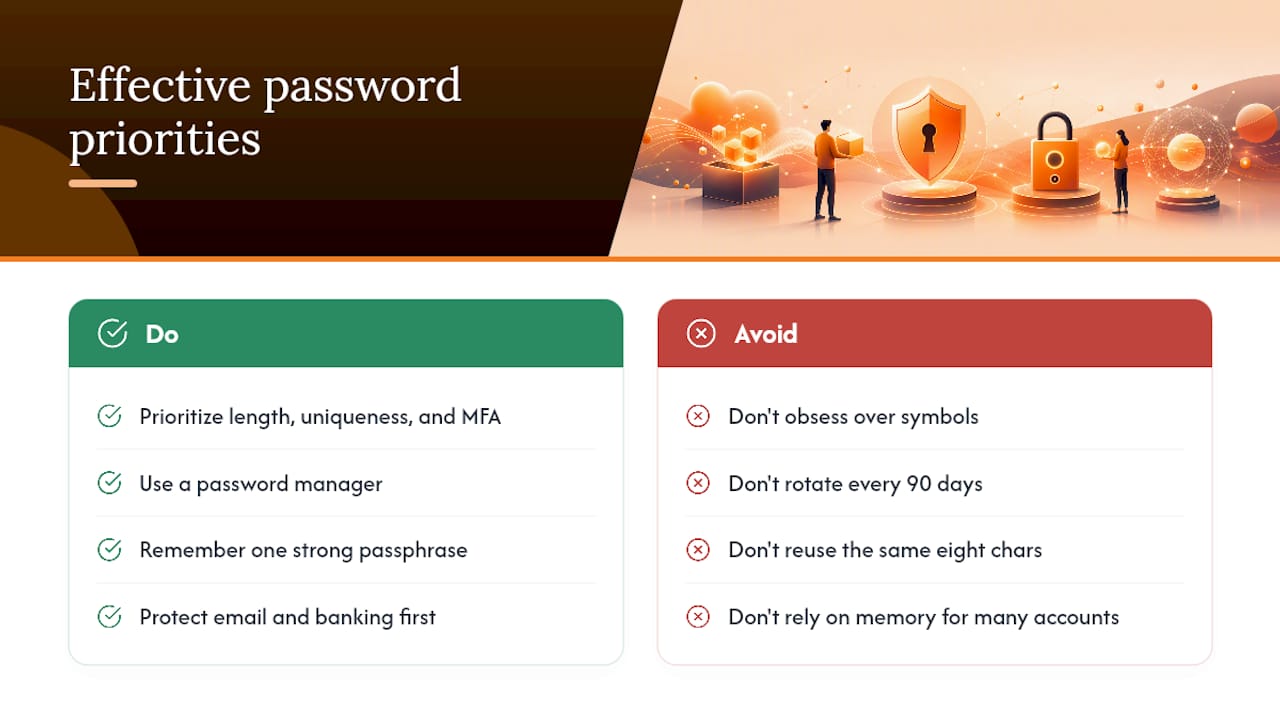
Where I’d push back hardest on typical advice is the obsession with memorization. You don’t need to remember unique passwords for forty accounts. You need to remember one strong passphrase, for your password manager, and let software handle the rest. Most people who fail at password security aren’t lazy. They’re just relying on a strategy (their own memory) that was never built to scale past a handful of accounts.
Start with email and banking today. Everything else can wait a week.
— Mike
Get Your Passwords Fixed, Not Just Rated
A strength checker tells you what’s wrong. It doesn’t fix it. LogMeOnce is built for the actual fix: generate unique, random passwords for every account, store them behind one strong master passphrase, and layer on MFA or passkeys without juggling five different apps.

If you’ve been putting off the cleanup this article just walked through, that’s exactly what LogMeOnce’s password management benefits are designed to shortcut. Import your existing logins, let the built-in audit flag every weak or reused password, and replace them in priority order instead of guessing where to start. For anyone also storing sensitive files alongside login credentials, encrypted cloud storage keeps that data behind the same protection.
Start a free trial and run your first vault audit today. Ten minutes now is the difference between finding out about a breach from a headline or from your own dashboard.
Sources
- How Do I Create a Good Password? | NIST
- Have I Been Pwned – Passwords
- Use strong passwords | CISA
- Passwords and Accounts: Best Cybersecurity Practices | U.S. Secret Service


