


 Password Manager
 Identity Theft Protection

 Team / Business
 Enterprise
 Government
 MSP
MSP


Unmonitored logins are persistent, high-risk access paths that commonly lead to account takeover, lateral movement, and data exfiltration. The risks of unmonitored logins aren’t theoretical: a dormant admin account with unchanged credentials is functionally identical to a backdoor, whether an attacker put it there or not. The first move isn’t buying a new tool. It’s finding every account, human and machine, that nobody has looked at in months.
Three actions matter more than anything else this week:
- Discover and inventory orphaned accounts, including API keys and service accounts, not just user logins.
- Enable server-side session termination so idle sessions can’t be revived by a stolen cookie or token.
- Require multi-factor authentication on every privileged and internet-facing path, no exceptions.
Unattended access is a top entry point for breaches. Stale user accounts, particularly those left behind by former employees, have caused some of the most damaging breaches on record, and they remain a documented risk pattern security teams keep rediscovering during incident response. Non-human accounts deserve equal attention. A forgotten API key doesn’t get bored and stop working. It just sits there, waiting.
Key Takeaways
Unmonitored logins turn into breaches when discovery, session enforcement, and lifecycle ownership are missing, not when a single tool fails.
| Point | Details |
|---|---|
| Discover before enforcing | Inventory human and non-human accounts using SSO logs, CASB, and API scans before applying controls. |
| Enforce server-side timeouts | Match idle timeout values to sensitivity, from 2 to 15 minutes for high-value apps up to 60 minutes elsewhere. |
| Monitor post-login behavior | Track session context and resource access, not just sign-in events, to catch misuse early. |
| Automate offboarding | Tie account deprovisioning to HR events so ex-employee access doesn’t linger for months. |
| Use time-boxed access tools | LogMeOnce’s Scheduled Login and passwordless MFA limit exposure windows and remove shared-credential risk. |
The Real Dangers of Unsecured Login Risks and Idle Sessions
An unmonitored login isn’t a passive liability. It’s an active tool waiting for someone to pick it up. Understanding how attackers actually use dormant access changes how you prioritize cleanup.
The pattern usually starts with credential stuffing: automated tools test breached username and password pairs against your login page until one works. If that account hasn’t been touched in eight months, nobody notices the sign-in because nobody’s watching for it. Once inside, the real damage is rarely about the initial login. It’s what happens next.
- Lateral movement and privilege escalation. An attacker who lands in a low-privilege dormant account probes for weak internal segmentation, then pivots toward admin rights using the same neglect that let them in.
- Silent administrative changes. Password resets, new admin users, disabled logging, altered firewall rules. Each looks like routine IT work unless someone is correlating the account’s history with its sudden activity.
- Data export at scale. Bulk downloads from CRM systems, cloud storage, or databases are the actual payoff for most intrusions, and they often happen in a narrow window before the account gets flagged.
- Service-account persistence. Unlike human accounts, a compromised service account or API key doesn’t need to log in again. It just keeps working, quietly, until someone rotates the credential.
- Insider and ex-employee exposure. An employee who left six months ago but still has an active VPN credential represents exactly the kind of stale account risk that turns into a serious incident.
The operational fallout compounds the technical damage. Unused SaaS licenses tied to dormant accounts quietly drain budget. Auditors flag unmanaged access as a control failure during SOC 2 or ISO reviews. Clients walk away from vendor relationships when a security assessment turns up accounts nobody can explain. Dormant access converts into direct cost, not just theoretical exposure.
Why Orphaned Accounts Keep Surviving Cleanup Efforts
If discovering old accounts were easy, this wouldn’t be a recurring problem. It survives because it’s a process failure dressed up as a technical one.
Most organizations run offboarding as a checklist owned by HR, executed by IT, and reviewed by nobody. When an employee changes roles or leaves, the handoff between departments has gaps, and accounts tied to old job functions get skipped rather than deactivated.
- HR notifies IT of departures late, or not at all, especially for contractors and temporary staff outside the formal payroll system.
- Employees sign up for SaaS tools directly with a company email and corporate card, creating shadow IT that never touches single sign-on.
- Shared credentials and browser-saved passwords on personal devices bypass the identity provider entirely, leaving no visibility for the security team.
- Service accounts and refresh tokens get created for a one-off integration project and never get assigned an owner, so nobody knows they exist when the project ends.
Unmanaged SaaS and AI tool logins are a growing piece of this problem. Every new tool an employee connects without going through procurement adds another identity that IT doesn’t know exists, and that shadow access compounds over time as more tools get adopted informally.
Technical Controls That Actually Stop Login Security Vulnerabilities
Process fixes matter, but they take weeks. These controls close gaps within days.
Server-side session enforcement is the foundation. Client-side timers can be manipulated or bypassed; a session that only expires when the browser decides to expire it isn’t a control, it’s a suggestion. NIST SP 800-171 Rev.2 control SC.L2-3.13.9 requires idle session timeouts for VPNs and web apps, and it requires the enforcement to be auditable, meaning you need logs proving the control actually fired.
Timeout values should match sensitivity, not convenience:
- High-value applications (admin consoles, financial systems, health records): idle timeout of 2 to 15 minutes.
- Lower-sensitivity internal tools: a moderate timeout without frustrating users.
- Public kiosks and shared terminals: immediate lock on any inactivity, no soft warning.
OWASP’s session management guidance points to banking applications as a reference case, where a short idle timeout is common practice precisely because the cost of a hijacked session is high.
Beyond timeouts, a few other controls carry outsized weight. Rotate session IDs at login and at any privilege change, so a token issued before an escalation can’t be reused after it. Use HttpOnly, secure cookies over TLS everywhere, with no exceptions for internal tools. Keep access token lifetimes short and pair them with revocable refresh tokens, rotating API keys on a schedule rather than leaving them static for years. Login endpoints exposed to the internet without a web application firewall or rate limiting invite automated credential stuffing and enumeration attacks that a properly configured WAF blocks before they reach your authentication logic.
Pro Tip: Don’t treat MFA as a finish line. A stolen session token can bypass MFA entirely if the session itself never expires. MFA verifies the login moment; server-side timeouts and token rotation protect everything after it.
Building an Operational Program Around Discovery and Offboarding
Technical controls stop specific attacks. Operational controls stop the accounts from piling up again six months from now.
- Run continuous discovery, not a one-time audit. Pull from SSO logs, CASB telemetry, API gateway logs, OAuth consent grants, and cloud audit trails. Ongoing discovery across these sources catches new orphaned credentials as they appear, not just the ones that existed at the last audit.
- Assign an owner to every account that bypasses SSO. No owner means no business justification, and no business justification means the account gets disabled by default.
- Time-box every exception. If a vendor needs standing access for a project, set an expiration date at creation and require documented renewal, not indefinite access that outlives the contract.
- Automate joiner-mover-leaver workflows. Deprovisioning tied to HR system events, rather than manual tickets, removes the lag where most stale accounts are born. Rotating certificates and API credentials should be part of the same automated offboarding sequence, not a separate afterthought.
- Document every policy exception in a form an auditor can review. Regulatory frameworks care less about whether you have zero exceptions and more about whether you can prove every exception was a deliberate, reviewed decision.
Enterprise environments with distributed teams tend to accumulate the messiest exception lists, since account creation happens across multiple departments with no single password management policy tying it together. The fix isn’t more approval steps. It’s fewer paths that skip the identity provider in the first place.
Catching Misuse After the Login Already Happened
A clean login tells you almost nothing about what happens next. Treating authentication as the finish line, rather than the starting point, is one of the more overlooked login security vulnerabilities in most monitoring setups.
Watching sign-in events alone creates blind spots, because the actual damage happens in the actions that follow, not the moment of access. Effective monitoring correlates the session ID with everything the session touches afterward: which resources it queried, what it downloaded, and whether its behavior matches the account’s normal pattern.
- Impossible travel: a login from Chicago followed by an action from Singapore twenty minutes later.
- Bulk data exports that don’t match the account’s typical usage volume.
- Unusual token minting or new API key generation outside a change window.
- Privilege changes made by an account that has never touched admin settings before.
- Atypical API call patterns, like a service account suddenly hitting endpoints it’s never used.
A SIEM or UEBA platform that correlates endpoint, cloud, and application telemetry is what turns these individual signals into a single flagged event instead of five unrelated log lines nobody reviews.
Pro Tip: When a session shows any of these signals, don’t just kill it. Quarantine it, force step-up authentication, rotate the associated tokens, and preserve the session logs before you touch anything else. Forensic teams can’t investigate evidence you’ve already destroyed by resetting the account.

A Prioritized Checklist for Reducing Dangers of Idle Sessions
Spread the work across a realistic timeline instead of trying to fix everything at once.
- Within hours: Run account discovery across SSO and cloud logs, disable any obviously orphaned accounts, and turn on MFA for every admin and privileged path immediately.
- Within days: Enforce server-side idle and absolute timeouts, rotate any exposed API keys or secrets, and put a WAF with rate limiting in front of every login endpoint.
- Within weeks: Build automated lifecycle workflows tied to HR events, assign documented owners to every account, and require just-in-time access for privileged tasks instead of standing permissions.
- Ongoing: Schedule periodic access certifications, keep non-human identity discovery running continuously, and run a tabletop exercise simulating session hijacking at least once a year.
How Password and Access Tools Map to These Mitigations
Most of the controls above require infrastructure changes, but some of the highest-leverage fixes come from tightening how credentials are issued and used day to day.
Scheduled Login limits when a credential works at all, so an account tied to a contractor’s nine-to-five engagement simply can’t authenticate outside that window, even if someone tries. That’s time-boxing enforced at the credential level, not just a policy on paper.
- Password management combined with single sign-on and passwordless MFA closes the gap created by browser-saved passwords and shared logins that sit outside identity provider visibility.
- Dark web monitoring flags exposed credentials before they turn into the account takeover scenario described earlier in this piece.
- Centralized logging across managed accounts supports the auditability that NIST-aligned policies require during a compliance review.
- Consumer and business guidance on scheduling account access to working hours shows how the same time-boxing principle applies at the individual account level, not just the enterprise policy level.
| Point | Details |
|---|---|
| Time-boxed access | Scheduled Login restricts when a credential authenticates, shrinking the window for misuse. |
| Reduced shared-credential risk | SSO and passwordless MFA remove the need for browser-saved or shared passwords outside IT visibility. |
| Faster breach detection | Dark web monitoring flags exposed credentials before attackers use them for account takeover. |
What the Data Actually Tells You to Fix First
Most advice on this topic treats every control as equally urgent, and that’s where teams waste time. It isn’t. Session timeout enforcement and MFA on privileged paths stop more real-world breaches per hour of effort than almost anything else on a typical remediation list, because they attack the moment an attacker is most exposed: right after they’ve gotten in but before they’ve done anything useful with the access.
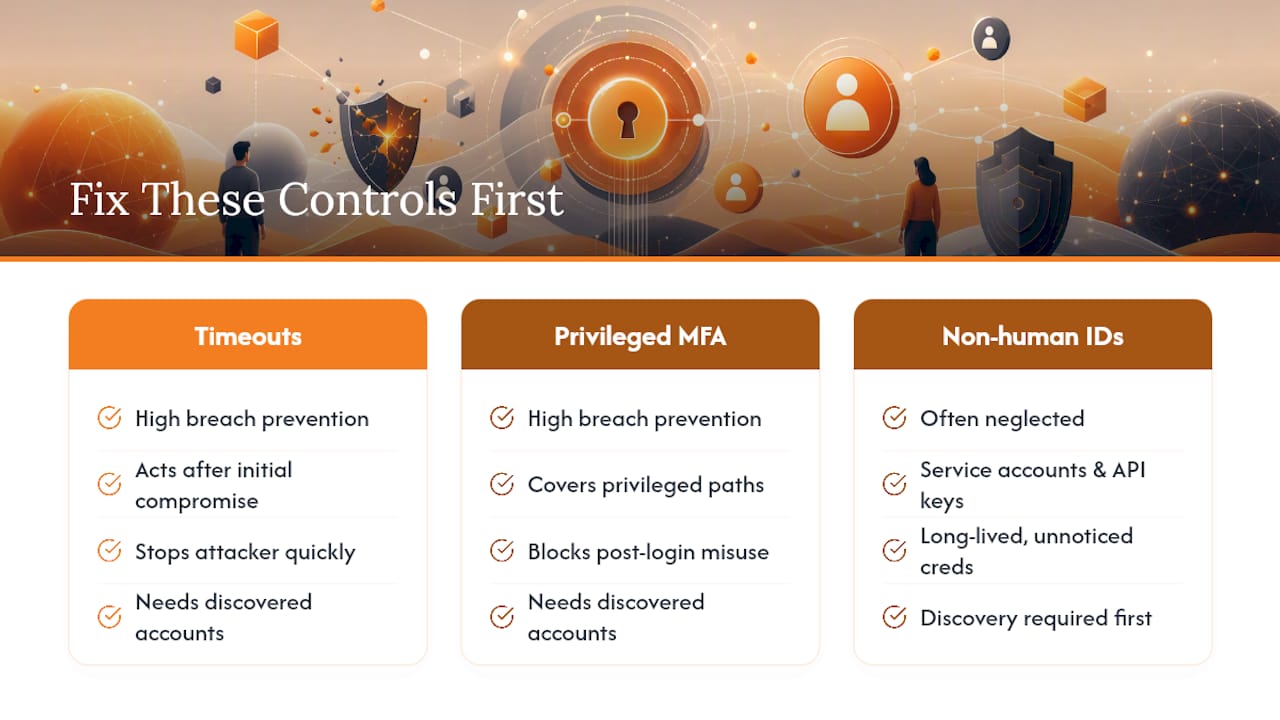
The advice that undersells itself is non-human identity governance. Security teams pour resources into human account hygiene while service accounts and API keys, the credentials that never sleep and never get suspicious about a strange login prompt, sit untouched for years. An expired employee password gets noticed eventually. An expired API key with a hardcoded secret in a forgotten script often doesn’t get noticed at all.
If you take one thing from this roadmap, prioritize discovery before enforcement. You can’t time-box, rotate, or revoke an account you don’t know exists. Every technical control described here assumes you’ve already found the accounts it needs to apply to, and that assumption is where most programs quietly fail.
— Mike
Put These Controls Into Practice With LogMeOnce
Every control described above, from time-boxed access to session termination to eliminating shared passwords, maps directly to features built into LogMeOnce’s cybersecurity platform. Scheduled Login enforces the time-boxing your offboarding process needs. Passwordless MFA and single sign-on remove the browser-saved credentials that sit outside your identity provider’s visibility. Dark web monitoring catches exposed credentials before they become the account takeover scenario this article walks through.

If your team is still tracking orphaned accounts in a spreadsheet, that’s the gap worth closing first. Review how LogMeOnce’s password management benefits apply to your environment, and start a trial to see how scheduled access and centralized credential control fit into the lifecycle program you’re building.
Sources
- OWASP Web Security Testing Guide v4.1 — Session timeout guidance
- NHIMG — Why unmanaged SaaS and AI tool logins increase IAM risk
Recommended
- Scheduled Login Puts LogMeOnce Users in Control of Password Management, Making Them Elusive to Cyberattack Intruders – LogMeOnce
- Schedule Login – LogMeOnce
- How Secure is Logmeonce ? – LogMeOnce


