


 Password Manager
 Identity Theft Protection

 Team / Business
 Enterprise
 Government
 MSP
MSP


Cloud-based authentication systems, also called Identity-as-a-Service (IDaaS) or hosted Identity and Access Management (IAM), deliver identity verification and access control from vendor-managed cloud infrastructure rather than on-premises servers you maintain yourself. Before committing to an enterprise rollout, run a focused 6-to-8-week pilot covering one business unit, one directory sync, and one SSO integration. Track three metrics: authentication success rate, MFA enrollment rate, and help-desk ticket volume. Those three numbers will tell you more than any vendor demo.
A few things worth knowing before you go further:
- NIST SP 800-63 defines digital identity assurance levels (IAL, AAL, FAL) that your policy should map to before you write a single RFP requirement.
- The FIDO2 standard from the FIDO Alliance is the current baseline for phishing-resistant, device-bound authentication and should be a non-negotiable requirement for high-risk applications.
- Logmeonce offers passwordless MFA, SSO, and cloud encryption in a single platform, making it a practical starting point for organizations that want to consolidate identity tooling without building custom integrations.
Key Takeaways
Effective cloud-based authentication requires standards-first procurement, a KPI-validated pilot, and device posture enforcement alongside MFA to close the session-token attack surface.
| Point | Details |
|---|---|
| Start with a pilot | Run a 6-to-8-week pilot with one business unit; track authentication success rate, MFA enrollment, and help-desk ticket delta before expanding. |
| Require four protocols | Mandate SAML, OAuth 2.0/OIDC, FIDO2, and SCIM in every RFP; missing any one creates integration gaps that delay production. |
| MFA alone is not enough | Layer FIDO2 passwordless auth and device posture checks to close the session-token and adversary-in-the-middle attack surface. |
| Map to compliance early | Identify which frameworks apply (SOC 2, HIPAA, FedRAMP, PCI DSS) before vendor selection and require matching certifications in writing. |
| Logmeonce consolidates the stack | Logmeonce combines passwordless MFA, SSO, cloud encryption, and password management in one platform, reducing integration complexity. |
How do cloud-based authentication systems actually work?
The core flow is straightforward: a user authenticates with an Identity Provider (IdP), which issues a signed token, and the target application (the Service Provider, or SP) validates that token without ever seeing the user’s credentials.
Here is what that looks like in practice:
- The user hits a protected resource at the SP.
- The SP redirects the browser to the IdP with an authentication request.
- The IdP verifies the user’s identity (password, MFA, device attestation, or any combination).
- The IdP issues a signed token, either a JWT for OAuth 2.0/OIDC flows or a SAML assertion for legacy enterprise SSO.
- The SP validates the token’s signature against the IdP’s public key, checks claims (audience, expiry, scope), and grants access.
- A session is created at the SP layer; the IdP manages the upstream session separately.
The components that make this work:
- Identity Provider (IdP): The authoritative source for user identity. It holds credentials, enforces MFA policy, and issues tokens. In cloud IAM, this is the vendor’s managed service.
- Service Provider (SP): Any application or API that trusts the IdP’s tokens. Could be a SaaS app, an internal tool, or a REST API.
- User directory: Usually Active Directory, LDAP, or a cloud directory synced via SCIM. SCIM automates provisioning and deprovisioning so accounts stay in sync without manual IT intervention.
- Tokens: JWTs carry claims in a compact, URL-safe format. SAML assertions are XML-based and remain common in enterprise SSO. Both have expiry windows and must be validated on every request.
- SDKs and APIs: Client libraries for web, mobile, and server-side integration. Most enterprise IdPs publish SDKs for JavaScript, Java, Python, .NET, and iOS/Android.
NIST’s identity management guidance explicitly calls for standard-based protocols like SAML and OpenID as the expected approach for cloud subscriber authentication. That is not a suggestion; it is the baseline for any serious procurement.
What authentication methods should your cloud platform support?
These methods are complementary, not a menu where you pick one. Most enterprise deployments layer two or three together depending on the application’s risk profile.
| Method | Security | User Experience | Deployment Effort | Best Use Case |
|---|---|---|---|---|
| MFA (TOTP/push) | High | Moderate friction | Low | All users, all apps as baseline |
| SSO | Moderate (depends on IdP) | Low friction | Medium | Reducing password sprawl across SaaS apps |
| Federated identity | High (trust chain) | Transparent | High | Cross-org or partner access, B2B |
| Adaptive/risk-based | Very high | Minimal friction for normal sessions | High | High-value apps, privileged accounts |
| Passwordless (FIDO2) | Highest (phishing-resistant) | Lowest friction | Medium | Executive accounts, finance, DevOps |
Multi-factor authentication (MFA): The floor, not the ceiling. TOTP apps and push notifications cover most of your user base quickly. The operational tradeoff is help-desk volume during enrollment and when users lose devices. Plan for a self-service recovery flow before you launch. Logmeonce’s two-factor authentication implementation includes multiple second-factor options to reduce that friction.
Single Sign-On (SSO): One login session, many applications. The security benefit is fewer credentials to phish; the UX benefit is obvious. The deployment catch is that every app needs a SAML or OIDC integration, and legacy apps without federation support require a proxy or header-injection approach. SSO in cloud authentication is well-documented, but the integration surface is where timelines slip.
Federated identity: Extends trust across organizational boundaries using SAML or OIDC. Common in B2B scenarios where a partner’s IdP authenticates their users into your SP. Setup requires exchanging metadata and establishing trust relationships, which takes time but scales well once done.
Adaptive/risk-based authentication: The IdP evaluates contextual signals (device posture, IP reputation, geolocation, time of day) and adjusts the authentication challenge accordingly. A user logging in from a known device on a corporate network gets a smooth session; the same user logging in from a new country at 2 AM gets stepped up to MFA or blocked. This is where Access Context Manager patterns become relevant.

Passwordless (FIDO2): Device-bound credentials (passkeys, hardware security keys) that cannot be phished because the private key never leaves the device. The FIDO2 standard provides stronger phishing resistance than any password-based MFA. Prioritize this for privileged accounts, finance systems, and any application with access to sensitive data. Logmeonce’s passwordless MFA covers this use case directly.
When to prioritize passwordless plus adaptive MFA: For any application classified as high-risk (privileged access, financial data, PII), deploy FIDO2 as the primary factor and layer adaptive policy on top. This combination eliminates the credential-phishing attack surface while keeping the step-up challenge invisible to users who behave normally.
Which protocols do you need to specify in your RFP?
Support for SAML, OAuth 2.0/OIDC, FIDO2, and SCIM is the baseline for any modern cloud authentication deployment. If a vendor cannot demonstrate all four, keep looking.
- SAML 2.0: Still required for legacy enterprise SSO integrations, especially with older SaaS platforms and on-premises applications that predate OAuth. Expect it in any environment with a mix of legacy and modern apps. NIST’s identity management guidance lists SAML as an expected standard for cloud subscriber authentication.
- OAuth 2.0: The authorization framework for modern web and mobile APIs. It delegates access without sharing credentials. Use it for API-to-API authorization and as the foundation for OIDC.
- OpenID Connect (OIDC): OAuth 2.0 plus an identity layer. OIDC adds the ID token (a JWT carrying user claims) on top of OAuth’s access token. Use it for modern web and mobile app authentication where you need both authorization and identity.
- FIDO2 (WebAuthn + CTAP2): The protocol stack behind passkeys and hardware security keys. Mandatory for any passwordless deployment. The FIDO Alliance publishes the full spec at Fidoalliance.
- SCIM 2.0: System for Cross-domain Identity Management. Automates user provisioning and deprovisioning between your IdP and downstream applications. Without SCIM, you are doing directory sync manually or with brittle scripts. Require it for any app that needs near-real-time account lifecycle management.
Practical rule of thumb: Legacy enterprise apps → SAML. Web and mobile APIs → OAuth 2.0/OIDC. Passwordless and device-bound auth → FIDO2. Directory sync and lifecycle management → SCIM. For NIST 800-series compliance, map each protocol to the appropriate Authentication Assurance Level (AAL1, AAL2, AAL3) before finalizing your architecture.
Standards-first procurement, specifying support for all four protocols upfront, reduces integration surprises during pilots and shortens time-to-production.
What are the real business benefits of cloud authentication?
Moving authentication to the cloud removes a category of infrastructure you should not be running yourself: certificate management, HA clustering, patch cycles, and capacity planning for an identity service that needs five-nines availability.
Core benefits:
- Scalability without ops overhead: Cloud IdPs scale authentication capacity automatically. A product launch that spikes logins by 10x does not require you to pre-provision servers.
- Centralized policy and audit: One control plane for MFA policy, session length, IP restrictions, and access logs. Auditors get a single pane instead of log files scattered across a dozen systems.
- Faster developer onboarding: SDKs and pre-built integrations cut integration time from weeks to days. A developer can wire up OIDC authentication in an afternoon with a well-documented SDK.
- Improved user experience: SSO means users authenticate once and move between applications without re-entering credentials. Passwordless goes further, eliminating the credential step entirely.
- Reduced help-desk load: Password resets are a significant portion of help-desk tickets in most enterprises. SSO and passwordless authentication both reduce that volume. The Cloud Security Alliance documents this as one of the primary operational benefits of centralized IAM.
- Faster time-to-market: New applications inherit authentication from the IdP rather than building it from scratch. Security review cycles shorten when the auth layer is already certified.
One caveat worth stating plainly: moving to a cloud IdP shifts some risk to the vendor. Data residency, SLA commitments, and vendor lock-in are real concerns. Require contractual guarantees on uptime, breach notification timelines, and data portability before signing.
What security controls does your architecture actually need?
Adopt Zero Trust as the baseline posture: no implicit trust based on network location, verify every request using contextual signals, and enforce least privilege at every layer. MFA alone is not enough.
Technical controls checklist:
- Enforce least privilege on all service accounts, API keys, and human identities. Audit entitlements quarterly.
- Set session lengths appropriate to risk: short sessions (15–60 minutes) for privileged access, longer (8–24 hours) for standard productivity apps with continuous re-evaluation.
- Define token lifetimes explicitly. Access tokens should be short-lived (minutes to an hour). Refresh tokens need rotation policies and revocation endpoints.
- Implement token revocation and test it. A compromised token that cannot be revoked is an open door.
- Use certificate-based device access for privileged workstations. Device certificates provide a stronger signal than IP address alone.
- Deploy endpoint verification to check device posture (OS version, disk encryption, patch status) before granting access. Google’s Access Context Manager demonstrates how contextual attributes and endpoint verification combine to enforce fine-grained access policies.
- Rotate signing keys on a defined schedule and automate the rotation. Manual key rotation is where teams cut corners.
- Monitor for anomalous authentication patterns: impossible travel, credential stuffing signatures, unusual token request volumes.
Runtime hardening for production:
- Set up alerting on authentication failure spikes, token issuance anomalies, and admin account activity.
- Test your revocation workflow before go-live. Revoke a test account’s tokens and confirm access is blocked within your SLA window.
- Run tabletop exercises for account takeover scenarios. Know who gets paged, what the containment steps are, and how long recovery takes.
- Use identity entitlement management tooling to detect over-privileged accounts and misconfigured access policies across cloud resources.
Pro Tip: Test token revocation and account recovery flows during your pilot, not after production cutover. Discovering that revocation takes 15 minutes instead of 15 seconds is a manageable pilot finding. Discovering it during an incident is not.
What compliance requirements apply to U.S. organizations?
The certifications and frameworks below are not interchangeable. Each covers a different scope, and you need to know which ones apply to your environment before you write vendor requirements.
- SOC 2 Type II: Audits a vendor’s security, availability, processing integrity, confidentiality, and privacy controls over a period (typically 6–12 months). Type II is the meaningful one; Type I only covers design, not operating effectiveness. Require a current SOC 2 Type II report from any cloud IdP.
- ISO/IEC 27001: A management-system certification covering how a vendor governs its security program. ISO 27001 signals that the vendor has documented controls and undergoes independent audits, not just that they have good technology.
- PCI DSS: Applies if your authentication system touches cardholder data environments. PCI DSS specifies MFA requirements for non-console administrative access and remote access into the cardholder data environment. Confirm your IdP is in scope for your QSA’s assessment.
- HIPAA: Applies to covered entities and business associates handling protected health information. Your IdP is likely a business associate. Require a signed BAA and confirm audit logging meets HIPAA’s access control and audit control requirements.
- FedRAMP: Required for cloud services used by U.S. federal agencies. FedRAMP authorization is a lengthy process; if you are a federal buyer, your IdP must be on the FedRAMP Marketplace. State and local government buyers should check whether FedRAMP authorization is an acceptable proxy for their own procurement requirements.
- CCPA: California Consumer Privacy Act obligations apply when you process personal data of California residents. Confirm your IdP’s data processing agreement covers CCPA obligations, including the right to deletion and data portability.
Vendor questions to ask:
- Where is authentication data stored, and can you restrict it to U.S. data centers?
- What is your breach notification timeline, and does it meet our contractual and regulatory obligations?
- Is data encrypted at rest and in transit? What key management model do you use?
- Do you use subprocessors for any identity data? Who are they, and where are they located?
- How do you handle government disclosure requests for user data?
For federal procurement, also review Commerce as a reference for what responsible disclosure expectations look like in a government context. Agencies with specialized compliance needs (ITAR, CJIS, IL4/IL5) should escalate to their security officer before selecting a vendor.
How do you evaluate and select a cloud authentication provider?
Evaluate providers on eight axes: protocol support, availability SLA, compliance certifications, integration surface, pricing model, support quality, incident history, and product roadmap. Weight them in that order for most enterprise deployments.
Evaluation checklist:
- Protocol support: Does the vendor support SAML 2.0, OAuth 2.0, OIDC, FIDO2, and SCIM 2.0 natively? Ask for a protocol compatibility matrix.
- Availability SLA: What is the contractual uptime commitment? 99.9% means roughly 8.7 hours of downtime per year. For authentication infrastructure, 99.99% (52 minutes/year) is a more appropriate target.
- Compliance certifications: SOC 2 Type II, ISO 27001, and any sector-specific certifications (FedRAMP, HIPAA BAA, PCI DSS) relevant to your environment.
- Integration surface: How many pre-built connectors exist for your SaaS stack? What SDKs are available? Is there a well-documented REST API for custom integrations?
- Pricing model: Per-user per-month, monthly active users (MAU), or enterprise license? Understand what counts as a billable user and whether internal service accounts are included.
- Support and SLA: What is the response time SLA for P1 incidents? Is 24/7 support included or an add-on? Ask for the escalation path for authentication outages.
- Incident history: Ask for the vendor’s last three security incidents and their post-mortems. A vendor with no incidents in the last three years either has excellent security or is not being transparent.
- Roadmap: Is FIDO2/passkey support on the roadmap if not already shipped? What is the vendor’s position on emerging standards like OpenID for Verifiable Credentials?
Sample RFP and demo questions:
- Walk us through how you handle IdP failover. What is the RTO/RPO for an authentication service outage?
- How does your SCIM implementation handle deprovisioning? What is the latency between an account being disabled in our directory and access being revoked in downstream apps?
- Show us your token revocation flow. How quickly does a revoked token stop working across all integrated applications?
- What observability do you provide? Can we export authentication logs to our SIEM in real time?
- Where is our tenant’s data stored, and can we restrict it to specific regions?
Red flags:
- No documented token revocation endpoint or vague answers about revocation latency.
- Pricing that changes significantly based on undisclosed usage thresholds.
- SOC 2 Type I only (design attestation, not operating effectiveness).
- No published incident history or post-mortems.
- FIDO2 support described as “on the roadmap” with no committed date.
- Single-region deployment with no documented failover.
How do you implement cloud authentication without breaking things?
Use a phased migration: pilot with a small group, validate your KPIs, expand by org unit, then cut over. Never do a big-bang migration for authentication infrastructure.
Step-by-step implementation checklist:
- Discovery: Inventory all applications, their current authentication method, and their user population. Identify which apps support SAML or OIDC natively and which need a proxy.
- Architecture design: Define your IdP topology (single tenant vs. multi-tenant), directory sync strategy (AD Connect, LDAP, SCIM), and token lifetime policies.
- Protocol mapping: For each application, assign the appropriate protocol (SAML for legacy, OIDC for modern, FIDO2 for high-risk). Document the integration pattern.
- Directory sync setup: Configure SCIM or directory sync between your IdP and user store. Test provisioning and deprovisioning with test accounts before touching production users.
- SDK integration: Wire up authentication in any custom applications using the IdP’s SDK. Test token validation, refresh flows, and error handling.
- Pilot scope: Select one business unit (50–200 users) that is technically representative but not business-critical. Include at least one legacy SAML app and one modern OIDC app.
- User communication: Send a clear, jargon-free email explaining what is changing, what users need to do (enroll MFA, register a passkey), and where to get help.
- Help-desk playbook: Train help-desk staff on the new flows before the pilot launches. Document the top five expected issues and their resolutions.
- Rollback plan: Define the trigger conditions for rolling back (authentication success rate below 95%, help-desk volume spike above 3x baseline) and the exact steps to revert.
- Production cutover: Expand by org unit in waves. Monitor KPIs after each wave before proceeding.
Pilot success metrics (KPIs):
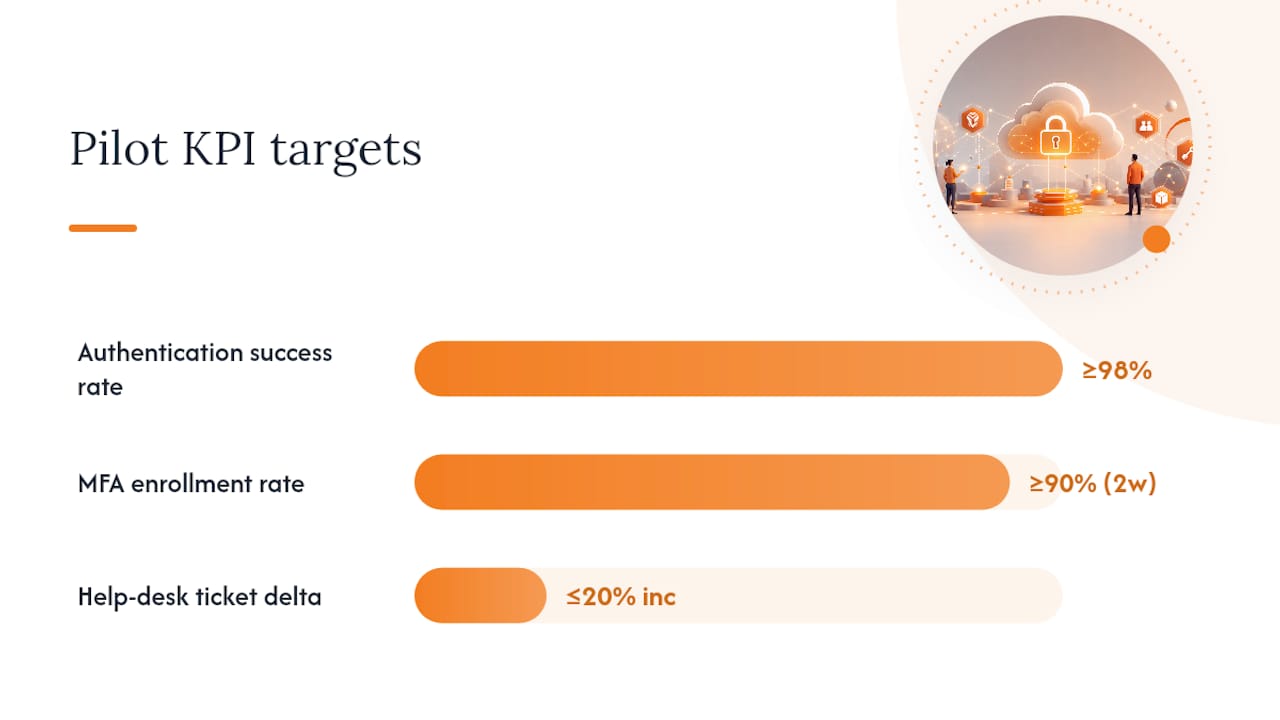
- Authentication success rate: target above 98%.
- MFA enrollment rate: target above 90% within the first two weeks.
- Help-desk ticket delta: aim for no more than a 20% increase during the first week, trending down by week three.
- Authentication latency: baseline before pilot, confirm no regression above 200ms added latency.
- False-reject rate: track users who are correctly credentialed but denied access due to policy misconfiguration.
Endpoint verification, as documented in Google’s Context-Aware Access setup, is worth configuring during the pilot phase so device posture data is available before you enforce it in production.
Pro Tip: *Roll out MFA enrollment as a self-service flow with a grace period (7–14 days) before enforcement. Forced enrollment on day one generates a disproportionate help-desk spike.
Avoid common enterprise password management mistakes during migration by auditing shared credentials and service accounts before the cutover, not after.
What deployment models and pricing should you budget for?
The three deployment options are SaaS (fully managed), hybrid (cloud IdP with on-premises gateway), and on-premises gateway (local component for legacy app integration). Most enterprises start SaaS and add a hybrid component for legacy systems.
Timeline expectations:
- Pilot (4–8 weeks): One business unit, one or two app integrations, directory sync configured. Goal is KPI validation, not scale.
- Phased rollout (3–6 months): Expand by org unit or application tier. Each wave should be 2–4 weeks with a monitoring period before the next.
- Full enterprise cutover (6–12 months): Depends heavily on the number of legacy SAML integrations and whether on-premises systems require a gateway component.
| Deployment Model | Pros | Cons | Pricing Shape |
|---|---|---|---|
| SaaS (fully managed) | Fastest time-to-value, no infra to manage, automatic updates | Data residency constraints, vendor dependency | Per-user/month or MAU-based |
| Hybrid (cloud IdP + on-prem gateway) | Supports legacy apps, keeps sensitive data on-prem | Gateway maintenance, added complexity | Per-user/month plus gateway licensing |
| On-premises gateway only | Maximum data control, works in air-gapped environments | High ops burden, slower feature velocity | Enterprise license, often perpetual |
Procurement caveats:
- Directory sync professional services are frequently not included in base pricing. Budget for implementation support if your AD environment is complex.
- Custom SAML integrations for legacy apps can add weeks to the timeline and cost per-integration fees with some vendors.
- Support tier upgrades (24/7, dedicated TAM) are often priced separately and worth the cost for authentication infrastructure.
- MAU-based pricing can surprise you if your user base has seasonal spikes. Clarify how MAU is counted (calendar month, rolling 30 days) before signing.
What most teams get wrong about cloud authentication
The conventional wisdom says MFA is the answer. Deploy MFA, check the compliance box, move on. That framing misses the actual attack surface.
Most credential-based breaches in 2025 did not bypass MFA through brute force. They bypassed it through session token theft, adversary-in-the-middle phishing kits (like Evilginx), and SIM-swapping. TOTP and push-based MFA are vulnerable to all three. FIDO2 is not, because the credential is bound to the device and the origin domain. A phishing site cannot replay a FIDO2 assertion to a different domain.
The second thing teams underestimate is device posture. Contextual signals like device posture, IP geolocation, and OS version are more effective than MFA alone when it comes to blocking account takeover. An attacker with a stolen session token from a managed device still fails device posture checks if they are operating from an unmanaged machine. Many organizations skip endpoint verification entirely because it adds deployment complexity. That is the gap attackers exploit.
The third mistake is treating the pilot as a checkbox rather than a genuine test. Pilot KPIs matter because they surface integration failures, policy misconfigurations, and user adoption gaps before they affect the whole organization. A pilot that does not track false-reject rate will miss the policy misconfiguration that locks out a subset of users post-cutover.
Prioritize FIDO2 for your highest-risk applications first, deploy endpoint verification in parallel, and treat your pilot KPIs as real decision gates, not formalities.
Logmeonce covers the criteria your RFP should require
If you have worked through the selection checklist above and need a platform that maps directly to those requirements, Logmeonce delivers passwordless MFA, SSO, cloud storage encryption, and enterprise password management in a single platform. The practical advantage for IT teams is consolidation: instead of stitching together a separate IdP, a password manager, and an encryption layer, you get a unified control plane with one audit log and one vendor relationship to manage.

Logmeonce’s cybersecurity platform covers the buyer criteria that matter most during evaluation: passwordless MFA aligned with FIDO2 principles, SSO for reducing credential sprawl, cloud encryption for data-at-rest protection, and dark web monitoring for compromised credential detection. For teams that need to demonstrate compliance posture, the platform’s password management benefits include audit-ready reporting and enterprise-grade access controls. Start a free trial or request a demo at Logmeonce to see how the platform fits your specific integration requirements.
Sources
The references below are the authoritative starting points for engineers, architects, and auditors working on cloud authentication deployments.


