


 Password Manager
 Identity Theft Protection

 Team / Business
 Enterprise
 Government
 MSP
MSP


Mitigating authentication fatigue starts with three controls you can assign today: enable number matching on every push-based MFA prompt, pilot FIDO2/WebAuthn passkeys for your highest-risk roles, and audit how many push prompts your users receive per session. Those three moves address the immediate attack surface. The longer-term architecture is phishing-resistant MFA built on FIDO2/WebAuthn and hardware security keys, layered with adaptive risk-based step-up, SSO to reduce total prompt volume, and hardened recovery paths that do not become a backdoor.
Immediate priorities for IT teams:
- Enable number matching on push MFA today. CISA’s number-matching fact sheet calls this the recommended interim mitigation for push-based MFA when a full migration to phishing-resistant MFA isn’t yet feasible.
- Audit and cap push prompts per session. Set a rate limit of a few prompts before lockout or step-up and alert on denied-push spikes in your identity dashboard.
- Pilot passkeys or FIDO2 hardware keys for privileged accounts and high-risk roles. NIST SP 800-63B explicitly discourages blind-approval out-of-band flows and requires session-bound, cryptographic proof of intent.
Pro Tip: Don’t wait for a full platform migration to get value from FIDO2. A 10-person pilot covering your IT admins and finance leads can run in two weeks and gives you real telemetry before you commit to a broader rollout.
Key Takeaways
Phishing-resistant MFA (FIDO2/WebAuthn) combined with number matching and SSO consolidation is the most effective architecture for reducing authentication fatigue while closing the push-bombing attack vector.
| Point | Details |
|---|---|
| Enable number matching first | CISA recommends number matching as the immediate interim control for push-based MFA; it breaks single-tap blind approval. |
| Rate-limit push prompts | Cap prompts at 3–5 per session and alert on denied-push spikes to catch push-bombing campaigns early. |
| Pilot FIDO2 for privileged roles | Start with IT admins and finance; FIDO2 eliminates push prompts entirely for enrolled users. |
| Consolidate via SSO | Fewer separate authentication events per day means fewer opportunities for fatigue and fewer attack surfaces. |
| Logmeonce for integrated control | Logmeonce provides passwordless MFA, SSO, session controls, and telemetry in a single enterprise platform. |
What MFA fatigue (push bombing) is and why it matters
MFA fatigue, often called push bombing, is what happens when an attacker who already has a user’s password floods that user’s authenticator app with rapid-fire approval requests. The goal isn’t to guess the code. The goal is to wear the user down until they tap “Approve” just to make the notifications stop.
That’s the key difference from ordinary MFA friction. Normal friction is a single prompt at login. Push bombing is a deliberate, high-volume attack that exploits the human tendency to comply under pressure or simply to silence an annoyance.
The security impact is direct: one accidental approval hands an attacker an authenticated session. But the business cost runs deeper. A UCL field study on authentication fatigue found that repeated authentication tasks disrupt productivity and push employees toward coping strategies that increase risk, including password reuse, shared credentials, and batching tasks to avoid repeated logins. Help-desk costs climb alongside user frustration, and security teams end up chasing incidents that a design change could have prevented.
Consider a realistic scenario: a mid-level finance analyst receives 15 push notifications over 20 minutes while trying to meet a deadline. She’s already authenticated twice that morning. On the 16th prompt, she taps “Approve” without reading it. The attacker now has a valid session tied to her credentials and access to the financial systems she uses daily.
How attackers exploit MFA fatigue: the attack flow
The attack sequence is straightforward, which is part of why it works.
- Credential acquisition. The attacker obtains a valid username and password through phishing, credential stuffing, or a prior data breach.
- Automated push flood. Using the stolen credentials, the attacker triggers repeated MFA push requests to the victim’s registered device, sometimes dozens within minutes.
- Social engineering overlay (optional). Some attackers call or message the target, impersonating IT support, and instruct them to approve the prompt to “resolve a login issue.”
- User approval. The victim approves one prompt, either from fatigue, confusion, or social pressure.
- Session takeover. The attacker gains an authenticated session and moves laterally, exfiltrates data, or establishes persistence.
MITRE ATT&CK catalogs this as technique T1621, Multi-Factor Authentication Request Generation, and describes it as an attacker technique specifically designed to coerce user approval through volume.
Variants include pure push bombing (volume alone), credential stuffing followed by targeted push, and hybrid attacks that combine persistent prompts with a phone call. The hybrid version is particularly effective because it adds a plausible authority figure to the pressure.
A 2022 Microsoft security blog analysis of the DEV-0537 (Lapsus$) group documented exactly this pattern: attackers used push bombing combined with social engineering calls to compromise accounts at multiple organizations. The remediation lesson from that incident was consistent across every affected environment: rate-limit push prompts, add number matching, and monitor denied-push telemetry.
Pro Tip: Single-tap approval push notifications are the highest-risk design. Any prompt that requires no cognitive engagement from the user is a prompt an attacker can exploit through volume alone.
Signs and telemetry that show users are experiencing authentication fatigue
Behavioral signals usually appear before an incident does. The challenge is that most organizations aren’t collecting the right telemetry to see them.
Behavioral indicators to watch for:
- Rising volume of denied push notifications per user or per group
- Users approving prompts after a long string of denials in the same session (the “finally gave up” pattern)
- Increased help-desk tickets about login problems, locked accounts, or “I keep getting MFA requests I didn’t initiate”
- Reports of shared credentials or users logging in from each other’s devices to avoid repeated prompts
- Employees disabling MFA where self-service allows it
Telemetry metrics to instrument:
| Metric | What it signals | Suggested threshold |
|---|---|---|
| Denied push rate per user/day | Fatigue or active attack | Alert above 5 denials/day |
| Prompt acceptance after 3+ prompts | Blind approval behavior | Flag any session with 3+ prompts before accept |
| Average prompts per authentication session | Excessive friction | Investigate if average exceeds 2 |
| Help-desk MFA tickets per user/month | Systemic friction | Baseline, then track trend |
| Denied-push spikes across user groups | Coordinated push-bombing | Alert on sudden group-level spikes |
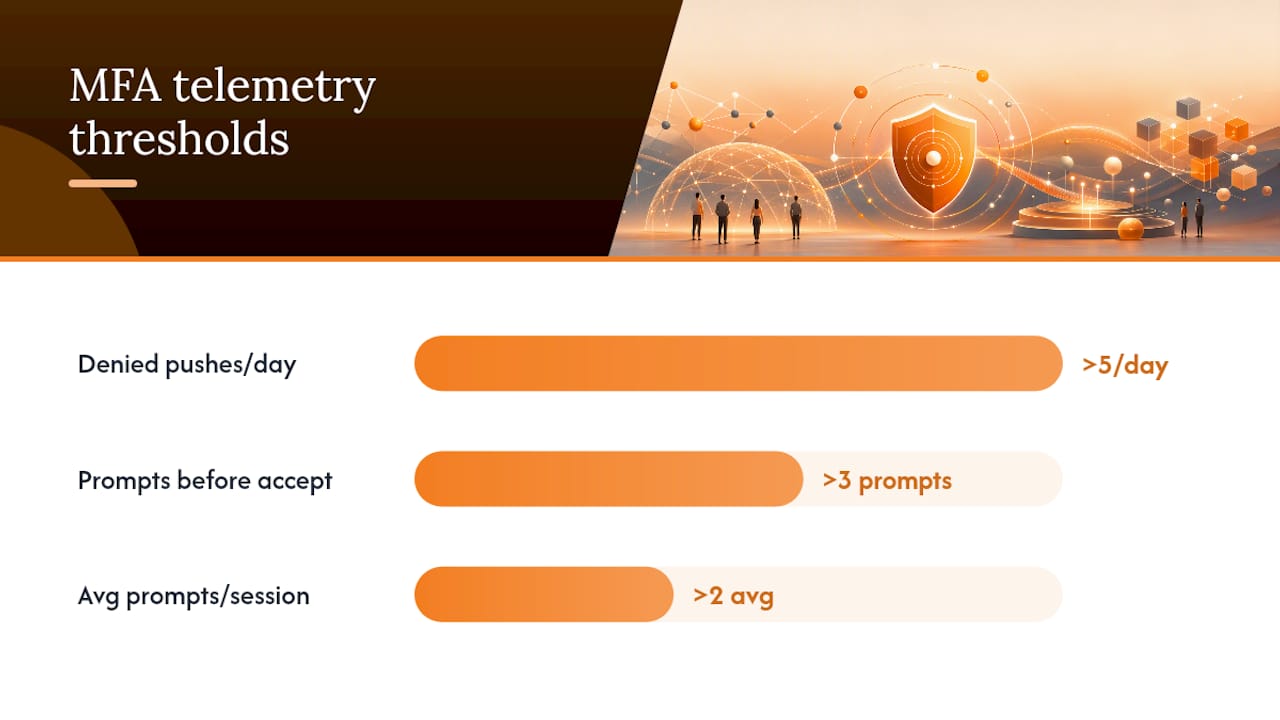
Start by pulling denied-push logs from your identity provider. Most enterprise platforms (Azure AD, Okta, Ping) surface these in their audit logs. If you’re not already routing those signals into your SIEM or identity dashboard, that’s the first instrumentation task.
Pro Tip: Set a baseline for denied-push rate during a quiet two-week period, then use that baseline to calibrate your alert thresholds. A threshold without a baseline is just a guess.
Core mitigations and best practices, prioritized for impact and effort
The mitigations below are ordered by security impact and deployment speed. Work through them in sequence, but don’t let perfect be the enemy of good: number matching alone, deployed this week, meaningfully reduces your push-bombing exposure.
Tier 1: Phishing-resistant MFA (highest impact, longer runway)
FIDO2/WebAuthn and hardware security keys are the architectural endpoint. FIDO2 binds the authentication cryptographically to the origin, so a push-bombing attack against a FIDO2 user simply doesn’t work. There’s no push to approve. The OWASP Authentication Cheat Sheet recommends moving away from weak authenticators (SMS, simple push) toward cryptographic authenticators, and CISA’s guidance places phishing-resistant MFA at the top of its recommendation hierarchy.
Hardware security keys (USB/NFC form factors like those from the FIDO Alliance ecosystem) are the right choice for privileged accounts, IT admins, and any role with access to sensitive systems. Passkeys, the FIDO2-based consumer-friendly variant, work well for broader workforce rollout where hardware distribution is impractical.
Tier 2: Immediate push-bombing mitigations
- Number matching: Requires the user to type a code displayed on the sign-in screen into their authenticator app, breaking the single-tap approval flow. Microsoft’s Azure AD documentation shows exactly how to enable this in a few configuration steps.
- Rate-limit push prompts: Cap the number of push requests per authentication attempt (3–5 is a common policy) and lock the account or require step-up after the limit is hit.
- Disable auto-approve flows: Any push configuration that allows approval without active user input should be disabled.
Tier 3: Adaptive and risk-based controls
Risk-based step-up authentication evaluates signals like device posture, location, login time, and behavioral patterns before deciding which factor to require. A user logging in from a known device on a corporate network during business hours gets a lighter challenge. The same user logging in from an unknown device in a new country at 2 AM gets a harder one. Adaptive authentication approaches reduce total prompt volume for low-risk sessions while concentrating friction where it matters.
Tier 4: Operational UX changes
SSO reduces the number of separate authentication events a user faces per day. A user who authenticates once to an SSO provider and then moves freely between applications generates far fewer prompts than one who re-authenticates per application. Session lifetime policies matter too: sessions that expire too aggressively force re-authentication unnecessarily, while sessions that never expire create their own risk. Find the middle ground based on your risk profile and user workflows.
Recovery path hardening is often overlooked. A strong MFA posture is undermined if the account recovery flow accepts a simple email link or a security question. Harden recovery to require the same or stronger authentication as the primary login path.
Prioritization by organization size:
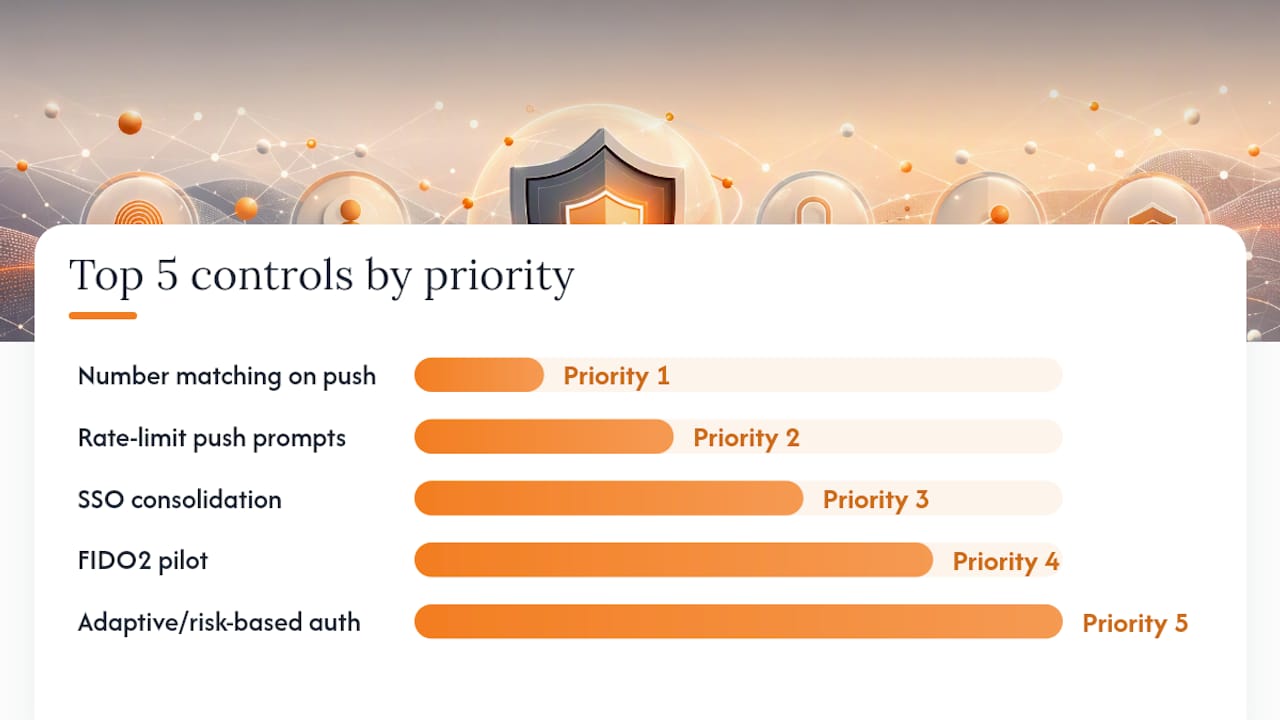
| Priority | Control | Small org (under 500 users) | Mid-size (200–2,000) | Enterprise (thousands+) |
|---|---|---|---|---|
| 1 | Number matching on push | Enable immediately | Enable immediately | Enable immediately |
| 2 | Rate-limit push prompts | Configure in IdP | Configure in IdP | Configure in IdP + SIEM alert |
| 3 | SSO consolidation | Start with top 5 apps | Phased by department | Full IdP-driven SSO |
| 4 | FIDO2 pilot | IT admins first | IT + finance + execs | All privileged roles |
| 5 | Adaptive/risk-based auth | Use IdP built-in rules | Dedicated policy engine | Full UEBA integration |
| 6 | Hardware security keys | Admins only | Privileged roles | All high-risk roles |
| 7 | Recovery path hardening | Audit and fix weak resets | Policy + runbook | Automated enforcement |
Pro Tip: Stage your FIDO2 pilot with a volunteer group from IT. They’ll find the enrollment friction, the edge cases with legacy apps, and the help-desk scripts you need before you roll it out to 500 people who have a deadline.
Implementation checklist: step-by-step actions and metrics to watch
Phase 1: Assess (days 1–3)
- Inventory all applications and their current MFA methods.
- Pull denied-push logs and establish a baseline for the five telemetry metrics above.
- Identify your highest-risk roles (admins, finance, executives, developers with production access).
- Document which applications support FIDO2/WebAuthn and which are limited to push or SMS.
Phase 2: Quick wins (days 4–10)
- Enable number matching on all push-based MFA. For Azure AD environments, follow Microsoft’s number-matching configuration guide.
- Set push rate limits (3–5 prompts max before lockout or step-up).
- Review and tighten session lifetime policies for your highest-risk applications.
- Send a brief user communication explaining the number-matching change and why it matters.
Phase 3: Pilot (weeks 2–8)
- Enroll your IT admin group in FIDO2/passkey authentication.
- Run for two to four weeks, collecting support tickets, enrollment success rates, and denied-push rates.
- Document edge cases: legacy VPN clients, mobile apps that don’t support FIDO2, shared workstations.
- Define acceptance criteria before expanding: target less than one MFA-related support ticket per 50 users per week.
Phase 4: Rollout (months 2–6)
- Expand FIDO2/passkeys to all privileged roles, then to broader workforce groups.
- Deploy SSO for the top 10–20 applications by login frequency to reduce total prompt volume.
- Integrate denied-push telemetry into your SIEM and set automated alerts for push-bombing patterns.
- Update onboarding and offboarding runbooks to include MFA enrollment and de-provisioning steps.
Phase 5: Iterate (ongoing)
- Review MFA telemetry monthly. Track denied-push rate, prompts per session, and help-desk ticket volume.
- Conduct quarterly reviews of which applications still use push or SMS and set migration targets.
- Adjust session policies and risk-based rules based on observed user behavior and incident data.
Timeline summary:
| Phase | Timeline | Key milestone |
|---|---|---|
| Assess | Days 1–3 | Baseline telemetry established |
| Quick wins | Days 4–10 | Number matching live, push rate limits set |
| Pilot | Weeks 2–8 | FIDO2 pilot running for IT admins |
| Rollout | Months 2–6 | Privileged roles on passkeys, SSO expanded |
| Iterate | Ongoing | Monthly telemetry review, quarterly MFA audit |
User education, reporting, and organizational processes
Training users to recognize push bombing is as important as the technical controls. A user who understands what’s happening will deny and report. A user who doesn’t will eventually approve.
Core training talking points:
- What a push notification you didn’t initiate looks like, and why it’s a red flag.
- The number-matching mechanic: if the number on your screen doesn’t match the number in your app, deny and report immediately.
- Never approve a prompt because someone on the phone or in a chat tells you to, regardless of who they claim to be.
- Denying a prompt is the right action. It doesn’t break anything. Report it to the help desk.
Reporting playbook:
- User denies the unexpected push.
- User reports via a dedicated channel (Slack/Teams channel, email alias, or ticketing system) with the time and their username.
- Help desk logs the report and checks the identity provider’s audit log for the source IP and authentication attempt details.
- If the denied-push count for that user exceeds the alert threshold, the SOC is notified automatically.
- The account is reviewed for compromise indicators: recent password changes, new registered devices, unusual access patterns.
Pro Tip: Make the reporting path frictionless. A one-click “Report suspicious MFA” button in your company’s Slack or Teams workspace gets far more reports than an email alias buried in the IT wiki.
Process recommendations:
- Embed MFA enrollment and push-bombing awareness into new-hire onboarding.
- Include MFA de-provisioning in offboarding checklists to prevent orphaned authenticators.
- Run a quarterly review of denied-push trends and use the data to adjust rate limits and session policies.
- Update help-desk runbooks annually to reflect current MFA configurations and escalation paths.
Vendor features and configuration checklist
When evaluating or reconfiguring an identity provider or MFA platform, these are the specific capabilities to verify before you commit.
Feature checklist:
- Number matching support on push notifications (not just available, but enabled by default or easily configurable)
- FIDO2/WebAuthn support for both web and native mobile applications
- Hardware security key management (enrollment, revocation, backup key policies)
- Adaptive risk scoring with configurable signals (device, location, behavior)
- Push rate limiting with configurable thresholds and lockout behavior
- Session binding: can push prompts be tied to a specific session ID or transaction context?
- Denied-push telemetry exposed via API or SIEM integration
- Robust, phishing-resistant recovery flows (not just email link or security questions)
Questions to ask vendors:
- Does your push MFA support number matching, and is it enabled by default?
- Can you bind push prompts to a specific session or transaction ID to prevent replay?
- What rate limits exist on push requests, and are they configurable per policy group?
- How do you surface denied-push telemetry, and does it integrate with standard SIEM formats?
- What FIDO2 authenticator types do you support, and how do you handle cross-platform passkey sync?
- What does your account recovery flow require, and can it be hardened to match primary authentication strength?
Pro Tip: Ask vendors for a demo of their denied-push alerting specifically. Many platforms log the data but don’t surface it in a usable dashboard. If the vendor can’t show you a denied-push spike in under two minutes, assume you’ll be building that view yourself.
Integration challenges to anticipate:
- Legacy applications that don’t support FIDO2 will need a bridge (SAML/OIDC proxy or a password manager with SSO) to participate in a passkey rollout.
- Mobile device management (MDM) enrollment is a prerequisite for device-bound passkeys on mobile; users without enrolled devices will need an alternative path.
- Cross-platform passkey sync (Apple Passkeys, Google Password Manager, Windows Hello) works well within ecosystems but has friction at the boundaries. Plan for users who switch between platforms.
Pro Tip: For enterprise password management environments, verify that your password manager can act as a FIDO2 authenticator or at minimum as an SSO bridge for legacy apps. That single capability eliminates most of the “we can’t migrate this app” objections.
What CISA, NIST, and OWASP say about reducing MFA fatigue
The three authoritative sources on this topic are aligned, and their guidance is more specific than most organizations realize.
CISA is direct: prefer phishing-resistant MFA. Where that’s not immediately feasible, implement number matching on push-based MFA as an interim control. CISA’s fact sheet also specifies that organizations should train users to report unknown or bulk confirmation requests and that security teams should investigate denied-push patterns as potential attack indicators.
NIST SP 800-63B addresses the mechanism directly. The guidance discourages out-of-band authentication schemes that allow blind approval and requires that authentication demonstrate intent through session-bound or cryptographic proof. In plain terms: a push notification that requires only a single tap, with no connection to the specific session being authenticated, does not meet the intent-to-authenticate standard NIST describes. Number matching is the minimum; FIDO2 cryptographic binding is the target.
OWASP takes a similar position. The Authentication Cheat Sheet recommends abandoning ineffective mandatory password rotation, planning for authenticator agility, and favoring cryptographic authenticators over SMS or simple push. OWASP also flags usability: an authentication system that users find so burdensome they route around it has failed, regardless of its theoretical security properties.
The convergence across CISA, NIST, and OWASP is notable. All three point to the same destination: cryptographic, phishing-resistant authentication. The path there runs through number matching, rate limiting, and SSO consolidation.
Lessons from incidents: what went wrong and what fixed it
The Lapsus$ group’s 2022 campaign, analyzed in detail by Microsoft’s security team, is the clearest documented example of push bombing at scale. Attackers obtained credentials through social engineering and data purchases, then triggered repeated MFA push requests to target users. In several cases, they combined the push flood with a phone call impersonating IT support, instructing users to approve the prompt. The technique worked because the push design required no cognitive engagement: one tap, no context, no session binding.
What went wrong in these environments:
- Push prompts had no number matching or session context, making blind approval trivially easy.
- No rate limits on push requests meant attackers could sustain the flood indefinitely.
- Denied-push events weren’t generating alerts, so the SOC had no visibility into the attack in progress.
- Recovery flows in some cases were weaker than the primary authentication, giving attackers an alternative path.
Remediation steps that followed:
- Enable number matching on all push-based MFA immediately.
- Set push rate limits and automatic account lockout after threshold breaches.
- Route denied-push telemetry to the SIEM with automated alerting.
- Audit and harden account recovery flows to require equivalent authentication strength.
- Begin FIDO2 migration for privileged accounts.
Pro Tip: Treat a denied-push spike the same way you’d treat a failed-login spike: as a potential attack in progress, not a user error. Build the alert before you need it.
The pattern repeats across incidents. Weak push design plus absent telemetry plus strong recovery paths equals a reliable attack vector. Each of those three failures has a direct technical fix.
The case for making security the path of least resistance
Most MFA fatigue discussions focus on the attacker. The more useful frame is the user.
When authentication is genuinely frictionless for legitimate users, push bombing stops working. Not because the attacker can’t send prompts, but because the user never sees them. FIDO2 passkeys don’t generate push notifications. A user who authenticates with a hardware key or a device-bound passkey is simply not reachable by this attack class.
The organizations that have made the most progress on reducing login fatigue share a common approach: they treated the authentication experience as a product problem, not just a security problem. They measured prompt volume per user per day, set targets, and held identity teams accountable for hitting them. SSO consolidation, passkey rollout, and session policy tuning were driven by those metrics, not by incident response.
The UCL authentication fatigue research makes the point clearly: when authentication tasks are too frequent and too disruptive, users don’t become more security-conscious. They find workarounds. The secure path has to be the easy path, or users will find a different path.
That’s the practical argument for investing in FIDO2 and SSO beyond the security benefit. Fewer prompts, less friction, and better user experience all reduce the attack surface at the same time. The password management benefits that come from centralizing credentials through a well-configured identity platform compound that effect: users manage fewer secrets, face fewer login events, and have fewer opportunities to make the kind of fatigued mistake attackers are counting on.
Logmeonce brings these mitigations together in one platform
Reducing push fatigue requires more than a policy change. It requires an identity platform that supports number matching, FIDO2/WebAuthn, SSO, adaptive authentication, and the telemetry to measure all of it. That’s where Logmeonce fits into the mitigation playbook described in this guide.

Logmeonce’s enterprise cybersecurity platform covers the full stack: passwordless MFA, SSO across your application portfolio, session controls, and dark web monitoring to catch credential exposure before it becomes a push-bombing opportunity. The enterprise password management layer handles credential centralization and SSO bridging for legacy apps that can’t natively support FIDO2, removing the most common objection to a passkey rollout. You get the telemetry, the controls, and the recovery hardening in one place, without stitching together five separate vendors. Start with a free trial at Logmeonce and run the number-matching and SSO configuration against your current environment to see the prompt-volume reduction directly.
Sources
The sources below are the authoritative references for every recommendation in this guide.
- Implementing Number Matching in MFA Applications
- NIST.SP.800-63B-4
- Authentication Cheat Sheet
- The Great Authentication Fatigue (UCL study)
- Implementing Number Matching in Azure AD (Microsoft Learn)
Recommended


