


 Password Manager
 Identity Theft Protection

 Team / Business
 Enterprise
 Government
 MSP
MSP


The MSP identity stack that actually holds up under audit combines five categories: a centralized password manager, single sign-on (SSO), phishing-resistant MFA or passwordless authentication, encrypted cloud storage, and dark-web monitoring. NIST SP 800-63B and CISA both frame these as foundational, not optional. Logmeonce maps directly to all five.
- Password manager: Eliminates credential sprawl; supports compliance audits and offboarding workflows
- SSO: Centralizes authentication, reduces attack surface, enables step-up authentication for sensitive apps
- Phishing-resistant MFA / passwordless (FIDO2): Meets AAL3 requirements; blocks credential-phishing at the protocol level
- Encrypted cloud storage: Protects regulated data at rest; satisfies HIPAA, CMMC, and similar mandates
- Dark-web monitoring: Converts breach intelligence into forced resets before attackers can use stolen credentials
Key Takeaways
The most effective MSP identity stack combines a centralized password manager, phishing-resistant MFA, SSO, encrypted cloud storage, and dark-web monitoring, sequenced by client risk profile and compliance obligation.
| Point | Details |
|---|---|
| Start with password manager + MFA | These two controls form the baseline for every client type before SSO or monitoring is added. |
| Sequence by risk profile | SMBs start with password manager and MFA; regulated clients deploy all five categories simultaneously. |
| NIST password policy | Minimum 15 characters for privileged accounts, maximum 64, no forced complexity, screen against breach lists. |
| Automate the lock step | Dark-web alert confirmation should trigger an automatic account lock; scope review stays manual. |
| Logmeonce covers all five | One platform for password management, SSO, passwordless MFA, encrypted storage, and dark-web monitoring. |
What cybersecurity tools for MSPs actually do in a bundled stack
Each category serves a distinct function. Packaging them together is what turns a commodity service into a defensible, recurring-revenue offering.
Password manager
A centralized password manager vaults credentials, enforces generation policies, and provides audit trails for every access event. For MSPs, the delivery model is typically managed or co-managed: the MSP holds the admin console, clients get scoped access. SMBs benefit most from eliminating shared spreadsheets; enterprises need it for privileged-account governance; government clients require it for FISMA audit trails. Pairing a business password manager with MFA is often the right baseline for smaller organizations before layering in SSO.
SSO
SSO centralizes authentication across every application a client uses. Per CISA administrative guidance, SSO must be highly available and support step-up authentication for sensitive resources. MSPs typically white-label the IdP layer and bill per-seat or per-tenant.
Phishing-resistant MFA and passwordless
Passwordless authentication stores the private key on the user’s device; a biometric or PIN unlocks it locally. No password ever crosses the wire, which eliminates the phishing vector entirely. When combined with a second factor, it becomes passwordless MFA. FIDO2/WebAuthn is the standard implementation. MSPs can offer this as an upgrade tier for clients in regulated verticals.

Encrypted cloud storage
Client files and backups stored in the cloud need encryption at rest and in transit, with keys the client controls. This is the category most often required by HIPAA, CMMC, and state privacy laws. MSPs bundle it as a storage add-on or include it in a compliance tier.
Dark-web monitoring
Continuous scanning of breach databases and paste sites for client email domains and credential pairs. When a hit appears, the MSP triggers a forced reset workflow. This is the category that most directly converts threat intelligence into a billable, measurable outcome.
How MSPs should prioritize adoption for different client profiles
Risk profile drives sequencing. A small business with ten employees and no compliance obligations has different first-90-days needs than a healthcare group under HIPAA.
Prioritization by client type:
| Client profile | Phase 1 (Day 1–30) | Phase 2 (Day 31–90) | Phase 3 (Day 91–180) |
|---|---|---|---|
| SMB (no compliance) | Password manager + MFA | Dark-web monitoring | SSO for core apps |
| Growth / mid-market | Password manager + MFA + SSO | Dark-web monitoring | Passwordless pilot |
| Regulated (HIPAA/CMMC) | All five categories simultaneously | Compliance reporting | Passwordless enforcement |
| Government | Phishing-resistant MFA (AAL3) first | SSO + password manager | Encrypted storage + monitoring |
- Day 1–30: Audit existing credentials, deploy the password manager, enforce MFA on email and admin accounts. Cost bucket: low to medium (SaaS licensing plus onboarding hours).
- Day 31–90: Roll out SSO to the top five applications, activate dark-web monitoring, configure alert workflows. Cost bucket: medium (integration work, staff training).
- Day 91–180: Pilot passwordless for high-risk roles, enable encrypted cloud storage for regulated data, produce first compliance report. Cost bucket: medium to high depending on client size.
Technical must-haves your MSP stack needs to support
Protocols and when to use them
OIDC and OAuth2 handle modern web and mobile app authentication. Use OIDC when the application needs to verify user identity; use OAuth2 when delegating resource access. SAML remains necessary for legacy enterprise apps, especially on-premises systems that predate OIDC. Most enterprise IdPs support all three; confirm this before signing a vendor contract.
Hybrid identity and directory integration
Most MSP clients run a mix of on-premises Active Directory and cloud apps. The migration path: sync AD to a cloud IdP via Azure AD Connect or a SCIM-compatible connector, then progressively move authentication to the cloud IdP. CISA’s Hybrid Identity Solutions Guidance recommends prioritizing cloud-based passwordless authentication as the end state.
Passwordless and FIDO2 specifics
NIST SP 800-63B defines AAL3 as requiring phishing-resistant, non-exportable cryptographic authenticators. FIDO2 hardware keys (YubiKey-class devices) or platform authenticators (Windows Hello, Touch ID) satisfy this. Confirm that any vendor you evaluate supports passwordless MFA via WebAuthn, not just TOTP.
NIST password policy requirements
- Minimum length: at least 12 characters; aim for longer passphrases for privileged accounts
- Maximum length: do not truncate passwords below 64 characters
- No forced complexity rules (no mandatory symbols, no periodic rotation without cause)
- Allow paste in password fields
- Screen new passwords against breached-credential databases
Pro Tip: Configure your password manager to auto-reject any credential that appears in a known breach list at creation time, not just at login. This catches reused passwords before they become a liability.
Security and configuration best practices aligned with NIST and CISA
Configuration checklist
- Enforce MFA on every admin account before touching anything else
- Set session timeouts: 15 minutes for privileged sessions, 8 hours for standard users
- Require SSO for all SaaS apps; block direct-credential login where the IdP supports it
- Enable immutable audit logs shipped to a SIEM or log aggregator the client does not control
- Rotate service-account credentials on a schedule and immediately on any suspected compromise
Credential lifecycle and non-human accounts
Centralized password management must cover service accounts, API keys, and automation scripts, not just human users. These non-human identities are where credential sprawl is worst and rotation is most neglected. Decouple identity from credentials in legacy services before enforcing rotation, or you will break production workflows.
CISA’s administrative guidance is direct: SSO should centralize authentication control to enable step-up authentication and better auditing. Federated protocols are the recommended path, and SSO availability must be treated as a critical infrastructure dependency, not a convenience feature.
Change management and training
End-user resistance kills rollouts faster than technical problems. Run a 30-minute live session before go-live, not a PDF. Focus on three things: why the change matters, what the new login flow looks like, and who to call when something breaks. Track helpdesk ticket volume in the first two weeks; a spike above baseline signals a training gap, not a tool problem.
Turning dark-web alerts into containment steps
SOP for alert triage
- Validate the hit: confirm the credential pair belongs to a current client account, not a stale or test account
- Determine scope: check whether the password is reused across other systems
- Force reset or lock: disable the account or force an immediate password change before notifying the user
- Notify stakeholders: send a client notification within four hours of confirmed compromise (see template headings below)
- Log remediation: record the alert timestamp, scope determination, reset time, and any downstream systems affected
Client notification template headings: Subject line, affected account(s), confirmed or suspected breach source, actions already taken by MSP, actions required from client, escalation contact.
Metrics to track: time-to-detection (alert receipt to validation), time-to-reset (validation to forced credential change), and percentage of confirmed compromised credentials resolved within SLA. Automate steps 3 and 5 wherever your platform supports it.
A dark-web monitoring program without a documented SOP is just an alert feed. The SOP is what turns it into a billable, auditable service.
How to evaluate identity and password-management vendors
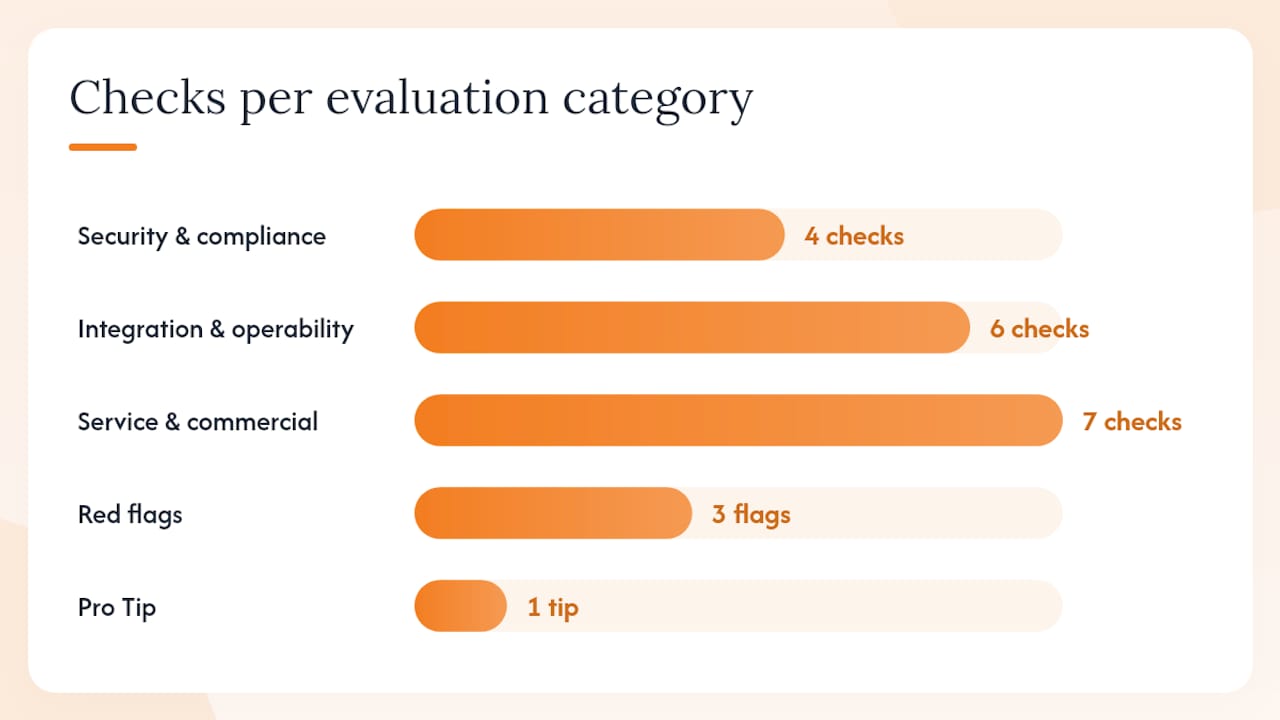
Security and compliance questions:
- Where is data stored, and can you specify US-only residency?
- What encryption standards apply at rest and in transit (AES-256, TLS 1.3)?
- Has the platform completed an independent SOC 2 Type II audit in the last 12 months?
- Does it hold FIPS 140-2 or FIPS 140-3 certification for cryptographic modules?
Integration and operability questions:
- Does it support OIDC, SAML, and OAuth2 natively?
- Is SCIM provisioning available for automated user lifecycle management?
- Does it offer a multi-tenant admin console with delegated permissions per client?
- Can logs and alerts be forwarded to a third-party SIEM?
Service and commercial questions:
- What is the SLA for platform availability, and what is the remediation path when it is missed?
- Is MSP-specific billing (per-tenant, per-seat, consolidated invoicing) available?
- What onboarding support is included, and is white-labeling an option?
Red flags: vendors who cannot produce an independent audit report, platforms that store master keys server-side with no client-controlled key option, and any provider that treats multi-tenant admin as an enterprise-only add-on.
Pro Tip: Ask every vendor for a live demo of their delegated admin console with two simulated tenants. How fast an engineer can isolate one client’s data from another’s tells you more about MSP readiness than any sales deck.
Why identity-first framing changes your MSP go-to-market
Zero trust is not a product. It is an architecture principle, and identity is its control plane. CISA’s zero-trust maturity model treats identity as the first pillar, ahead of devices, networks, and workloads. For MSPs, that sequencing is a go-to-market gift: it means you can sell identity services as the entry point to a broader zero-trust engagement, then expand into device posture, network segmentation, and workload security over time.
Clients who buy identity services from you are stickier than clients who buy only endpoint protection. Credential management touches every login, every application, and every offboarding event. That operational dependency is what converts a transactional client into a long-term managed account.
Responding to credential compromise: actions and automation
When a credential compromise is confirmed, the response sequence matters more than the speed of any single step. Lock the account first, then investigate. Reversing that order lets an attacker maintain access while you are still scoping the incident.
Automation points worth building:
- Auto-lock triggered by dark-web alert confirmation (no human approval required for the lock step)
- Auto-ticket creation in your PSA tool with pre-populated scope fields
- Auto-notification to the client’s designated security contact via a templated message
- Auto-log entry in your compliance reporting system with timestamp and action taken
Manual steps that should stay manual: scope determination (a human needs to confirm blast radius), client communication beyond the initial auto-notification, and any decision to restore access.
Common deployment pitfalls and how to avoid them
Skipping the credential audit. Deploying a password manager into an environment where nobody knows how many service accounts exist guarantees broken integrations on day one. Run a discovery scan first.
Enforcing MFA before SSO is stable. If SSO goes down and MFA is already enforced, users are locked out. Build SSO redundancy before making MFA mandatory.
Ignoring legacy apps. SAML-only apps that cannot federate to your IdP will need application-level passwords stored in the vault. Plan for this explicitly rather than discovering it during rollout.
Treating passwordless as all-or-nothing. Roll it out to a pilot group of 10–15 users in a low-risk role first. Collect friction data, fix the edge cases, then expand.
Integration testing checklist for diverse client environments
Before signing off on any deployment, validate the following across at least two client environments with different directory configurations:
- SSO login works for all target applications (OIDC and SAML paths tested separately)
- MFA enrollment completes on iOS, Android, Windows, and macOS
- Password manager browser extension auto-fills correctly in Chrome, Edge, and Firefox
- SCIM provisioning creates and deprovisions accounts within the expected time window
- Dark-web monitoring alerts route to the correct MSP admin inbox, not the client’s
- Audit logs appear in the SIEM within the agreed latency window
- Encrypted storage read/write works from both on-premises and remote connections
- Failover behavior for SSO is tested: confirm users can authenticate if the primary IdP is unreachable
Document every test result with a pass/fail and a timestamp. This becomes your deployment sign-off record and your first compliance evidence artifact.
Compliance frameworks MSPs must map their identity stack to
HIPAA: Covered entities and their business associates must implement access controls, audit controls, and transmission security. A password manager with audit logging plus MFA satisfies the technical safeguard requirements for access control. Encrypted cloud storage addresses transmission and storage security.
CMMC (Cybersecurity Maturity Model Certification): Level 2 requires MFA for privileged and non-privileged accounts accessing CUI. Level 3 adds phishing-resistant MFA. Your FIDO2 deployment directly satisfies these controls.
GDPR (for clients with EU data subjects): Article 32 requires appropriate technical measures for data security. MFA, encryption, and access logging are the standard technical evidence. Data residency matters here: confirm your vendor can store EU personal data in EU regions.
OMB M-22-09: Federal agencies must use phishing-resistant MFA and move toward enterprise-wide SSO. MSPs serving federal contractors should treat this as a baseline, not a stretch goal.
FIPS 140-2 / 140-3: Required for cryptographic modules used in federal environments. Verify certification status directly on the NIST CMVP database, not from vendor marketing materials.
Map each framework requirement to a specific control in your stack before the client signs. A one-page control mapping document is a sales tool as much as a compliance artifact.
Why identity services are the MSP’s highest-leverage offering
The conventional wisdom in MSP circles is that endpoint protection is the anchor product and everything else is upsell. That framing is backwards. Endpoint tools protect devices. Identity tools protect access, and access is what attackers actually want.
Every breach investigation eventually traces back to a credential: a phished password, a reused login, a service account that never rotated. Endpoint detection catches some of those events after the fact. A well-configured identity stack prevents most of them from becoming events at all.
There is also a business case that rarely gets stated plainly: identity services generate more recurring touchpoints than almost any other managed service. Password resets, MFA enrollment, offboarding workflows, dark-web alerts, SSO app additions — these are weekly interactions, not quarterly check-ins. That frequency builds the kind of operational trust that makes clients reluctant to switch providers.
The MSPs who will own the compliance conversation in the next few years are the ones who can walk into a HIPAA or CMMC audit with a clean control mapping and a year of audit logs. That capability starts with the identity stack, not the firewall.
Logmeonce covers the full MSP identity stack in one platform
MSPs evaluating identity platforms face a familiar problem: most vendors cover two or three of the five required categories and leave gaps that require additional contracts, integrations, and billing relationships. Logmeonce is built to close that gap.

The platform covers password management, passwordless MFA, SSO, encrypted cloud storage, and dark-web monitoring under a single admin console. For MSPs, that means one contract, one support relationship, and one billing line per client instead of five. The multi-tenant admin console lets you manage every client environment from a single pane, with delegated permissions scoped per tenant. Onboarding support and white-label options are available for MSPs who want to present the platform under their own brand.
Start with a free trial or request a demo at Logmeonce to see how the platform maps to your current client roster.
Sources
- NIST SP 800-63B
- NIST SP 800-63B (PDF)
- Hybrid Identity Solutions Guidance (HISG) | CISA
- Passwordless authentication — Wikipedia
- Essential Password Security Tools for Small Businesses (2026 Guide)
- What Is Centralized Password Management? Definition


