


 Password Manager
 Identity Theft Protection

 Team / Business
 Enterprise
 Government
 MSP
MSP


TL;DR:
- Password strength now depends on length, randomness, uniqueness, and breach screening, not complexity rules.
- The 2026 guidelines recommend using passwords of at least 15-16 characters, emphasizing passphrases for better security.
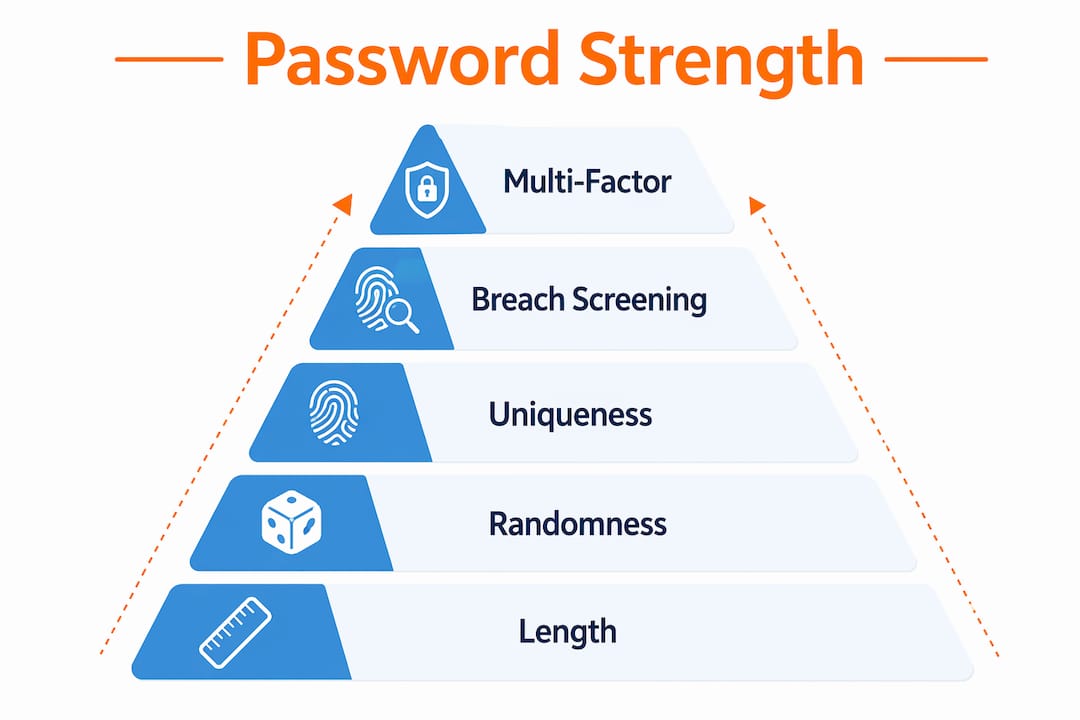
Password strength is defined as how resistant a credential is to guessing, cracking, and brute-force attacks, with length and randomness being the two most critical factors. The 2026 NIST guidelines now set a minimum of 15–16 characters, replacing the outdated 8-character standard that dominated security policy for decades. Complexity rules like mandatory symbols and capital letters are no longer the priority. Length, randomness, uniqueness, and breach screening are the four pillars that determine whether a password actually protects you or just looks like it does.
What actually determines password strength?
Password strength measures how hard it is for an attacker to guess or crack a credential through automated tools. Four factors define it: length, randomness, uniqueness, and breach status. A password that scores well on all four is genuinely difficult to compromise. One that scores well on only one or two is still vulnerable.
Length is the single biggest lever. Every character you add multiplies the number of possible combinations an attacker must try. Randomness determines whether those characters follow a predictable pattern. Uniqueness prevents one breached account from unlocking others. Breach screening confirms the password has never appeared in a known data leak. Miss any one of these, and the others provide less protection than you think.
The 2026 NIST guidelines formalize this understanding. They allow passphrases up to 64 characters and drop mandatory periodic resets, which research showed caused users to make minor, predictable changes rather than genuinely new passwords. The shift reflects how attackers actually work: automated tools, not patient humans guessing one at a time.
Why length matters more than complexity
The traditional complexity model told you to use uppercase letters, numbers, and symbols. That model is now outdated. Complexity substitution patterns like replacing “a” with “@” or “o” with “0” are precomputed by modern cracking tools and provide almost no additional protection. Attackers run these substitutions automatically in the first pass.
Length works differently. Each added character does not add a fixed amount of security. It multiplies it. A 12-character password drawn from lowercase letters has roughly 95 billion possible combinations. A 16-character password from the same set has over 43 trillion. That exponential growth is what makes length the dominant factor in measuring password resilience.

The table below shows how character set size and length interact to produce dramatically different security levels.
| Password length | Character set | Approximate combinations |
|---|---|---|
| 8 characters | Lowercase only | ~208 billion |
| 8 characters | Mixed case + symbols | ~6.1 trillion |
| 16 characters | Lowercase only | ~43 trillion |
| 16 characters | Mixed case + symbols | ~645 quadrillion |
| 20 characters | Mixed case + symbols | ~1.3 sextillion |
The jump from 8 to 16 characters outperforms the jump from lowercase to mixed case at the same length. That is the core argument for prioritizing length. A 20-character truly random password generated by a password manager sits at the top of the practical security range for most accounts.
Pro Tip: If your organization still enforces mandatory symbol requirements without a minimum length above 12 characters, update the policy. A 16-character lowercase passphrase beats an 8-character “complex” password every time.
How randomness and passphrases create stronger credentials
Randomness is the quality that makes a password unpredictable. Humans are poor at generating it. When asked to create a random password, most people draw on familiar words, dates, keyboard patterns, or personal references. Attackers know this. Dictionary attacks and rule-based cracking tools exploit exactly these tendencies.
The EFF Diceware method addresses this directly. It uses physical dice and a vetted word list to generate truly random passphrases. The result is a sequence of unrelated words with no logical or thematic connection. Five random words yield roughly 64 bits of entropy, which is sufficient for standard accounts. Six words are recommended for high-value accounts like banking or email.
Passphrases offer a practical advantage beyond raw security: they are easier to remember than strings like xK9#mP2!qL. A phrase like “staple-lamp-river-cloud-fence” is longer, higher entropy, and memorizable. That combination solves the core usability problem that drives password reuse.
Key principles for building strong passphrases:
- Use a vetted random word list such as the EFF Diceware list, not words you choose yourself
- Select words with no logical connection to each other or to you personally
- Aim for at least five words for standard accounts and six for high-value ones
- Avoid thematic word groups like colors, animals, or sports teams, which reduce effective entropy
- Never reuse a passphrase across accounts, even if it feels unique enough
For accounts where you do not need to type the password manually, a password manager generating 20-plus character random strings is the stronger choice. Reserve passphrases for credentials you must memorize.
Pro Tip: When building a Diceware passphrase, roll the dice for each word rather than picking from the list by eye. Human selection introduces bias that defeats the purpose of the method.
How uniqueness and breach screening prevent cascading compromises
Password reuse is one of the most common and most damaging security mistakes. Attackers who obtain a breached password test it against dozens of other services automatically. A single leaked credential from a low-stakes forum account can unlock email, banking, or corporate systems if the same password was used across them.
Uniqueness means every account gets a credential that exists nowhere else. This limits the blast radius of any single breach. If one password is compromised, the damage stops at that account.
Breach screening adds a second layer. Services like Have I Been Pwned maintain databases of hundreds of millions of compromised passwords. Breach list screening is now a mandatory step under 2026 security standards. A password that has never appeared in a breach is meaningfully safer than one that has, regardless of how complex it looks.
Practical steps for maintaining uniqueness and screening:
- Use a password manager that generates a distinct credential for every account automatically
- Check new passwords against a breach database before deploying them
- Audit existing passwords periodically and replace any that appear in known breach lists
- Treat any reused password as compromised, even if no breach has been confirmed for that specific account
The security of password manager tools has improved significantly. Modern managers encrypt your vault locally before syncing, meaning the provider never sees your actual credentials. That architecture makes them a far safer option than reusing memorable passwords across accounts.
Why strong passwords alone are not enough
Even a 20-character random password can be bypassed without multi-factor authentication. Phishing attacks steal credentials directly from users who enter them on fake login pages. Session hijacking captures authenticated tokens after login. Credential stuffing tests breached passwords at scale. None of these attacks require cracking the password itself.
MFA is now mandatory alongside strong passwords under 2026 security guidance for high-value accounts. It adds a second verification step that an attacker cannot complete with a stolen password alone. App-based codes, hardware tokens, and biometric verification all qualify. SMS codes are the weakest MFA option but still better than no second factor.
The combination of a strong, unique password and MFA creates defense in depth. Neither layer is sufficient alone. Together, they force an attacker to compromise two independent factors simultaneously, which is exponentially harder than compromising one.
MFA implementation priorities for individuals and businesses:
- Enable app-based MFA (such as TOTP codes) on email, banking, and any account with financial or personal data
- Use hardware security keys for administrator accounts and privileged access
- Avoid SMS-based MFA where app-based options exist, since SIM-swapping attacks can intercept text messages
- Treat any account without MFA as operating at reduced security, regardless of password quality
Logmeonce supports passwordless MFA options alongside traditional credential management, giving both individuals and organizations a path to stronger authentication without sacrificing usability.
Key Takeaways
Strong password security requires length, randomness, uniqueness, and breach screening working together, with MFA as a mandatory second layer for any account that matters.
| Point | Details |
|---|---|
| Length beats complexity | A 16-character password outperforms an 8-character complex one; prioritize length above all else. |
| Randomness prevents prediction | Use Diceware or a password manager to generate credentials humans cannot predict. |
| Unique passwords limit damage | One breached password should never unlock more than one account. |
| Breach screening is mandatory | Check every password against known breach databases before and after deployment. |
| MFA closes the gap | A strong password plus app-based MFA blocks attacks that bypass credentials entirely. |
The shift I’ve watched happen in real security practice
For most of the 2010s, security teams obsessed over complexity. Policies demanded uppercase letters, two symbols, a number, and a character that had never appeared in the previous 12 passwords. Users responded by doing exactly what you would expect: they wrote passwords on sticky notes, cycled through minor variations, and reused the same “complex” credential everywhere.
The research caught up with what practitioners already knew. Complexity theater does not stop attackers. Length and randomness do. The 2026 NIST guidelines are not a surprise to anyone who has watched credential stuffing attacks scale up over the past five years. They are a formal acknowledgment of what the data showed.
The part that still frustrates me is the memorization problem. People hear “use a unique 20-character random password for every account” and immediately ask how they are supposed to remember 80 of them. The honest answer is: you are not. That is what password managers are for. Humans should memorize three to five credentials at most: the master password for their manager, their primary email, and perhaps one or two critical accounts. Everything else should be generated and stored.
The one mistake I see even security-aware users make is treating their passphrase as permanent. Passphrases are strong, but they are not immune to phishing or breach. If a passphrase appears in a breach, replace it immediately. The dos and don’ts of password creation are simpler than most people think. The hard part is building the habit of actually following them.
— Mike
Logmeonce makes strong password security practical
Knowing the rules for strong credentials is one thing. Applying them consistently across dozens of accounts is another.

Logmeonce generates high-entropy passwords automatically, stores them in an encrypted vault, and checks them against breach databases without requiring you to manage any of it manually. The platform supports app-based MFA and passwordless authentication, covering both the credential and the second-factor layer in one place. For businesses, Logmeonce scales across teams with centralized policy controls that enforce length, uniqueness, and breach screening by default. Explore the full range of password management benefits and see how Logmeonce fits your security needs.
FAQ
What is the minimum password length recommended in 2026?
The 2026 NIST guidelines recommend a minimum of 15–16 characters, replacing the older 8-character standard. Passphrases up to 64 characters are explicitly supported.
Why is password complexity less important than length?
Complexity substitutions like replacing letters with symbols are precomputed by modern cracking tools and add minimal protection. Length multiplies the number of possible combinations exponentially, making it the stronger defense.
What is a passphrase and how does it improve password resilience?
A passphrase is a sequence of five or more random, unrelated words that provides high entropy while remaining memorizable. Five random words yield approximately 64 bits of entropy, sufficient for most standard accounts.
How does breach screening protect my accounts?
Breach screening checks a password against databases of credentials exposed in previous data breaches. Using a compromised password, even one that looks strong, exposes your account to credential stuffing attacks.
Does a strong password eliminate the need for MFA?
No. Phishing, session hijacking, and credential stuffing can bypass even strong passwords. MFA adds a second verification layer that blocks unauthorized access even when a password is stolen.
Recommended
- How to Create Strong Password to Keep the Hackers Out
- How to Create a Strong Password – LogMeOnce
- After University of Maryland Hack, LogmeOnce Founder Reiterates Importance of Password Strength – LogMeOnce
- How to Remember Passwords While Keeping Them Secure


