


 Password Manager
 Identity Theft Protection

 Team / Business
 Enterprise
 Government
 MSP
MSP


TL;DR:
- Strong passwords rely on length and unpredictability, not on using complex symbols and patterns.
- Organizations should enforce a minimum of 15 characters and screen passwords against breach data to ensure security.
A strong password is defined by length and unpredictability, not by a mix of symbols and capital letters. The gap between strong passwords vs weak passwords is wider than most people realize. Nearly half of all passwords analyzed in 2026 research covering 231 million unique credentials were cracked in under a minute. That single statistic reframes the entire conversation: password security is not about complexity theater. It is about making a password genuinely hard to guess or brute-force. NIST SP 800-63B now sets the minimum at 15 characters for user-chosen passwords, with support for 64 or more. Length, randomness, and breach avoidance are the three pillars that separate a secure credential from a liability.
What characteristics define strong passwords vs weak passwords?
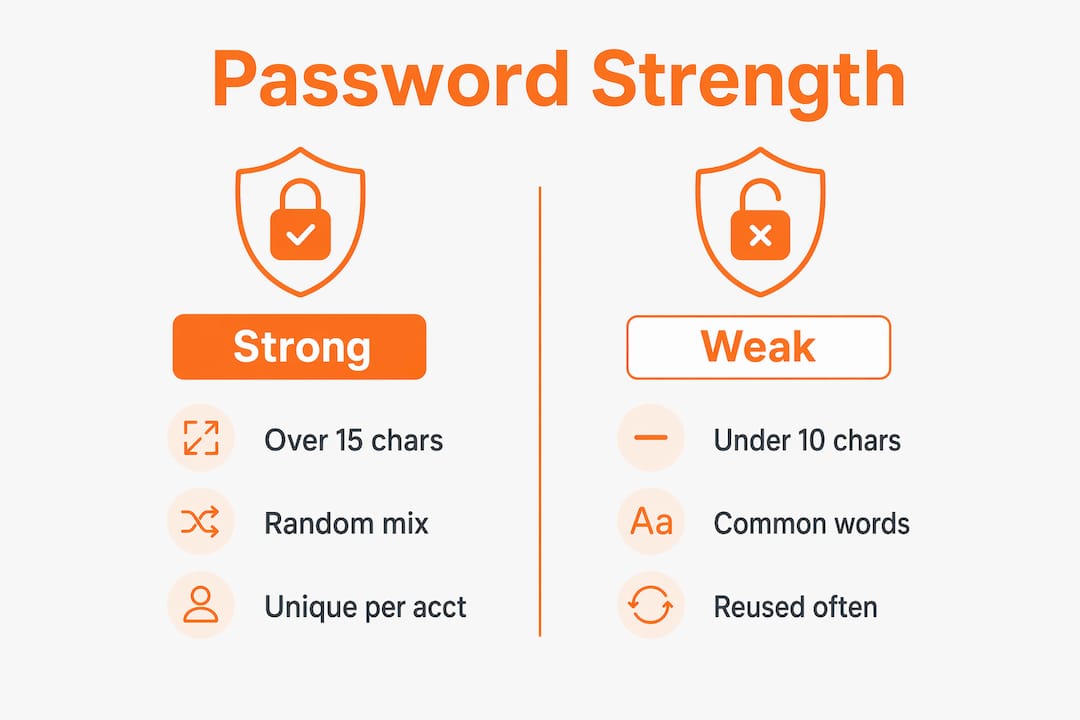
Length is the single most important factor in password strength. A 16-character password built from random characters creates a search space so large that modern cracking tools cannot work through it in any practical timeframe. At 16+ characters, special characters add almost no meaningful protection because the entropy from length alone is already sufficient.

Weak passwords share predictable traits. They are short, often under 10 characters. They use dictionary words, names, or dates. They rely on common substitutions like replacing “a” with “@” or “e” with “3.” Hackers know every one of these patterns. Cracking tools are pre-loaded with substitution rules, so “P@ssw0rd” falls in seconds.
Strong passwords, by contrast, are long, random, and unique to each account. A passphrase built from four unrelated words, such as “correct horse battery staple,” is both memorable and highly resistant to cracking because its entropy comes from word combination, not character tricks. Four random words from a large dictionary provide substantial entropy while staying easy to recall.
| Point | Strong password | Weak password |
|---|---|---|
| Length | 15+ characters | Under 10 characters |
| Predictability | Random or passphrase-based | Dictionary words, names, dates |
| Uniqueness | One password per account | Reused across multiple accounts |
| Complexity | Natural variety from length | Forced symbols replacing letters |
| Breach status | Not found in leaked databases | Commonly found in breach lists |
The table above shows the core differences at a glance. Every weak password trait is something a cracking algorithm directly exploits. Every strong password trait directly defeats those same algorithms.
Pro Tip: Test any password you are considering against HaveIBeenPwned before using it. If it appears in a breach database, discard it immediately regardless of how complex it looks.
Why do current guidelines emphasize length over complexity?
The 2026 update to NIST SP 800-63B removes mandatory complexity rules entirely. The standard now requires a minimum of 15 characters and supports passwords up to 64 characters or longer. This is a deliberate departure from the old model that forced uppercase letters, numbers, and symbols.
The reason is behavioral. When organizations force complexity rules, users respond by creating predictable patterns. “Password1!” satisfies most legacy complexity checkers. It is also one of the first passwords any cracking tool tries. Forced rules create the illusion of security without the substance.
Forced password rotations cause the same problem. Periodic rotation requirements push users to make minor, predictable changes: “Password1!” becomes “Password2!” after a reset. The new credential is marginally different but equally weak. NIST now discourages mandatory rotation unless a breach is confirmed.
The current secure password guidelines focus on three things:
- Minimum length of 15 characters, with no upper limit below 64
- Breach screening at the point of password creation, checking against known compromised credential lists
- No forced complexity rules or mandatory periodic resets without a confirmed security event
“The most impactful password policy change an organization can make is replacing complexity mandates with length requirements and breach screening.” — Security compliance professionals aligned with NIST 800-63B guidance
Pro Tip: If your organization still enforces 90-day password rotations, replace that policy with breach-triggered resets. Users will create stronger passwords when they are not constantly resetting them.
How can you create and manage strong passwords in practice?
Password managers are the most practical solution for both individuals and organizations. They generate long, random, unique passwords for every account automatically. Manual password creation almost always results in reuse or predictable patterns because human memory has real limits.
For accounts where a password manager is not available, a four-word passphrase works well. Pick four unrelated words at random, such as “lamp river cloud fence.” That phrase is 21 characters, easy to type, and far stronger than “Tr0ub4dor&3.” The strength comes from the combination of words, not from character substitution.
Organizations should also review their login form design. Blocking password paste in input fields discourages password manager use and pushes users toward shorter, manually typed passwords. Allowing paste is a simple change that directly improves security compliance across a workforce.
Best practices for passwords in 2026 include:
- Use a password manager to generate and store credentials for every account
- Set a minimum password length of 15 characters in all organizational policies
- Screen new passwords against breach databases like HaveIBeenPwned at creation
- Eliminate forced periodic resets; reset only after a confirmed breach
- Enable multi-factor authentication on every account that supports it
- Never reuse a password across two or more accounts
- Allow password paste in all login forms to support password manager adoption
Multi-factor authentication deserves special emphasis. Even a strong password can be exposed in a data breach. A second factor, such as an authenticator app or hardware key, stops an attacker from using a stolen credential. Strong passwords and multi-factor authentication work together. Neither alone is sufficient for high-value accounts.
Pro Tip: Before deploying a long-password policy, verify that your authentication system does not silently truncate inputs. Some hashing algorithms, including bcrypt, truncate at 72 bytes. A 90-character password may be processed as a 72-character one without any warning to the user.
What are common misconceptions about password strength?
The biggest myth in password security is that complexity equals strength. Adding “!” to the end of a word does not make a password strong. Human-generated complex passwords follow predictable patterns that cracking tools are specifically designed to exploit. Substituting letters with numbers or symbols is one of the first rule sets any modern cracking engine applies.
A second widespread myth is that frequent password changes improve security. The evidence shows the opposite. Users who change passwords on a schedule create weaker credentials over time, not stronger ones. Security improves when passwords are long, unique, and checked against breach databases, not when they are rotated on a calendar.
A third misconception is that AI-generated passwords are automatically safe. AI tools can produce strong passwords, but they can also produce outputs that mimic human patterns if not properly configured. Randomness must be genuine, not just the appearance of randomness.
What experts actually recommend:
- Length over complexity: 20 random characters beats “P@ssw0rd!2024” every time
- Uniqueness over memorability: one password per account, managed by a tool
- Breach screening over rotation: check against compromised lists, not the calendar
- Passphrases over character tricks: four random words outperform symbol-heavy short passwords
The importance of strong passwords is not just about individual accounts. When employees reuse weak passwords, a single breach at one service can cascade into a full corporate network compromise. The effects of weak passwords extend far beyond the account where they are set.
Key takeaways
Strong passwords rely on length and randomness, not complexity rules. Every organization and individual that still follows legacy password policies is operating with a known security gap.
| Point | Details |
|---|---|
| Length beats complexity | Passwords of 15+ characters provide more protection than short, symbol-heavy ones. |
| Breach screening matters | Checking passwords against compromised databases at creation stops known-bad credentials. |
| Avoid forced rotation | Mandatory periodic resets produce predictable, weaker passwords over time. |
| Use a password manager | Managers generate unique, random passwords per account and remove the memory burden. |
| Enable multi-factor authentication | A second factor stops attackers even when a strong password is exposed in a breach. |
Why the complexity obsession is holding organizations back
I have watched organizations spend years enforcing 12-character passwords with three character types, mandatory 90-day resets, and blocked paste fields. Every one of those policies felt like security. None of them were.
The shift from complexity to length is not just a technical update. It is an admission that the old model was built around what was easy to audit, not what actually stopped attackers. A policy that forces “Password1!” is auditable. A policy that requires 20 random characters and breach screening is actually secure.
The resistance I see most often is not malicious. It is inertia. IT teams built their policies around NIST guidance from 2003, and updating them requires admitting those policies were wrong. That is a hard conversation. But the 2026 research showing 60% of passwords cracked within an hour makes the cost of inertia impossible to ignore.
Password managers are the practical answer to the usability problem. Users do not need to remember 20-character random strings if a manager handles storage and autofill. The benefits of using a password manager go beyond convenience. They make the secure behavior the easy behavior, which is the only way to achieve consistent compliance across a workforce.
The future points toward passkeys and passwordless authentication. Those technologies are maturing fast. But until they are universal, long, unique, breach-screened passwords managed by a dedicated tool remain the most reliable defense available.
— Mike
Logmeonce makes strong password practices easier to adopt
Logmeonce is built around the principle that secure behavior should not require extra effort. Its password manager generates long, random, unique credentials for every account automatically, aligned with current NIST guidelines.

Logmeonce also includes breach detection features that flag compromised credentials before they become a problem. For organizations managing dozens or hundreds of accounts, the platform supports policy enforcement, multi-factor authentication, and cloud encryption in one place. Individuals and security teams can explore the full range of Logmeonce cybersecurity solutions to see how the platform fits their specific needs. A free trial is available with no commitment required.
FAQ
What makes a password strong in 2026?
A strong password is at least 15 characters long, randomly generated, unique to one account, and not found in any known breach database. Length and randomness matter far more than symbol requirements.
How are weak passwords hacked?
Attackers use brute-force tools and dictionary attacks that test billions of combinations per second. Short, predictable passwords and common substitutions like “P@ssw0rd” fall within seconds because cracking tools are pre-loaded with those exact patterns.
Are frequent password changes a good security practice?
No. Mandatory periodic resets push users to make minor, predictable changes that weaken security over time. NIST SP 800-63B recommends resetting passwords only when a breach is confirmed.
Why should I use a password manager?
Password managers generate and store long, random, unique passwords for every account. Manual password creation almost always leads to reuse or predictable patterns that attackers exploit.
What is a passphrase and is it stronger than a complex password?
A passphrase is four or more unrelated random words strung together, such as “lamp river cloud fence.” It is typically 20+ characters, easy to remember, and provides more entropy than a short password loaded with symbols.
Recommended
- How to Create Strong Password to Keep the Hackers Out
- How to Create a Strong Password – LogMeOnce
- Lock and Key: Understanding the Risks of a Weak Password
- Dangers of Weak Password – LogMeOnce


