


 Password Manager
 Identity Theft Protection

 Team / Business
 Enterprise
 Government
 MSP
MSP


TL;DR:
- A mature incident response process is a structured, cyclical framework involving preparation, detection, containment, eradication, recovery, and post-incident review to continuously improve security. Teams often struggle with execution gaps, such as delayed containment approval and neglecting post-incident analysis, which lead to recurring incidents. Implementing pre-authorized decision matrices and scheduling immediate post-incident reviews can enhance effectiveness and reduce repeat failures.
The incident response process is a structured, cyclical framework that security teams use to detect, contain, eradicate, and recover from cybersecurity incidents while feeding lessons back into future defenses. Known formally through standards like NIST SP 800-61 Rev. 2 and the SANS Institute methodology, this framework gives organizations a repeatable system for managing threats before they become disasters. Without it, security teams react to incidents ad hoc, which extends damage, increases legal exposure, and guarantees the same failures repeat. This guide walks through every phase, practical preparation steps, and how to turn each incident into a stronger security posture.
What are the core phases of the incident response process?
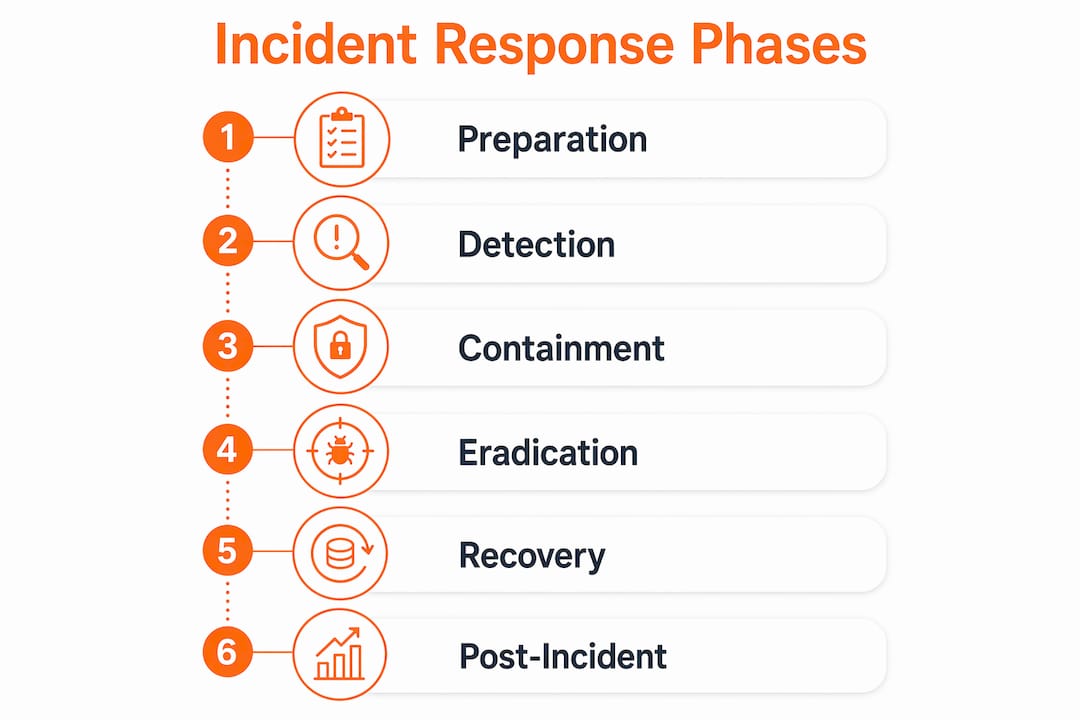
Most organizations operationalize incident response as an iterative lifecycle built around four major phases: Preparation; Detection and Analysis; Containment, Eradication, and Recovery; and Post-Incident Activity. A more granular operational model, aligned with both NIST and SANS, breaks this into six distinct phases that form a continuous loop rather than a linear sequence.
Here is how each phase functions in practice:
- Preparation — Build the plan, train the team, and deploy monitoring tools before any incident occurs.
- Detection and Analysis — Identify potential incidents through alerts, logs, and user reports, then validate and scope the threat.
- Containment — Limit the spread of the incident while preserving evidence for forensic review.
- Eradication — Remove the root cause, whether malware, compromised credentials, or a misconfigured system.
- Recovery — Restore affected systems to normal operation with verified integrity checks.
- Post-Incident Activity — Conduct a structured review, document lessons learned, and update the plan.
The table below compares how three major frameworks organize these phases:
| Framework | Phase Structure | Key Emphasis |
|---|---|---|
| NIST SP 800-61 Rev. 2 | 4 phases (groups containment/eradication/recovery) | Iterative cycle, documentation |
| SANS Institute | 6 phases (PICERL model) | Practical execution, lessons learned |
| ISO 27035 | 5 phases (plan, detect, assess, respond, learn) | Governance and risk alignment |
Teams often cycle through detection, containment, and recovery multiple times as new evidence surfaces. A ransomware incident, for example, may require re-entering the containment phase after discovering a second infected subnet that was missed in the initial sweep. This iterative quality is what separates a mature incident response workflow from a checklist exercise.
Pro Tip: Map your organization’s actual response actions to one of these frameworks before your next tabletop exercise. The gaps between what your team does and what the framework requires are your highest-priority training targets.
How to prepare your team for effective incident response
Preparation is the phase that determines how every other phase performs. Incident response is an operational capability that requires policy, monitoring, detection tools, and reporting structures working together before an incident ever starts.
Effective preparation covers five core areas:
- Incident response plan (IRP): Define incident types, response steps, communication methods, stakeholders, escalation paths, and performance measures. The Canadian Centre for Cyber Security recommends annual testing and revision to keep response capabilities sharp against evolving threats.
- Team structure and decision authority: Assign clear roles including an Incident Commander, technical leads, legal counsel, and communications owners. Undefined decision authority causes delays during containment that allow incidents to spread further.
- Tooling and monitoring: Deploy a SIEM platform such as Splunk or Microsoft Sentinel, endpoint detection and response (EDR) tools, and forensic imaging capabilities before you need them.
- Communication and escalation protocols: Define who gets notified at each severity level, including executives, legal, regulators, and affected customers.
- Testing cadence: Run tabletop exercises quarterly and full simulations annually. Treat the IRP as a living document with versioned revisions after every test, audit, or real incident.
Preparation is not a one-time setup. Organizations that treat it as a project with a completion date consistently underperform during actual incidents. Treat it as an ongoing cybersecurity capability that requires the same maintenance attention as your production systems.
Pro Tip: Create a “go-bag” document for each incident type your organization is likely to face. Include pre-approved containment actions, contact lists, and system diagrams. Your team should be able to act within minutes, not hours.

Best practices for detection, containment, eradication, and recovery
The middle phases of the incident response lifecycle are where damage is controlled and operations are restored. Each phase has distinct objectives and failure modes that security teams must understand.
Turning alerts into validated incidents
Detection starts with an alert but requires analysis to become a confirmed incident. Security teams should triage alerts by severity, cross-reference with threat intelligence feeds, and establish the scope of affected systems before escalating. A single compromised endpoint looks very different from a lateral movement campaign across 40 servers.
Containment without destroying evidence
Containment limits the spread of a threat while keeping forensic evidence intact. The two approaches are short-term containment (isolating affected systems immediately) and long-term containment (applying patches or access controls while systems remain operational). Time-stamped logs of every action taken and every system affected are best practice. This documentation supports forensics, legal proceedings, and the post-incident review.
| Phase | Primary Goal | Common Failure Mode |
|---|---|---|
| Detection | Validate and scope the incident | Alert fatigue causing missed signals |
| Containment | Limit spread, preserve evidence | Wiping systems before imaging them |
| Eradication | Remove root cause completely | Leaving persistence mechanisms in place |
| Recovery | Restore with verified integrity | Rushing restoration without validation |
Eradication and recovery done right
Eradication means removing every artifact of the threat: malware, backdoors, compromised accounts, and attacker-controlled infrastructure. Skipping a thorough eradication step is the leading cause of re-infection within 30 days of an incident. Recovery follows only after eradication is confirmed. Restore systems from clean backups, validate integrity with hash verification, and monitor restored systems closely for 72 hours before returning them to full production status.
Pro Tip: Never restore from a backup taken after the initial compromise date. Verify your backup timestamps against your earliest confirmed indicator of compromise before you begin recovery.
How does post-incident activity drive continuous improvement?
Post-incident activity is the phase most teams skip or rush, and it is the phase that determines whether the same incident happens again. Skipping post-incident activity leads to recurring failures because the root causes and process gaps that enabled the incident remain unaddressed.
A structured post-incident review covers four outputs:
- Root cause analysis: Identify the technical vulnerability and the process failure that allowed exploitation. Both must be addressed.
- Lessons learned documentation: Record what worked, what failed, and what was missing. Distribute this to all stakeholders within five business days of incident closure.
- Plan and runbook updates: Translate findings directly into revised detection logic, updated playbooks, and new escalation contacts. Post-incident improvements must be wired into change management, not just filed in a document.
- Metrics review: Track mean time to detect (MTTD), mean time to respond (MTTR), and containment time per incident. Use these numbers to set improvement targets for the next quarter.
“Continuous learning transforms incidents into opportunities to improve monitoring and detection capabilities.” — PagerDuty Incident Response Lifecycle
The feedback loop from post-incident activity back into preparation is what makes the incident response framework a true cycle rather than a one-time procedure. Organizations that formalize this loop through governance structures, such as a security steering committee or a change advisory board, see measurable reductions in repeat incident rates. Integrating lessons learned into cyber hygiene practices across the organization amplifies the impact beyond the security team alone.
Key takeaways
A mature incident response process requires preparation, clear decision authority, rigorous documentation, and a formal feedback loop that turns every incident into a preparation improvement.
| Point | Details |
|---|---|
| Six-phase lifecycle | NIST and SANS both use a six-phase model that cycles continuously from preparation through post-incident review. |
| Decision authority matters | Undefined roles during containment cause delays that allow incidents to spread and worsen. |
| Documentation is non-negotiable | Time-stamped logs of every action support forensics, legal defense, and after-action accuracy. |
| Post-incident review closes the loop | Skipping this phase guarantees recurring failures; findings must feed directly into plan revisions. |
| Plans require active maintenance | Treat your incident response plan as a living document revised after every test, audit, or real incident. |
Where most IR programs actually break down
After working through dozens of incident response engagements, the failure point is almost never the framework. Teams know NIST. They have a plan document. The breakdown happens in the gap between documentation and execution under pressure.
The clearest example I keep seeing: containment decisions stall because no one has pre-authorized the action of isolating a production server. The Incident Commander wants approval from a VP who is unreachable at 2 a.m. That 90-minute delay turns a contained breach into a network-wide event. The fix is not a better framework. It is a pre-signed decision matrix that authorizes specific containment actions at specific severity levels without requiring executive approval in the moment.
The second consistent failure is treating recovery as the finish line. Teams restore systems, close the ticket, and move on. The post-incident review gets scheduled for “next week” and never happens. The detection gap that allowed the incident to persist for six days stays in place. The next attacker finds the same path.
My honest recommendation: schedule the post-incident review before you close the incident ticket. Make it a condition of closure. Assign a specific person to own the lessons-learned document and give them a hard deadline. The NIST SP 800-61 framework gives you the structure. Your job is to enforce the discipline.
The teams that genuinely improve after incidents are the ones that treat the post-incident review as the most important meeting of the response cycle, not an administrative afterthought.
— Mike
How Logmeonce supports your incident response readiness
Building a strong incident response capability requires more than a written plan. You need continuous monitoring, identity controls, and encrypted data protection working together before an incident starts.

Logmeonce provides cybersecurity solutions designed to support the detection, containment, and recovery phases of your incident response lifecycle. From multi-factor authentication that limits credential-based attack vectors to password management tools that reduce the risk of compromised access, Logmeonce integrates directly into the preparation and eradication phases of your IR plan. Explore Logmeonce’s full suite to strengthen your organization’s security posture before the next incident demands it.
FAQ
What is the incident response process?
The incident response process is a structured framework that security teams follow to detect, contain, eradicate, and recover from cybersecurity incidents. NIST SP 800-61 Rev. 2 and the SANS Institute both define it as a continuous cycle that feeds post-incident learning back into preparation.
How many steps are in an incident response plan?
Most frameworks define four to six incident response steps. NIST uses four phases, while SANS and the Wiz IR lifecycle model use six: Preparation, Detection and Analysis, Containment, Eradication, Recovery, and Post-Incident Activity.
How often should an incident response plan be updated?
The Canadian Centre for Cyber Security recommends reviewing and revising your incident response plan at least annually, and after every significant test, audit, or real incident. Plans that go unrevised become ineffective against current threat patterns.
What is the most commonly skipped phase in incident response?
Post-incident activity is the most frequently skipped phase. Skipping it leaves root causes unaddressed and guarantees that the same incident types recur, according to the NIST SP 800-61 framework.
What is the difference between an incident response framework and an incident response plan?
An incident response framework such as NIST SP 800-61 or ISO 27035 defines the phases and principles of response. An incident response plan is your organization’s specific document that applies that framework to your systems, teams, escalation paths, and communication protocols.


