


 Password Manager
 Identity Theft Protection

 Team / Business
 Enterprise
 Government
 MSP
MSP

TL;DR:
- Most passwords are probably compromised, making multi-factor authentication essential for real security. Authentication apps generate secure codes offline using TOTP, providing stronger protection than SMS and resistant to common attacks. Passkeys, built on FIDO2 standards, are the future, offering seamless, phishing-resistant login methods for individuals and organizations.
Your password was probably compromised years ago. Billions of credentials sit in dark web databases right now, waiting for the right buyer. Relying solely on a password is the digital equivalent of locking your front door with tape. Security with authentication apps, known in the industry as multi-factor authentication (MFA), solves this by requiring a second form of proof before granting access. This guide covers exactly how these apps work, which ones are worth your time, how to deploy them at scale, and what the shift to passkeys means for your security strategy.
Key takeaways
| Point | Details |
|---|---|
| Passwords alone are insufficient | Billions of leaked credentials make a second layer of verification non-negotiable for real protection. |
| TOTP works offline | Authentication apps generate time-based codes locally, making them far safer than SMS-based verification. |
| Recovery planning is critical | Without backup codes or a secondary authenticator, losing your device can permanently lock you out. |
| Passkeys are the next standard | Over 5 billion passkeys are now in use globally, signaling a major shift away from traditional 2FA. |
| Enterprise adoption needs training | Organizational MFA success depends as much on user education as on technical deployment. |
How authentication apps work
Most people understand that authentication apps produce a six-digit code. Far fewer understand why that code is actually secure, and that gap matters when you are choosing between different multi-factor authentication solutions.
The TOTP algorithm explained
The engine inside most authentication apps is the Time-based One-Time Password (TOTP) algorithm. When you set up an app by scanning a QR code, the service shares a secret cryptographic key with your device. From that point forward, your app and the server independently run the same calculation using that secret key plus the current Unix timestamp. Because both sides sync to the same time reference, they produce the same six-digit code every 30 seconds. The codes never travel over a network. TOTP apps compute codes locally with that shared secret, which is exactly why they work in airplane mode and why intercepting your Wi-Fi traffic gains an attacker nothing useful.
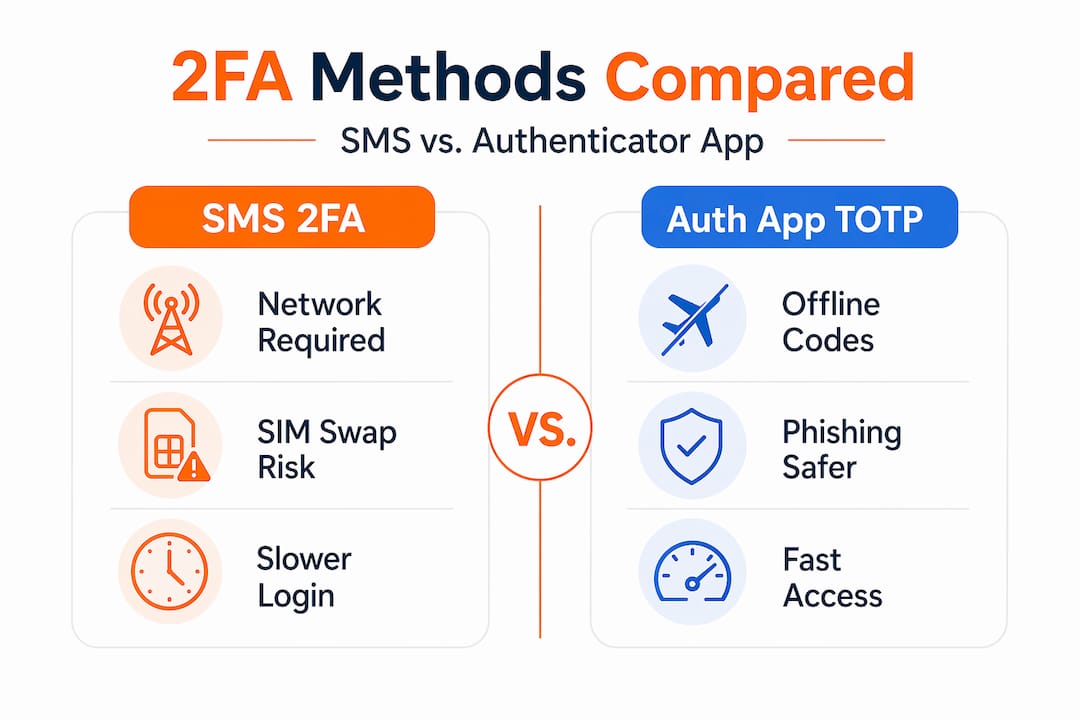
This is the core technical advantage over SMS codes. SMS-based 2FA is vulnerable to SS7 exploits and SIM swapping, where an attacker convinces your carrier to redirect your number to their device. NIST and security researchers have been recommending a move away from SMS toward app or hardware token methods for years.
Passkeys and the FIDO2 standard
Passkeys represent the next evolution. Built on the FIDO2 and WebAuthn standards, a passkey replaces both your password and your second factor with a single cryptographic credential stored on your device. When you authenticate, your device signs a challenge from the server using a private key that never leaves your hardware. There is no shared secret to steal, no code to intercept, and no phishing page that can capture anything useful because the credential is bound to the legitimate domain. Passkeys provide stronger phishing resistance and a genuinely better user experience than password-plus-2FA combinations.
| Method | Offline capable | Phishing resistant | User experience |
|---|---|---|---|
| SMS 2FA | No | No | Moderate |
| TOTP app | Yes | Partial | Good |
| Push approval | No | Partial | Very good |
| Passkey (FIDO2) | Yes (device-bound) | Yes | Excellent |
Pro Tip: When setting up any TOTP app, screenshot or print the backup QR code the service provides. Store it somewhere physically secure. That QR code is the only way to recreate your tokens if you lose your device without a cloud backup enabled.
Choosing the right authentication app
Knowing how authentication apps work is only half the battle. You still need to pick the right one for your situation. Here is a breakdown of the major contenders.

Google Authenticator is the most widely supported app. It generates verification codes offline and now supports syncing to your Google Account, which protects your tokens if you replace your phone. The tradeoff is that your codes live in Google’s ecosystem.
Microsoft Authenticator goes beyond simple TOTP. It adds push approvals with number matching, which requires you to type the number shown on your login screen into the app before approving. Number matching combats MFA fatigue by preventing users from blindly tapping “approve” on fraudulent push requests. It also supports device certificates for enterprise environments.
Authy offers encrypted cloud backup across multiple devices, which is useful if you regularly switch between a phone and a tablet. The cloud sync is protected by a backup password you set, meaning Twilio (Authy’s owner) cannot decrypt your tokens.
2FAS and Ente Auth are strong open-source alternatives with no accounts required and local or encrypted cloud backup options. They appeal to privacy-conscious users who want transparency in the code.
Bitwarden Authenticator integrates TOTP directly into its password manager, useful for reducing the number of apps you manage.
| App | Cloud backup | Open source | Push approval | Best for |
|---|---|---|---|---|
| Google Authenticator | Yes (Google) | No | No | Personal, Google users |
| Microsoft Authenticator | Yes (Microsoft) | No | Yes | Enterprise, Microsoft 365 |
| Authy | Yes (encrypted) | No | No | Multi-device personal use |
| 2FAS | Optional (encrypted) | Yes | No | Privacy-focused users |
| Ente Auth | Yes (end-to-end) | Yes | No | Privacy-focused users |
| Bitwarden Authenticator | Yes | Yes | No | Password manager users |
Pro Tip: Never store your TOTP tokens in the same app as your passwords unless that app uses separate encryption layers for each. Combining them simplifies your setup, but a single breach exposes everything at once.
Security benefits and real limitations
The case for authentication app security is strong. A second factor stops the overwhelming majority of automated account takeover attacks. Even if an attacker has your password from a data breach, they cannot log in without the current code from your physical device. Two-factor authentication blocks essentially all bulk phishing attacks and most targeted attacks when TOTP is implemented correctly.
For enterprises, the calculus is even clearer. NIST IR 8587 stresses protecting identity tokens throughout their entire lifecycle, not just at the moment of authentication. That means token verification, lifecycle controls, and protection against forgery across federated and API systems. Turning on MFA is step one. Engineering it properly is the real work.
Applying NIST information security standards within your authentication stack is what separates a checkbox deployment from one that actually holds up under pressure.
That said, authentication apps are not invincible. Three failure modes deserve serious attention:
- MFA fatigue. Attackers send dozens of push approval requests hoping a user accidentally approves one. Number matching in Microsoft Authenticator was specifically designed to close this gap.
- Adversary-in-the-middle attacks. A sophisticated phishing proxy can capture your TOTP code in real time and replay it before it expires. TOTP does not protect against this. Only passkeys are truly immune.
- Recovery holes. If your backup plan is “call customer support,” you may find that an attacker can social-engineer their way through that process faster than you can. Backup codes and secondary authenticators are the only reliable safety net.
“Effective authentication security depends on engineering token verification and secure lifecycle management, not just endpoint MFA enablement.” — NIST IR 8587 Implementation Guidance
Practical setup and usage tips
Getting started with secure login via apps is straightforward. Keeping it secure over time requires a bit more discipline.
- Enable MFA on every account that supports it. Start with email and financial accounts, since those are the keys to every other account through password reset flows.
- Scan the QR code carefully. When setting up TOTP, point your camera steadily at the code displayed on the website. Once scanned, verify that the first generated code works before closing the setup screen.
- Save your backup codes immediately. Most services generate 8 to 10 single-use recovery codes during setup. Store them in an encrypted note or a printed document in a physically secure location.
- Manage your trusted devices. Apple’s approach is a good model: trusted devices and phone numbers must be actively managed so verification codes reach you reliably, and you are not locked out when switching hardware.
- Integrate with a password manager. Pairing your authenticator with a quality password management solution creates a unified security layer where strong, unique passwords and second factors work together.
- Train your team. For businesses, technical deployment is only half the job. Regular training on recognizing push fatigue attacks and understanding why MFA matters dramatically improves compliance and reduces incidents.
Pro Tip: Set a recurring calendar reminder every six months to audit which accounts have MFA enabled, which authenticator app each one uses, and whether your backup codes are still accessible. Neglected MFA setups are nearly as dangerous as having no MFA at all.
The shift to passkeys and what comes next
The numbers tell a clear story. The FIDO Alliance reports 5 billion passkeys now in active use, with 90% of consumers now familiar with the concept. Among organizations deploying passkeys, 47% report improved security confidence, 45% report faster logins, and 32% report a measurable reduction in phishing incidents.
Those are not incremental improvements. Those are the kinds of numbers that shift how an entire industry thinks about authentication app security.
For individuals, the transition is already underway. Major platforms including Apple, Google, and Microsoft support passkeys natively. You can already replace your TOTP app for many services today by creating a passkey tied to your device’s biometric sensor.
For businesses, the picture is more nuanced. Legacy applications, complex identity federation setups, and user training requirements mean TOTP-based MFA will remain relevant for years. The smart move is a parallel strategy: deploy TOTP now for accounts that do not yet support passkeys, adopt passkeys wherever possible, and plan your migration timeline for everything else. Organizations that ignore the shift risk getting stuck maintaining two incompatible authentication systems simultaneously rather than managing a planned transition.
Interoperability is also maturing. The FIDO Alliance’s passkey credential exchange specifications are designed to let you move passkeys between platforms and password managers, reducing the vendor lock-in concern that made some organizations hesitant to commit early.
My honest take after years watching this space
I’ve spent years watching both individuals and organizations approach MFA with good intentions and then undermine their own security through poor planning. The pattern is remarkably consistent.
The most dangerous mistake I see is treating setup as the finish line. People enable an authenticator app, feel secure, and never think about what happens when they get a new phone. Suddenly they cannot access accounts, they have never looked at their backup codes, and they are calling support lines that may let an attacker in through social engineering. Backup and recovery planning is not optional. It should be the first thing you set up, not an afterthought.
I’ve also seen enterprises push MFA to employees without any explanation of why it matters or how to use it correctly. The result is MFA fatigue on week two and users approving pushes just to make the notifications stop. That is worse than no MFA, because it creates a false sense of security.
My honest recommendation: use cloud-synced backup in your authenticator app if you are an individual. Yes, it adds a dependency on Google or Microsoft or a third-party encrypted vault. But a perfectly secure setup you get locked out of is useless. Convenience and security are not opposites. They need to be balanced deliberately.
On passkeys: embrace them now wherever you can. The experience is genuinely better, the security is genuinely stronger, and the earlier you build familiarity with the standard, the less disruptive the full transition will be.
— Mike
Take your authentication security further with LogMeOnce

If you have read this far, you understand that real digital security requires more than a single strong password. LogMeOnce brings together everything you need in one place: two-factor authentication features, passwordless login options, encrypted cloud storage, and a password manager built for both individuals and enterprise teams. The platform supports TOTP, push approvals, and passkey-ready authentication in a unified interface, so you are not juggling three separate apps and hoping they all stay in sync. Explore LogMeOnce password management benefits and see how consolidating your security tools actually simplifies your setup instead of complicating it.
FAQ
What is the difference between 2FA and MFA?
Two-factor authentication (2FA) uses exactly two verification factors, typically a password plus a code from an app. Multi-factor authentication (MFA) is the broader category covering two or more factors, which can include biometrics, hardware keys, or passkeys alongside traditional codes.
Are authentication apps safer than SMS verification?
Yes. SMS 2FA is vulnerable to SIM swapping and SS7 protocol exploits, while TOTP apps generate codes locally with no network transmission. NIST guidance recommends moving away from SMS-based verification toward app or hardware-based methods.
What happens if I lose my phone and cannot access my authenticator app?
Use the backup codes you saved during setup, or log in through a secondary authenticator if you configured one. Apple recommends actively managing trusted devices and phone numbers to maintain account access when your primary device is unavailable.
How do passkeys differ from standard authentication apps?
Passkeys use public-key cryptography tied to your device hardware, replacing both your password and your TOTP code with a single credential that never leaves your device. They are immune to phishing because the credential is cryptographically bound to the legitimate domain, unlike TOTP codes which can be intercepted in real time.
Which authentication app is best for business use?
Microsoft Authenticator is widely considered the strongest enterprise option because it supports push approvals with number matching, which reduces MFA fatigue, along with device certificate integration for Microsoft 365 environments. Businesses with diverse identity needs should also evaluate enterprise identity platforms that support multiple authenticator types and centralized management.
Recommended


