


 Password Manager
 Identity Theft Protection

 Team / Business
 Enterprise
 Government
 MSP
MSP


TL;DR:
- Implementing SSO reduces password reuse, enhances security, and simplifies user onboarding and offboarding processes. It centralizes access control and auditing, decreasing breach risks and IT help desk burdens. However, careful planning and ongoing operational discipline are essential to avoid configuration pitfalls and ensure long-term effectiveness.
Most organizations operate under a silent myth: the more login credentials employees manage, the more locked down their systems must be. Security through complexity sounds logical until you examine what actually happens. Password overload drives employees toward reuse, weak choices, and phishing vulnerability, quietly eroding the very protection those extra credentials were supposed to create. Single sign-on (SSO) flips this logic entirely, and this guide walks you through exactly how it works, what it delivers, where it can break, and how to deploy it without turning your IT team’s lives upside down.
Key Takeaways
| Point | Details |
|---|---|
| Centralized access control | Single sign-on improves security by allowing IT to manage user permissions and access from one location. |
| Reduced password fatigue | Users log in only once, decreasing the risk of unsafe password habits and boosting productivity. |
| Faster onboarding and offboarding | Organizations can quickly grant or revoke access across all apps, which improves security and saves IT time. |
| Protocol challenges exist | Implementing SSO requires careful protocol selection and configuration to avoid integration pitfalls. |
| Ongoing maintenance required | SSO systems need regular updates, monitoring, and staff training to stay secure and reliable. |
What is single sign-on? The basics IT leaders need to know
SSO is an authentication method that lets a user log in once and gain access to multiple applications without logging in again. Think of it like a master key card for a corporate building. One scan at the front door, and you’re cleared for every floor you’re authorized to access.
At its core, SSO operates through two main players. The Identity Provider (IdP) handles authentication. It verifies who the user is. The Service Providers (SPs) are the individual apps, whether that’s your CRM, your HR platform, or your cloud storage. The IdP authenticates the user, then issues a secure token or assertion to each service provider, confirming the user’s identity without requiring another password.
This architecture is what makes SSO and online security such a natural pairing. When authentication is centralized, your IT team controls access from a single point, making it far easier to enforce policies, audit access, and revoke permissions the moment someone leaves the organization.
Understanding how SSO keeps data secure requires understanding what it eliminates. With SSO, users no longer maintain separate credentials for every system. Centralizing authentication via an IdP and issuing tokens to service providers reduces password sprawl, enables faster access, and simplifies access control for IT teams across the board.
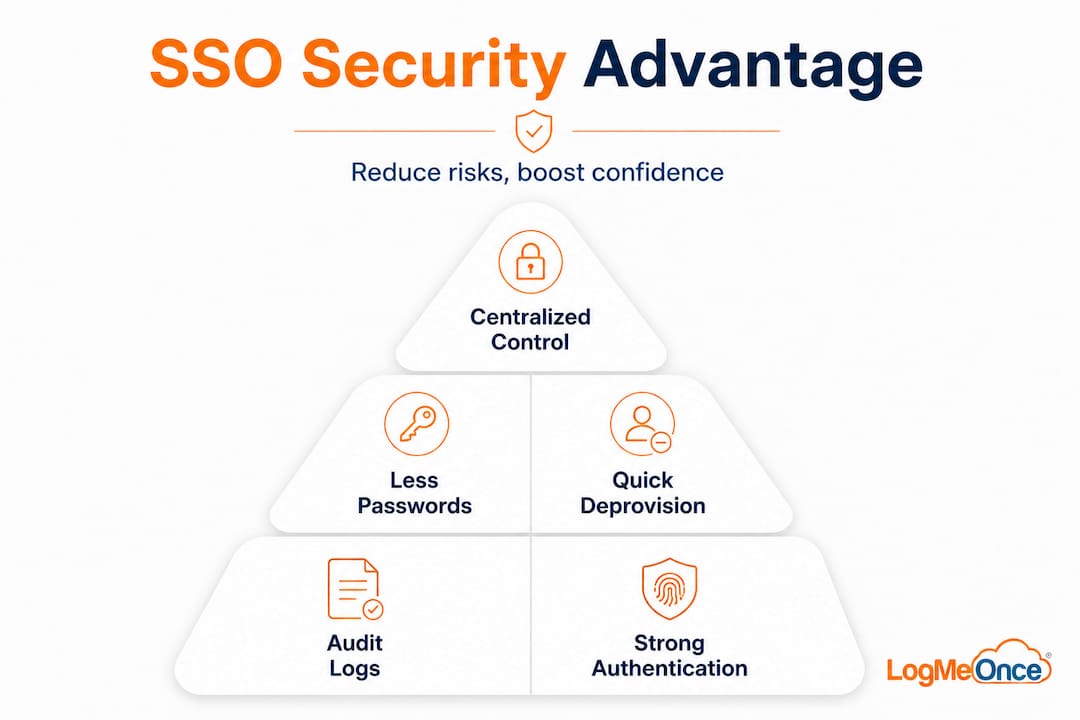
Here’s a quick look at what SSO architecture involves:
| Component | Role | Example |
|---|---|---|
| Identity Provider (IdP) | Authenticates users and issues tokens | Okta, Azure AD, LogMeOnce |
| Service Provider (SP) | Accepts tokens and grants access to apps | Salesforce, Slack, Google Workspace |
| Authentication Protocol | Defines how tokens are created and verified | SAML, OAuth 2.0, OIDC |
| Directory Service | Stores user identities and attributes | Active Directory, LDAP |
Key things SSO does for your organization:
- Eliminates repeated logins across connected applications
- Centralizes access provisioning and deprovisioning
- Reduces the number of credentials stored across your environment
- Enforces consistent authentication policies across all connected systems
- Integrates with multi-factor authentication (MFA) at a single enforcement point
5 reasons enterprises should implement SSO
Once SSO’s fundamentals are clear, its business and security advantages become hard to ignore. Here are the five reasons IT and security leaders consistently prioritize SSO in their identity management strategy.
1. Significantly reduced breach risk from passwords
Password-related incidents remain the most common attack vector in enterprise environments. Employees who manage dozens of logins tend to reuse passwords, write them down, or fall for phishing attempts. SSO shrinks the attack surface. There are fewer credentials to steal, fewer places those credentials live, and fewer moments where a user is asked to enter a password at all. Connecting this to enterprise password management benefits makes the risk reduction concrete and measurable.

2. Streamlined onboarding and offboarding
When a new employee joins, IT needs to provision access to potentially dozens of applications. Without SSO, that means creating accounts in each system individually. With SSO, provisioning happens once at the IdP level. The same logic applies in reverse when someone leaves. Revoking one account at the IdP immediately cuts access to every connected application. This matters enormously for identity management solutions in organizations with high staff turnover or large contractor populations.
3. Simplified regulatory compliance
Frameworks like SOC 2, HIPAA, and ISO 27001 require organizations to demonstrate who accessed what, and when. SSO generates centralized access logs by default, giving your compliance team a single source of truth. Instead of piecing together audit trails from fifteen separate application logs, you pull one report from the IdP. This alone can reduce compliance audit preparation time by a significant margin.
4. Reduced IT help desk load
Password reset requests routinely account for 20 to 50 percent of help desk ticket volume in enterprises without SSO. Every reset costs staff time and creates a window of frustration for the employee waiting. With SSO, the number of passwords employees must remember drops to one (or in passwordless configurations, zero). Centralizing authentication via an IdP not only reduces ticket volume but also frees your IT team to focus on higher-value work.
5. Elevated user productivity and satisfaction
Logging in repeatedly to separate systems throughout the workday creates friction. It sounds minor, but the cumulative effect across an organization of 500 employees adds up to thousands of hours lost annually. Employees who can move between tools without interruption maintain focus and complete tasks faster. Security controls that get in the way of work often get bypassed; SSO keeps controls strong while removing the friction that pushes users toward workarounds.
Statistic to note: Gartner research consistently identifies password-related issues as responsible for a significant share of help desk calls in enterprises. Reducing this burden through SSO directly improves IT team efficiency and reduces operational costs.
Pro Tip: Pair SSO with MFA at the IdP level so that the single authentication point becomes both convenient and strongly secured. One strong login beats twelve weak ones every time.
Common SSO pitfalls: Implementation challenges and how to avoid them
After seeing the upsides, it is critical to look honestly at where SSO deployments run into trouble. The technology is mature, but implementation details have a way of creating friction that can delay rollouts and frustrate IT teams.
Common implementation edge cases include protocol fragmentation across SAML, OAuth, and OIDC, per-provider configuration differences, attribute mapping inconsistencies, and ongoing maintenance demands like certificate rotation. These aren’t hypothetical problems. They’re the specific issues that cause SSO integrations to fail quietly in production.
Here’s a comparison of the three major SSO protocols:
| Protocol | Primary use case | Token format | Common issue |
|---|---|---|---|
| SAML 2.0 | Enterprise web apps, older systems | XML assertions | Verbose config, certificate management |
| OAuth 2.0 | API authorization, modern apps | Access tokens | Often confused with authentication |
| OIDC | Modern identity layer on top of OAuth | JWT (JSON Web Token) | Subtle scope and claims mismatches |
The biggest hidden challenges in SSO deployments:
- Protocol fragmentation: Your CRM may support SAML while your DevOps tools use OIDC. Your IdP must handle both, and the configuration for each is distinct.
- Attribute mapping errors: When an app expects a user attribute called “email_address” but your IdP sends “mail,” login silently fails. These bugs are notoriously hard to trace.
- Certificate rotation: SAML in particular relies on X.509 certificates that expire. When they do, SSO breaks for affected applications. Without a rotation schedule and alerting, this becomes a fire drill.
- Opaque debugging: SSO failures often surface as vague error messages. The actual cause, a misconfigured attribute, an expired certificate, or a clock skew between servers, is buried in logs that require specialist knowledge to read.
Pro Tip: Build a dedicated SSO runbook before you go live. Document every integration, the protocol used, the certificate expiry dates, and the specific attribute mappings. When something breaks at 2 a.m., your on-call engineer will thank you for it. For more detail on building a secure SSO deployment process, start with your highest-risk applications first.
How to roll out SSO effectively: A step-by-step IT checklist
With a clear picture of both the rewards and the risks, here is a practical deployment checklist to guide your SSO rollout from planning through sustained operation.
Step 1: Conduct a thorough needs assessment
Map every application your organization uses and categorize by user base, sensitivity level, and current authentication method. Identify which apps already support SAML, OAuth, or OIDC. Flag legacy systems that may require custom connectors or proxy-based SSO. This inventory becomes the foundation of your integration plan.
Step 2: Select SSO protocols and a compatible identity provider
Based on your app inventory, choose the protocols you’ll need to support. Then evaluate IdP vendors on compatibility, scalability, MFA support, and total cost of ownership. Make sure the IdP you select has native connectors for your most critical applications. Pre-built connectors dramatically reduce configuration effort and the likelihood of attribute mapping errors.
Step 3: Develop a phased rollout plan starting with a pilot group
Never roll SSO out to your entire organization simultaneously. Start with a pilot group of 20 to 50 users who represent a cross section of roles and technical sophistication. Integrate two to three applications in the first phase. Measure the experience, gather feedback, and iron out issues before expanding. This approach limits blast radius if something goes wrong.
Step 4: Test integrations thoroughly before full launch
Test each application integration with both happy-path (normal login) and edge-case scenarios. Test what happens when a user’s session expires, when a certificate is close to renewal, and when someone is deprovisioned mid-session. Include security testing to verify that tokens cannot be replayed or intercepted.
“SSO may be easy to demo but hard to operate. Configuration errors, attribute inconsistencies, opaque debugging, and ongoing maintenance requirements are the real challenges that surface after launch.” — How SSO works, why it breaks
Step 5: Establish ongoing SSO health monitoring and support
Set up alerting for certificate expiry, failed authentication events, and unusual login patterns. Assign clear ownership for SSO operations within your IT team. Schedule quarterly reviews to assess whether new applications need to be integrated and whether any configurations have drifted. Making SSO straightforward over the long term is mostly about operational discipline, not just the initial setup.
What most IT teams overlook when implementing SSO
Here is an uncomfortable truth we see repeatedly: most IT teams treat SSO as a project, not a practice. They scope the deployment, allocate budget, launch, and move on. Then, six months later, a certificate expires without warning, an acquired company’s user base can’t authenticate, or a new SaaS application gets added outside the SSO umbrella. The gains start eroding quietly.
The real differentiator between organizations that benefit long-term from SSO and those that struggle is operational discipline. SSO is not a product you install and forget. It is an ongoing capability that needs the same maintenance rhythm as any other piece of critical infrastructure. That means scheduled certificate reviews, a process for onboarding new applications into the SSO framework, user lifecycle audits, and an incident response playbook specifically for authentication outages.
There’s also a training dimension that teams consistently underestimate. End users who don’t understand how SSO works will escalate tickets when sessions expire or behave unexpectedly. Administrators who haven’t been trained on the specific IdP’s tooling will make configuration mistakes under pressure. Investment in training is not optional, it is part of what makes the technology actually work.
We’ve seen organizations lean on advanced password management alongside SSO to cover the gaps. Not every application will ever support SSO, and legacy systems in particular may require traditional credential management in parallel. A mature identity strategy accounts for both and treats them as complementary rather than competitive.
Teams that treat SSO as a lifecycle, not a launch, report the strongest long-term value. That means building SSO health into your regular operational reviews, assigning ownership explicitly, and funding the ongoing work of keeping integrations current. The technology is proven. The discipline around operating it is what separates organizations that thrive from those that quietly drift back toward password chaos.
Explore seamless SSO and cybersecurity solutions from LogMeOnce
If this guide has clarified how SSO can transform your organization’s security posture and IT efficiency, the logical next step is finding a platform built to make it work at scale, without the operational headaches that derail less integrated solutions.

LogMeOnce delivers enterprise cybersecurity solutions that combine SSO, passwordless MFA, encrypted cloud storage, and dark web monitoring in one tightly integrated suite. You get centralized identity control without the complexity of stitching together multiple point products. Whether you’re managing access for 50 users or 50,000, the platform scales cleanly. Explore the full range of password management benefits and see how LogMeOnce can be the identity backbone your IT strategy needs. Start with a free trial and experience the difference that purpose-built identity management delivers.
Frequently asked questions
How does single sign-on (SSO) improve IT security?
SSO reduces password sprawl and centralizes authentication via an IdP, making access control and deprovisioning far more efficient and reducing the number of credentials that can be compromised.
What is the difference between SAML, OAuth, and OIDC?
SAML, OAuth, and OIDC are distinct SSO protocols that each exchange authentication data differently, with SAML suited for enterprise apps, OAuth for API authorization, and OIDC as a modern identity layer built on OAuth.
What are the key challenges when implementing SSO?
The primary challenges include protocol compatibility issues, attribute mapping errors, configuration differences across providers, and ongoing maintenance requirements like certificate rotation.
Does SSO make it easier to comply with regulations?
Yes, SSO centralizes access logs and control through the IdP, giving compliance teams a single audit trail that simplifies reporting for frameworks like HIPAA, SOC 2, and ISO 27001.
Recommended
- Single Sign On – Online Security Needn’t be Complex
- What Is Single Sign-On and How Does It Keep Information Secure?


