


 Password Manager
 Identity Theft Protection

 Team / Business
 Enterprise
 Government
 MSP
MSP


TL;DR:
- Effective identity management prevents attackers from exploiting compromised credentials and overprivileged accounts. Establishing a structured IAM and IGA program, integrating Zero Trust principles, and continuously measuring security metrics are vital for small and mid-sized enterprises. Tailoring controls, fostering organizational buy-in, and leveraging robust solutions like LogMeOnce strengthen security and streamline compliance efforts.
Attackers rarely break through firewalls directly. They walk in through compromised credentials, overprivileged accounts, and forgotten service logins. For IT managers at small and mid-sized enterprises, that reality is especially sharp: you’re managing complex user populations with limited staff, tight budgets, and zero tolerance for downtime. A disciplined identity management process changes that equation. This guide delivers a practical, ordered framework covering assessment, implementation, and verification so your team can reduce the attack surface, satisfy auditors, and keep daily operations running without friction.
Key Takeaways
| Point | Details |
|---|---|
| Map and assess risks | Evaluate current identity processes and risks to guide your security priorities. |
| Implement essential IAM controls | Prioritize MFA, passwordless, access review, and least privilege to stop threats. |
| Address edge cases proactively | Regularly test for issues like MFA fatigue, dormant accounts, and privilege creep. |
| Track metrics for ongoing success | Use measurable outcomes like MFA adoption and access review rates to ensure progress. |
| Culture drives results | Lasting security depends on user buy-in and process alignment as much as tools. |
Understand identity management fundamentals
To confidently follow the step-by-step guide, you need a solid grasp of the basic concepts and terms.
Identity and Access Management (IAM) is the discipline of defining who can access what, when, and under what conditions. It covers authentication (proving who you are), authorization (determining what you can do), and the enforcement of policies that connect those two decisions. IAM is operational: it enables logins, manages credentials, and enforces access rules in real time.
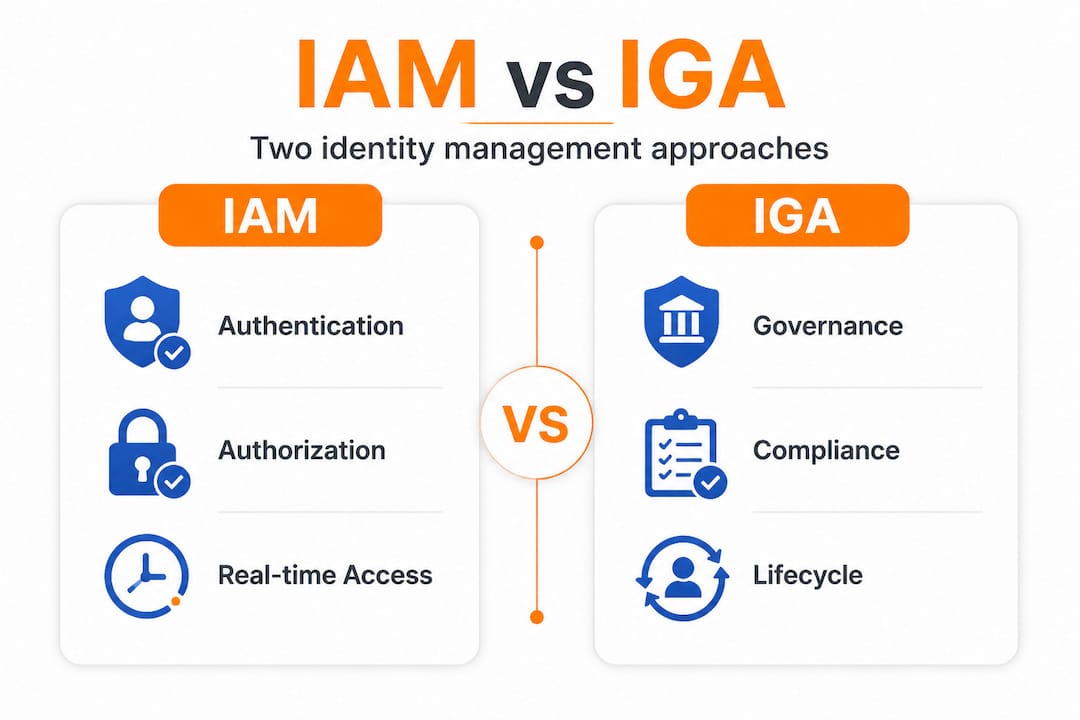
Identity Governance and Administration (IGA) sits one layer above IAM. Where IAM handles the mechanics of access, IGA oversees policies, performs access reviews, manages the entire identity lifecycle, and ensures compliance with regulations. Think of IAM as the gatekeeper and IGA as the auditor who checks whether the right people have the right keys. As the IGA and IAM distinction makes clear, IAM handles authentication and authorization while IGA oversees governance, audits, and compliance including access reviews and lifecycle management. You genuinely need both.
Zero Trust is now the baseline security model for serious organizations. Under Zero Trust, no user or device is trusted by default, even inside the corporate network. Instead of static permissions granted once and forgotten, continuous verification with contextual risk factors like device posture and location become the standard. Aligning with NIST 800 information security frameworks reinforces this shift by requiring ongoing risk evaluation rather than one-time access grants.
Here is what a mature IAM/IGA program covers:
- Authentication: passwords, MFA, biometrics, certificates
- Authorization: role-based access control (RBAC), attribute-based access control (ABAC)
- Identity lifecycle: provisioning, deprovisioning, role changes
- Compliance and audits: access reviews, certifications, reporting
- Privileged access management: elevated accounts, service accounts, admin roles
- Federation: single sign-on (SSO), cross-organization trust
| Dimension | IAM focus | IGA focus |
|---|---|---|
| Primary function | Authentication and authorization | Governance, audit, compliance |
| Who uses it | End users, apps, systems | IT, security, compliance teams |
| Key activities | Login, access enforcement, SSO | Access reviews, lifecycle, reporting |
| Response time | Real-time | Periodic/continuous |
| Regulatory role | Enforcement | Documentation and attestation |
Preparation: Assess risks, requirements, and prerequisites
With foundational concepts set, the next step is understanding your organization’s unique risks and requirements.

Before deploying any new control, you need a clear picture of what you’re protecting and at what level. The NIST SP 800-63-4 risk management process provides a disciplined starting point: conduct an initial impact assessment by user group, select assurance levels, then tailor and document your chosen controls. This structure prevents the common mistake of applying enterprise-grade controls to low-risk processes or using inadequate protections on high-value systems.
The three assurance levels you need to assign are:
- IAL (Identity Assurance Level): How confident you are that a claimed identity is real
- AAL (Authentication Assurance Level): How strong the authentication mechanism is
- FAL (Federation Assurance Level): How trustworthy the assertion passing between systems is
Follow this sequence to map your environment:
- List every application and data system your users access.
- Classify each system by potential impact if compromised (low, medium, high).
- Identify the user groups accessing each system, including contractors and service accounts.
- Match each group and system to an IAL, AAL, and FAL tier based on risk.
- Document regulatory requirements (HIPAA, PCI-DSS, SOC 2, etc.) and note where they elevate required assurance levels.
- Identify privileged accounts, shared credentials, and unmanaged service accounts as priority targets.
| Risk tier | Example systems | Recommended AAL | Notes |
|---|---|---|---|
| Low | Intranet wikis, internal newsletters | AAL1 | Basic password sufficient |
| Medium | CRM, HR portals, collaboration tools | AAL2 | MFA required |
| High | Finance systems, ERP, admin consoles | AAL3 | Phishing-resistant MFA, hardware keys |
| Critical | Identity infrastructure, backups, root accounts | AAL3+ | Just-in-time access, zero standing privileges |
Pro Tip: Involve business unit owners when classifying applications, not just IT staff. Finance managers and HR directors understand the real-world impact of a breach far better than a service desk ticket ever will. Early buy-in also speeds up later rollout by preventing last-minute objections from stakeholders who feel excluded.
Consult NIST 800 guidance for detailed control tailoring instructions aligned to each assurance level. The documentation requirement is non-negotiable. Without written records of your impact assessments, you have no baseline for audits and no defensible record of due diligence.
Step by step: Implement core identity management controls
Once you’ve mapped your requirements, it’s time to get hands-on with actionable identity management steps.
The following sequence is built around realistic priorities for SME IT teams. Each step delivers measurable risk reduction before you move to the next one.
-
Build a baseline identity inventory. You cannot manage what you cannot see. Pull a complete list of all active accounts, service accounts, shared credentials, and admin accounts across every system. Flag any account not tied to a named individual.
-
Enforce multi-factor authentication across all user-facing systems. Start with admin and privileged accounts where the blast radius of a compromise is largest. Per IAM best practices, phishing-resistant MFA for admins, passwordless options where possible, and quarterly access reviews are the foundation of strong identity hygiene.
-
Implement conditional access policies. Conditional access evaluates context at login time: device compliance status, network location, sign-in risk, and user behavior patterns. A finance manager logging in from a new country at 3 AM should trigger a stepped-up authentication requirement or a block, not a silent approval.
-
Enable passwordless solutions for high-value accounts. Passwordless methods like FIDO2 security keys, biometrics, and certificate-based authentication eliminate the credential theft vector entirely for those accounts. It is a radical improvement in security with surprisingly low user friction once deployed properly.
-
Review and right-size privileges. Using enterprise password management principles, compare each account’s actual usage against its assigned permissions. Remove excess permissions, convert standing admin rights to just-in-time (JIT) access, and enforce separation of duties for sensitive operations.
-
Lock down service accounts. Service accounts are perennial weak spots. They often have high privileges, no MFA, no owner, and are never reviewed. Assign every service account a documented owner, restrict interactive login, rotate credentials on a fixed schedule, and monitor for anomalous behavior.
Never let operational convenience override admin account security. If an admin claims MFA is “too slow” for their workflow, the real issue is a poorly designed process. Solve the process problem, not the security control.
You should compare top IAM platforms to understand which tools fit your environment before committing to a vendor. The right platform significantly reduces manual effort at every step above.
Pro Tip: Automate account removal as part of your HR offboarding workflow. Every hour a departed employee’s account stays active is unnecessary risk. Use scheduled scripts or ITSM integrations to trigger account disablement the moment an offboarding ticket is opened.
Troubleshooting and managing edge cases
Effectively setting controls is only half the journey; anticipating potential weak spots keeps your defenses adaptive.
Even well-designed identity programs run into scenarios that break assumptions. Knowing these edge cases in advance lets you build defenses before attackers find the gaps. Common identity management edge cases that people often forget include:
- Token expiry and misuse: Expired session tokens that aren’t cleanly invalidated can be reused by attackers who captured them earlier.
- MFA fatigue and bypass: Attackers flood users with MFA push notifications hoping for an accidental or frustrated approval.
- Impossible travel: A login from New York followed by a login from Singapore 30 minutes later is physically impossible and usually indicates credential theft.
- Dormant account activation: Accounts that haven’t logged in for 90 or more days suddenly become active, often a sign of a compromise or forgotten credential reuse.
- Service account interactive logins: A service account logging in interactively is almost always anomalous and should generate an immediate alert.
- Privilege creep from role changes: Employees who transfer departments often accumulate permissions from both old and new roles without anyone removing the previous set.
Practical remediation steps for each scenario: configure token lifetimes appropriate to session sensitivity; deploy passwordless MFA which eliminates push-approval attacks entirely; implement sign-in risk policies to auto-block impossible travel events; set dormant account thresholds with automatic disablement after 60 days of inactivity; and schedule quarterly access reviews tied to your HR system to catch privilege creep before it compounds.
Understanding the enterprise security nuances around password management and identity hygiene reveals how even small procedural gaps become serious vulnerabilities over time.
Pro Tip: Regularly run simulated authentication failures and account recovery scenarios with your real users. Watching where users stall, skip steps, or try workarounds will surface design flaws in your authentication flows that no security review meeting will ever catch.
Verification: Measure success and ensure continuous improvement
To make your improvements stick, ongoing measurement and adjustment are crucial.
Deploying controls without measuring them is the identity management equivalent of locking the front door and never checking whether the lock is working. Strong IAM metrics provide the visibility you need to demonstrate progress, find gaps, and justify investment.
Target 100% MFA adoption as your first non-negotiable benchmark. Any account not covered by MFA is a liability, full stop. Beyond that, key identity metrics worth tracking include access review completion rate, mean time to deprovision, privileged account count reduction, and failed authentication rate baselines.
| Metric | Target | If off-track |
|---|---|---|
| MFA adoption rate | 100% | Identify and remediate uncovered accounts immediately |
| Access review completion | 100% quarterly | Automate reminders; escalate to management if blocked |
| Mean time to deprovision | Under 24 hours | Integrate HR offboarding with identity provisioning systems |
| Privileged account count | Declining quarter over quarter | Enforce JIT access; eliminate standing admin roles |
| Failed authentication rate | Establish baseline, alert on spikes | Investigate anomalies; check for credential stuffing |
Follow this quarterly review cycle to keep your program on track:
- Pull your IAM metrics dashboard and compare against targets set the previous quarter.
- Run a full access certification campaign: every manager reviews and approves or removes the access rights of their direct reports.
- Audit all privileged accounts and service accounts for owner documentation and recent activity.
- Review conditional access policies for outdated conditions, for example, location rules that no longer match business operations.
- Update your risk assessment if the business has added new applications, changed vendors, or hired contractors.
Pair these reviews with your enterprise IAM tools to automate data collection and reporting. Manual spreadsheet audits at scale invite human error and delay.
What most guides miss about real-world identity management
Every published identity management framework assumes the hardest part is technical: configure MFA, deploy conditional access, run access reviews. In practice, the hardest part is getting people to care.
Experienced security teams know that a perfectly architected IAM deployment can fail because a single senior executive demanded an exception to the MFA policy. Or because the finance team’s line-of-business application doesn’t support modern authentication and IT quietly left it unprotected for two years while waiting for a vendor update that never came. These are not edge cases. They are the norm.
The real lessons come from watching enterprise scenarios play out in organizations of every size. Process changes routinely deliver faster security improvements than product purchases. Killing shared accounts, enforcing an offboarding checklist, and requiring manager sign-off on access requests often reduce your attack surface more in 30 days than a new platform rollout over six months.
Here’s the counterintuitive insight most guides skip entirely:
Sometimes improving security means removing controls, not adding them. If users are drowning in MFA prompts, they start finding workarounds. Simplifying authentication to well-designed, contextual policies actually reduces risk compared to friction-heavy systems people learn to bypass.
Human resistance is not a failure of your security program. It is data. When users push back on a control, they are telling you the design creates unnecessary friction. Listen. Adjust. Build security that fits the way people actually work, and they will stop fighting it.
Culture and leadership alignment matter more than any tool selection decision. If your CISO cannot get a 30-minute executive briefing on identity risk onto the calendar, that is the first problem to solve, before you configure a single policy.
Secure your next steps with robust digital identity solutions
When you’re ready to push your identity strategy forward with proven tools, here’s where to start.
Putting this framework into action requires platforms that match your organization’s scale and complexity without demanding a dedicated enterprise IT team to manage them. LogMeOnce brings together comprehensive cybersecurity solutions designed specifically for teams navigating the full IAM lifecycle: from initial MFA rollout to mature privilege governance.

With advanced MFA tools that support phishing-resistant authentication, passwordless login, and adaptive policy enforcement, LogMeOnce helps you implement the exact controls this guide covers. Explore the full range of password management benefits to understand how centralized credential control, automated provisioning, and audit-ready reporting can simplify your next compliance cycle and strengthen your identity posture from day one.
Frequently asked questions
How do I choose the right assurance level for each user group?
Assess the impact of user actions on your systems and data, then use the NIST SP 800-63-4 framework to assign Identity Assurance Level (IAL), Authentication Assurance Level (AAL), and Federation Assurance Level (FAL) based on the actual risk each user group represents.
What identity management metrics matter most for small and midsize enterprises?
Track MFA adoption, access review rates, mean time to deprovision, reduction in privileged account count, and your baseline failed authentication rate. These five metrics give a complete picture of both posture and operational hygiene.
How can I reduce MFA fatigue for admins and users?
Implement phishing-resistant MFA methods for critical roles to eliminate push-notification fatigue entirely, and use contextual authentication signals to minimize unnecessary prompts for low-risk, routine logins.
What’s the biggest mistake SMBs make with identity management?
Skipping regular access reviews and failing to promptly deprovision accounts after personnel changes are the most common and consequential errors, leaving your environment quietly exposed for months or years.
How are IAM and IGA different, and do I need both?
IAM manages real-time access decisions while IGA governs lifecycle and compliance; both are essential because operational access control without governance oversight creates compliance gaps and undetected privilege accumulation.


