Logo and interface of LogMeOnce password manager, featuring various app icons
LogMeOnce provides passwordless security for nonprofits, protecting sensitive donor and volunteer data without requiring password management. Its zero-knowledge encryption ensures only your organization accesses stored credentials. Unlike competitors offering limited discounts, LogMeOnce delivers enterprise-grade protection with QR code and selfie sign-ins, eliminating password-related vulnerabilities across distributed teams.
Key Takeaways
- Nonprofit password management failures stem from a structural vulnerability, as most organizations lack dedicated IT staff.
- Shared spreadsheets and sticky notes remain common credential storage methods, exposing organizations to unauthorized access and data loss.
- Volunteer turnover magnifies risk, as former volunteers retain access to email platforms, donor databases, and social media accounts.
- Zero-knowledge encryption ensures only authorized users can unlock stored records, with the provider unable to access encrypted contents.
Why are nonprofits prime cyber targets?
Nonprofit organizations face disproportionate cyber risk because they hold valuable donor data while operating with minimal security resources. Credential theft attacks exploit this gap relentlessly, targeting the very organizations least equipped to defend themselves.
Nonprofit password management failures stem from a structural vulnerability. Most nonprofits lack dedicated IT staff. An operations manager or executive director often handles security tasks alongside their primary responsibilities. This arrangement leaves credential hygiene unmonitored. Shared spreadsheets and sticky notes become the default system for managing access to donor databases, banking portals, and grant platforms.
What makes donor data so attractive to attackers?
Donor records contain names, addresses, payment details, and giving histories. Attackers sell this information or use it for targeted phishing campaigns against your supporters. A single compromised volunteer account provides entry to systems holding years of sensitive constituent data.
How do limited budgets increase breach risk?
Tight budgets force difficult tradeoffs. Security tools get deprioritized against program funding. Staff training on phishing recognition happens once a year at best. Without a password manager for nonprofits, organizations rely on memory and browser-saved logins. These practices create credential reuse across platforms. One breached password cascades into multiple system compromises.
The consequences extend beyond immediate data loss. Donor trust erodes when constituents learn their information was exposed. Regulatory penalties for data protection failures add financial damage to reputational harm. Secure password sharing for volunteers becomes essential when board members, part-time staff, and seasonal volunteers all need controlled access to different systems. Without it, organizations carry risk they cannot see and losses they cannot recover.

What access challenges do nonprofits face?
Nonprofits manage sensitive donor data and financial accounts with limited IT resources. Shared spreadsheets and sticky notes remain common credential storage methods, yet these practices expose organizations to unauthorized access and data loss. Without a password manager for nonprofits, every shared login becomes a potential breach point.
Volunteer turnover magnifies the risk. Board members, event staff, and seasonal helpers cycle in and out regularly. When a volunteer departs, shared account credentials often stay unchanged for months. Former volunteers retain access to email platforms, donor databases, and social media accounts long after their service ends. This offboarding gap creates vulnerabilities that most nonprofit leaders never detect.
Why does volunteer turnover create security gaps?
Nonprofits average higher personnel churn than typical businesses. Each departure leaves behind active credentials unless someone manually updates every shared password. Most organizations lack a formal offboarding checklist for digital access. The result is a growing list of unrevoked permissions across critical systems.
How do reused passwords increase breach exposure?
Staff and volunteers frequently reuse the same credentials across multiple platforms. One compromised password unlocks email, fundraising tools, and cloud storage simultaneously. Nonprofit password management eliminates this cascade risk by enforcing unique credentials for every account. Without that enforcement, a single phishing attack on a volunteer compromises the entire organization’s digital infrastructure.
Secure password sharing for volunteers addresses these challenges directly. Role-based access controls grant temporary permissions that expire automatically. When a volunteer’s term ends, system access ends with it. No sticky notes. No spreadsheets. No lingering credentials waiting to be exploited.
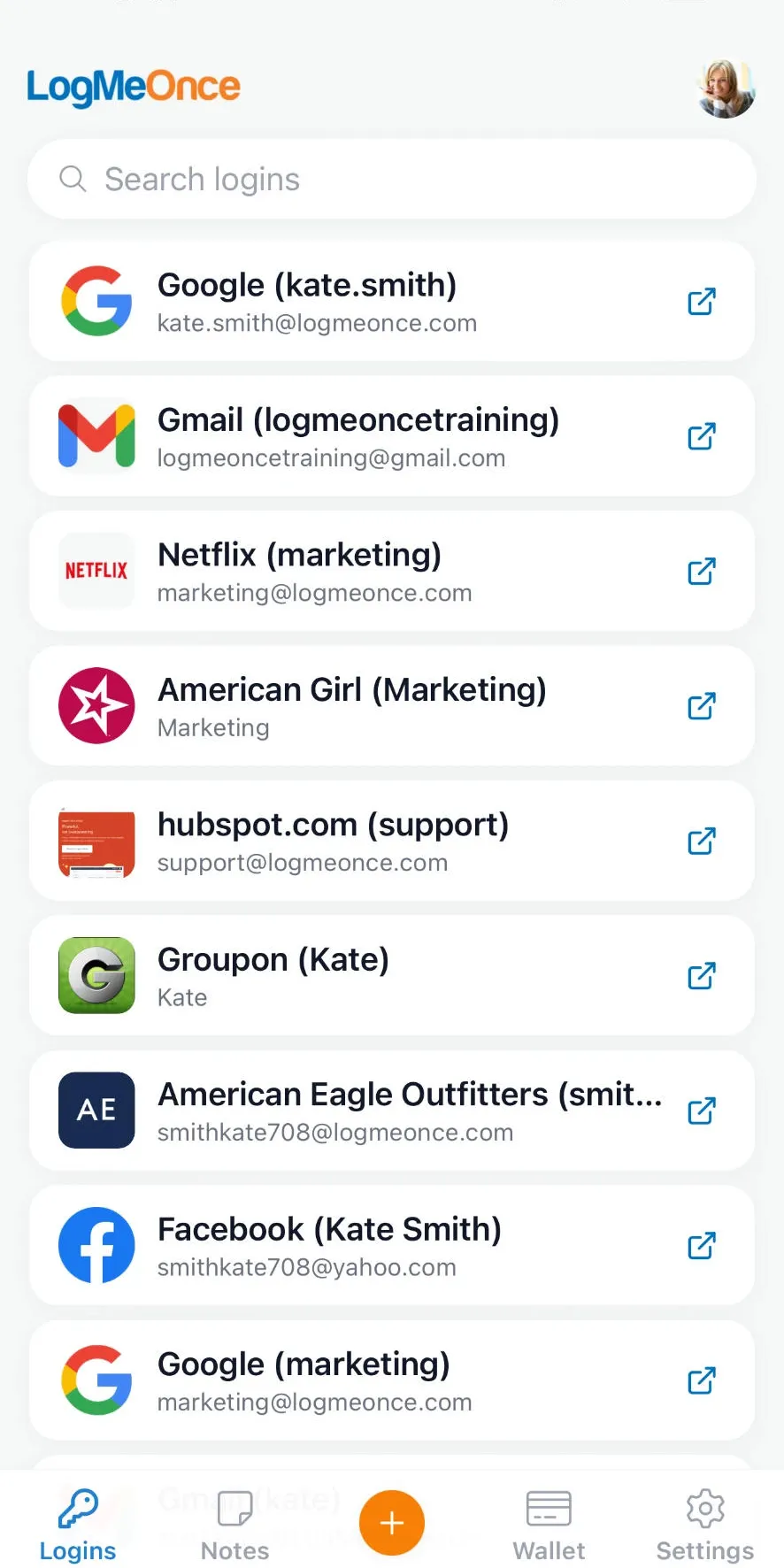
Login credentials displayed on a mobile interface with various service icons
Which features protect donor records best?
Donor records demand protection that goes beyond basic password storage. Three specific security features create a defense-in-depth architecture that locks down sensitive constituent data while keeping daily operations smooth for your team.
How does zero-knowledge encryption protect donor data?
Zero-knowledge encryption ensures only your authorized users can unlock stored records. LogMeOnce cannot access the encrypted contents of your vault under any circumstance. A breach of the provider’s infrastructure exposes nothing usable to attackers. Your donor names, giving histories, and contact details remain mathematically inaccessible without the decryption keys your team controls.
What login method reduces volunteer credential mistakes?
Passwordless login options like QR code and selfie sign-ins eliminate the weakest link in nonprofit security: human error. Volunteers and part-time staff no longer create, forget, or reuse weak passwords. Each sign-in requires a live biometric check or a unique QR scan. Credential theft becomes nearly impossible when there are no credentials to steal.
Multi-factor authentication adds a separate verification layer beyond any single login method. Even if one factor is compromised, unauthorized access is blocked by the second requirement.
Centralized admin dashboards give you immediate control over who accesses donor records. When a volunteer rotates off a campaign or a board member’s term ends, you revoke access in seconds from one screen. No lingering permissions. No forgotten shared logins. The dashboard also logs every access attempt, creating an audit trail that satisfies grant reporting requirements and board oversight expectations.
How to implement password management on a budget?
Implementing nonprofit password management on a tight budget starts with a disciplined audit, not a software purchase. You identify every shared account, donor database login, and cloud service credential currently circulating among staff and volunteers. Skipping this step leaves credential sprawl intact, which exposes donor data and financial accounts to preventable breaches. A password manager for nonprofits then enforces structure without requiring a dedicated IT hire.
What should you audit before choosing a password manager?
Map every login your organization uses. Document who accesses each account and how credentials are shared today. Sticky notes, spreadsheets, and shared email inboxes create blind spots that a password manager eliminates. LogMeOnce provides advanced password management and identity protection solutions, enabling users to manage passwords, passkeys, files, and accounts with ease. This audit reveals exactly how many seats and permission levels your solution must support.
How do you set up secure access for volunteers without adding cost?
Secure password sharing for volunteers depends on permission tiers, not trust. Create distinct access levels for board members, staff, contractors, and volunteers. Grant volunteers access only to the specific accounts their role requires. LogMeOnce enables you to manage passwords, passkeys, files, and accounts with ease, so you assign and revoke access instantly when volunteers rotate off projects. This prevents orphaned credentials from lingering in inactive accounts.
Follow these steps to deploy password management on a budget:
- Audit all existing credentials. Catalog every shared login, donor platform, and cloud service account across your organization.
- Select a scalable solution with passwordless authentication. LogMeOnce offers advanced passwordless security solutions to protect your digital identity effectively, reducing reliance on memorized passwords that volunteers forget or mishandle.
- Define role-based permission tiers. Separate access for leadership, staff, and volunteers so no single person holds unnecessary credentials.
- Train your team on daily hygiene. Walk non-technical users through secure sharing practices and passwordless sign-in workflows. LogMeOnce provides advanced password management and identity protection solutions that simplify this training.
- Enforce a review cadence. Schedule quarterly access audits to remove departed volunteers and update permissions.
Training non-technical team members matters as much as the tool itself. Volunteers often lack cybersecurity awareness, yet they handle sensitive donor information. LogMeOnce provides advanced password management and identity protection solutions that make secure behavior intuitive. Show your team how passwordless login eliminates the weakest link: reused and weak passwords. Without this step, even the best software underperforms.
How to maintain donor privacy and compliance long-term?
Long-term donor privacy demands automated security controls and zero-knowledge encryption. Manual credential management exposes sensitive financial data to breaches that erode trust and violate compliance mandates.
What role does automated credential rotation play in donor privacy?
Automated credential rotation for critical financial logins reduces breach risk significantly. Stale passwords create persistent vulnerabilities that attackers exploit. LogMeOnce automates this rotation, ensuring compromised credentials become useless before damage occurs. You eliminate the human tendency to reuse or delay password updates.
How does advanced authentication protect donor information?
Advanced authentication like QR and biometric verification reduces human error. Weak or shared passwords remain the primary entry point for data thieves. LogMeOnce replaces these with passwordless sign-ins backed by patented technology. Your team accesses donor systems securely without memorizing or writing down credentials.
Why does zero-knowledge architecture matter for compliance?
Zero-knowledge architecture ensures donor data remains private even from the provider. LogMeOnce cannot access your encrypted vault contents under any circumstance. Only your organization holds the decryption keys. This design satisfies strict regulatory requirements and prevents third-party data exposure.
Follow these steps to lock in long-term compliance:
- Audit all shared accounts across staff and volunteers. Identify every login tied to donor databases, payment processors, and communication platforms.
- Enforce passwordless authentication for every user. Replace traditional passwords with biometric or QR-based sign-ins to eliminate credential theft.
- Activate automated credential rotation on financial and donor management systems. Schedule rotations at intervals matching your risk tolerance.
- Restrict access by role using a centralized vault. Grant volunteers temporary, limited permissions that expire automatically when their service ends.
- Monitor breach alerts continuously. LogMeOnce scans for compromised credentials and notifies you instantly, closing the gap between detection and response.
FAQ
Why are nonprofits prime cyber targets?
Nonprofits hold valuable donor data while operating with minimal security resources, making credential theft attacks effective against organizations least equipped to defend themselves.
How does LogMeOnce protect donor and volunteer data?
LogMeOnce uses zero-knowledge encryption and passwordless QR code and selfie sign-ins, ensuring only authorized users access stored credentials without password-related vulnerabilities.
What access challenges do volunteer turnover create?
Former volunteers retain access to email platforms, donor databases, and social media accounts, exposing organizations to unauthorized access and data loss without secure password sharing controls.
Is there a nonprofit discount available?
LogMeOnce works with nonprofit organizations to keep strong security affordable. Reach out to LogMeOnce directly to ask about nonprofit discount eligibility for your organization, particularly useful when your staff of employees and volunteers is small and your budget is tight.
How does a secure password manager handle employee access?
A secure password manager centralizes every login your employees and volunteers rely on, from donor databases to social media accounts. Admins can grant, adjust, or revoke an employee’s access in seconds from one dashboard, so your organization never loses track of who can reach sensitive systems as your team changes.
Conclusion
A nonprofit that audits its credentials, enforces role-based access, and adopts passwordless authentication protects donor data without straining its budget. The next step is selecting a solution that automates credential rotation and uses zero-knowledge encryption, ensuring compliance and security persist beyond initial setup. This approach transforms password management from a vulnerability into a sustainable operational strength. Ready to put these practices to work? create a free account and start protecting your organization’s donor and volunteer credentials today.